老师帮忙看看2-5-编程练习(以这次为准)?
代码中存在的大小问题,请老师指正批评。
<!DOCTYPE html>
<html xmlns="http://www.w3.org/1999/xhtml" manifest="cache.manifest">

   <head>
      <title>2-5-编程练习</title>
      <meta charset="UTF-8">
      <meta name="renderer" content="webkit">
      <meta http-equiv="X-UA-Compatible" content="IE=edge,chrome=1">
      <base target="_blank">
      <style type="text/css">
         *
            {
                margin: 0;
                padding: 0;
            }

            a
            {text-decoration: none;}

            li
            {list-style-type: none;}

            body
            {font-family: "微软雅黑";}

            header /*网页头部header样式*/
            {
                width: 100%;
                min-width: 1700px;
                height: 60px;
                background-color: #222;
            }

            header > div
            {
                width: 1000px;
                height: 60px;
                margin: 0 auto;
            }

            header h1
            {
                float: left;
                height: 60px;
                max-height: 100%;
            }

            header h1 > a
            {
                display: inline-block;
                height: 60px;
                line-height: 60px;
                max-height: 100%;
                color: #FFF;
            }

            header h1 > a > img
            {
                margin-bottom: 9px;
                vertical-align: middle;
            }

            header nav
            {
                float: right;
                height: 60px;
            }

            header nav > #navList /*导航列表navList*/
            {
                height: 60px;
                max-height: 100%;
            }

            header nav > #navList > li /*导航列表项*/
            {
                float: left;
                height: 54px;
                line-height: 60px;
                width: 100px;
                box-sizing: border-box;
                text-align: center;
            }

            /*下面对6个导航列表项设置背景颜色*/
            header nav > #navList > li:nth-child(1) /*导航列表项的第1项:Home*/
            {background-color: #43D;}

            header nav > #navList > li:nth-child(2) /*导航列表项的第2项:Course*/
            {background-color: #0BC;}

            header nav > #navList > li:nth-child(3) /*导航列表项的第3项:Actual*/
            {background-color: #8A0;}

            header nav > #navList > li:nth-child(4) /*导航列表项的第4项:Plan*/
            {background-color: #FA0;}

            header nav > #navList > li:nth-child(5) /*导航列表项的第5项:Notes*/
            {background-color: #F6B;}

            header nav > #navList > li:nth-child(6) /*导航列表项的第6项:FAQ*/
            {background-color: #D01;}

            header nav > #navList > li:hover /*导航列表项鼠标悬停效果*/
            {
                font-weight: bold;
                height: 60px;
            }

            header nav > #navList > li > a
            {
                font-size: 20px;
                color: #FFF;
            }

            .banner /*banner图部分*/
            {
                width: 100%;
                min-width: 1700px;
                height: 500px;
                line-height: 500px;
                text-align: center;
                font-size: 50px;
                background-color: #DDD;
            }

            .content /*内容区content部分*/
            {
                overflow: hidden;
                width: 96%;
                min-width: 1700px;
                margin: 0 2% 50px;
            }

            .content > aside /*内容区content的左边部分*/
            {
                float: left;
                width: 650px;
                margin-left: 40px;
            }

            .content > article /*内容区content的右边部分*/
            {
                float: left;
                width: 800px;
                margin-left: 10%;
            }

            .content h2
            {
                margin: 30px auto;
                font-size: 30px;
                font-weight: normal;
            }

            .colorGary
            {color: #888;}

            .content > aside > dl > dt
            {
                position: relative;
                margin: 30px auto 2px 100px;
                text-decoration: underline;
            }

            .content > aside > dl > dt a
            {color: #000;}

            .content > aside > dl > dt a:hover
            {color: #F39;}

            .content > aside > dl > dt::before /*使用::before伪类插入红色圆形图标*/
            {
                position: absolute;
                left: -75px;
                top: 10px;
                width: 51px;
                height: 51px;
                line-height: 51px;
                text-align: center;
                font-size: 28px;
                color: #FFF;
                background-image: url("http://img1.sycdn.imooc.com/climg//582e61290001787900500051.png");
            }

            .content > aside > dl > dt:nth-of-type(1)::before
            {content: "1";}

            .content > aside > dl > dt:nth-of-type(2)::before
            {content: "2";}

            .content > aside > dl > dt:nth-of-type(3)::before
            {content: "3";}

            .content > aside > dl > dt:nth-of-type(4)::before
            {content: "4";}

            .content > aside > dl > dd
            {
                margin-left: 100px;
                font-size: 16px;
            }

            .content > article > p,
            .content > article > img
            {margin: 10px auto;}

            .content > article > img
            {width: 90%;}
      </style>
   </head>

   <body>
      <!--网页头部header-->
      <header>
            <div>
            <!--logo是重要信息,放在<h1>标签内-->
                <h1>
                    <a href="http://www.imooc.com" title="IMOOC, improving your IT skills!">
                        <img src="http://img1.sycdn.imooc.com/climg//582e5f160001b17100400040.png"> IMOOC
                    </a>
                </h1>
                <!--导航列表navList-->
                <nav>
                    <ul id="navList">
                        <li><a href="https://www.imooc.com/" title="慕课网首页">Home</a></li>
                        <li><a href="https://www.imooc.com/course/list" title="免费课程">Course</a></li>
                        <li><a href="https://coding.imooc.com/" title="实战课程">Actual</a></li>
                        <li><a href="https://class.imooc.com/" title="就业班">Plan</a></li>
                        <li><a href="https://www.imooc.com/article" title="手记">Notes</a></li>
                        <li><a href="https://www.imooc.com/wenda" title="猿问">FAQ</a></li>
                    </ul>
                </nav>
            </div>
        </header>

        <!--banner图部分-->
        <section class="banner">
            This is the banner image section.
        </section>

        <!--内容区content-->
        <section class="content">
            <!--内容区content的左边部分:aside-->
            <aside>
                <!--内容区content的左边部分的标题-->
                <h2>Recent <span class="colorGary">Course</span></h2>
                <!--
                下面是描述列表<dl>
                观察到每段文字描述前面,都有红色的圆形图标,
                因此使用::before伪类,而不是<img>标签
                -->
                <dl>
                    <dt><h3><a href="#">Hyper Text Markup Language</a></h3></dt>
                    <dd>Hyper Text Markup Language(HTML) is the standard markup language used to create web pages and its elements form the building blocks of all websites.</dd>
                    <dt><h3><a href="#">Cascading Style Sheets</a></h3></dt>
                    <dd>Cascading Style Sheets(CSS) is a simple mechanism for adding style(eg. fonts, color, spacing) to web documents.</dd>
                    <dt><h3><a href="#">JavaScript</a></h3></dt>
                    <dd>JavaScript(JS) is a high-level, dynamic, untyped and interpreted programming language.</dd>
                    <dt><h3><a href="#">Angular.JS</a></h3></dt>
                    <dd>Angular.JS is an open-source web application framework mainly maintained by Google and by a community of individuals and...</dd>
                </dl>
            </aside>
            <!--内容区content的右边部分:article-->
            <article>
                <!--内容区content的右边部分的标题-->
                <h2>Welcome to <span class="colorGary">Massive Open Online Course!</span></h2>
                <p>We provide the latest courses to help you cope with the challenging world!</p>
                <img src="http://img1.sycdn.imooc.com/climg//582e61180001ede703300130.jpg">
                <p>We hope that all the students who love study can be more convenient access to learning resources, using the Internet to improve themselves.</p>
                <p>Focus on IT skills education MOOC, consistent with the development trend of the Internet down to earth's MOOC. We offer free and useful courses. We concentrate on education...</p>
            </article>
        </section>
   </body>

</html>0
收起
正在回答
3回答

同学你好,练习的布局是可以的。
同学说的大小问题指的是左右两侧高度不同吗?
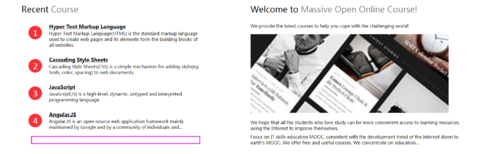
可以调整左侧每一行的间隙,或者调整右侧图片宽度,看起来效果美观即可。
祝学习愉快!

我学习太差被关起来了
2019-07-12 15:35:41
2-5-编程练习的代码如下。
<!DOCTYPE html>
<html xmlns="http://www.w3.org/1999/xhtml" manifest="cache.manifest">

   <head>
      <title>2-5-编程练习</title>
      <meta charset="UTF-8">
      <meta name="renderer" content="webkit">
      <meta http-equiv="X-UA-Compatible" content="IE=edge,chrome=1">
      <base target="_blank">
      <style type="text/css">
         *
            {
                margin: 0;
                padding: 0;
            }

            a
            {text-decoration: none;}

            li
            {list-style-type: none;}

            body
            {font-family: "微软雅黑";}

            header /*网页头部header样式*/
            {
                width: 100%;
                min-width: 1700px;
                height: 60px;
                background-color: #222;
            }

            header > div
            {
                width: 1000px;
                height: 60px;
                margin: 0 auto;
            }

            header h1
            {
                float: left;
                height: 60px;
                max-height: 100%;
            }

            header h1 > a
            {
                display: inline-block;
                height: 60px;
                line-height: 60px;
                max-height: 100%;
                color: #FFF;
            }

            header h1 > a > img
            {
                margin-bottom: 9px;
                vertical-align: middle;
            }

            header nav
            {
                float: right;
                height: 60px;
            }

            header nav > #navList /*导航列表navList*/
            {
                height: 60px;
                max-height: 100%;
            }

            header nav > #navList > li /*导航列表项*/
            {
                float: left;
                height: 54px;
                line-height: 60px;
                width: 100px;
                box-sizing: border-box;
                text-align: center;
            }

            /*下面对6个导航列表项设置背景颜色*/
            header nav > #navList > li:nth-child(1) /*导航列表项的第1项:Home*/
            {background-color: #43D;}

            header nav > #navList > li:nth-child(2) /*导航列表项的第2项:Course*/
            {background-color: #0BC;}

            header nav > #navList > li:nth-child(3) /*导航列表项的第3项:Actual*/
            {background-color: #8A0;}

            header nav > #navList > li:nth-child(4) /*导航列表项的第4项:Plan*/
            {background-color: #FA0;}

            header nav > #navList > li:nth-child(5) /*导航列表项的第5项:Notes*/
            {background-color: #F6B;}

            header nav > #navList > li:nth-child(6) /*导航列表项的第6项:FAQ*/
            {background-color: #D01;}

            header nav > #navList > li:hover /*导航列表项鼠标悬停效果*/
            {
                font-weight: bold;
                height: 60px;
            }

            header nav > #navList > li > a
            {
                font-size: 20px;
                color: #FFF;
            }

            .banner /*banner图部分*/
            {
                width: 100%;
                min-width: 1700px;
                height: 500px;
                line-height: 500px;
                text-align: center;
                font-size: 50px;
                background-color: #DDD;
            }

            .content /*内容区content部分*/
            {
                overflow: hidden;
                width: 96%;
                min-width: 1700px;
                margin: 0 2% 50px;
            }

            .content > aside /*内容区content的左边部分*/
            {
                float: left;
                width: 650px;
                margin-left: 40px;
            }

            .content > article /*内容区content的右边部分*/
            {
                float: left;
                width: 800px;
                margin-left: 10%;
            }

            .content h2
            {
                margin: 30px auto;
                font-size: 30px;
                font-weight: normal;
            }

            .colorGary
            {color: #888;}

            .content > aside > dl > dt
            {
                position: relative;
                margin: 30px auto 2px 100px;
                text-decoration: underline;
            }

            .content > aside > dl > dt a
            {color: #000;}

            .content > aside > dl > dt a:hover
            {color: #F39;}

            .content > aside > dl > dt::before /*使用::before伪类插入红色圆形图标*/
            {
                position: absolute;
                left: -75px;
                top: 10px;
                width: 51px;
                height: 51px;
                line-height: 51px;
                text-align: center;
                font-size: 28px;
                color: #FFF;
                background-image: url("http://img1.sycdn.imooc.com/climg//582e61290001787900500051.png");
            }

            .content > aside > dl > dt:nth-of-type(1)::before
            {content: "1";}

            .content > aside > dl > dt:nth-of-type(2)::before
            {content: "2";}

            .content > aside > dl > dt:nth-of-type(3)::before
            {content: "3";}

            .content > aside > dl > dt:nth-of-type(4)::before
            {content: "4";}

            .content > aside > dl > dd
            {
                margin-left: 100px;
                font-size: 16px;
            }

            .content > article > p,
            .content > article > img
            {margin: 10px auto;}

            .content > article > img
            {width: 90%;}
      </style>
   </head>

   <body>
      <!--网页头部header-->
      <header>
            <div>
            <!--logo是重要信息,放在<h1>标签内-->
                <h1>
                    <a href="http://www.imooc.com" title="IMOOC, improving your IT skills!">
                        <img src="http://img1.sycdn.imooc.com/climg//582e5f160001b17100400040.png"> IMOOC
                    </a>
                </h1>
                <!--导航列表navList-->
                <nav>
                    <ul id="navList">
                        <li><a href="https://www.imooc.com/" title="慕课网首页">Home</a></li>
                        <li><a href="https://www.imooc.com/course/list" title="免费课程">Course</a></li>
                        <li><a href="https://coding.imooc.com/" title="实战课程">Actual</a></li>
                        <li><a href="https://class.imooc.com/" title="就业班">Plan</a></li>
                        <li><a href="https://www.imooc.com/article" title="手记">Notes</a></li>
                        <li><a href="https://www.imooc.com/wenda" title="猿问">FAQ</a></li>
                    </ul>
                </nav>
            </div>
        </header>

        <!--banner图部分-->
        <section class="banner">
            This is the banner image section.
        </section>

        <!--内容区content-->
        <section class="content">
            <!--内容区content的左边部分:aside-->
            <aside>
                <!--内容区content的左边部分的标题-->
                <h2>Recent <span class="colorGary">Course</span></h2>
                <!--
                下面是描述列表<dl>
                观察到每段文字描述前面,都有红色的圆形图标,
                因此使用::before伪类,而不是<img>标签
                -->
                <dl>
                    <dt><h3><a href="#">Hyper Text Markup Language</a></h3></dt>
                    <dd>Hyper Text Markup Language(HTML) is the standard markup language used to create web pages and its elements form the building blocks of all websites.</dd>
                    <dt><h3><a href="#">Cascading Style Sheets</a></h3></dt>
                    <dd>Cascading Style Sheets(CSS) is a simple mechanism for adding style(eg. fonts, color, spacing) to web documents.</dd>
                    <dt><h3><a href="#">JavaScript</a></h3></dt>
                    <dd>JavaScript(JS) is a high-level, dynamic, untyped and interpreted programming language.</dd>
                    <dt><h3><a href="#">Angular.JS</a></h3></dt>
                    <dd>Angular.JS is an open-source web application framework mainly maintained by Google and by a community of individuals and...</dd>
                </dl>
            </aside>
            <!--内容区content的右边部分:article-->
            <article>
                <!--内容区content的右边部分的标题-->
                <h2>Welcome to <span class="colorGary">Massive Open Online Course!</span></h2>
                <p>We provide the latest courses to help you cope with the challenging world!</p>
                <img src="http://img1.sycdn.imooc.com/climg//582e61180001ede703300130.jpg">
                <p>We hope that all the students who love study can be more convenient access to learning resources, using the Internet to improve themselves.</p>
                <p>Focus on IT skills education MOOC, consistent with the development trend of the Internet down to earth's MOOC. We offer free and useful courses. We concentrate on education...</p>
            </article>
        </section>
   </body>

</html>
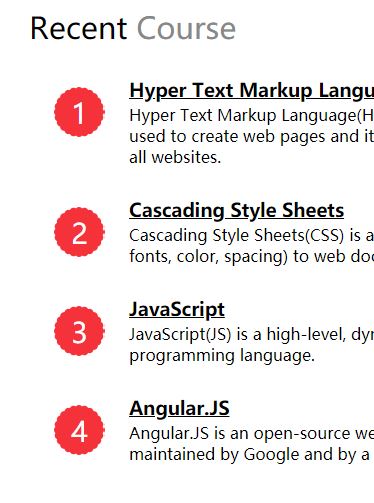
在Chrome和Firefox中,显示效果如同预期,如下图所示。
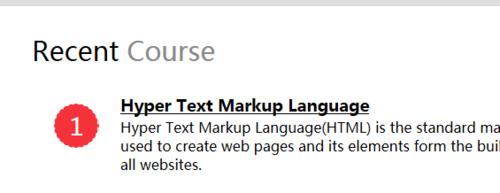
但是在Edge和IE中,红色圆形图标内的数字下方存在黑色短线,如下图所示。
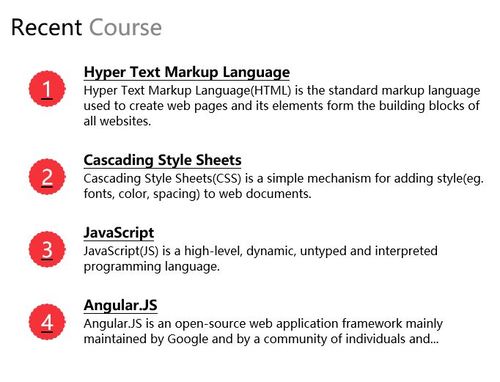
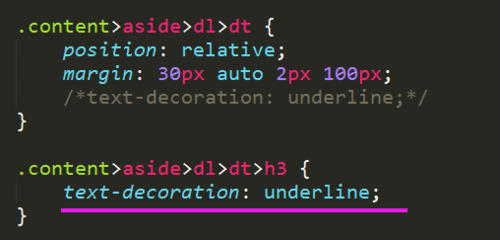
为了消除黑色短线,我在CSS代码中增加取消下划线的设置,如下所示。
.content > aside > dl > dt::before /*使用::before伪类插入红色圆形图标*/
{
    position: absolute;
    left: -75px;
    top: 10px;
    width: 51px;
    height: 51px;
    line-height: 51px;
    text-align: center;
    font-size: 28px;
    color: #FFF;
    text-decoration: none;
    background-image: url("http://img1.sycdn.imooc.com/climg//582e61290001787900500051.png");
}

.content > aside > dl > dt:nth-of-type(1)::before
{content: "1";text-decoration: none;}

.content > aside > dl > dt:nth-of-type(2)::before
{content: "2";text-decoration: none;}

.content > aside > dl > dt:nth-of-type(3)::before
{content: "3";text-decoration: none;}

.content > aside > dl > dt:nth-of-type(4)::before
{content: "4";text-decoration: none;}
但是在Edge和IE显示效果中,仍然无法消除黑色下划线。
不知道什么原因。
相似问题
老师,第2章 内部类的编程练习呢,是不是漏了
23
0
3


编程练习有老师查看吗?
7
1
4


老师帮忙看一下
12
0
7




2-6 编程练习的第一个答案
139
1
10






编程练习的答案呢
0
0
3
登录后可查看更多问答,登录/注册








恭喜解决一个难题,获得1积分~
来为老师/同学的回答评分吧
0 星