主体的mmm标签下中间部分不会用了
<!DOCTYPE html>
<html lang="en">
<head>
<meta charset="UTF-8">
<meta name="viewport" content="width=device-width, initial-scale=1.0">
<meta http-equiv="X-UA-Compatible" content="ie=edge">
<link rel="stylesheet" href="css/reset.css">
<style>
.header{
width: 100%;
height: 80px;
background-color: #07cbc9;
overflow: hidden;
position: fixed;
}
.header img{
width:300px;
height:45px;
padding: left;
padding-top: 18px;
padding-left: 100px;
}
a{
display: block;
line-height: 80px;
text-decoration: none;
color: #fff;
text-align: center;
}
a:hover{
background-color: brown;
}
.header .logo{
float:left;
}
.header .nav{
float:right;
}
.header .nav ul{
padding-left: 100px;
padding-right:10px;
}
.header .nav ul li{
float:left;
width:100px;
height:200px;
line-height:80px;
font-weight:bolder;
color:#FFFEFE;
}
.main .top{
width:100%;
height:100%;
}
.main .banner-top{
width:510px;
height:600px;
position: absolute; /*绝对定位*/
top:340px;
margin-top:-100;
z-index: 2;
right: 50%;
margin-right: -250px;
overflow:hidden;
}
.main .banner{
position: absolute;
top:100px;
left:0;
background-color: black;
width:100%;
height:700px;
opacity: .5;
}
input{
width:505px;
height:39px;
margin: 10px auto;
border:2px solid #808080;
}
button{
width: 123px;
height:43px;
border: 0px solid #808080;
margin-left: 155px;
}
button,input:hover{
border:2px solid #07cbc9;
}
.middle .title-1{
font-size: 20px;
padding-top: 40px;
margin-left: 43%;
padding-bottom: 10px;
}
.middle .heng{
width:500px;
height:20px;
font-style: italic;
color: #07cbc9;
padding-top: 8px;
margin-left: 44%;
padding-bottom: 3px;
}
.middle .duanlluo{
font-size: 22px;
color: #808080;
padding-top:8px;
padding-bottom:30px;
margin-left: 30%
}
.mmm{
width:100%;
height:600px;
}
.mmm .mleft{
padding-left: 50px;
}
.wenzi .qqq{
font-size: 20px;
font-weight: bold;
}
.mmm .mleft .qqq{
width: 370px;
height: 246px;
float: left;
border:1px solid #808080;
padding-top: 20px;
padding-left: 20px;
}
.mmm .mcenter{
float: left;
width: 568px;
height: 380px;
}
/* ddsdsad*/
.header{
width: 100%;
height: 80px;
background-color: #07cbc9;
overflow: hidden;
position: fixed;
}
.header img{
width:300px;
height:45px;
padding: left;
padding-top: 18px;
padding-left: 100px;
}
a{
display: block;
line-height: 80px;
text-decoration: none;
color: #fff;
text-align: center;
}
a:hover{
background-color: brown;
}
.header .logo{
float:left;
}
.header .nav{
float:right;
}
.header .nav ul{
padding-left: 100px;
padding-right:10px;
}
.header .nav ul li{
float:left;
width:100px;
height:200px;
line-height:80px;
font-weight:bolder;
color:#FFFEFE;
}
.main .top{
width:100%;
height:100%;
}
.main .banner-top{
width:510px;
height:600px;
position: absolute; /*绝对定位*/
top:340px;
margin-top:-100;
z-index: 2;
right: 50%;
margin-right: -250px;
overflow:hidden;
}
.main .banner{
position: absolute;
top:100px;
left:0;
background-color: black;
width:100%;
height:700px;
opacity: .5;
}
input{
width:505px;
height:39px;
margin: 10px auto;
border:2px solid #808080;
}
button{
width: 123px;
height:43px;
border: 0px solid #808080;
margin-left: 155px;
}
button,input:hover{
border:2px solid #07cbc9;
}
.middle .title-1{
font-size: 20px;
padding-top: 40px;
margin-left: 43%;
padding-bottom: 10px;
}
.middle .heng{
width:500px;
height:20px;
font-style: italic;
color: #07cbc9;
padding-top: 8px;
margin-left: 44%;
padding-bottom: 3px;
}
.middle .duanlluo{
font-size: 22px;
color: #808080;
padding-top:8px;
padding-bottom:30px;
margin-left: 30%
}
.mmm{
width:100%;
height:600px;
}
.mmm .mleft{
padding-left: 50px;
}
.wenzi .qqq{
font-size: 20px;
font-weight: bold;
}
.mmm .mleft .qqq{
width: 370px;
height: 246px;
float: left;
border:1px solid #808080;
padding-top: 20px;
padding-left: 20px;
}
.mmm .mcenter{
float: left;
width: 568px;
height: 380px;
}
/* ddsdsad*/
</style>
<title>网页布局</title>
</head>
<body>
<!--头部 -->
<div class="header">
<div class="logo"><a href="" class="
ee"><img src="images\logo.png" alt="logo" ></a> </div>
<div class="nav">
<ul>
<li><a href="">HOME</a> </li>
<li><a href="">ABOUT</a> </li>
<li><a href="">GALLERY</a> </li>
<li><a href="">FACULTY</a> </li>
<li><a href="">EVENTS</a> </li>
<li><a href="">CONTACT</a> </li>
</ul>
</div>
</div>
<!-- 主体 -->
<div class="main">
<div class="top">
<img src="images\banner3.jpg" alt="">
</div>
<div class="banner"></div>
<div class="banner-top" >
<form action="" class="form" >
<input style="background:none;" type="text" name="user" placeholder="your Name"><br/>
<input style="background:none;" type="txet" name="phone" placeholder="your Phone"><br/>
<input style="background:none;" type="text" name="email" placeholder="your Email" ><br/>
<input style="background:none;" type="text" name="here" placeholder="Write Your Comment Here"><br/>
<input style="background:none;" type="text" name="neirong" placeholder="Write Your Comment Here">
<button style="background:none;">SEND MESSAGE</button>
</form>
</div>
</div>
<div class="middle">
<div class="title-1">ABOUT</div>
<div class="heng">——</div>
<div class="duanlluo"><p> LoremIpsum is simplydummytextiofthe printing and typesetting<br/>
industryLoremlpsumhasbeentheindustry's standard dummy<br/>
texteversincethe15oos.</p>
</div>
</div>
<div class="mmm">
<div class="mleft">
<div class="wenzi">A WORD<br>ABOUT US</div>
<div class="qqq">LoremIpsum is simplydummytextiofthe printing and typesetting<br/>
industryLoremlpsumhasbeentheindustry's standard dummy <button>EXPLORE</button></div>
</div>
<div class="mcenter"><img src="images\bb3.jpg" alt=""></div>
<div class="mright">
<div>
700000
</div>
<div> ddsdad</div>
</div>
</div>
<div ></div>
</div>
<!-- 页脚 -->
<div class="footer"></div>
</body>
</html>
正在回答 回答被采纳积分+1

同学你好, 可以参考如下思路实现效果
标题和介绍部分, 可以不用设置margin-left值, 通过给body设置的text-align:center;就可以让文字水平居中显示, 下划线可以通过margin: 0 auto;实现居中显示
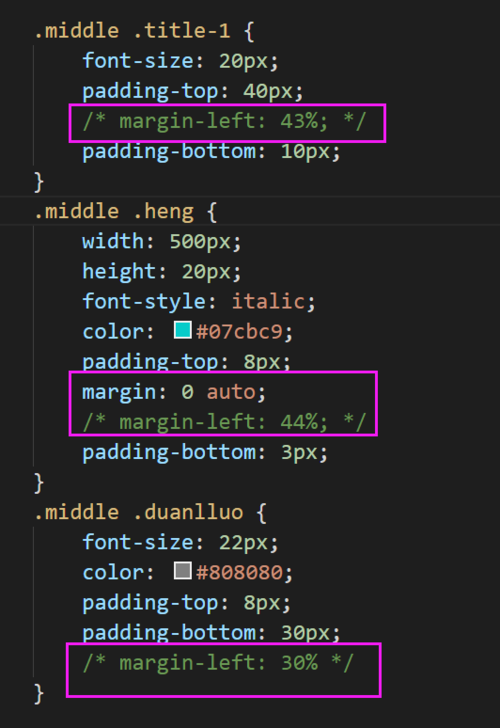
关于下半部分, 可以参考下面的思路实现
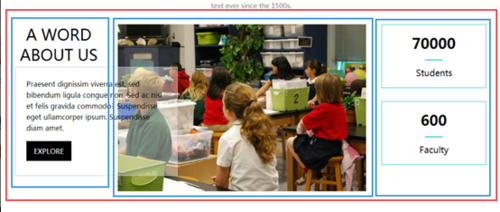
(1)我用画图给你展示一下(由于是手画的可能不太严谨)使用一个大的div,使用margin:0 auto实现整体居中,里面放三个小的div, 三个小div设置浮动使显示在一行
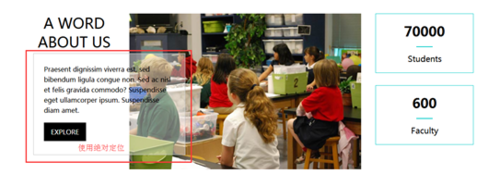
(2)最后在设置一个div容纳遮罩的这部分,可以使用background: rgba(255,255,255,0.5);实现遮罩效果,并使用绝对定位,要相对于上面说到的大div。具体该填充多少值可以参考原型图。
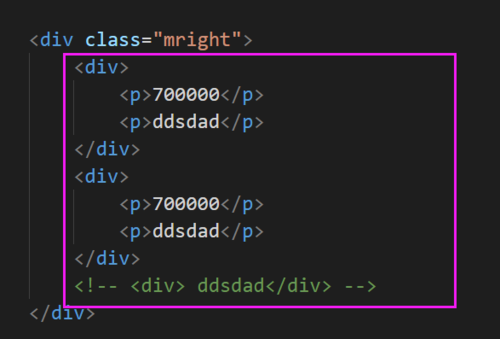
右侧的html结构可以参考调整一下
老师帮同学调可以一下整体的样式, 具体细节同学自己下去调整哦, 效果图
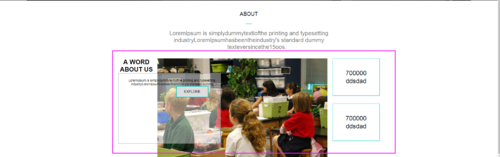





mmm下的中间部分CSS代码, 可以参考注释理解
.mmm {
/* width: 100%; */
/* 固定的宽度, 通过margin: 0 auto;实现整体居中 */
width: 1000px;
margin: 0 auto;
/* 清除子元素浮动代码的高度塌陷影响 */
overflow: hidden;
/* 让绝对定为的子元素参照外层盒子进行定位 */
position: relative;
/* height: 600px; */
}
.mmm .mleft {
float: left;
/* padding-left: 50px; */
}
.mmm .mleft .wenzi {
/* 设置左侧文字样式 */
font-weight: bold;
width: 140px;
font-size: 24px;
}
.mmm .mleft .qqq {
position: absolute;
width: 370px;
height: 246px;
float: left;
border: 1px solid #808080;
padding-top: 20px;
padding-left: 20px;
/* 设置背景颜色透明度 */
background: rgba(255, 255, 255, .4);
}
.mmm .mcenter {
float: left;
width: 568px;
height: 380px;
margin-left: 10px;
}
.mmm .mright {
/* 右浮动,靠近大盒子右侧显示 */
float: right;
width: 180px;
text-align: center;
}
.mmm .mright div {
/* 设置边框 */
border: 1px solid #07cbc9;
/* 设置上下padding值, 让文字垂直居中显示 */
padding: 40px 0;
}
.mmm .mright div:first-child {
/* 设置下边距 */
margin-bottom: 30px;
}
.mmm .mright div p {
/* 设置段落样式 */
height: 30px;
line-height: 30px;
font-size: 24px;
}
如果帮助到了你, 欢迎采纳!
祝学习愉快~~~~
相似问题






登录后可查看更多问答,登录/注册











恭喜解决一个难题,获得1积分~
来为老师/同学的回答评分吧
0 星