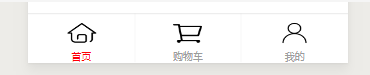
老师帮我看看这个购物车上面那个图标能不能向左偏点
<!--miniprogram/custom-tab-bar/index.wxml-->
<cover-view class="tab-bar">
<cover-view class="tab-bar-border"></cover-view>
<cover-view wx:for="{{list}}" wx:key="index" class="tab-bar-item" data-path="{{item.pagePath}}" data-index="{{index}}" bindtap="switchTab">
<cover-image src="{{selected === index ? item.selectedIconPath : item.iconPath}}"></cover-image>
<cover-view style="color: {{selected === index ? selectedColor : color}}">{{item.text}}</cover-view>
</cover-view>
</cover-view>
/* custom-tab-bar/index.wxss */
.tab-bar {
position: fixed;
bottom: 0;
left: 0;
right: 0;
height: 50px;
background: white;
display: flex;
padding-bottom: env(safe-area-inset-bottom);
}
.tab-bar-border {
background-color: rgba(212, 212, 212, 0.8);
position: absolute;
left: 0;
top: 0;
width: 100%;
height: 1px;
transform: scaleY(0.5);
box-shadow: 0 1px 1px 0px rgba(212,212,212,0.40);
}
.tab-bar-item {
flex: 1;
text-align: center;
display: flex;
justify-content: center;
align-items: center;
flex-direction: column;
box-shadow: 0 -1px 1px 0 rgba(212,212,212,0.50);
}
.tab-bar-item cover-image {
width: 31px;
height: 24px;
margin-top: 7px;
}
.tab-bar-item cover-view {
font-size: 10px;
display: inline-block;
width: 31px;
height: 14px;
line-height: 14px;
text-align: center;
margin-top: 4px;
}
Component({
data: {
selected: 0,
color: "#9c9c9c",
selectedColor: "#ff0000",
list: [
{
pagePath: "/pages/index/index",
iconPath: "/image/首页1.png",
selectedIconPath: "/image/首页.png",
text: "首页"
},
{
pagePath: "/pages/shop/shop",
iconPath: "/image/购物车.png",
selectedIconPath: "/image/购物车1.png",
text: "购物车"
},
{
pagePath: "/pages/my/my",
iconPath: "/image/我的.png",
selectedIconPath: "/image/我的1.png",
text: "我的"
}
]
},
attached() { },
methods: {
switchTab(e) {
const data = e.currentTarget.dataset
const url = data.path
wx.switchTab({
url
})
this.setData({
selected: data.index
})
}
}
})
我实现的是这样子的

实际上需要这样的

正在回答 回答被采纳积分+1








- 参与学习 人
- 提交作业 622 份
- 解答问题 6815 个
微信带火了小程序,也让前端工程师有了更多的展现机会,本阶段带你从移动基础知识的学习到webAPP开发,及小程序开发,让你PC端与移动端两端通吃。
了解课程









恭喜解决一个难题,获得1积分~
来为老师/同学的回答评分吧
0 星