请问鼠标点击没有反应,双向绑定没有实现的原因是什么
<!doctype html>
<html>
<head>
<meta charset="utf-8">
<link rel="stylesheet" href="css/index.css">
<link rel="stylesheet" href="css/animate.css">
<title>无标题文档</title>
</head>

<body>
	<header class="header">
		<div class="header_box">
			<div class="header_logo">H5实战页面</div>
			<nav>
				<a href="javascript:void(0)" class="header_box_nav_a header_box_nav_a_active">实战课程</a>
				<a href="javascript:void(0)" class="header_box_nav_a">商业案例</a>
				<a href="javascript:void(0)" class="header_box_nav_a">课程体系</a>
				<a href="javascript:void(0)" class="header_box_nav_a">集成环境</a>
				<a href="javascript:void(0)" class="header_box_nav_a">云端学习</a>
				<!--<div class="header_box_nav_line"></div>-->
				<a href="javascript:void(0)" class="header_box_nav_item">即刻学习</a>
			</nav>
		</div>
	</header>
	<div class="screen-1">
    	<h2 class="screen-1_h2 screen-1_h2_animate_init">实战课程重磅上线</h2>
        <h3 class="screen-1_h3 screen-1_h3_animate_init">一键云学习,还在等待什么?</h3>
    </div>
	<div class="screen-2">
		<div class="screen-2_box">
  		  <h2 class="screen-2_h2">每门课都是真实商业案例</h2>
		  <div class="screen-2_line"></div>
      	  <h3 class="screen-2_h3">
				真实案例,真实场景,在实战中实践、操作、调试<br>
				大牛带你体验BAT真实开发流程,所有开发过程一一为你呈现
			</h3>
			<div class="screen-2_people"></div>
			<div class="screen-2_cloud"></div>
			<div class="screen-2_plane"></div>
		</div>
    </div>
	<div class="screen-3">
		<div class="screen-3_box">
			<div class="screen-3_left"></div>
			<div class="screen-3_smallbox_up">
				<h2 class="screen-3_h2">强大的语言课程体系支持</h2>
				<div class="screen-3_smallbox_up_line"></div>
        		<h3 class="screen-3_h3">
					学习环境与课程轻松对接,安装、调试、写入、部署、运行,一站式解决,<br>
					让你体验开发全流程
				</h3>
			</div>
			<div class="screen-3_smallbox_down">
				<div class="screen-3_connent screen-3_smallbox_down1">HTML5</div>
				<div class="screen-3_connent screen-3_smallbox_down2">PHP</div>
				<div class="screen-3_connent screen-3_smallbox_down3">JAVA</div>
				<div class="screen-3_connent screen-3_smallbox_down4">Python</div>
				<div class="screen-3_connent screen-3_smallbox_down5">Node.js</div>
			</div>
		</div>
	</div>
	<div class="screen-4">
		<div class="screen-4_box">
			<h2 class="screen-4_h2">省去本地复杂的环境搭建</h2>
			<div class="screen-4_line"></div>
        	<h3 class="screen-4_h3">你可以告别在虚拟机中调试开发了</h3>
			<div class="screen-4_smallbox">
				<div class="screen-4_smallbox_connnent screen-4_smallbox1">实战课程集成开发环境</div>
				<div class="screen-4_smallbox_connnent screen-4_smallbox2">内置终端命令行</div>
				<div class="screen-4_smallbox_connnent screen-4_smallbox3">编译你的应用程序</div>
				<div class="screen-4_smallbox_connnent screen-4_smallbox4">通过云端服务输出效果</div>
			</div>
		</div>
	</div>
	<div class="screen-5">
		<div class="screen-5_box">
			<div class="screen-5_people"></div>
			<h2 class="screen-5_h2">省去本地复杂的环境搭建</h2>
			<div class="screen-5_line"></div>
        	<h3 class="screen-5_h3">你可以告别在虚拟机中调试开发了</h3>
		</div>
	</div>
	<div class="screen-buy">
    	<a class="screen-buy_button" href="javascript:;">继续了解学习体验</a>
    </div>
	<footer>
		<div class="footer_box">
			<div class="footer_up_box">
				<a href="javascript:;" class="footer_up_connent">网站首页</a>
				<a href="javascript:;" class="footer_up_connent">人才招聘</a>
				<a href="javascript:;" class="footer_up_connent">联系我们</a>
				<a href="javascript:;" class="footer_up_connent">高校联盟</a>
				<a href="javascript:;" class="footer_up_connent">关于我们</a>
				<a href="javascript:;" class="footer_up_connent">讲师招募</a>
				<a href="javascript:;" class="footer_up_connent">意见反馈</a>
				<a href="javascript:;" class="footer_up_connent">友情链接</a>
			</div>
			<div class="footer_down">© 2016 imooc.com 京ICP备13046642号</div>
		</div>
		<div class="outline">
			<a href="javascript:;" class="outline_item">卖</a>
            <a href="javascript:;" class="outline_item">案</a>
            <a href="javascript:;" class="outline_item">课</a>
            <a href="javascript:;" class="outline_item">环</a>
            <a href="javascript:;" class="outline_item">云</a>
		</div>
	</footer>
	<script>
	//封装创建事件的函数
	function addHandler(element, type, handler) {
    	if (element.addEventListener) {
        	element.addEventListener(type, handler, true);
    	}
    	else if (element.attachEvent) {
       		element.attachEvent('on' + type, handler);
    	}
    	else {
       		element['on' + type] = handler;
    	}
		}
	// 获取元素

var getElem = function( selector ){
  return document.querySelector(selector);
}
var getAllElem = function( selector ){
  return document.querySelectorAll(selector);
}
// 获取元素的样式
var getCls = function ( element ) {
  return element.getAttribute('class');
}
// 设置元素的样式
var setCls = function( element ,cls){
  return element.setAttribute('class',cls);
}

// 为元素添加样式
var addCls = function( element , cls ){
  var baseCls  = getCls(element);
  if( baseCls.indexOf(cls) === -1){
      setCls(element,baseCls+' '+cls); // 注意空格
  }
  return ;
}
// 为元素删减样式
var delCls = function( element , cls){
  var baseCls  = getCls(element);
  if(baseCls.indexOf(cls) > -1){ // 更精确的需要用正则表达式 ,因为这里只用于切换 _animate_in 所以没事
      setCls( element,baseCls.split(cls).join(' ').replace(/\s+/g,' ') );
  }
  return ;
}

//初始化设置,隐藏
var screen={//找到所有动画的对象
		".screen-1":[".screen-1_h2",".screen-1_h3"],
		".screen-2":[".screen-2_h2",".screen-2_h3",".screen-2_line",".screen-2_people",".screen-2_cloud",".screen-2_plane"],
		".screen-3":[".screen-3_h2",".screen-3_smallbox_up_line",".screen-3_h3",".screen-3_left",
					 ".screen-3_smallbox_down1",".screen-3_smallbox_down2",".screen-3_smallbox_down3",
					 ".screen-3_smallbox_down4",".screen-3_smallbox_down5"],
		".screen-4":[".screen-4_h2",".screen-4_h3",".screen-4_line",
					 ".screen-4_smallbox1",".screen-4_smallbox2",".screen-4_smallbox3",".screen-4_smallbox4"],
		".screen-5":[".screen-5_people",".screen-5_h2",".screen-5_h3",".screen-5_line"]
	};
function animateinit(ele){//封装初始化init函数
	var screenele=screen[ele];//对象里面的screen1-5
	var target=document.querySelector(ele);
	for(var i=0;i<screenele.length;i++){
		var screenanimate=document.querySelector(screenele[i]);//对象里面的screen1-5数组里的每一项
		var classscreen=screenanimate.getAttribute("class");
		screenanimate.setAttribute('class',classscreen +' '+screenele[i].substr(1)+'_animate_init');
	}
}
//滚动条设置
function animatescroll(ele){
	var screenele=screen[ele];//对象里面的screen1-5
	var target=document.querySelector(ele);
	for(var i=0;i<screenele.length;i++){
		var screenanimate=document.querySelector(screenele[i]);//对象里面的screen1-5数组里的每一项
		var classscreen=screenanimate.getAttribute("class");
		screenanimate.setAttribute('class',classscreen.replace('_animate_init','_animate_done'));//切换动画
	}
}
addHandler(window,"load",function(){
	for(k in screen){
		if(k==".screen-1"){continue;}//跳过第一屏
		animateinit(k);
	}
});
setTimeout(function(){animatescroll(".screen-1");},100);//添加第一屏的动画
var header_box_nav_as=getAllElem(".header_box_nav_a");//	找到所有导航条按钮
var outline_items=getAllElem(".outline_item");//	找到所有快捷按钮
//封装改变导航条和快捷按钮的函数
var jiaohu=function (idx){
	for(var i=0;i<header_box_nav_as.length;i++){
		delCls(header_box_nav_as[i],"header_box_nav_a_active");
	}//删除所有导航条颜色,并添加选中项颜色
	addCls(header_box_nav_as[idx],"header_box_nav_a_active");
	for(var a=0;a<outline_items.length;a++){
		delCls(outline_items[a],"outline_item_active");
	}//删除所有快捷按钮颜色,并添加选中项颜色
	addCls(outline_items[idx],"outline_item_active");
}
//添加滚动动画
addHandler(window,"scroll",function(){
	var top=document.body.scrollTop||document.documentElement.scrollTop;//找到滚动条的高度,兼容性写法
	if(top>100){
		addCls(getElem('.header'),'header_status_in');
		addCls(getElem('.outline'),'outline_status_in');
	   }else{
		delCls(getElem('.header'),'header_status_in');
		delCls(getElem('.outline'),'outline_status_in');
		jiaohu(0);
	   }

	if(top>640){
	   animatescroll(".screen-2");
	   jiaohu(1);
	   }
	if(top>(640*2-100)){
	   animatescroll(".screen-3");
	   jiaohu(2);
	   }
	if(top>(640*3-100)){
	   animatescroll(".screen-4");
	   jiaohu(3);
	   }
	if(top>(640*4-100)){
	   animatescroll(".screen-5");
	   jiaohu(4);
	   }
});
//双向定位
var dingwei=function (j,anniu){//根据按钮的不同调整滚动的高度
	var xuanzhong=anniu[j];//遍历每一个按钮
	addHandler(xuanzhong,"click",function(){
		var top=document.body.scrollTop||document.documentElement.scrollTop;
		top = j*640;
	});
}
for(var d=0;d<header_box_nav_as.length;d++){//针对导航条双向定位
	dingwei(d,header_box_nav_as);
}
for(var f=0;f<outline_items.length;f++){//针对快捷按钮双向定位
	dingwei(f,outline_items);
}
	</script>
</body>
</html>
@charset "utf-8";
/* CSS Document */
/*全局*/
*{margin: 0;padding: 0;}
/*导航条*/
.header{width: 100%;background-color: #f3f5f7;}
.header_box{width: 1200px;height: 80px;margin: 0 auto;position: relative;overflow: hidden;}
.header_box .header_logo{background: url("../img/logo.png") no-repeat left center;background-size: 40px 40px;
position: absolute;left: 0;top: calc(50% - 20px);width: 150px;height: 40px;font-size: 18px;line-height: 40px;
text-indent: 50px;}
nav{position: absolute;right: 0;top: calc(50% - 40px);}
.header_box .header_box_nav_a{line-height: 80px; display: inline-block;text-decoration: none;color: black;
padding-left: 40px;cursor: pointer;font-size: 14px;}
.header_box_nav_a:hover{color: red;}
.header_box .header_box_nav_item{background-color: red;color: white;width: 95px;height: 40px;text-decoration: none;
border-radius: 5px;text-align: center;line-height: 40px;margin-left: 40px;cursor: pointer;font-size: 14px;display: inline-block;}
.header_box_nav_line{width: 58px;height: 2px;position: absolute;margin-left: 40px;
left: 0;bottom: 20px;background-color: red;}
/*第一屏*/
.screen-1{width: 100%;height: 640px;background-image: url("../img/sc1.jpg");background-size: cover;}
.screen-1_h2{color: white;font-size: 40px;text-align: center;padding-top: 240px;}
.screen-1_h3{color: white;font-weight: normal;font-size: 14px;text-align: center;padding-top: 35px;}
/*第二屏*/
.screen-2{width: 100%;height: 640px;background-color: #f3f5f7;}
.screen-2_box{width: 1200px;height: 640px;margin: 0 auto;position: relative;}
.screen-2_h2{color: black;font-size: 40px;text-align: center;padding-top: 90px;}
.screen-2_h3{color: black;font-weight: normal;font-size: 14px;text-align: center;line-height: 20px;margin-top: 60px;}
.screen-2_line{width: 58px;height: 3px;position: absolute;margin: auto;top: 168px;left: 0;right: 0;
background-color: red;}
.screen-2_people{width: 275px;height: 380px;background-image: url("../img/sc2-1.png");
position: absolute;bottom: 0;left: calc(50% - 138px);z-index: 3;}
.screen-2_cloud{width: 750px;height: 361px;background-image: url("../img/sc2.png");
position: absolute;bottom: 0;left: calc(50% - 375px);z-index: 2;}
.screen-2_plane{width: 266px;height: 205px;background-image: url("../img/sc2-2.png");
position: absolute;bottom: 155px;left: 600px;z-index: 4;}
/*第三屏*/
.screen-3{width: 100%;height: 640px;background-color: #2b333b;}
.screen-3_box{width: 1200px;height: 640px;margin: 0 auto;position: relative;overflow: hidden;}
.screen-3_left{width: 308px;height: 340px;float: left;background-image: url("../img/sc3.png");
position: relative;top: calc(50% - 170px);}
.screen-3_smallbox_up{width: 520px;height: 130px;float: right;margin-top: 230px;position: relative;}
.screen-3_h2{color: white;font-size: 40px;text-align: left;}
.screen-3_smallbox_up_line{width: 50px;height: 3px;background-color: red;
position: absolute;left: 0;top: 80px;}
.screen-3_h3{color: white;font-weight: normal;font-size: 14px;text-align: left;line-height: 22px;margin-top: 60px;}
.screen-3_smallbox_down{position: absolute;bottom: 116px;right: 0;}
.screen-3_connent{float: left;font-size: 12px;text-align: center;border-radius: 50%;width: 68px;height: 68px;
margin-left: 19px;margin-right: 19px;line-height: 68px;font-weight: 700;}
.screen-3_smallbox_down1{border: 4px solid #1f5975;color: #1f5975;}
.screen-3_smallbox_down2{border: 4px solid #424d76;color: #424d76;}
.screen-3_smallbox_down3{border: 4px solid #6b4146;color: #6b4146;}
.screen-3_smallbox_down4{border: 4px solid #29535f;color: #29535f;}
.screen-3_smallbox_down5{border: 4px solid #3e4e40;color: #3e4e40;}
/*第四屏*/
.screen-4{width: 100%;height: 640px;background-color: #f3f5f7;}
.screen-4_box{width: 1200px;height: 640px;margin: 0 auto;position: relative;}
.screen-4_h2{color: black;font-size: 40px;text-align: center;padding-top: 90px;}
.screen-4_h3{color: black;font-weight: normal;font-size: 14px;text-align: center;line-height: 20px;margin-top: 60px;}
.screen-4_line{width: 58px;height: 3px;position: absolute;margin: auto;top: 168px;left: 0;right: 0;
background-color: red;}
.screen-4_smallbox{margin: 0 auto;overflow: hidden;}
.screen-4_smallbox_connnent{width: 25%;height: 120px;float: left;background-size: 80px 80px;background-position: top center;font-size: 14px;background-repeat: no-repeat;
text-align: center;line-height: 225px;margin-top: 120px;}
.screen-4_smallbox1{background-image: url("../img/sc4-1.png");}
.screen-4_smallbox2{background-image: url("../img/sc4-2.png");}
.screen-4_smallbox3{background-image: url("../img/sc4-3.png");}
.screen-4_smallbox4{background-image: url("../img/sc4-4.png");}
/*第五屏*/
.screen-5{width: 100%;height: 640px;background-image: url("../img/sc5.jpg");background-size: cover;}
.screen-5_box{width: 1200px;height: 640px;position: relative;margin: 0 auto;}
.screen-5_people{width: 200px;height: 200px;background-image: url("../img/sc5-1.png");margin: 0 auto;
background-size: 200px;background-position: center bottom;background-repeat: no-repeat;padding-top: 100px;}
.screen-5_h2{color: white;font-size: 40px;text-align: center;padding-top: 58px;}
.screen-5_h3{color: white;font-weight: normal;font-size: 14px;text-align: center;line-height: 20px;margin-top: 60px;}
.screen-5_line{width: 58px;height: 3px;position: absolute;margin: auto;top: 435px;left: 0;right: 0;
background-color: white;}
/*购买屏*/
.screen-buy{width: 100%;height: 200px;background-color: white;}
.screen-buy_button{width: 240px;height: 60px;margin: 0 auto;position: relative;top: calc(50% - 30px);
border: 2px solid black;border-radius: 5px;text-align: center;text-decoration: none;
display: block;line-height: 60px;color: black;font-size: 18px;}
/*页脚*/
footer{width: 100%;height: 106px;background-color: black;}
.footer_box{width: 1200px;height: 74px;margin: 0 auto;}
.footer_up_box{position: relative;left: calc(50% - 432px); overflow: hidden;}
.footer_up_connent{float: left;cursor: pointer;text-decoration: none;color: white;display: block;line-height: 30px;font-size: 11px;
padding: 20px 30px 0;}
.footer_down{text-align: center;color: white;line-height: 26px;font-size: 14px;}
.footer_up_connent:hover{color: red;}
/*快捷按钮*/
.outline{position: fixed;right: 0;top: calc(50% - 60px);width: 40px;padding: 5px 10px;background-color: #f3f5f7;
box-shadow: 0px 4px 12px 0px rgba(7, 17, 27, 0.1);}
.outline_item{display: block;text-align: center;line-height: 40px;width: 100%;height: 40px;text-decoration: none;
color: black;font-size: 12px;border-bottom: 2px solid #A3A3A3;margin: 5px 0px;}
.outline_item:last-of-type{border: none;}
.outline_item:hover{color: red;}@charset "utf-8";
/* CSS Document */
/*第一屏*/
.screen-1_h2,.screen-1_h3{transition: all 1s;}
.screen-1_h2_animate_init{opacity: 0;transform: translate(0,100px);}
.screen-1_h2_animate_done{opacity: 1;transform: translate(0,0);}
.screen-1_h3_animate_init{opacity: 0;transform: translate(0,-100px);}
.screen-1_h3_animate_done{opacity: 1;transform: translate(0,0);}
/*第二屏*/
.screen-2_h2,.screen-2_line,.screen-2_h3,.screen-2_people,.screen-2_cloud,.screen-2_plane{transition: all 1s;}
.screen-2_people{transition-delay: 1s;}
.screen-2_plane{transition-delay: 2s;}
.screen-2_h2_animate_init{opacity: 0;transform: translate(0,100px);}
.screen-2_h2_animate_done{opacity: 1;transform: translate(0,0);}
.screen-2_h3_animate_init{opacity: 0;transform: translate(0,100px);}
.screen-2_h3_animate_done{opacity: 1;transform: translate(0,0);}
.screen-2_line_animate_init,.screen-2_people_animate_init,.screen-2_cloud_animate_init{opacity: 0;}
.screen-2_line_animate_done,.screen-2_people_animate_done,.screen-2_cloud_animate_done{opacity: 1;}
/*第二屏小飞机*/
@keyframes plane{
from{opacity: 0;transform: translate(0,300px);}
30%{opacity: 1;transform: translate(0,-20px);}
50%{opacity: 1;transform: translate(0,10px);}
70%{opacity: 1;transform: translate(0,-10px);}
to{opacity: 1;transform: translate(0,0);}
}
.screen-2_plane_animate_init{opacity: 0;}
.screen-2_plane_animate_done{opacity: 1;animation: plane 2s linear;animation-delay: 2s;}
/*第三屏动画呼吸灯*/
@keyframes huxideng{
from{opacity: 1;}
50%{opacity: 0.5;}
to{opacity: 1;}
}
/*第三屏*/
.screen-3_h2,.screen-3_h3,.screen-3_left,
.screen-3_smallbox_down1,.screen-3_smallbox_down2,.screen-3_smallbox_down3,
.screen-3_smallbox_down4,.screen-3_smallbox_down5{transition: all 1s;}
.screen-3_smallbox_up_line{transition: all 2s;}
.screen-3_h2_animate_init,.screen-3_h3_animate_init{opacity: 0;transform: translate(0,100px);}
.screen-3_h2_animate_done,.screen-3_h3_animate_done{opacity: 1;transform: translate(0,0);}
.screen-3_left_animate_init{opacity: 0;transform: rotate(180deg);}
.screen-3_left_animate_done{opacity: 1;transform: rotate(0deg);}
.screen-3_smallbox_down1_animate_init,.screen-3_smallbox_down2_animate_init,.screen-3_smallbox_down3_animate_init,
.screen-3_smallbox_down4_animate_init,.screen-3_smallbox_down5_animate_init
{opacity: 0;}
.screen-3_smallbox_down1_animate_done,.screen-3_smallbox_down2_animate_done,.screen-3_smallbox_down3_animate_done,
.screen-3_smallbox_down4_animate_done,.screen-3_smallbox_down5_animate_done
{opacity: 1;animation: huxideng 3s linear infinite;}/*呼吸灯循环点亮*/
.screen-3_smallbox_up_line_animate_init{opacity: 0;}
.screen-3_smallbox_up_line_animate_done{opacity: 1;}
/*第四屏*/
.screen-4_h2,.screen-4_h3,.screen-4_smallbox1,.screen-4_smallbox2,.screen-4_smallbox3,.screen-4_smallbox4{transition: all 1s;}
.screen-4_line{transition: all 2s;}
.screen-4_h2_animate_init{opacity: 0;transform: translate(0,100px);}
.screen-4_h2_animate_done{opacity: 1;transform: translate(0,0);}
.screen-4_h3_animate_init{opacity: 0;transform: translate(0,100px);}
.screen-4_h3_animate_done{opacity: 1;transform: translate(0,0);}
.screen-4_line_animate_init{opacity: 0;}
.screen-4_line_animate_done{opacity: 1;}
.screen-4_smallbox1_animate_init,.screen-4_smallbox2_animate_init,.screen-4_smallbox3_animate_init,.screen-4_smallbox4_animate_init
{opacity: 0;transform: scale(0.1);}
.screen-4_smallbox1_animate_done,.screen-4_smallbox2_animate_done,.screen-4_smallbox3_animate_done,.screen-4_smallbox4_animate_done
{opacity: 1;transform: scale(1);}
/*第五屏*/
.screen-5_h2,.screen-5_h3,.screen-5_people{transition: all 1s;}
.screen-5_line{transition: all 2s;}
.screen-5_h2_animate_init{opacity: 0;transform: translate(0,100px);}
.screen-5_h2_animate_done{opacity: 1;transform: translate(0,0);}
.screen-5_h3_animate_init{opacity: 0;transform: translate(0,100px);}
.screen-5_h3_animate_done{opacity: 1;transform: translate(0,0);}
.screen-5_line_animate_init{opacity: 0;}
.screen-5_line_animate_done{opacity: 1;}
.screen-5_people_animate_init{opacity: 0;transform: scale(0.1);}
.screen-5_people_animate_done{opacity: 1;transform: scale(1);}
/*快捷按钮*/
.outline{transition: all 1s;transform: translate(100%,0);}
.outline_status_in{transform: translate(0,0);}
.outline_item_active{color: red;}
/*导航条*/
.header_status_in{position: fixed;left: 0;right: 0;top: 0;background-color: rgba(123,123,123,0.51);z-index: 10;}
.header{transition: all 1s;}
.header_box_nav_a_active{color: red;}
/*.header_box_nav_a_active::after{content: '';display: block;width: 56px;height: 2px;
position: absolute;background-color:#f01400; right: 0;bottom: 0;}*/17
收起
正在回答 回答被采纳积分+1
3回答

好帮手慕粉
2019-12-23 09:42:43
同学你好,同学只是把640*j赋值给了top,那么当点击时,top值变为了640*j,但是document.documentElement.scrollTop的值并没有变为640*j,还是最初获取的top值。我们可以打印出来看一下:
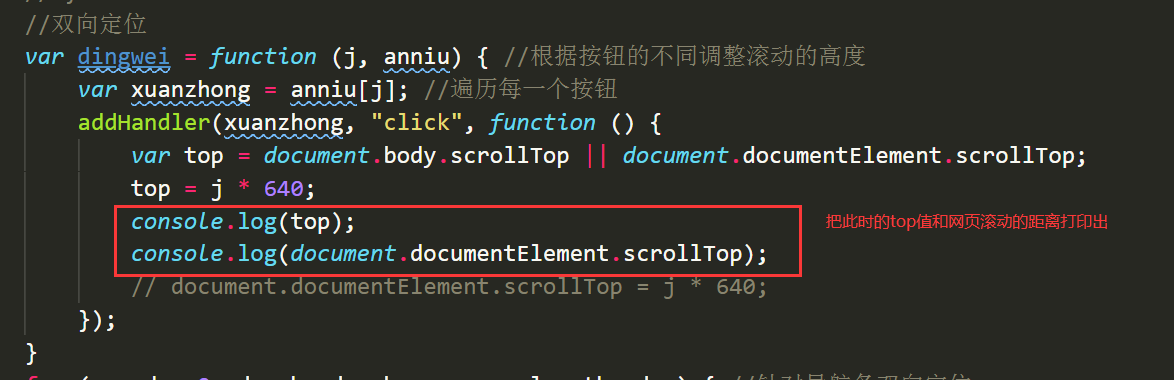
当我没有滚动页面时,点击“商业案例”:

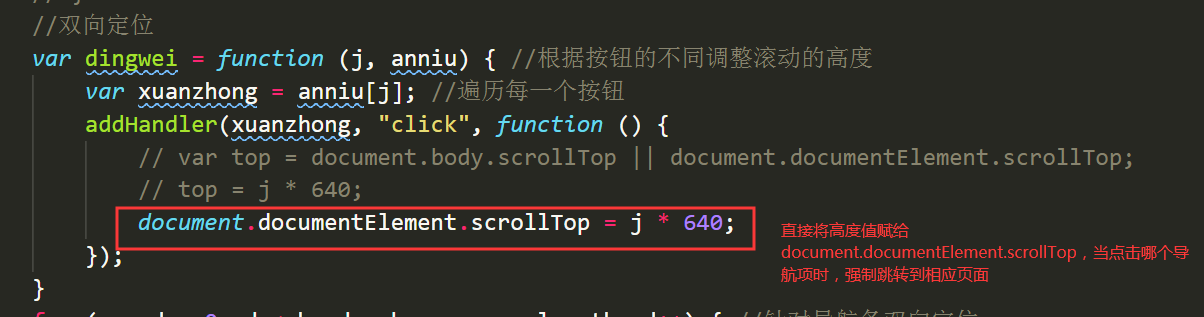
所以要将640*j赋值给动态获取高度的方法,document.documentElement.scrollTop不仅可以获取当前高度的值,还可以给它赋值一个高度,让它直接跳转到这个高度。而同学的只是将值赋值给了top,重新给top赋值了,但是跟document.documentElement.scrollTop没有关系,所以在点击的时候,页面不会跳到相应的页面。所以让网页跳转的关键是document.documentElement.scrollTop,而不是定义的变量top。
如果我的回答帮助到了你,欢迎采纳,祝学习愉快~

相似问题







登录后可查看更多问答,登录/注册











恭喜解决一个难题,获得1积分~
来为老师/同学的回答评分吧
0 星