请老师检查,以及,如何让五角星即使页面缩放也会在红色背景相应位置呢?
<!DOCTYPE html>
<html>
<head>
<meta charset="UTF-8">
<title>2Dtransform</title>
<style type="text/css">
div:first-child{
width: 300px;
height: 200px;
background: rgb(255,0,0);
margin: auto;
}
div:nth-child(2){
width: 0;
height: 0;
display: block;
border-right: solid 25px transparent;
border-left: solid 25px transparent;
border-bottom: solid 17px yellow;
position: relative;
left: 40%;
bottom: 160px;
-webkit-transform: rotate(35deg);
}
div:nth-child(2):after{
width: 0;
height: 0;
content: '';
display: block;
border-right: solid 25px transparent;
border-left: solid 25px transparent;
border-bottom: solid 17px yellow;
position: absolute;
top: 2px;
left: -27px;
-webkit-transform: rotate(-70deg);
}
div:nth-child(2):before{
width: 0;
height: 0;
content: '';
display: block;
border-right: solid 7px transparent;
border-left: solid 7px transparent;
border-bottom: solid 20px yellow;
position: absolute;
left: -17px;
top: -13px;
-webkit-transform: rotate(-35deg);
}
div:nth-child(3){
width: 0;
height: 0;
display: block;
border-right: solid 8px transparent;
border-left: solid 8px transparent;
border-bottom: solid 5px yellow;
position: relative;
left: 45%;
bottom: 198px;
transform: rotate(33deg);
}
div:nth-child(3):after{
width: 0;
height: 0;
content: '';
display: block;
border-right: solid 8px transparent;
border-left: solid 8px transparent;
border-bottom: solid 5px yellow;
position: absolute;
left: -8px;
top: 0px;
transform: rotate(-65deg);
}
div:nth-child(3):before{
width: 0;
height: 0;
content: '';
display: block;
border-right: solid 3px transparent;
border-left: solid 3px transparent;
border-bottom: solid 10px yellow;
position: absolute;
top: -5px;
left: -4.7px;
transform: rotate(-35deg);
}
div:nth-child(4){
width: 0;
height: 0;
display: block;
border-right: solid 8px transparent;
border-left: solid 8px transparent;
border-bottom: solid 5px yellow;
position: relative;
left: 46.6%;
bottom: 188px;
transform: rotate(33deg);
}
div:nth-child(4):after{
width: 0;
height: 0;
content: '';
display: block;
border-right: solid 8px transparent;
border-left: solid 8px transparent;
border-bottom: solid 5px yellow;
position: absolute;
left: -8px;
top: 0px;
transform: rotate(-65deg);
}
div:nth-child(4):before{
width: 0;
height: 0;
content: '';
display: block;
border-right: solid 3px transparent;
border-left: solid 3px transparent;
border-bottom: solid 10px yellow;
position: absolute;
top: -5px;
left: -4.7px;
transform: rotate(-35deg);
}
div:nth-child(5){
width: 0;
height: 0;
display: block;
border-right: solid 8px transparent;
border-left: solid 8px transparent;
border-bottom: solid 5px yellow;
position: relative;
left: 46.6%;
bottom: 173px;
transform: rotate(33deg);
}
div:nth-child(5):after{
width: 0;
height: 0;
content: '';
display: block;
border-right: solid 8px transparent;
border-left: solid 8px transparent;
border-bottom: solid 5px yellow;
position: absolute;
left: -8px;
top: 0px;
transform: rotate(-65deg);
}
div:nth-child(5):before{
width: 0;
height: 0;
content: '';
display: block;
border-right: solid 3px transparent;
border-left: solid 3px transparent;
border-bottom: solid 10px yellow;
position: absolute;
top: -5px;
left: -4.7px;
transform: rotate(-35deg);
}
div:nth-child(6){
width: 0;
height: 0;
display: block;
border-right: solid 8px transparent;
border-left: solid 8px transparent;
border-bottom: solid 5px yellow;
position: relative;
left: 45%;
bottom: 160px;
transform: rotate(33deg);
}
div:nth-child(6):after{
width: 0;
height: 0;
content: '';
display: block;
border-right: solid 8px transparent;
border-left: solid 8px transparent;
border-bottom: solid 5px yellow;
position: absolute;
left: -8px;
top: 0px;
transform: rotate(-65deg);
}
div:nth-child(6):before{
width: 0;
height: 0;
content: '';
display: block;
border-right: solid 3px transparent;
border-left: solid 3px transparent;
border-bottom: solid 10px yellow;
position: absolute;
top: -5px;
left: -4.7px;
transform: rotate(-35deg);
}
</style>
</head>
<body>
<div></div>
<div></div>
<div></div>
<div></div>
<div></div>
<div></div>
</body>
</html>15
收起
正在回答
1回答

同学你好,效果正确。可以使用定位来解决页面缩放布局错乱的问题。示例:
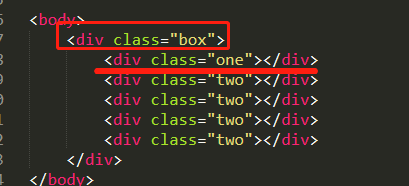
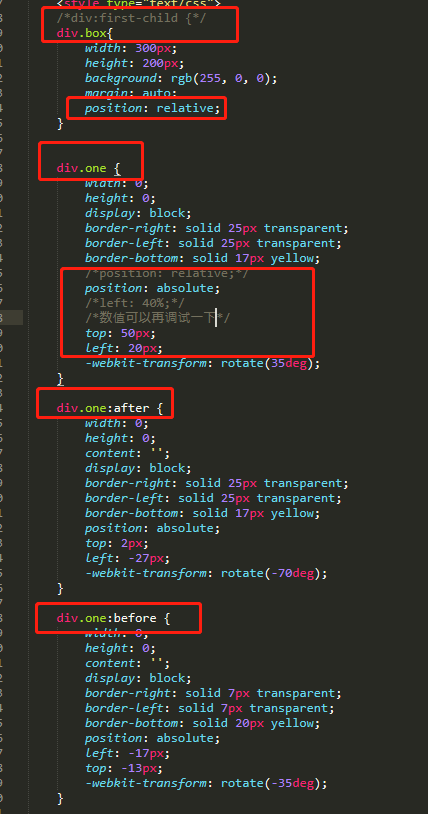
其他的小星星可以按照这个方式也调试一下。
如果我的回答帮到了你,欢迎采纳,祝学习愉快~

















恭喜解决一个难题,获得1积分~
来为老师/同学的回答评分吧
0 星