不会点击上方导航换图,求教
<!DOCTYPE html>
<html>
<head>
<meta charset="UTF-8">
<title>JavaScript6-2练习</title>
<link rel="stylesheet" href="css/6-2.css">
</head>
<body>
<div class="banner" id="banner">
<!-- 轮播图菜单 -->
<div class="bannerMenu" id="bannerMenu">
<div class="bgcolor">首页</div>
<div>点击看看</div>
<div>会自动的</div>
<div>我的网站</div>
</div>
<!-- 轮播图  -->
<div class="bannerSlide" id="bannerSlide">
<div><img src="img/1.jpg" alt=""></div>
<div><img src="img/2.jpg" alt=""></div>
<div><img src="img/3.jpg" alt=""></div>
<div><img src="img/4.jpg" alt=""></div>
</div>
</div>
<script src="js/6-2.js"></script>
</body>
</html>
*{
	margin:0;
	padding:0;
}
body{
	font-family:"Microsoft YaHei";
}
.banner {
	width: 800px;
	height: 450px;
	position: relative;
	left: 0;
	right: 0;
	margin: 0 auto;
}
.banner  .bannerMenu{
	width: 796px;
	height: 32px;
	border: dotted 2px rgba(0,0,0,0.2);
	border-bottom: none;
	border-radius: 10px 10px 0 0 ;
	padding: -2px -2px 0 -2px;
}
.banner .bannerMenu div {
	display: inline;
	width: 199px;
	height: 32px;
	float: left;
	line-height: 30px;
	text-align: center;
	border-radius: 10px 10px 0 0 ;
	font-size: 22px;
	cursor: pointer;
}
.banner .bannerSlide{
	width: 800px;
	height: 418px;
}
.banner .bannerSlide img{
	/*display: none;*/
	width: 800px;
	height: 418px;
	/*margin-left: -2px;*/
	position: absolute;
}
.bgcolor{
	background-color: #ffcc00;
}
function byId(id) {
	return typeof(id) === "string"?document.getElementById(id):id;
}


var index=0;
var timer=null;
var menu=byId('bannerMenu').getElementsByTagName('div');
var img=byId('bannerSlide').getElementsByTagName('div');
var main=byId(banner);
var len=menu.length;
main.onmouseover=function () {
	// 清除定时器
	if(timer) {
		clearInterval(timer);
	}
}
main.onmouseout=function () {
	// 开始定时器
	timer=setInterval(function(){
		index++;
		index=index%len;
		console.log(index);
		chageImg();
	},1000);
}
function chageImg(){
	for(var i=0;i<len;i++){
		img[i].style.display="none";
		menu[i].className="";
	}
	img[index].style.display="block";
	menu[index].className="bgcolor";
}
main.onmouseout();26
收起
正在回答
1回答

首先有一处错误,获取banner元素时,要传入ById内字符串,如下图第一处标注进行修改:
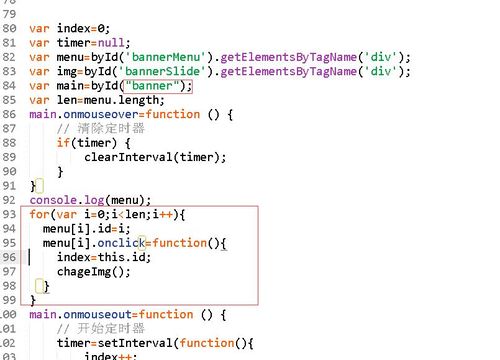
第二处标注,就是我帮你写的点击导航项切换图片,首先4个导航都可点击切换,所以使用遍历给4个导航绑定单击事件,其次,单击导航项的时候要切换到相应的图片,导航项要和图片有对应的索引,我们点击的时候也要知道它的索引值是几,然后让对应索引的图片显示。所以通过.id的方式给4个导航项添加一个表示着索引值的标志,在单击事件发生时,获取当前导航项的索引值,赋值给控制着轮播的全局变量index,调用changeImg函数即可





前端小白入门系列课程
- 参与学习 人
- 提交作业 11218 份
- 解答问题 36712 个
从一个不会编程的小白到一个老司机是需要过程的,首先得入门,学习基础知识,然后才能进阶,最后再到精通,本专题是你走进前端世界的不二选择!
了解课程


















恭喜解决一个难题,获得1积分~
来为老师/同学的回答评分吧
0 星