请老师看看代码哪个地方有误?
<%@ page language="java" contentType="text/html; charset=UTF-8" pageEncoding="UTF-8"%> <!DOCTYPE html> <html> <head> <meta http-equiv="Content-Type" content="text/html; charset=utf-8"> <title>添加菜品</title> <style type="text/css"> </style> </head> <body> <center> <h1>菜品添加</h1> <form action="/myfirstmvc/FoodAddServlet" method="post" enctype="multipart/form-data"> <table border="1px" width="400px" cellspacing="0px" cellpadding="0px"> <tr> <td>菜品 ID</td> <td><input type="text" name="id"></td> </tr> <tr> <td>菜 名</td> <td><input type="text" name="foodName"></td> </tr> <tr> <td>口 味</td> <td> <input type="radio" name="taste" value="香辣">香辣 <input type="radio" name="taste" value="微辣">微辣 <input type="radio" name="taste" value="麻辣">麻辣 <input type="radio" name="taste" value="不辣">不辣 </td> </tr> <tr> <td>菜品图片</td> <td><input type="file" name="foodImage"></td> </tr> <tr> <td>价 格</td> <td><input type="text" name="price"></td> </tr> <tr> <td>菜品描述</td> <td> <textarea name="description"></textarea> </td> </tr> <tr style="text-align:center;width:20px"> <td colspan="2"> <input type="submit" value="添加"> <input type="reset" value="重置"> </td> </tr> </table> </form> </center> </body> </html>
package com.imooc.servlet;
import java.awt.print.Pageable;
import java.io.FileOutputStream;
import java.io.IOException;
import java.io.InputStream;
import java.io.OutputStream;
import java.util.ArrayList;
import java.util.HashMap;
import java.util.List;
import java.util.Map;
import javax.servlet.ServletException;
import javax.servlet.annotation.WebServlet;
import javax.servlet.http.HttpServlet;
import javax.servlet.http.HttpServletRequest;
import javax.servlet.http.HttpServletResponse;
import org.apache.commons.fileupload.FileItem;
import org.apache.commons.fileupload.FileUploadException;
import org.apache.commons.fileupload.disk.DiskFileItemFactory;
import org.apache.commons.fileupload.servlet.ServletFileUpload;
import com.imooc.myfirstmvc.Food;
import com.imooc.myfirstmvc.UpLoadUtil;
@WebServlet("/FoodAddServlet")
public class FoodAddServlet extends HttpServlet {
protected void doGet(HttpServletRequest request, HttpServletResponse response)
throws ServletException, IOException {
try {
DiskFileItemFactory dff = new DiskFileItemFactory();
ServletFileUpload sfu = new ServletFileUpload(dff);
List<FileItem> list = sfu.parseRequest(request);
List<String> taste = new ArrayList<String>();
Map<String, String> map = new HashMap<String, String>();
Food food = new Food("id", "name", "taste", "path", " price", "description");
String url = "";
for (FileItem fileItem : list) {
if (fileItem.isFormField()) {
String name = fileItem.getFieldName();
String value = fileItem.getString("UTF-8");
if ("taste".equals(name)) {
String tasteValue = fileItem.getString("UTF-8");
taste.add(tasteValue);
map.put(name, tasteValue);
} else {
map.put(name, value);
}
} else {
String fileItemName = fileItem.getName();
String uuidname = UpLoadUtil.getUUIDName(fileItemName);
String path = this.getServletContext().getRealPath("/upload");
url = path + "/" + uuidname;
InputStream is = fileItem.getInputStream();
OutputStream os = new FileOutputStream("url");
int len = 0;
byte[] b = new byte[1024];
while ((len = is.read(b)) != -1) {
os.write(b, 0, len);
}
is.close();
os.close();
}
food.setId(map.get("id"));
food.setName(map.get("name"));
food.setTaste(map.get("taste"));
food.setPath(url);
food.setPrice(map.get("price"));
food.setDescription(map.get("description"));
}
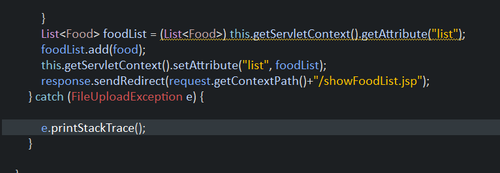
List<Food> foodList = (List<Food>) this.getServletContext().getAttribute("list");
foodList.add(food);
this.getServletContext().setAttribute("list", foodList);
response.sendRedirect(request.getContextPath()+"/showFoodList.jsp");
} catch (FileUploadException e) {
e.printStackTrace();
}
}
protected void doPost(HttpServletRequest request, HttpServletResponse response)
throws ServletException, IOException {
doGet(request, response);
}
}
<%@page import="java.util.List,com.imooc.myfirstmvc.*"%>
<%@ page language="java" contentType="text/html; charset=UTF-8"
pageEncoding="UTF-8"%>
<!DOCTYPE html>
<html>
<head>
<meta http-equiv="Content-Type" content="text/html; charset=utf-8">
<title>菜品信息展示</title>
<style type="text/css">
</style>
</head>
<body>
<%
List<Food> list = (List<Food>) this.getServletContext().getAttribute("list");
for (Food food : list) {
%>
<center>
<h1>菜品查询</h1>
<table border="1px" cellspacing="0px" cellpadding="0px" width="800px">
<thead>
<tr>
<th>菜品ID</th>
<th>菜名</th>
<th>口味</th>
<th>菜品图片</th>
<th>价格</th>
<th>菜品描述</th>
</tr>
</thead>
<tbody>
<tr>
<td><%=food.getId()%></td>
<td><%=food.getName()%></td>
<td><%=food.getTaste()%></td>
<td><%=food.getTaste()%></td>
<td><%=food.getPath()%></td>
<td><%=food.getPrice()%></td>
<td><%=food.getDescription()%></td>
</tr>
</tbody>
</table>
</center>
<%
}
%>
</body>
</html>
正在回答

应该写到FoodUtils 的 init方法中哦,
@Override
public void init() throws ServletException {
//初始化的内容
}
如果我的回答解决了你的疑惑,请采纳!祝学习愉快!

package com.imooc.servlet;

import java.io.IOException;
import java.util.ArrayList;
import java.util.List;

import javax.servlet.ServletException;
import javax.servlet.annotation.WebServlet;
import javax.servlet.http.HttpServlet;
import javax.servlet.http.HttpServletRequest;
import javax.servlet.http.HttpServletResponse;

import com.imooc.myfirstmvc.Food;


public class FoodUtils extends HttpServlet {


    protected void doGet(HttpServletRequest request, HttpServletResponse response) throws ServletException, IOException {
        List<Food> list=new ArrayList<Food>();
        this.getServletContext().setAttribute("list", list);
    }


    protected void doPost(HttpServletRequest request, HttpServletResponse response) throws ServletException, IOException {

        doGet(request, response);
    }

}
配置web.xml
<?xml version="1.0" encoding="UTF-8"?>
<web-app xmlns:xsi="http://www.w3.org/2001/XMLSchema-instance" xmlns="http://xmlns.jcp.org/xml/ns/javaee" xsi:schemaLocation="http://xmlns.jcp.org/xml/ns/javaee http://xmlns.jcp.org/xml/ns/javaee/web-app_4_0.xsd" version="4.0">
  <display-name>myfirstmvc</display-name>
  <welcome-file-list>
    <welcome-file>index.html</welcome-file>
    <welcome-file>index.htm</welcome-file>
    <welcome-file>index.jsp</welcome-file>
    <welcome-file>default.html</welcome-file>
    <welcome-file>default.htm</welcome-file>
    <welcome-file>default.jsp</welcome-file>
  </welcome-file-list>
    <servlet>
    <servlet-name>FoodUtils</servlet-name>
    <servlet-class>com.imooc.servlet.FoodUtils</servlet-class>
    <load-on-startup>2</load-on-startup>
  </servlet>
  <servlet-mapping>
    <servlet-name>FoodUtils</servlet-name>
    <url-pattern>/FoodUtils</url-pattern>
  </servlet-mapping>
</web-app>
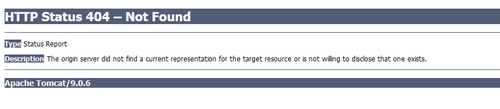
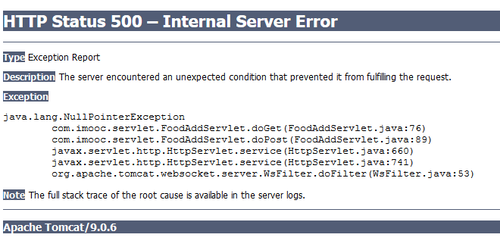
配置web.xml,运行addFood.jsp文件报错截图:
相似问题






登录后可查看更多问答,登录/注册
- 参与学习 人
- 提交作业 1088 份
- 解答问题 10204 个
如果你有Java语言基础,又想以后从事Java Web开发,那么本路径是你的不二选择!本路径从网页搭建开始入手,通过大量案例来学习Java Web基础。定能助你完成Java Web小白的蜕变!
了解课程













恭喜解决一个难题,获得1积分~
来为老师/同学的回答评分吧
0 星