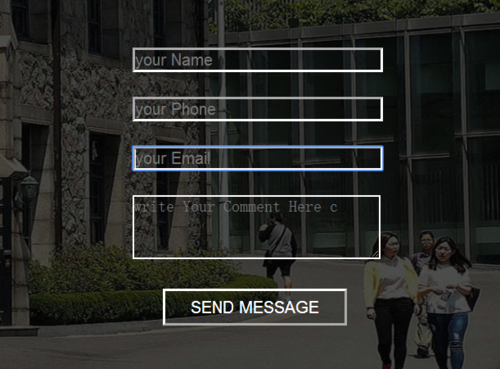
怎么能让banner里的input里的提示字体变为白色
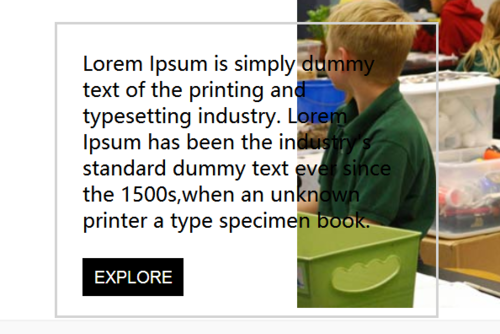
怎么能让banner里的input里的提示字体变为白色,以及about区里的box1的有案例里的白色背景
<!DOCTYPE html>
<html>
<head>
<meta charset="UTF-8">
<title>Document</title>
<style type="text/css">
*{
margin: 0px;
padding: 0px;
}
</style>
<link rel="stylesheet" type="text/css" href="css/head.css">
<link rel="stylesheet" type="text/css" href="css/banner.css">
<link rel="stylesheet" type="text/css" href="css/About.css">
</head>
<body>
<div class="head">
<img src="images/logo.png" class="head-logo">
<div class="head-nav">
<ul class="head-nav-ul">
<li class="head-nav-ul-li">HOME</li>
<li class="head-nav-ul-li">ABOUT</li>
<li class="head-nav-ul-li">ALLERY</li>
<li class="head-nav-ul-li">FACULITY</li>
<li class="head-nav-ul-li">EVENT</li>
<li class="head-nav-ul-li">CONTACT</li>
</ul>
</div>
<div class="clear"></div>
</div>
<div class="banner">
<img src="images/banner3.jpg" class="banner-bgr">
<div class="遮罩"></div>
<div class="遮罩-form">
<form class="form1">
<input type="text" name="" placeholder="your Name" class="input1"><br>
<input type="text" name="" placeholder="your Phone" class="input1"><br>
<input type="email" name="" placeholder="your Email" class="input1"><br>
<textarea placeholder="write Your Comment Here c" class="text1"></textarea><br>
<button class="but1" type="submit">SEND MESSAGE</button>
</form>
</div>
</div>
<div class="about">
<div class="top">
<div class="top-up">
<p class="p1">About</p>
<p class="p2">---</p>
<p class="p3">Lorem Ipsum is simply dummy text of the printing and typesetting<br>industry.Lorem Ipsum has been the industry's standard dummy <br>text ever since the 1500s.</p>
</div>
<div class="top-down">
<div class="word1">A WORD <br>ABOUT US</div>
<div class="box1">
<p class="pp">Lorem Ipsum is simply dummy<br> text of the printing and typesetting industry.
Lorem Ipsum has been the industry's standard dummy text ever since the 1500s,when an unknown printer a type specimen book.</p>
<button class="but">EXPLORE</button>
</div>
<div class="box2">
<div class="p1">70000</div><br>
<div class="p1 p22">---</div><br>
<div class="p1">Students</div>
</div>
<div class="box3">
<div class="p1">600</div><br>
<div class="p1 p22">---</div><br>
<div class="p1">Faculty</div>
</div>
<img src="images/bb3.jpg" class="top-down-pic" >
</div>
</div>
</div>
</body>
</html>
.banner{
width: 100%;
height: 550px;
}
.banner .banner-bgr{
width: 100%;
height: 550px;
}
.banner .遮罩{
width: 100%;
height: 481px;
position: absolute;
background-color: black;
opacity: 0.5;
top: 70px;
left: 0px;
z-index: 1;
}
.banner .遮罩-form{
width: 400px;
height: 200px;
position: absolute;
top: 180px;
left: 50%;
margin-left: -200px;
/* background-color: red;*/
background-color: transparent;
z-index: 3;
}
.banner .遮罩-form .form1{
margin-left: 80px;
width: 50px;
}
.banner .遮罩-form .form1 .input1{
width: 200px;
margin-top: 20px;
border-color: white;
color: white;
background-color: transparent;
}
.banner .遮罩-form .form1 .text1{
width: 200px;
margin-top: 20px;
height: 50px;
color: white;
border-color: white;
background-color: transparent;
}
.banner .遮罩-form .form1 .but1{
margin-top: 20px;
margin-left: 25px;
height: 30px;
width: 150px;
color: white;
border-color: white;
background-color: transparent;
}
.banner .遮罩-form .form1 .input1:hover{
border-color: #07cbc9;
}
.banner .遮罩-form .form1 .text1:hover{
border-color: #07cbc9;
}
.banner .遮罩-form .form1 .but1:hover{
background-color: #07cbc9;
}
.about{
width: 100%;
height: auto;
}
.about .top{
width: 100%;
height: 550px;
}
.about .top .top-up{
width: 100%;
height: 200px;
background-color: white;
}
.about .top .top-up .p1{
height: 80px;
line-height: 100px;
font-size: 80px;
padding-left: 490px;
}
.about .top .top-up .p2{
height: 15px;
line-height: 20px;
font-size: 80px;
color: #07cbc9;
padding-left: 570px;
}
.about .top .top-up .p3{
height: 105px;
line-height: 30px;
margin-left: 370px;
margin-top: 10px;
font-weight: lighter;
}
.about .top .top-down{
width: 100%;
height: 350px;
position: relative;
}
.about .top .top-down .top-down-pic{
height: 340px;
position: absolute;
left: 50%;
z-index: 1;
margin-left: -250px;
}
.about .top .top-down .word1{
position: absolute;
left: 150px;
top: 20px;
z-index: 2;
height: 100px;
width: 200px;
font-weight: bold;
font-size: 30px;
}
.about .top .top-down .box1{
position: absolute;
left: 190px;
top:114px;
z-index: 3;
height: 230px;
width: 300px;
border: solid lightgray;
}
.about .top .top-down .box1 .pp{
margin-top: 20px;
margin-left: 20px;
margin-right: 20px;
}
.about .top .top-down .but{
margin-top: 20px;
margin-left: 20px;
width:80px;
height:30px;
color: white;
background-color: black;
border: none;
}
.about .top .top-down .box2{
position: absolute;
right: 140px;
z-index: 3;
height: 100px;
width: 200px;
border: solid #07cbc9;
}
.about .top .top-down .box2 .p1{
font-size: 18px;
line-height: 10px;
height: 10px;
width: 100px;
margin-top: 5px;
margin-left: 50px;
text-align: center;
}
.about .top .top-down .box3{
position: absolute;
right: 140px;
top: 150px;
z-index: 3;
height: 100px;
width: 200px;
border: solid #07cbc9;
}
.about .top .top-down .box3 .p1{
font-size: 18px;
line-height: 10px;
height: 10px;
width: 100px;
margin-top: 5px;
margin-left: 50px;
text-align: center;
}
.p22{
color: #07cbc9;
}
.about .top .top-down .but:hover{
color: black;
background-color: white;
}
正在回答

1、设置placeholder的颜色,可以用下边的语句设置
input::-webkit-input-placeholder{
color: white;
}
2、
同学可以给
.about .top .top-down .box1设置背景颜色,并调整透明度:
background-color: rgba(255, 255, 255, 0.4); 这里的0.4是透明度
.about .top .top-down .box1{

	position: absolute;

	left: 190px;

	top:114px;

	z-index: 3;

	height: 230px;

	width: 300px;

	border: solid lightgray;
	 background-color: rgba(255, 255, 255, 0.4);

}
如果我的回答解决了你的疑惑,请采纳!祝学习愉快!








- 参与学习 人
- 提交作业 1088 份
- 解答问题 10204 个
如果你有Java语言基础,又想以后从事Java Web开发,那么本路径是你的不二选择!本路径从网页搭建开始入手,通过大量案例来学习Java Web基础。定能助你完成Java Web小白的蜕变!
了解课程













恭喜解决一个难题,获得1积分~
来为老师/同学的回答评分吧
0 星