创建工程之后报错了
[ERROR] Plugin org.apache.maven.plugins:maven-archetype-plugin:RELEASE or one of its dependencies could not be resolved: Failed to read artifact descriptor for org.apache.maven.plugins:maven-archetype-plugin:jar:RELEASE: Failed to resolve version for org.apache.maven.plugins:maven-archetype-plugin:jar:RELEASE: Could not find metadata org.apache.maven.plugins:maven-archetype-plugin/maven-metadata.xml in local (f:\maven-repo) -> [Help 1]
[ERROR]
[ERROR] To see the full stack trace of the errors, re-run Maven with the -e switch.
[ERROR] Re-run Maven using the -X switch to enable full debug logging.
[ERROR]
[ERROR] For more information about the errors and possible solutions, please read the following articles:
[ERROR] [Help 1] http://cwiki.apache.org/confluence/display/MAVEN/PluginResolutionException
正在回答

同学你好。
1、有用的报错信息是:
Could not find metadata org.apache.maven.plugins:maven-archetype-plugin/maven-metadata.xml in local
显示同学的plugins中,有一个文件找不到,可能是同学下载的时候没有下载好。
2、同学可以打开本地maven仓库,删除/org/apache/maven/plugins/下的maven-archetype-plugin文件夹,比如我的位置在这里:
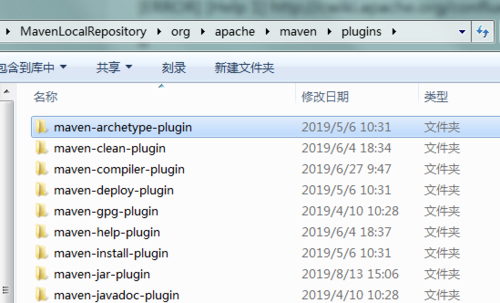
然后重新再试一下~
祝学习愉快~
同学你好。这个还是网络原因导致的,因为是外网,同学可以多删除几次再新建试试。
如果同学想要快一些,也可以尝试如下方式:
找到idea中配置的那个本地maven(一定是和配置一致的哦),找到conf文件夹中的settings.xml
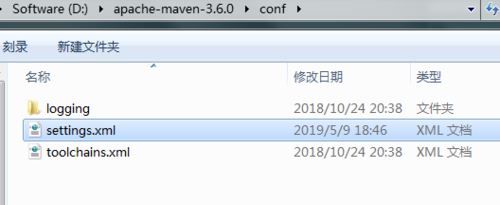
改变mirror:为本地仓库配置为阿里云的国内maven仓库的镜像
<mirror>
<id>alimaven</id>
<name>aliyun maven</name>
<url>http://maven.aliyun.com/nexus/content/groups/public/</url>
<mirrorOf>central</mirrorOf>
</mirror>
然后在idea中为maven添加参数:-DarchetypeCatalog=local
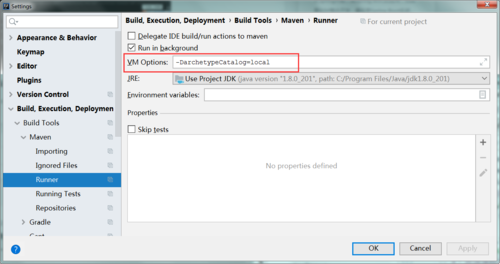
祝学习愉快~

 环境配置的也是自己创建的mevan文件夹
相似问题








登录后可查看更多问答,登录/注册
- 参与学习 人
- 提交作业 323 份
- 解答问题 8263 个
本阶段将带你学习主流框架SSM,以及SpringBoot ,打通成为Java工程师的最后一公里!
了解课程












恭喜解决一个难题,获得1积分~
来为老师/同学的回答评分吧
0 星