form表单无法居中显示
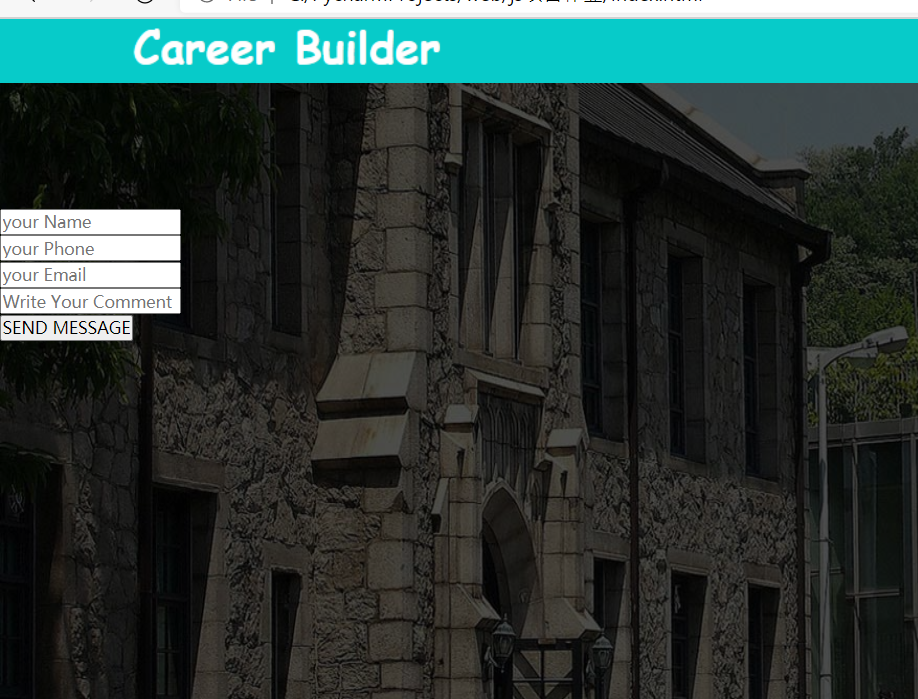
如图无法居中显示,css中已设置margin:100px auto; 怎样才能让表单居中呢
html:
<!DOCTYPE html>
<html>
<head>
<meta charset="utf-8">
<title>Career Builder</title>
<link rel="stylesheet" type="text/css" href="css/common.css">
<script type="text/javascript" src="js/js.js"></script>
</head>
<body>
<div class="header">
<div class="logo">
<a href="###"><img src="images/logo.png"></a>
</div>
<ul>
<li><a href='###'>HOME</a></li>
<li><a href='###'>ABOUT</a></li>
<li><a href='###'>GALLERY</a></li>
<li><a href='###'>FACULTY</a></li>
<li><a href='###'>EVENTS</a></li>
<li><a href='###'>CONTACT</a></li>
</ul>
</div>
<div class="banner">
<div class="banner-img">
<img src="images/banner3.jpg">
<div class='cap'></div>
<form>
<!-- placeholder属性设置默认显示 -->
<input type="text" name="name" placeholder='your Name'><br>
<input type="text" name="phone" placeholder="your Phone"><br>
<input type="text" name="email" placeholder="your Email"><br>
<input type="text" name="comment" placeholder="Write Your Comment Here"><br>
<input type="button" name="send_btn" value="SEND MESSAGE">
</form>
</div>
</div>
</body>
</html>
css:
*{
padding: 0px;
margin: 0px;
font-family: Microsoft YaHei UI;
}
body{
/*浏览器100%显示*/
width: 100%;
/*将页面左右居中*/
margin: 0px auto;
}
a{
/*取消超链接颜色样式*/
text-decoration: none;
color: white;
}
.header{
height: 60px;
background-color: #07cbc9
}
.header .logo img{
margin-left:100px;
float: left;
margin-top: 6px;
}
.header ul{
margin-right: 70px;
}
.header ul li{
list-style: none;
float: right;
margin-right: 30px;
padding-top: 22px;
box-sizing: border-box;
height: 60px;
font-weight: bold;
}
.header ul li:hover{
background-color: #000;
}
.banner .banner-img img{
height: 800px;
width: 100%;
position: absolute;
z-index: 10;
}
.banner .banner-img{
width: 100%;
}
.banner .banner-img .cap{
height: 800px;
width: 100%;
position: absolute;
z-index: 20;
background-color: black;
opacity: 50%
}
.banner .banner-img form{
position: absolute;
width: 100px;
margin: 100px auto;
z-index: 30;
}
正在回答

.banner .banner-img form{
position: absolute;
width: 100px;
margin: 100px auto;
z-index: 30;
}
这里有错
第一个:width不能是100px,而是100%
第二个:设置居中text-align: center;
改正后
.banner .banner-img form{
position: absolute;
width: 100%;
margin: 100px auto;
z-index: 30;
text-align: center;
}
相似问题








登录后可查看更多问答,登录/注册
- 参与学习 人
- 提交作业 218 份
- 解答问题 3562 个
本阶段带你用Python开发一个网站,学习主流框架Django+Flask是Python Web开发的第一步,在基础知识上实现积分商城的项目开发,体验真实的项目开发流程,提高解决编程问题和效率的能力。
了解课程











恭喜解决一个难题,获得1积分~
来为老师/同学的回答评分吧
0 星