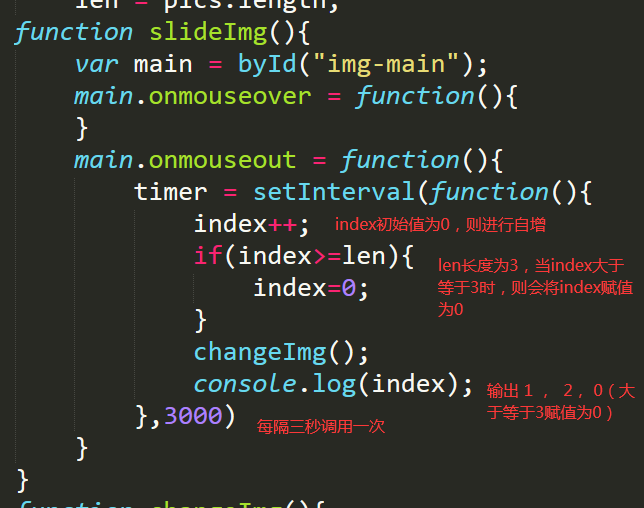
鼠标移到左右两边是正常速度 但是移到上面按钮就会出现一次型做2次减法
<!DOCTYPE html>
<html>
<head>
<title></title>
<link rel="stylesheet" type="text/css" href="sy_css.css">
<script src="sy_js.js" type="text/javascript" charset="utf-8" async defer></script>
</head>
<body>
<div class="header" id="main">
<div class="head">
<div class="head-img">
<a href="#" title=""><img src="img/loge.png"></a>
</div>
<div class="head-table">
<ul>
<li><a href="#">首页</a></li>
<li><a href="#">创作中心</a></li>
<li><a href="#">个人中心</a></li>
</ul>
<div class="form">
<form>
<input type="text" name="" placeholder="搜CSDN" onfocus="show1()" onblur="show2()">
<a href="#">
<img src="img/search.png" alt="" id="img1">
<img src="img/search (1).png" alt="" id="img2"></a>
</form>
</div>
<div class="on">
<a href="#" title="">登录/注册</a>
</div>
</div>
</div>
</div>
<div class="img-main" id="img-main">
<!--轮播图片-->
<div class="banner" id="banner">
<a href="" title="">
<div class="banner-slide slide1 active">
</div>
</a>
<a href="" title="">
<div class="banner-slide slide2">
</div>
</a>
<a href="" title="">
<div class="banner-slide slide3">
</div>
</a>
</div>
<!--上一张下一张按钮-->
<a href="javescript:void(0)" title="" class="button prev"></a>
<a href="javescript:void(0)" title="" class="button next"></a>
<!--圆点导航-->
<div class="dots">
<span class="active"></span>
<span></span>
<span></span>
</div>
</div>
</body>
</html>
body{
background-color:#F0F0F0;
margin:0;
padding: 0;
}
a{
color: black;
text-decoration: none;
}
.header{
width: 100%;
height: 50px;
background-color: white;
margin: 0 auto;
overflow: hidden;
}
.head{
width: 1050px;
margin: 0 auto;
overflow: hidden;
position: relative;
}
.head-img{
height: 50px;
width: 116px;
position: relative;
float: left;
}
.head-img img{
margin: auto 0;
position: absolute;
top: 50%;
margin-top: -16px;
}
.head-table{
background-color: white;
width: 700px;
height: 50px;
float: left;
overflow: hidden;
}
.head-table ul{
display: table;
padding: 0;
margin: 0;
line-height: 50px;
float: left;
}
.head-table li{
display: table-cell;
vertical-align: middle;
}
.head-table li a{
display: block;
height: 50px;
width: 80px;
text-align: center;
color: #666666;
}
.head-table a:hover{
background-color: #F0F0F0;
}
.head-table .form{
height: 50px;
float: left;
}
.form{
position: relative;
}
.form input{
height: 28px;
width: 240px;
background-color: #F0F0F0;
font-size: 18px;
position: absolute;
top: 50%;
margin-top: -17px;
margin-left: 200px;
border-radius: 5px;
}
.form img{
height: 31px;
position: absolute;
margin-left: 411.7px;
top: 50%;
margin-top: -17px;
background-color: #C0C0C0;
border-radius: 5px;
}
.form #img2{
display: none;
background-color: #DD0000;
}
.form input{
outline: none;
border-width: 1px;
}
.on{
right: 0;
position: absolute;
font-size: 20px;
height: 50px;
line-height: 50px;
}
.on a{
color: #666666;
}
.on:hover{
background-color: #F0F0F0;
}
.img-main{
width: 1050px;
height: 400px;
margin: 5px auto;
overflow: hidden;
position: relative;
}
.banner{
width: 1050px;
height: 400px;
margin: 5px auto;
background-color: yellow;
overflow: hidden;
position: relative;
}
.banner-slide{
width: 1050px;
height: 400px;
background-repeat: no-repeat;
position: absolute;
display: none;
}
.slide1{
background-image: url(img/bg1.jpg);
}
.slide2{
background-image: url(img/bg2.jpg);
}
.slide3{
background-image: url(img/bg3.jpg);
}
.active{
display: block;
}
.button{
position: absolute;
width: 40px;
height: 80px;
top: 50%;
margin-top: -20px;
background: url(img/arrow.png) no-repeat center center;
}
.button:hover{
background-color:#333;
opacity: 0.8;
filter:alpha(opacity=80);
}
.prev{
transform:rotate(180deg);
}
.next{
left: auto;
right: 0;
}
.dots{
position: absolute;
right: 0;
bottom: 24px;
text-align: right;
right: 20px;
}
.dots span{
display: inline-block;
width: 12px;
height: 12px;
border-radius: 50%;
background:rgba(7,17,27,0.4);
box-shadow: 0 0 0 2px rgba(255,255,255,0.8) inset;
margin-left: 8px;
line-height: 12px;
cursor: pointer;
}
.dots span.active{
box-shadow: 0 0 0 2px rgba(7,17,27,0.4) inset;
background:#fff;
}
function byId(id){
return typeof(id) === "string"?document.getElementById(id):id;
}
function show1(){
var a = byId("img1");
a.style.display="none";
var b = byId("img2");
b.style.display = "inline";
}
function show2(){
var a = byId("img1");
a.style.display="inline";
var b = byId("img2");
b.style.display = "none";
}
var index = 0,
timer = null,
pics = byId("banner").getElementsByTagName("div"),
len = pics.length;
function slideImg(){
var main = byId("img-main");
main.onmouseover = function(){
}
main.onmouseout = function(){
timer = setInterval(function(){
index++;
if(index>=len){
index=0;
}
changeImg();
console.log(index);
},3000)
}
}
function changeImg(){
pics[index].style.display = 'block';
}
slideImg();
正在回答 回答被采纳积分+1









- 参与学习 人
- 提交作业 676 份
- 解答问题 9666 个
本阶段将从前端网页搭建入手,到Java Web基础,前后端结合助你完成Java Web小白的蜕变!
了解课程










恭喜解决一个难题,获得1积分~
来为老师/同学的回答评分吧
0 星