可爱的老师,求助!
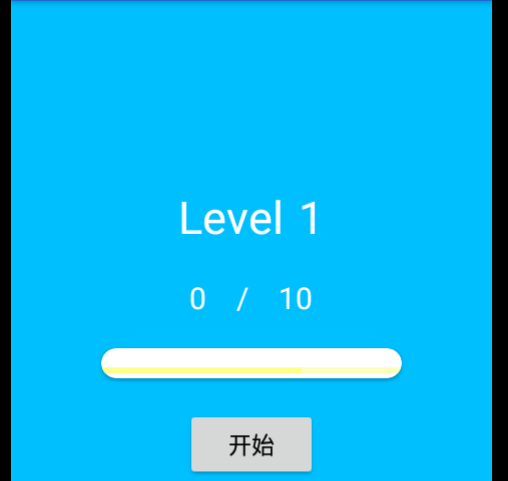
您好,老师。
如图,我想实现一个功能,就是,每当点击一下“开始”这个按钮,0/10,就是增加1 。直到10/10 ,上面就会变成Level 2 ,然后按钮上面的Text又恢复为:0/10 ,每次点满10次按钮,Level都会继续往上增加,不会封顶。
我写了下面的代码。但是,有个问题,就是Level 到2就不会再增加了。。。老师,麻烦帮我修改下代码可以吗?
谢谢你!
方便您实验,我全贴给您
这是Layout :
<?xml version="1.0" encoding="utf-8"?>
<LinearLayout
    xmlns:android="http://schemas.android.com/apk/res/android"
    xmlns:app="http://schemas.android.com/apk/res-auto"
    xmlns:tools="http://schemas.android.com/tools"
    android:layout_width="match_parent"
    android:layout_height="match_parent"
    android:orientation="vertical"
    android:gravity="center"
    android:background="#00BFFF"
    tools:context=".MainActivity">
    <LinearLayout
        android:layout_width="match_parent"
        android:layout_height="wrap_content"
        android:gravity="center"
        android:orientation="horizontal">
        <TextView
            android:layout_width="wrap_content"
            android:layout_height="wrap_content"
            android:text="Level"
            android:textSize="30dp"
            android:textColor="#ffffff"/>
        <TextView
            android:id="@+id/level_num"
            android:layout_width="wrap_content"
            android:layout_height="wrap_content"
            android:textColor="#ffffff"
            android:textSize="30dp"
            android:layout_marginLeft="10dp"
            android:text="1"/>


    </LinearLayout>

   <LinearLayout
       android:layout_width="match_parent"
       android:layout_height="wrap_content"
       android:gravity="center"
       android:layout_margin="10dp"
       android:orientation="horizontal">
       <TextView
           android:id="@+id/txt"
           android:layout_width="wrap_content"
           android:layout_height="wrap_content"
           android:text="0"
           android:layout_margin="10dp"
           android:textColor="#ffffff"
           android:textSize="20dp"/>
       <TextView
           android:layout_width="wrap_content"
           android:layout_height="wrap_content"
           android:text="/"
           android:layout_margin="10dp"
           android:textSize="20dp"
           android:textColor="#ffffff"/>
       <TextView
           android:layout_width="wrap_content"
           android:layout_height="wrap_content"
           android:textColor="#ffffff"
           android:layout_margin="10dp"
           android:textSize="20dp"
           android:text="10"/>
   </LinearLayout>
    <androidx.cardview.widget.CardView
        android:layout_width="wrap_content"
        app:cardCornerRadius="10dp"
        android:layout_height="wrap_content">
    <ProgressBar
        android:id="@+id/progressBar"
        android:layout_width="200dp"
        android:layout_height="10dp"
        android:max="100"
        android:min="10"
        android:secondaryProgress="70"
        style="@style/Widget.AppCompat.ProgressBar.Horizontal"
        android:layout_marginTop="10dp"/>
    </androidx.cardview.widget.CardView>
    <LinearLayout
        android:layout_width="match_parent"
        android:layout_height="wrap_content"
        android:layout_marginTop="10dp"
        android:gravity="center"
        android:orientation="horizontal">
        <Button
            android:id="@+id/start"
            android:layout_width="wrap_content"
            android:layout_height="wrap_content"
            android:textColor="#000000"
            android:textSize="15dp"
            android:layout_margin="10dp"
            android:text="开始"/>

    </LinearLayout>


</LinearLayout>
MainActivity:
package com.example.userrecyclerviewapplication;
import androidx.annotation.NonNull;
import androidx.appcompat.app.AppCompatActivity;
import android.graphics.Color;
import android.os.Bundle;
import android.view.View;
import android.widget.Button;
import android.widget.ProgressBar;
import android.widget.TextView;
public class MainActivity extends AppCompatActivity {
private TextView txt,level_num;
private ProgressBar pb;
private Button start;
@Override
protected void onCreate(Bundle savedInstanceState) {
super.onCreate(savedInstanceState);
setContentView(R.layout.activity_main);
level_num = findViewById(R.id.level_num);
txt = findViewById(R.id.txt);
pb = findViewById(R.id.progressBar);
start = findViewById(R.id.start);
pb.getProgressDrawable().setColorFilter(Color.YELLOW,android.graphics.PorterDuff.Mode.SRC_IN);
initEvent();
}
private void initEvent() {
start.setOnClickListener(new View.OnClickListener() {
@Override
public void onClick(View v) {
int progress = pb.getProgress();
int real_num = progress/10;
int level = 1 ;
if(real_num <10 && level >0){
progress = progress+10;
txt.setText(String.valueOf(real_num));
pb.setProgress(progress);
}else{
pb.setProgress(0);
txt.setText("0");
level++;
level_num.setText(String.valueOf(level));
}
}
});
}
}
6
收起
正在回答
1回答

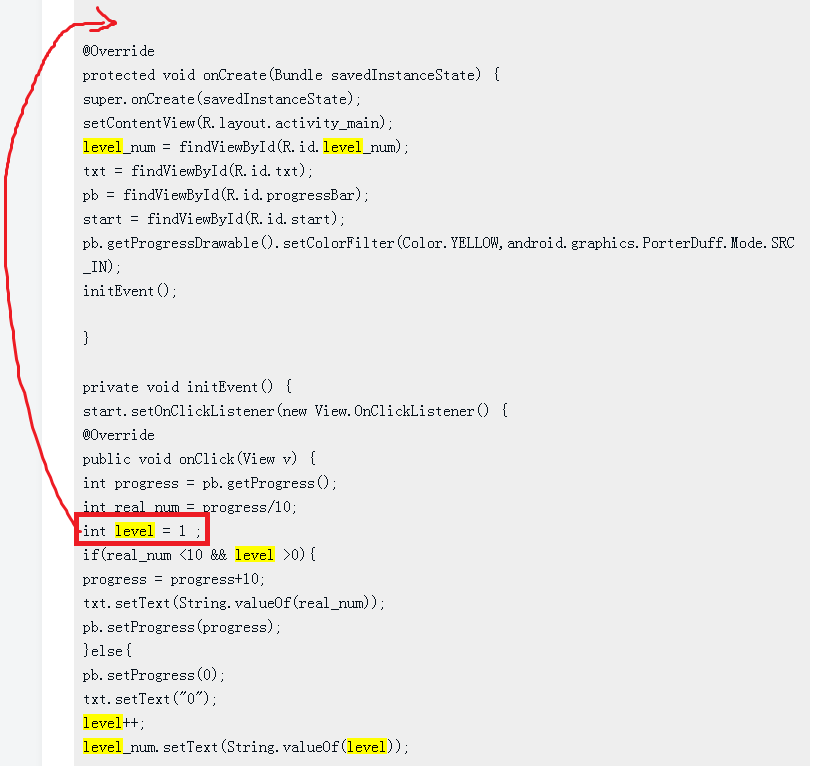
同学你好,level的定义,初始化不要放在onClick里,应该放在外面,否则,你点击一次,level每次都是从1开始计数的。祝:学习愉快



3.Android 高级应用与Kotlin综合实战
- 参与学习 人
- 提交作业 116 份
- 解答问题 1012 个
本阶段是提升项目经验的必备,除Android开发的高级控件,还有Android官方大力推荐的开发语言Kotlin,未来Android发展的方向,最后使用Kotlin来开发热门电商项目。
了解课程








恭喜解决一个难题,获得1积分~
来为老师/同学的回答评分吧
0 星