不知道哪里错了
# 具体遇到的问题
# 报错信息的截图
# 相关课程内容截图
# 尝试过的解决思路和结果
# 粘贴全部相关代码,切记添加代码注释(请勿截图)
在这里输入代码,可通过选择【代码语言】突出显示
public class Book {
//私有属性:书名、作者、出版社、价格
private String title,author,press;
private double price;
//通过构造方法实现属性赋值
public Book(String title,String author,String press,Double price){
this.title=title;
this.author=author;
this.press=press;
this.price=price;
}
public String getTitle(){
return this.title;
}
public String getAuthor(){
return this.author;
}
public void setPress(){
this.press=press;
}
public String getPress(){
return this.press;
}
public void setPrice(){
if(price<10){
System.out.println("价格最低十元");
this.price=10;
}else{
this.price=price;
}
public double getPrice(){
return this.price;
}
}
/*通过公有的get/set方法实现属性的访问,其中:
1、限定图书价格必须大于10,如果无效需进行提示,并强制赋值为10
2、限定作者、书名均为只读属性
*/
//信息介绍方法,描述图书所有信息
public void info(){
System.out.println("书名:"+this.title);
System.out.println("作者:"+this.author);
System.out.println("出版社:"+this.press);
System.out.println("价格:"+this.price+"元");
}
}
public class BookTest {
// 测试方法
public static void main(String[] args) {
//实例化对象,调用相关方法实现运行效果
Book b1=new Book("红楼梦","曹雪芹","人民文学出版社",10);
Book b2=new Book("小李飞刀","古龙","中国长安出版社",55.5);
b1.info();
System.out.println("===================");
b2.info();
}
}
正在回答

同学你好,
1、getPrice()方法写错位置了,应该将getPrice()方法写到setPrice()方法外面。
参考代码如下:
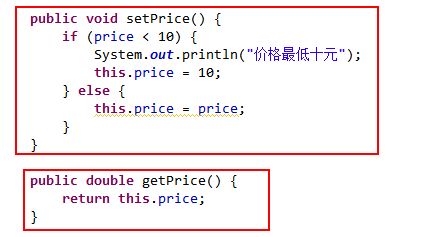
2、测试类中,创建Book对象的时候价格应该传入double类型数据,同学可以将10改为10.0
参考代码如下:

相似问题





登录后可查看更多问答,登录/注册
- 参与学习 人
- 提交作业 9410 份
- 解答问题 16556 个
综合就业常年第一,编程排行常年霸榜,无需脱产即可学习,北上广深月薪过万 无论你是未就业的学生还是想转行的在职人员,不需要基础,只要你有梦想,想高薪
了解课程










恭喜解决一个难题,获得1积分~
来为老师/同学的回答评分吧
0 星