校园网开发问题
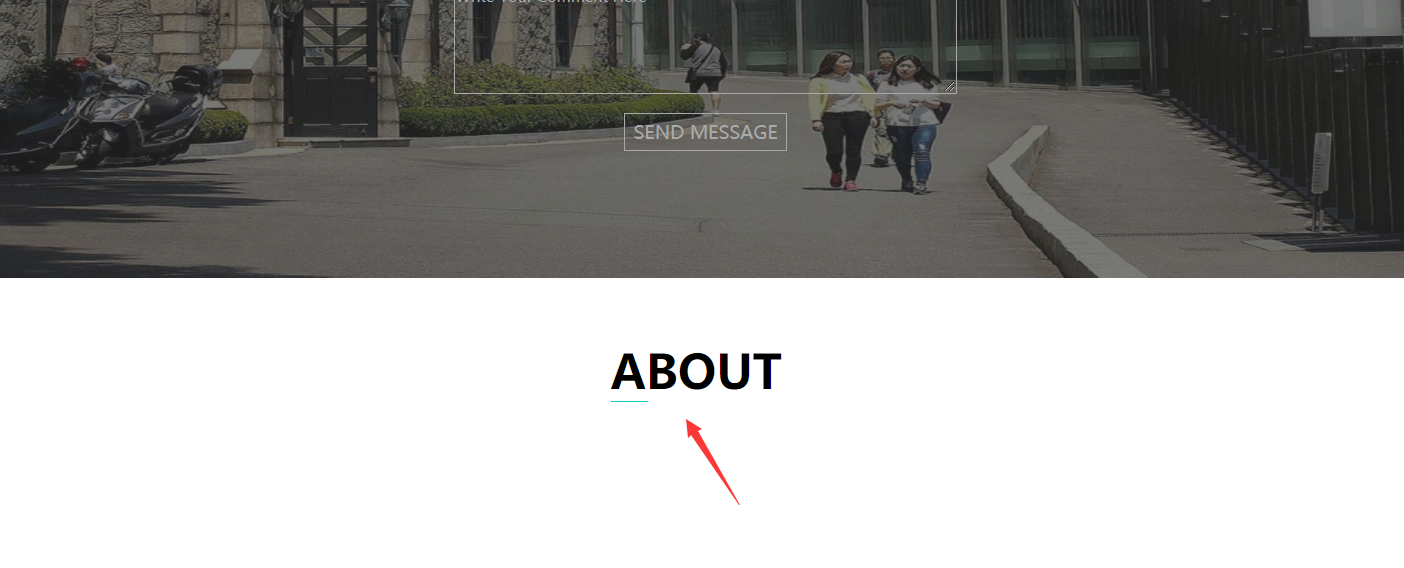
老师,我真的想进办法让这个下边框居中了
怎么让它到o啊
HTML
<!DOCTYPE html>
<html lang="en">
<head>
    <meta charset="UTF-8">
    <title>校园网首页开发lding</title>
    <script src="js/js.js"></script>
    <link rel="stylesheet" href="css/css.css">
</head>
<body>
    <div class="header">
        <div class="logo">
            <img src="image/logo.png">
        </div>
        <div class="function">
            <ul>
                <li id="f1"><a href="#" onmouseover="show('f1')" onmouseleave="show1('f1')">HOME</a></li>
                <li id="f2"><a href="#" onmouseover="show('f2')" onmouseleave="show1('f2')">ABOUT</a></li>
                <li id="f3"><a href="#"onmouseover="show('f3')" onmouseleave="show1('f3')">GALLERY</a></li>
                <li id="f4"><a href="#"onmouseover="show('f4')" onmouseleave="show1('f4')">FACULTY</a></li>
                <li id="f5"><a href="#"onmouseover="show('f5')" onmouseleave="show1('f5')">EVENTS</a></li>
                <li id="f6"><a href="#"onmouseover="show('f6')" onmouseleave="show1('f6')">CONTACT</a></li>
            </ul>
        </div>
    </div>
    <div class="banner">
        <div class="banner-img">
            <img src="image/banner3.jpg">
        </div>
        <div class="textdiv">
            <ul>
                <li><input type="text" id="text1" class="text" value="your Name"></li>
                <li><input type="text" id="text2" class="text" value="your Phone"></li>
                <li><input type="text" id="text3" class="text" value="your Email"></li>
                <li><textarea rows="10" cols="30" id="text4">
                                                                                                               Write Your Comment Here</textarea></li>
                <li><button id="btn" type="submit" value="SEND MESSAGE">SEND MESSAGE</button></li>

            </ul>
        </div>

    </div>
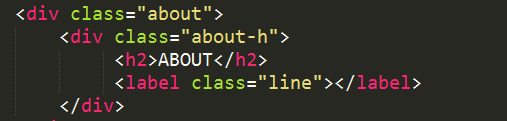
    <div class="about">
        <div class="about-h"><h2>ABOUT</h2></div>
    </div>
    <div class="gallery">

    </div>
    <div class="footer">

    </div>
</body>
</html>
css
*{
margin: 0px;
padding: 0px;
}
.header{
width: 100%;
height: 60px;
background-color: #07cbc9;
}
body{
font-family: Microsoft YaHei UI;
font-size: 14px;
}
.header .logo{
float: left;
position: relative;
margin-top: 6px;
margin-left: 100px;
}
.header .function ul{
float: right;
margin-right: 60px;
}
.header a{
text-decoration: none;
color: white;
font-size: 10px;
font-weight: bold;
}
.header .function ul li{
float: left;
margin-right: 5px;
line-height: 59px;
list-style: none;
background-color:#07cbc9;
padding-left: 10px;
padding-right: 10px;
}
.banner{
margin-top: 0px;
width: 100%;
height: 400px;
}
.banner .banner-img img{
width:100%;
height: 500px;
z-index: 10;
float: left;
position: relative;
filter:contrast(80%);
filter:brightness(70%);
opacity: 0.9;
}
.banner .textdiv ul li .text{
width: 400px;
height: 30px;
list-style: none;
background-color: transparent;
/*border-width: medium;*/
border: 1px solid #ccc;
outline: none;
color: darkgray;
font-family: Microsoft YaHei UI;
font-size: 10px;
}
.banner .textdiv ul li .text:hover {
border: 1px solid #07cbc9;
}
.banner .textdiv ul li #text4{
height: 100px;
width: 400px;
text-align: left;
background-color: transparent;
vertical-align:top;
border: 1px solid darkgray;
outline: none;
color: darkgray;
font-family: Microsoft YaHei UI;
font-size: 10px;
}
.banner .textdiv ul li #text4:hover{
border: 1px solid #07cbc9;
}
.banner .textdiv ul li{
margin-bottom: 15px;
}
.banner .textdiv{
width: 100%;
height: 400px;
z-index: 20;
margin-top: 50px;
/*background-size:contain;*/
/*background: url(../image/banner3.jpg);*/
/*background-repeat: no-repeat;*/
float: left;
position: absolute;
text-align: center;
}
.banner .textdiv ul{
margin-top: 60px;
}
.banner .textdiv #btn{
height: 30px;
width: 130px;
background-color: transparent;
border: 1px solid darkgray;
outline: none;
color: darkgray;
font-family: Microsoft YaHei UI;
font-size: 15px;
}
.banner .textdiv #btn:hover{
border: 1px solid #07cbc9;
}
body{
overflow: auto;
}
.about{
margin: 150px auto;
}
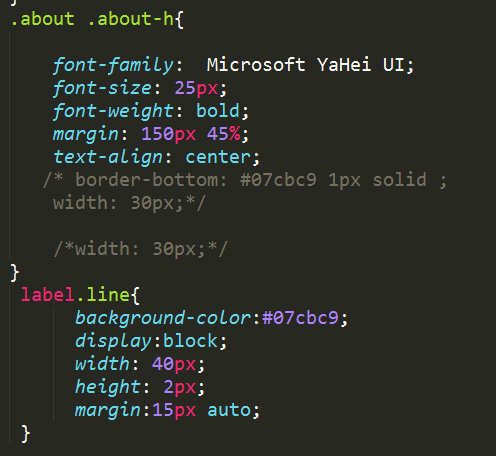
.about .about-h{
font-family: Microsoft YaHei UI;
font-size: 25px;
font-weight: bold;
margin: 150px 45%;
text-align: center;
border-bottom: #07cbc9 1px solid ;
width: 30px;
/*width: 30px;*/
}
13
收起
正在回答 回答被采纳积分+1
1回答





java工程师2020版
- 参与学习 人
- 提交作业 9410 份
- 解答问题 16556 个
综合就业常年第一,编程排行常年霸榜,无需脱产即可学习,北上广深月薪过万 无论你是未就业的学生还是想转行的在职人员,不需要基础,只要你有梦想,想高薪
了解课程










恭喜解决一个难题,获得1积分~
来为老师/同学的回答评分吧
0 星