我这边使用的VirtualBox与Vagrant搭建的虚拟机,现在准备配置Docker(虚拟化容器技术),但是在操作的时候出现的错误,

我这边使用的VirtualBox与Vagrant搭建的虚拟机,现在准备配置Docker(虚拟化容器技术),但是在操作的时候出现的错误,

问题描述:

我这边使用的VirtualBox与Vagrant搭建的虚拟机,现在准备配置Docker(虚拟化容器技术),但是在操作的时候出现的错误,

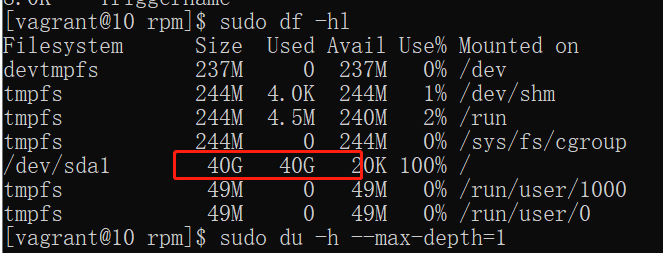
error: db5 error(28) from dbenv->open: No space left on device

error: cannot open Packages index using db5 - No space left on device (28)

error: cannot open Packages database in /var/lib/rpm

CRITICAL:yum.main:

是下面的/del/sdal/路径下没有可用空间造成的故障还是?


相关截图:

http://img1.sycdn.imooc.com//climg/6063340009872e3607710672.jpg

正在回答 回答被采纳积分+1

登陆购买课程后可参与讨论,去登陆

2回答
好帮手慕阿满 2021-03-31 14:33:03

同学你好,从报错信息上看是空间不足造成的。

问一下同学安装时是将CentOS安装到哪个文件夹下了呢?建议同学将另一个文件的内容移动到别的磁盘,重新执行命令再试试。

祝学习愉快~

  • 提问者 大吉他 #1

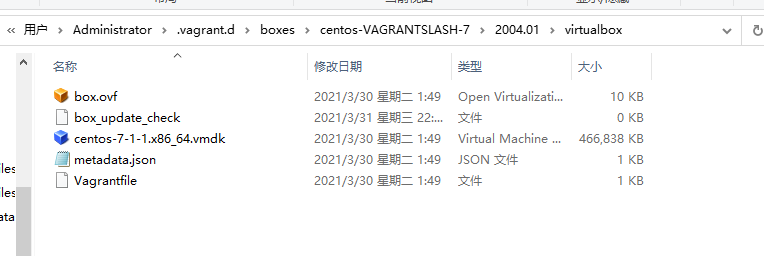
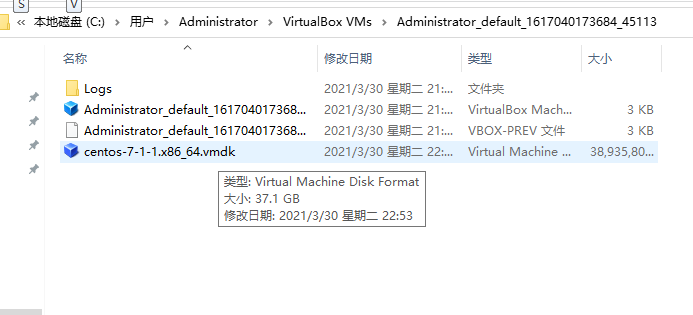
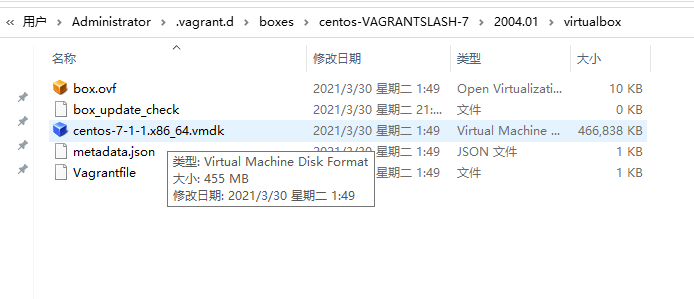
    安装centos是在命令窗口执行指令安装的,总共找到了两个centos文件,均在c盘,一个37G,一个500多M,直接将37G的centos移出去不影响吧

    2021-03-31 14:35:43
  • 好帮手慕阿满 回复 提问者 大吉他 #2

    同学你好,同学可以将CentOS移出去试试,注意备份。如果有影响,将其重新放回原来的目录。

    祝学习愉快~

    2021-03-31 15:25:59
  • 提问者 大吉他 回复 好帮手慕阿满 #3

    1.把CentOS移出去启动虚拟机报错:

    There was an error while executing `VBoxManage`, a CLI used by Vagrant

    for controlling VirtualBox. The command and stderr is shown below.


    Command: ["startvm", "fe2821fc-14e5-4a78-aad2-df8d36614c2a", "--type", "headless"]


    Stderr: VBoxManage.exe: error: Could not open the medium 'C:\Users\Administrator\VirtualBox VMs\Administrator_default_1617040173684_45113\centos-7-1-1.x86_64.vmdk'.

    VBoxManage.exe: error: VD: error VERR_FILE_NOT_FOUND opening image file 'C:\Users\Administrator\VirtualBox VMs\Administrator_default_1617040173684_45113\centos-7-1-1.x86_64.vmdk' (VERR_FILE_NOT_FOUND)

    VBoxManage.exe: error: Details: code E_FAIL (0x80004005), component MediumWrap, interface IMedium


    2.把CentOS移出去,再把那个空间小的CentOS加进来也报错:

    http://img1.sycdn.imooc.com//climg/60648aff0934050507640256.jpg

    报错内容:

    There was an error while executing `VBoxManage`, a CLI used by Vagrant

    for controlling VirtualBox. The command and stderr is shown below.


    Command: ["startvm", "fe2821fc-14e5-4a78-aad2-df8d36614c2a", "--type", "headless"]


    Stderr: VBoxManage.exe: error: UUID {00000000-0000-0000-0000-000000000000} of the medium 'C:\Users\Administrator\VirtualBox VMs\Administrator_default_1617040173684_45113\centos-7-1-1.x86_64.vmdk' does not match the value {839429ec-7a3d-4a0b-9e45-3dadc4fb80fa} stored in the media registry ('C:\Users\Administrator\.VirtualBox\VirtualBox.xml')

    VBoxManage.exe: error: Details: code E_FAIL (0x80004005), component MediumWrap, interface IMedium


    2021-03-31 22:45:35
大吉他 提问者 2021-03-30 22:30:26
  • 提问者 大吉他 #1

    老师您好,已经找到是什么占用空间了,但是不知道怎么解决,如下图(找到两个不同路径的CentOS):

    http://img1.sycdn.imooc.com//climg/60633ca009273f2606630253.jpg

    http://img1.sycdn.imooc.com//climg/60633cb2091c730406930315.jpg

    http://img1.sycdn.imooc.com//climg/60633cbb097a7e7006940299.jpg

    2021-03-30 22:59:24
  • 提问者 大吉他 #2

    老师,问题已经解决了

    2021-04-01 00:32:14
  • 好帮手慕阿满 回复 提问者 大吉他 #3

    同学自己解决了问题,棒棒哒,继续加油。

    祝学习愉快~

    2021-04-01 10:12:47
问题已解决,确定采纳
还有疑问,暂不采纳

恭喜解决一个难题,获得1积分~

来为老师/同学的回答评分吧

0 星
请稍等 ...
微信客服

购课补贴
联系客服咨询优惠详情

帮助反馈 APP下载

慕课网APP
您的移动学习伙伴

公众号

扫描二维码
关注慕课网微信公众号

在线咨询

领取优惠

免费试听

领取大纲

扫描二维码,添加
你的专属老师