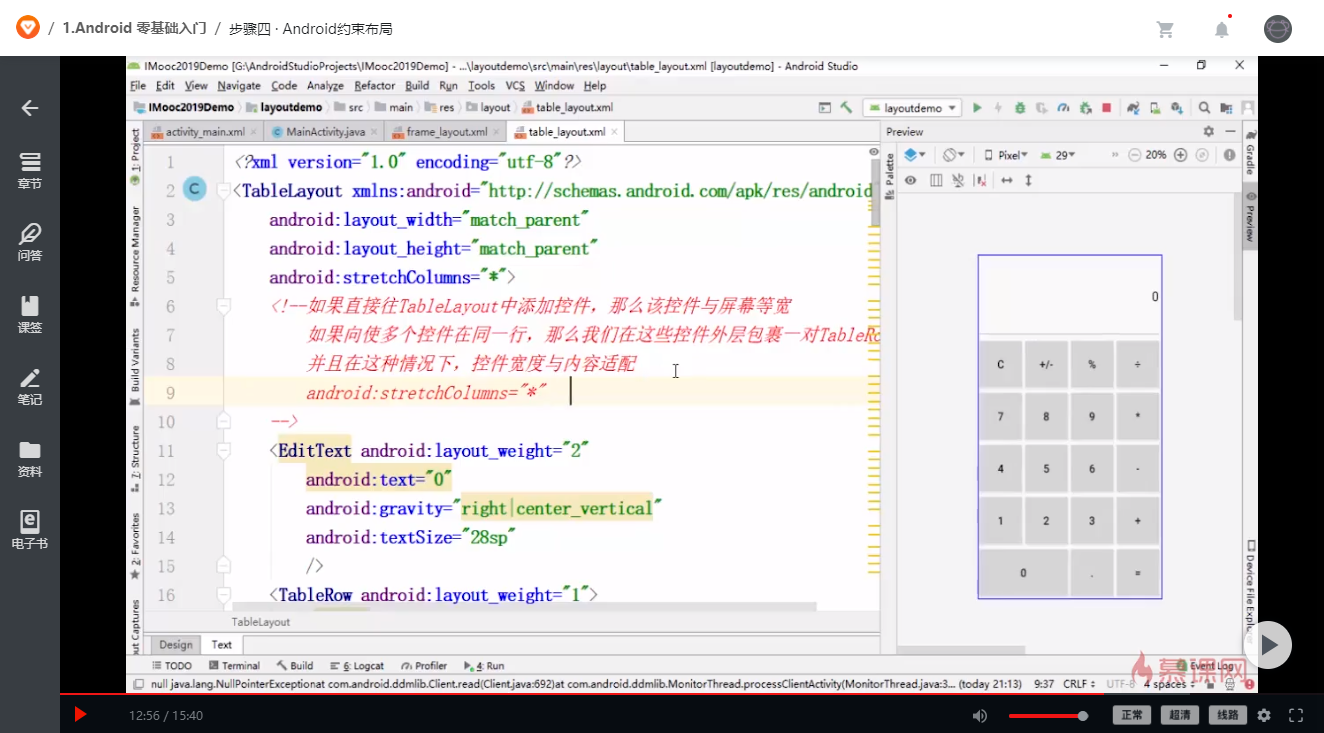
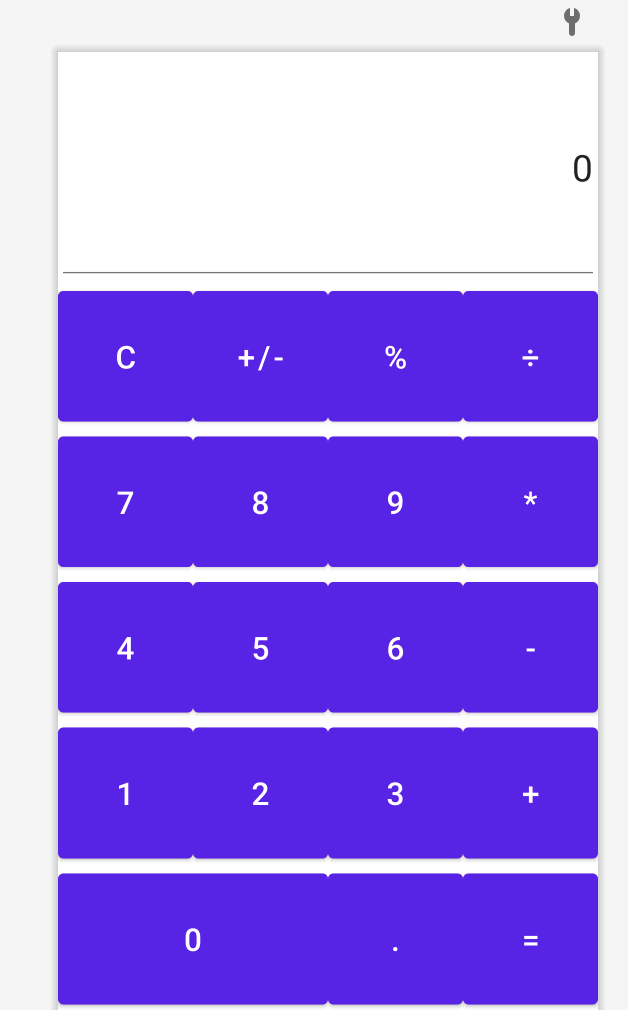
EditText中文本没有显示出来
<?xml version="1.0" encoding="utf-8"?>
<TableLayout xmlns:android="http://schemas.android.com/apk/res/android"
    xmlns:app="http://schemas.android.com/apk/res-auto"
    xmlns:tools="http://schemas.android.com/tools"
    android:layout_width="match_parent"
    android:layout_height="match_parent"
    android:stretchColumns="*"
    tools:context=".TableLayout">
    <!--如果直接往TableLayout中添加控件,那么该控件与屏幕等宽
        如果想使多个控件在同一行,那么我们在这些控件外层包裹一对TableRow
        并且在这种情况下,控件宽度与内容适配
        android:stretchColumns="*" 设置
        android:layout_span="2"  跨列2行
        -->
    <EditText
        android:layout_weight="2"
        android:text="0"
        android:gravity="right|center_vertical"
        android:textSize="28sp"
        />
    <TableRow android:layout_weight="1">

        <Button
            android:layout_height="match_parent"
            android:text="C"
            android:textSize="24sp"/>

        <Button
            android:layout_height="match_parent"
            android:text="+/-"
            android:textSize="24sp"/>

        <Button
            android:layout_height="match_parent"
            android:text="%"
            android:textSize="24sp"/>

        <Button
            android:layout_height="match_parent"
            android:text="÷"
            android:textSize="24sp"/>
    </TableRow>

    <TableRow android:layout_weight="1">

        <Button
            android:layout_height="match_parent"
            android:text="7"
            android:textSize="24sp"/>

        <Button
            android:layout_height="match_parent"
            android:text="8"
            android:textSize="24sp"/>

        <Button
            android:layout_height="match_parent"
            android:text="9"
            android:textSize="24sp"/>

        <Button
            android:layout_height="match_parent"
            android:text="*"
            android:textSize="24sp"/>
    </TableRow>

    <TableRow android:layout_weight="1">

        <Button
            android:layout_height="match_parent"
            android:text="4"
            android:textSize="24sp"/>

        <Button
            android:layout_height="match_parent"
            android:text="5"
            android:textSize="24sp"/>

        <Button
            android:layout_height="match_parent"
            android:text="6"
            android:textSize="24sp"/>

        <Button
            android:layout_height="match_parent"
            android:text="-"
            android:textSize="24sp"/>
    </TableRow>

    <TableRow android:layout_weight="1">

        <Button
            android:layout_height="match_parent"
            android:text="1"
            android:textSize="24sp"/>

        <Button
            android:layout_height="match_parent"
            android:text="2"
            android:textSize="24sp"/>

        <Button
            android:layout_height="match_parent"
            android:text="3"
            android:textSize="24sp"/>

        <Button
            android:layout_height="match_parent"
            android:text="+"
            android:textSize="24sp"/>
    </TableRow>

    <TableRow android:layout_weight="1">

        <Button
            android:layout_height="match_parent"
            android:text="0"
            android:textSize="24sp"
            android:layout_span="2"/>

        <Button
            android:layout_height="match_parent"
            android:text="."
            android:textSize="24sp"/>

        <Button
            android:layout_height="match_parent"
            android:text="="
            android:textSize="24sp"/>

    </TableRow>
</TableLayout>

8
收起
正在回答 回答被采纳积分+1
1回答

LovelyChubby
2021-06-08 13:22:23
 <EditText
       android:layout_weight="2"
       android:text="0"
       android:gravity="right|center_vertical"
       android:textSize="28sp"
       />
你没指定EditText的宽高,要她怎么显示呢?
相似问题
placeholder简短提示显示不出来
43
1
4


为什么我这个没有图像显示出来啊
21
0
11


现在有个其他问题,TAB的图片显示不出来
0
0
3

本地路径和http路径显示出来的替代内容为什么不同
10
0
4

为什么背景显示不出来
0
0
3


登录后可查看更多问答,登录/注册
1.Android 零基础入门
- 参与学习 人
- 提交作业 1789 份
- 解答问题 2907 个
Android大楼Java起,本阶段是Android攻城狮培养计划的第一部分语法与界面基础篇,将带大家从0开始入门Android开发。
了解课程














恭喜解决一个难题,获得1积分~
来为老师/同学的回答评分吧
0 星