pip install Ta-Lib 报错
网上说, 这个可以解决, 我用的是这里面方法一, 但是还是报一样的错
https://jingyan.baidu.com/article/7e440953f8c24a6ec1e2ef14.html
报错
E:\python\AutomaticStockTrading>pip install Ta-Lib
Collecting Ta-Lib
Using cached TA-Lib-0.4.21.tar.gz (270 kB)
Requirement already satisfied: numpy in c:\users\11253\appdata\local\programs\python\python39\lib\site-packages (from Ta-Lib) (1.20.2)
Using legacy 'setup.py install' for Ta-Lib, since package 'wheel' is not installed.
Installing collected packages: Ta-Lib
Running setup.py install for Ta-Lib ... error
ERROR: Command errored out with exit status 1:
command: 'c:\users\11253\appdata\local\programs\python\python39\python.exe' -u -c 'import io, os, sys, setuptools, tokenize; sys.argv[0] = '"'"'C:\\Users\\11253\\App
Data\\Local\\Temp\\pip-install-jyy0oib3\\ta-lib_f5954259ceb8477eb7517e174fd69076\\setup.py'"'"'; __file__='"'"'C:\\Users\\11253\\AppData\\Local\\Temp\\pip-install-jyy0oib
3\\ta-lib_f5954259ceb8477eb7517e174fd69076\\setup.py'"'"';f = getattr(tokenize, '"'"'open'"'"', open)(__file__) if os.path.exists(__file__) else io.StringIO('"'"'from set
uptools import setup; setup()'"'"');code = f.read().replace('"'"'\r\n'"'"', '"'"'\n'"'"');f.close();exec(compile(code, __file__, '"'"'exec'"'"'))' install --record 'C:\Us
ers\11253\AppData\Local\Temp\pip-record-ljhrqr6n\install-record.txt' --single-version-externally-managed --compile --install-headers 'c:\users\11253\appdata\local\program
s\python\python39\Include\Ta-Lib'
cwd: C:\Users\11253\AppData\Local\Temp\pip-install-jyy0oib3\ta-lib_f5954259ceb8477eb7517e174fd69076\
Complete output (21 lines):
C:\Users\11253\AppData\Local\Temp\pip-install-jyy0oib3\ta-lib_f5954259ceb8477eb7517e174fd69076\setup.py:76: UserWarning: Cannot find ta-lib library, installation may
fail.
warnings.warn('Cannot find ta-lib library, installation may fail.')
running install
running build
running build_py
creating build
creating build\lib.win-amd64-3.9
creating build\lib.win-amd64-3.9\talib
copying talib\abstract.py -> build\lib.win-amd64-3.9\talib
copying talib\deprecated.py -> build\lib.win-amd64-3.9\talib
copying talib\stream.py -> build\lib.win-amd64-3.9\talib
copying talib\test_abstract.py -> build\lib.win-amd64-3.9\talib
copying talib\test_data.py -> build\lib.win-amd64-3.9\talib
copying talib\test_func.py -> build\lib.win-amd64-3.9\talib
copying talib\test_pandas.py -> build\lib.win-amd64-3.9\talib
copying talib\test_stream.py -> build\lib.win-amd64-3.9\talib
copying talib\__init__.py -> build\lib.win-amd64-3.9\talib
running build_ext
skipping 'talib\_ta_lib.c' Cython extension (up-to-date)
building 'talib._ta_lib' extension
error: Microsoft Visual C++ 14.0 or greater is required. Get it with "Microsoft C++ Build Tools": https://visualstudio.microsoft.com/visual-cpp-build-tools/
----------------------------------------
ERROR: Command errored out with exit status 1: 'c:\users\11253\appdata\local\programs\python\python39\python.exe' -u -c 'import io, os, sys, setuptools, tokenize; sys.arg
v[0] = '"'"'C:\\Users\\11253\\AppData\\Local\\Temp\\pip-install-jyy0oib3\\ta-lib_f5954259ceb8477eb7517e174fd69076\\setup.py'"'"'; __file__='"'"'C:\\Users\\11253\\AppData\
\Local\\Temp\\pip-install-jyy0oib3\\ta-lib_f5954259ceb8477eb7517e174fd69076\\setup.py'"'"';f = getattr(tokenize, '"'"'open'"'"', open)(__file__) if os.path.exists(__file_
_) else io.StringIO('"'"'from setuptools import setup; setup()'"'"');code = f.read().replace('"'"'\r\n'"'"', '"'"'\n'"'"');f.close();exec(compile(code, __file__, '"'"'exe
c'"'"'))' install --record 'C:\Users\11253\AppData\Local\Temp\pip-record-ljhrqr6n\install-record.txt' --single-version-externally-managed --compile --install-headers 'c:\
users\11253\appdata\local\programs\python\python39\Include\Ta-Lib' Check the logs for full command output.
18
收起
正在回答 回答被采纳积分+1
1回答

时间,
2021-09-12 11:33:28
同学,你好!同学可以使用下述方法下载安装:
1、下载对应的.whl文件,注意别改文件名!链接如下 :https://www.lfd.uci.edu/~gohlke/pythonlibs/#ta-lib
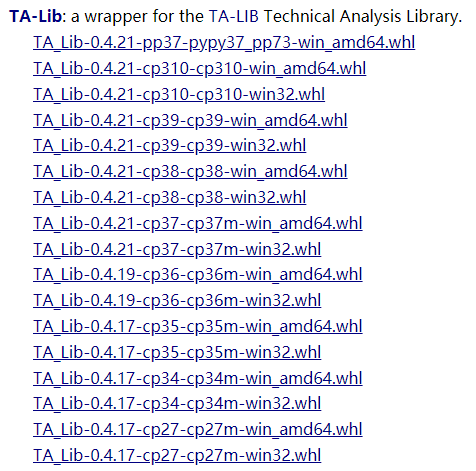
2、在终端中进入.whl所在的文件夹,执行下述命令即可
pip install 带后缀的完整文件名
祝学习愉快!
相似问题




登录后可查看更多问答,登录/注册
Python全能工程师
- 参与学习 人
- 提交作业 16425 份
- 解答问题 4469 个
全新版本覆盖5大热门就业方向:Web全栈、爬虫、数据分析、软件测试、人工智能,零基础进击Python全能型工程师,从大厂挑人到我挑大厂,诱人薪资在前方!
了解课程















恭喜解决一个难题,获得1积分~
来为老师/同学的回答评分吧
0 星