gradlew assembleRelease失败
相关代码:
E:\MyApplication>gradlew assembleRelease
Starting a Gradle Daemon, 1 incompatible and 3 stopped Daemons could not be reused, use --status for details

> Configure project :myapp
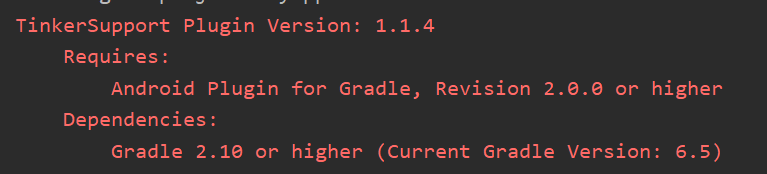
TinkerSupport Plugin Version: 1.1.4
        Requires:
                Android Plugin for Gradle, Revision 2.0.0 or higher
        Dependencies:
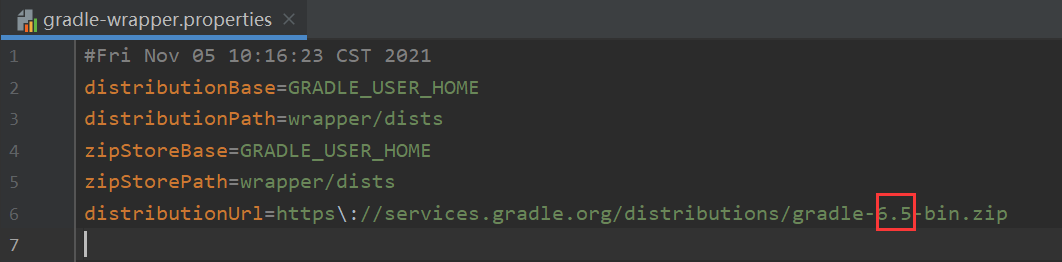
                Gradle 2.10 or higher (Current Gradle Version: 6.5)

apply plugin: 'com.tencent.tinker.patch'
----------------------tinker build warning ------------------------------------
tinker auto operation:
excluding annotation processor and source template from app packaging. Enable dx jumboMode to reduce package size.
enable dx jumboMode to reduce package size.
disable preDexLibraries to prevent ClassDefNotFoundException when your app is booting.
disable archive dex mode so far for keeping dex apply.

tinker will change your build configs:
we will add TINKER_ID=null in your build output manifest file build/intermediates/manifests/full/*

if minifyEnabled is true
you will find the gen proguard rule file at build/intermediates/tinker_intermediates/tinker_proguard.pro
and we will help you to put it in the proguardFiles.

if multiDexEnabled is true
you will find the gen multiDexKeepProguard file at build/intermediates/tinker_intermediates/tinker_multidexkeep.pro
and we will help you to put it in the MultiDexKeepProguardFile.

if applyResourceMapping file is exist
we will build myapp apk with resource R.txt file
if resources.arsc has changed, you should use applyResource mode to build the new apk!
-----------------------------------------------------------------
WARNING: API 'variantOutput.getPackageApplication()' is obsolete and has been replaced with 'variant.getPackageApplicationProvider()'.
It will be removed at the end of 2019.
For more information, see https://d.android.com/r/tools/task-configuration-avoidance.
To determine what is calling variantOutput.getPackageApplication(), use -Pandroid.debug.obsoleteApi=true on the command line to display more information
.
WARNING: API 'variant.getAssemble()' is obsolete and has been replaced with 'variant.getAssembleProvider()'.
It will be removed at the end of 2019.
For more information, see https://d.android.com/r/tools/task-configuration-avoidance.
To determine what is calling variant.getAssemble(), use -Pandroid.debug.obsoleteApi=true on the command line to display more information.
WARNING: API 'variantOutput.getProcessManifest()' is obsolete and has been replaced with 'variantOutput.getProcessManifestProvider()'.
It will be removed at the end of 2019.
For more information, see https://d.android.com/r/tools/task-configuration-avoidance.
To determine what is calling variantOutput.getProcessManifest(), use -Pandroid.debug.obsoleteApi=true on the command line to display more information.
WARNING: API 'variantOutput.getProcessResources()' is obsolete and has been replaced with 'variantOutput.getProcessResourcesProvider()'.
It will be removed at the end of 2019.
For more information, see https://d.android.com/r/tools/task-configuration-avoidance.
To determine what is calling variantOutput.getProcessResources(), use -Pandroid.debug.obsoleteApi=true on the command line to display more information.
----------------------tinker-support build warning ------------------------------------
if you not set autoBackupApkDir we will auto backup the build file to E:\MyApplication\myapp/tinker.

if overrideTinkerPatchConfiguration is true
we will override tinker patch configuration,you must use tinker-support's configuration

you will find the gen proguard rule file at build/intermediates/bugly_intermediates/bugly_proguard.pro
and we will help you to put it in the proguardFiles.

if enableProxyApplication is true
we will replace you real application to TINKER_PATCH_APPLICATION

if autoGenerateTinkerId is true
we will auto set base tinkerId as versionName.versionCode, like 1.0.1
-----------------------------------------------------------------
------ Tinker Support Override tinkerPatch Configuration ------
tinkerPatch {
        tinkerEnable = true
        oldApk = E:\MyApplication\myapp\build\bakApk/app-0208-15-10-00/app-release.apk
        ignoreWarning = false
        useSign = true
        buildConfig {
                applyMapping = E:\MyApplication\myapp\build\bakApk/app-0208-15-10-00/app-release-mapping.txt
                applyResourceMapping = E:\MyApplication\myapp\build\bakApk/app-0208-15-10-00/app-release-R.txt
                tinkerId = app-1.0.0
                keepDexApply = false
                isProtectedApp = false
                supportHotplugComponent = true
        }
        dex {
                dexMode = jar
                pattern = [classes*.dex, assets/secondary-dex-?.jar]
                loader = [com.tencent.tinker.loader.*]
        }
        lib {
                 pattern = [lib/*/*.so]
        }
        res {
                 pattern = [res/*, r/*, assets/*, resources.arsc, AndroidManifest.xml]
                 ignoreChange = [assets/*_meta.txt]
                 largeModSize = 100
        }
        packageConfig {
        }
        sevenZip {
                 zipArtiface = com.tencent.mm:SevenZip:1.1.10
                 path =
        }
------ End ------
variantName:Debug
outputVariantName:Debug
variantName:Release
outputVariantName:Release

> Task :myapp:processReleaseManifest
E:\MyApplication\myapp\src\main\AndroidManifest.xml:23:9-27:56 Warning:
        activity#com.tencent.bugly.beta.ui.BetaActivity@android1:name was tagged at AndroidManifest.xml:23 to replace other declarations but no other de
claration present
E:\MyApplication\myapp\src\main\AndroidManifest.xml:23:9-27:56 Warning:
        activity#com.tencent.bugly.beta.ui.BetaActivity@android1:configChanges was tagged at AndroidManifest.xml:23 to replace other declarations but no
 other declaration present
E:\MyApplication\myapp\src\main\AndroidManifest.xml:23:9-27:56 Warning:
        activity#com.tencent.bugly.beta.ui.BetaActivity@android1:theme was tagged at AndroidManifest.xml:23 to replace other declarations but no other d
eclaration present
E:\MyApplication\myapp\src\main\AndroidManifest.xml:29:9-39:20 Warning:
        provider#com.tencent.bugly.beta.utils.BuglyFileProvider@android1:name was tagged at AndroidManifest.xml:29 to replace other declarations but no
other declaration present
E:\MyApplication\myapp\src\main\AndroidManifest.xml:29:9-39:20 Warning:
        provider#com.tencent.bugly.beta.utils.BuglyFileProvider@android1:authorities was tagged at AndroidManifest.xml:29 to replace other declarations
but no other declaration present
E:\MyApplication\myapp\src\main\AndroidManifest.xml:29:9-39:20 Warning:
        provider#com.tencent.bugly.beta.utils.BuglyFileProvider@android1:exported was tagged at AndroidManifest.xml:29 to replace other declarations but
 no other declaration present
E:\MyApplication\myapp\src\main\AndroidManifest.xml:29:9-39:20 Warning:
        provider#com.tencent.bugly.beta.utils.BuglyFileProvider@android1:grantUriPermissions was tagged at AndroidManifest.xml:29 to replace other decla
rations but no other declaration present
E:\MyApplication\myapp\src\main\AndroidManifest.xml Warning:
        meta-data#android.support.FILE_PROVIDER_PATHS@android1:name was tagged at AndroidManifest.xml:0 to replace other declarations but no other decla
ration present
E:\MyApplication\myapp\src\main\AndroidManifest.xml Warning:
        meta-data#android.support.FILE_PROVIDER_PATHS@android1:resource was tagged at AndroidManifest.xml:0 to replace other declarations but no other d
eclaration present

> Task :myapp:tinkerProcessReleaseManifest
tinker add tinker_id_app-1.0.0 to your AndroidManifest.xml E:\MyApplication\myapp\build\intermediates\merged_manifests\release\AndroidManifest.xml
tinker add com.example.myapp.MyApplication to dex loader pattern
tinker gen AndroidManifest.xml in build/intermediates/tinker_intermediates/AndroidManifest.xml

> Task :myapp:tinkerProcessReleaseResourceId
apply resource mapping file E:\MyApplication\myapp\build\bakApk/app-0208-15-10-00/app-release-R.txt is illegal, just ignore

> Task :myapp:tinkerSupportProcessReleaseManifest
manifestPath: E:\MyApplication\myapp\build\intermediates\merged_manifests\release\AndroidManifest.xml
app version:1.0.1
Remove TINKER_ID tinker_id_app-1.0.0
tinkerpatch change application name from com.example.myapp.MyApplication to com.tencent.bugly.beta.tinker.TinkerPatchReflectApplication
tinkerSupport add com.tencent.bugly.beta.tinker.TinkerPatchReflectApplication to dex loader pattern
tinkerSupport gen AndroidManifest.xml in build/intermediates/bugly_intermediates/AndroidManifest.xml

> Task :myapp:compileReleaseJavaWithJavac FAILED

FAILURE: Build failed with an exception.

* What went wrong:
Execution failed for task ':myapp:compileReleaseJavaWithJavac'.
> java.lang.IllegalAccessError: class org.gradle.internal.compiler.java.ClassNameCollector (in unnamed module @0x7ce2cda) cannot access class com.sun.to
ols.javac.code.Symbol$TypeSymbol (in module jdk.compiler) because module jdk.compiler does not export com.sun.tools.javac.code to unnamed module @0x7ce2
cda

* Try:
Run with --stacktrace option to get the stack trace. Run with --info or --debug option to get more log output. Run with --scan to get full insights.

* Get more help at https://help.gradle.org

Deprecated Gradle features were used in this build, making it incompatible with Gradle 7.0.
Use '--warning-mode all' to show the individual deprecation warnings.
See https://docs.gradle.org/6.5/userguide/command_line_interface.html#sec:command_line_warnings

BUILD FAILED in 26s
16 actionable tasks: 5 executed, 11 up-to-date

E:\MyApplication>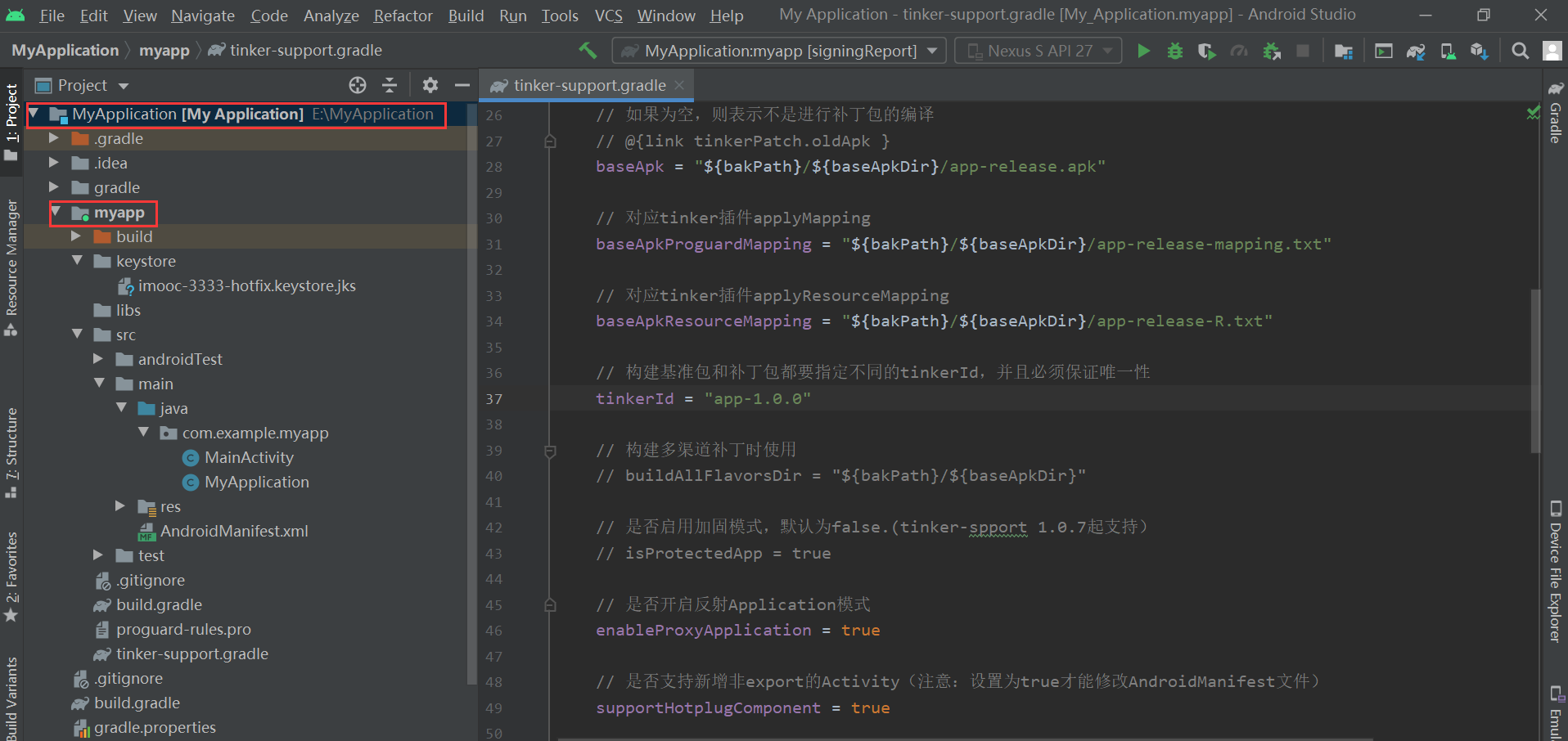
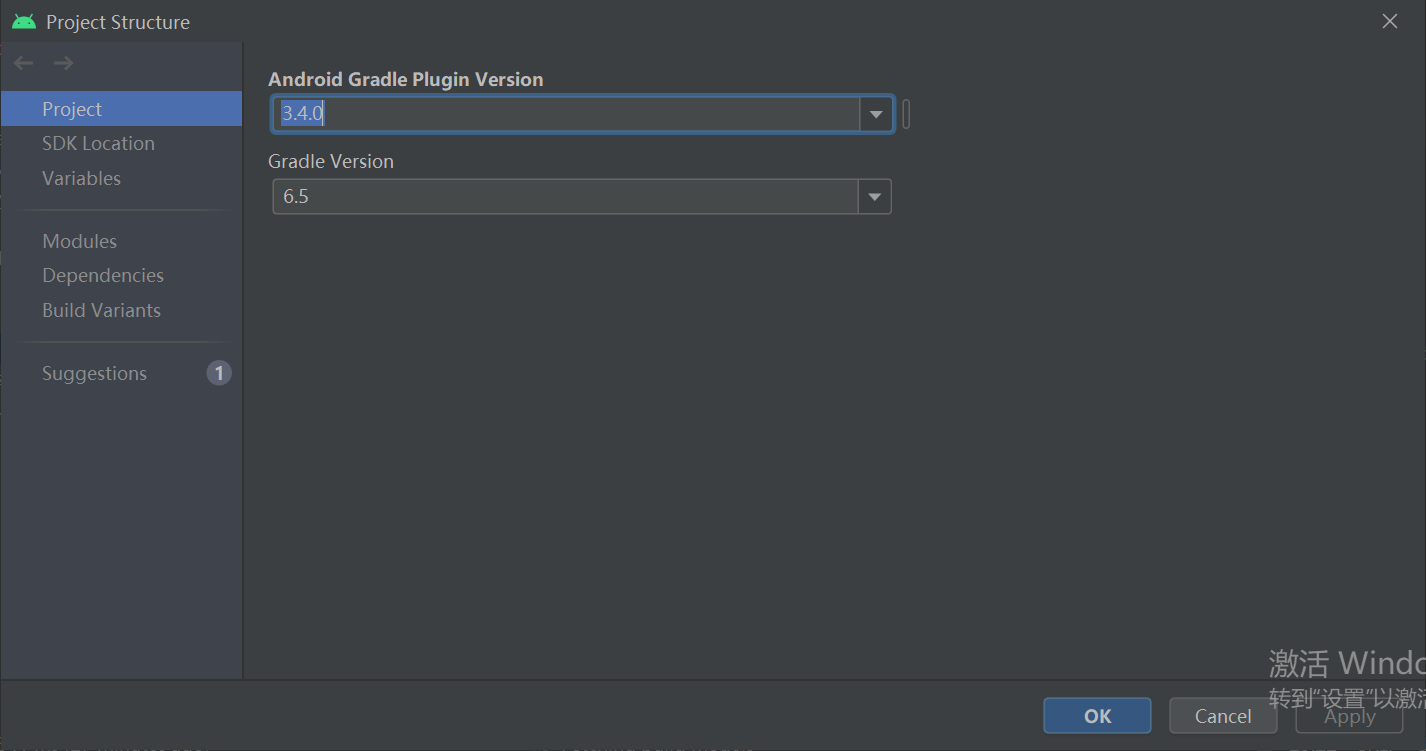
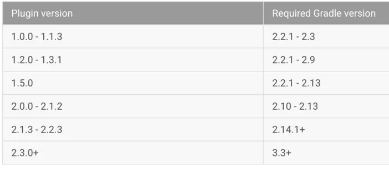
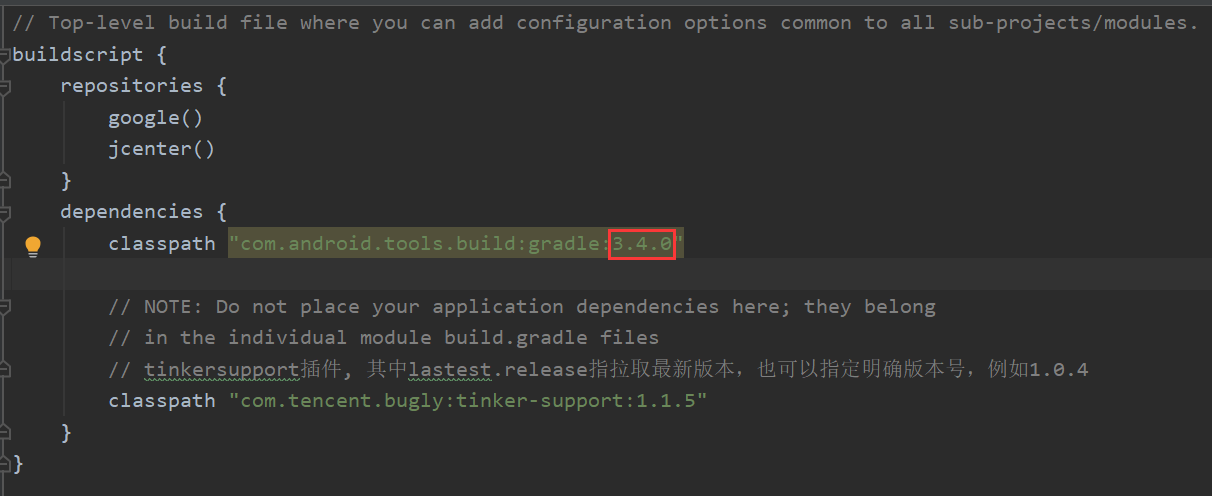
下面是版本
源自:热修复
3-3 生效patch
10
收起
正在回答 回答被采纳积分+1
1回答

相似问题





登录后可查看更多问答,登录/注册
3.Android 高级应用与Kotlin综合实战
- 参与学习 人
- 提交作业 116 份
- 解答问题 1012 个
本阶段是提升项目经验的必备,除Android开发的高级控件,还有Android官方大力推荐的开发语言Kotlin,未来Android发展的方向,最后使用Kotlin来开发热门电商项目。
了解课程








恭喜解决一个难题,获得1积分~
来为老师/同学的回答评分吧
0 星