老师小球案例没有懂。我自己写不出来啊,能给我讲讲吗
<style>
body {
background-color: black;
}
.ball {
position: absolute;
border-radius: 50%;
}
</style>
</head>
<body>
<script>
function ball(x, y) {
this.x = x;
this.y = y;
this.r = '20'
this.opacity=1;
this.color = colorarr[parseInt(Math.random()*colorarr.length)];
do{
this.dx=parseInt(Math.random()*20)-10;
this.dy=parseInt(Math.random()*20)-10;
}while(this.dx==0&&this.dy==0)
this.init();
ballarr.push(this);
}
ball.prototype.init = function () {
this.dom = document.createElement('div')
this.dom.className = 'ball'
this.dom.style.width = this.r * 2 + 'px'
this.dom.style.height = this.r * 2 + 'px'
this.dom.style.left = this.x - this.r + 'px';
this.dom.style.top = this.y - this.r + 'px'
this.dom.style.backgroundColor = this.color;
document.body.appendChild(this.dom);
}
ball.prototype.update = function () {
this.x+=this.dx;
this.y-=this.dy
this.r+=0.2;
this.opacity-=0.01;
this.dom.style.width = this.r * 2 + 'px'
this.dom.style.height = this.r * 2 + 'px'
this.dom.style.left = this.x - this.r + 'px';
this.dom.style.top = this.y - this.r + 'px'
this.dom.style.opacity=this.opacity;
if(this.opacity<0){
for(var i=0;i<ballarr.length;i++){
if(ballarr[i]==this){
ballarr.splice(i,1);
}
}
document.body.removeChild(this.dom);
}
}
var ballarr = [];
var colorarr=['#66cccc','#ccff66','#ff99cc','#ff6666','#cc3399','#ff6600']
new ball(200,600);
setInterval(function () {
for (var i = 0; i < ballarr.length; i++) {
ballarr[i].update()
}
}, 20);
document.onmousemove=function(e){
var x=e.clientX;
var y=e.clientY;
new ball(x ,y);
}
搜索
复制
正在回答 回答被采纳积分+1

同学你好,炫彩小球案例实现比较复杂,同学自己写不出来是正常的,只要能听懂课程中的思路就可以了。老师再给同学理一下思路,同学再多看几遍视频,慢慢就能理解了:
首先,整体思路是使用的面向对象来实现的,即创建一个Ball小球类,然后监听鼠标指针,只要鼠标指针的位置发生变化,就会获取当前鼠标指针的位置(即 var x = e.clientX; var y = e.clientY;),并在当前位置创建小球实例,即new Ball(x, y)。这样,随着鼠标指针的移动,一个个小球实例就会被创建出来。
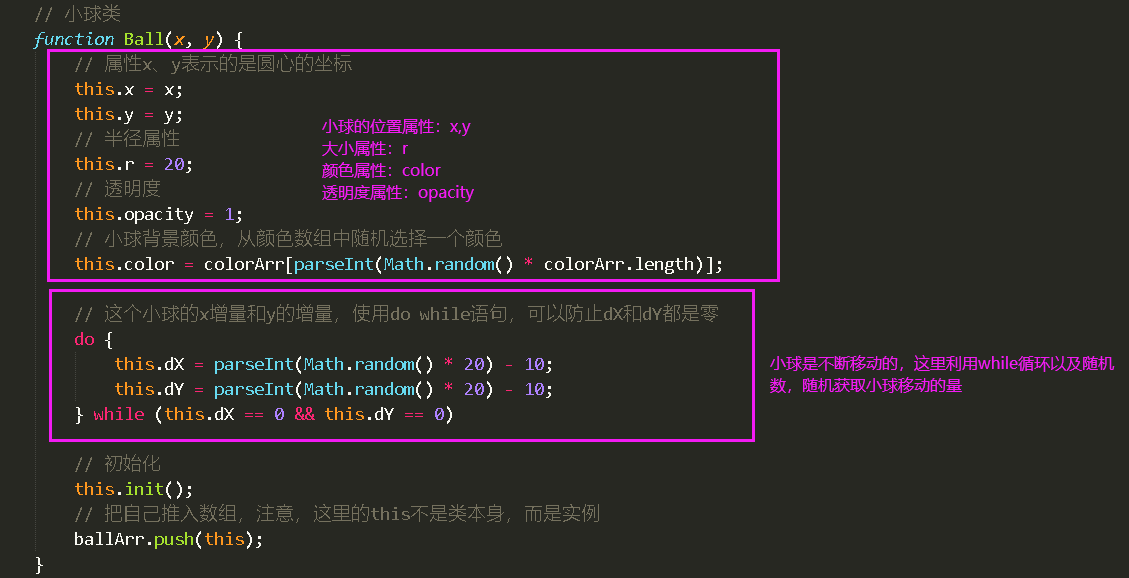
其次,关于Ball小球类的创建工作,以下代码是创建Ball小球类,以及Ball小球类所拥有的属性,如图
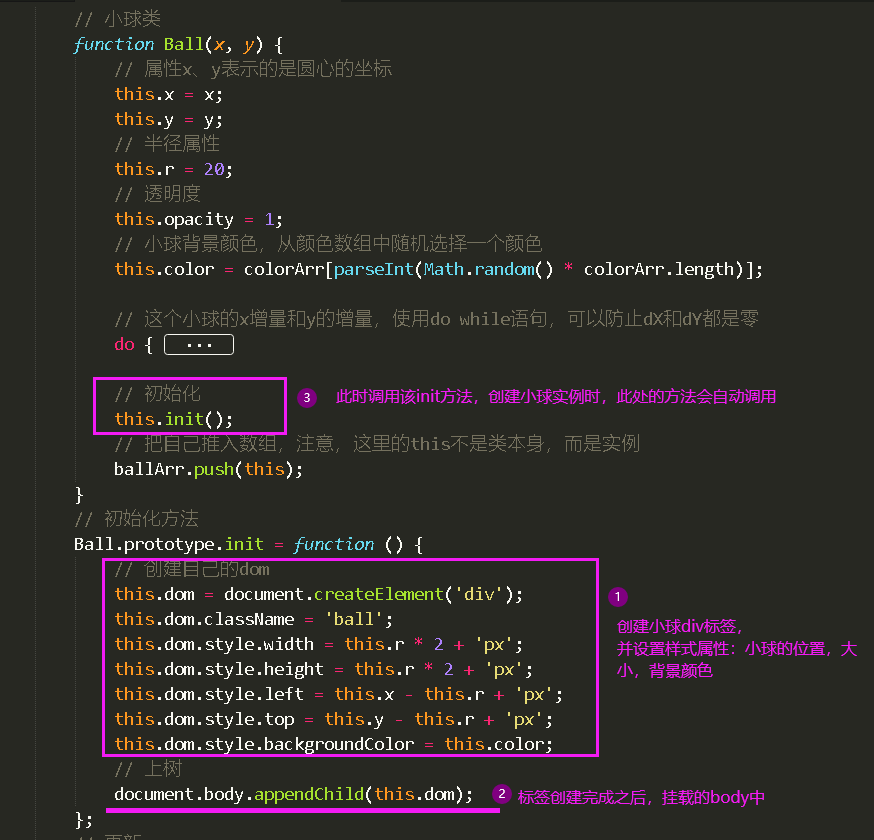
以下代码是Ball小球类的init方法,用于初始化小球,即创建小球元素,并挂载到body中,这样页面才能显示小球,如图
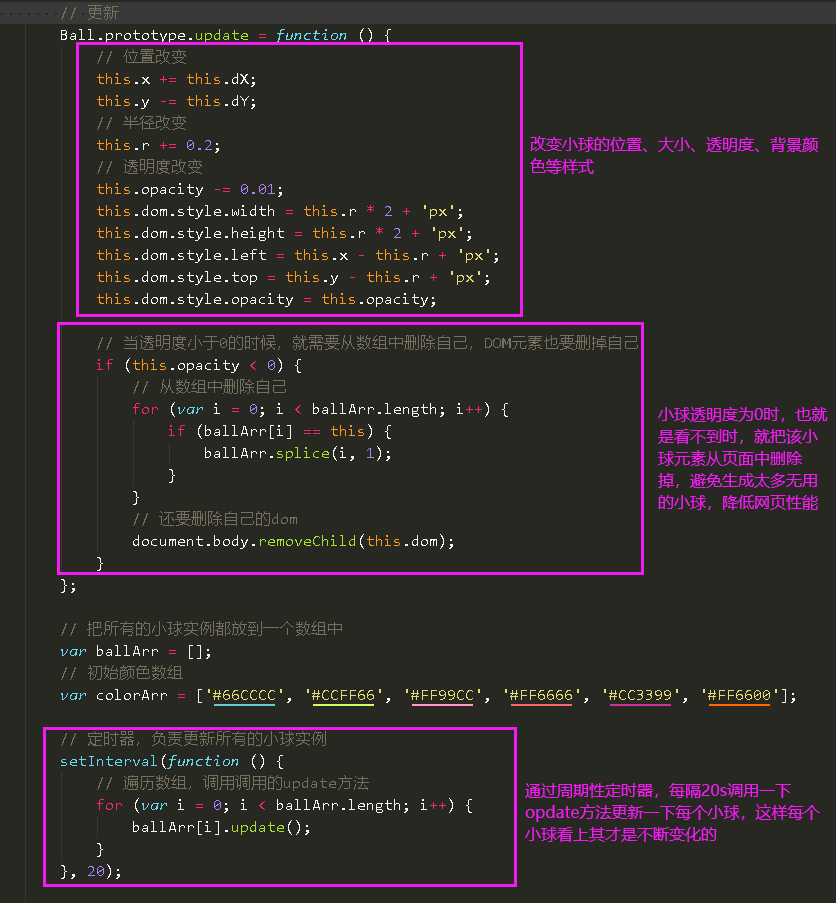
以下是Ball小球类的update方法,用于更新小球的位置、大小、透明度、背景颜色等样式,并且当小球看不到的时候(即透明度为0的时候),删除该小球,如图
建议同学结合着代码中的注释以及实现过程,再好好理解一下。
祝学习愉快!
相似问题











登录后可查看更多问答,登录/注册













恭喜解决一个难题,获得1积分~
来为老师/同学的回答评分吧
0 星