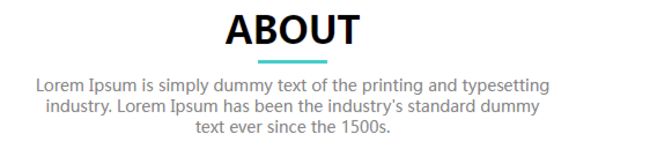
老师,请问下为什么我这边设置后水平分割线不在正中央

老师,请问下为什么我这边设置后水平分割线不在正中央
老师,请问下为什么我这边设置后水平分割线不在正中央

https://img1.sycdn.imooc.com//climg/62205c5d09548a7517980866.jpg


相关代码:

 <!-- About -->
    <section class="about">
        <!-- 标题和简短描述 -->
        <div class="title-and-shortDescription">
            <h2 class="title">ABOUT</h2>
            <div class="cross-line"></div>
            <p class="short-description">Lorem Ipsum is simply dummy text of the printing and typesetting<br />
               industry. Lorem Ipsum has been the industry's standard dummy<br />
               text ever since the 1500s.</p>
        </div>
    </section>

相关代码:

.about {
    width: 1200px;
    margin: 0 auto;
}

.about .title-and-shortDescription .title {
    font-size: 32px;
    text-align: center;
    margin-top: 30px;
}

.about .title-and-shortDescription .cross-line {
    width: 60px;
    height: 3px;
    margin: 10px auto;
    background: #07cbc9;
}
.about .title-and-shortDescription .short-description {
    text-align: center;
    color:gray;
    font-size: 14px;
}


正在回答 回答被采纳积分+1

登陆购买课程后可参与讨论,去登陆

1回答
好帮手慕慕子 2022-03-03 14:40:39

同学你好,代码书写是没有问题的,水平线是水平居中显示的,因为字母并不像正方形那样是规整的图形,所以在视觉上可能存在些许误差,可以忽略不计。

祝学习愉快~

  • 提问者 qq_慕设计8017444 #1

    我看4-8自由编程给的图片分割线是在字母的垂直居中位置,我画出来的分割线明显偏上一些

    2022-03-08 09:54:47
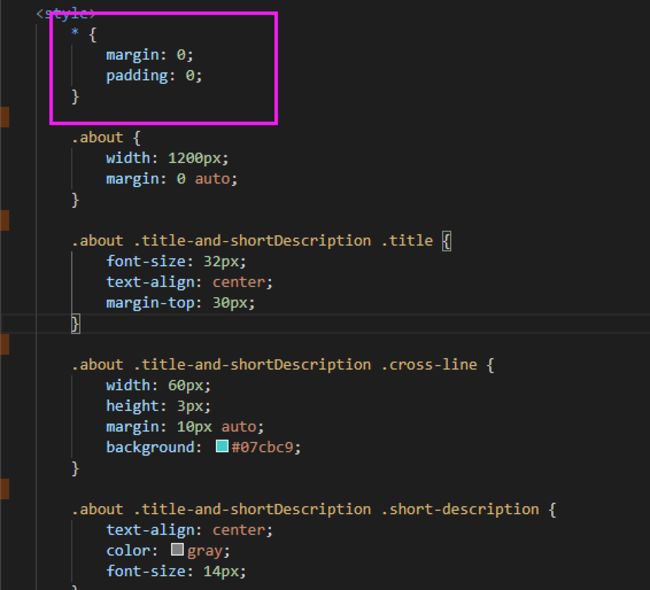
  • 老师将同学说的不在正中央理解成了没有水平居中,现在理解了同学说的意思,再次测试同学粘贴的代码,添加通配符去除所有元素默认的内外边距,如下:

    https://img1.sycdn.imooc.com//climg/6226bb230941f8ba05660514.jpg

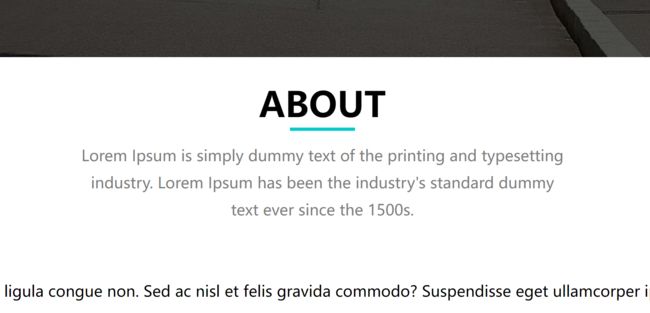
    显示效果如下:

    https://img1.sycdn.imooc.com//climg/6226bba8096aebdf05620142.jpg

    与同学截图的效果并不一致,猜测可能是受到其它地方设置的样式影响,同学可以通过控制台检查元素排查下,如果还有疑问,可以将你的完整代码全部粘贴过来,老师帮助测试下。

    另外,给出的效果图中也不是完全的垂直居中,不做严格的要求,设置适当的间距实现效果就可以了

    祝学习愉快~

    2022-03-08 10:22:50
  • * {
        margin: 0;
        padding: 0;
    }
    
    /* 去掉列表小圆点 */
    ul, ol{
        list-style: none;
    }
    
    /* 去掉超级链接的下划线 */
    a {
        text-decoration: none;
    }
    
    /* 利用继承性设置字体 */
    body {
        font: normal 14px/25px "微软雅黑";
    }
    
    header {
        width: 100%;
        height: 80px;
        background-color: rgb(7, 203, 201);
    }
    
    header .header-main {
        width: 1200px;
        margin: 0 auto;
        background-color: red;
    }
    
    header .header-main .logo {
        float: left;
        height: 48px;
        padding: 16px;
    }
    
    header .header-main .main-nav {
        float: right;
    }
    
    
    header .header-main .main-nav li {
        float: left;
        margin-right: 20px;
        /* 行高等于盒子高 */
        line-height: 80px;
    }
    
    /* 不用转块 */
    header .header-main .main-nav li a {
        /* font-size:16px;
        display: block;
        width: 80px;
        height: 80px;
        line-height: 80px; */
        color:white;
    }
    
    header .header-main .main-nav li a:hover{
       color:orange;
    }
    
    /* 不需要设置宽高,会根据里面的盒子的宽高自动撑起 */
    .banner{
        /* width: 100%;
        height: 600px; */
        position: relative;
    }
    
    .banner .image{
        width: 100%;
        height: 600px;
    }
    
    /* 遮罩层宽高设置100%即可 */
    .banner .mask{
        position: absolute;
        left: 0;
        top: 0;
        width: 100%;
        height: 100%;
        /* height: 600px; */
        background:rgba(0, 0, 0, 0.5);
    }
    
    .banner form{
        position: absolute;
        width: 504px;
        top: 100px;
        left:50%;
        margin-left: -252px;
        background: none;
    }
    
    /* 使用并集选择器 */
    .banner form input, textarea{
        width: 502px;
        height: 40px;
        margin-bottom: 20px;
        border: 1px solid #808080;
        background: none;
    }
    
    .banner form textarea{
        height: 110px;
    }
    
    .banner form .btn{
        text-align: center;
        width: 200px;
        /* 居中:行内块和Line可以设置顶部和底部margin,但是不可以设置左右的margin,因此需要先转块*/
        display: block;
        margin: 0 auto;
    }


    /* .banner form input:first-child{
        width: 504px;
        height: 40px;
    } */


    .about {
        width: 1200px;
        margin: 0 auto;
    }
    
    .about .title-and-shortDescription .title {
        font-size: 32px;
        text-align: center;
        margin-top: 30px;
    }
    
    .cross-line {
        width: 60px;
        height: 3px;
        margin: 10px auto;
        background: #07cbc9;
    }
    
    .about .title-and-shortDescription .short-description {
        text-align: center;
        color:gray;
        font-size: 14px;
    }
    
    .about .detailDescription {
        position: relative;
        width: 1201px;
        height: 464px;
        margin-top: 30px;
    }
    
    
    .about .detailDescription .left-content h3 {
        float: left;
        width: 260px;
        top: 30px;
        left: 0px;
        font-size: 32px;
    }
    
    
    .about .detailDescription .left-content img {
        float: left;
        width: 650px;
        height: 435px;
        left:250px;
        top:30px;
    }
    
    .about .detailDescription .left-content .explore {
        position: absolute;
        width: 300px;
        padding: 20px;
        font-size: 18px;
        border: 1px solid gray;
        background: rgba(255,255,255,0.5);
        position: absolute;
        top: 150px;
    }
    
    .about .detailDescription .left-content .explore div {
        width: 140px;
        height: 40px;
        color: white;
        background-color: black;
        text-align: center;
        line-height: 40px;
        margin-bottom: 20px;
       
    }


    .about .detailDescription .right-content {
        float: right;
    }
    
    .about .detailDescription .right-content .right-box {
        border: 1px solid #07cbc9;
        width: 260px;
        text-align: center;
        padding-top: 40px;
        padding-bottom: 40px;
    }
    
    .about .detailDescription .right-content .bottom {
        margin-top: 30px;
    }
    
    .about .detailDescription .right-content .right-box .number {
        font-size: 28px;
        font-weight: bold;
    }


    2022-03-08 10:53:29
问题已解决,确定采纳
还有疑问,暂不采纳

恭喜解决一个难题,获得1积分~

来为老师/同学的回答评分吧

0 星
请稍等 ...
微信客服

购课补贴
联系客服咨询优惠详情

帮助反馈 APP下载

慕课网APP
您的移动学习伙伴

公众号

扫描二维码
关注慕课网微信公众号

在线咨询

领取优惠

免费试听

领取大纲

扫描二维码,添加
你的专属老师