安装mySQL出错。
安装mySQL出错。
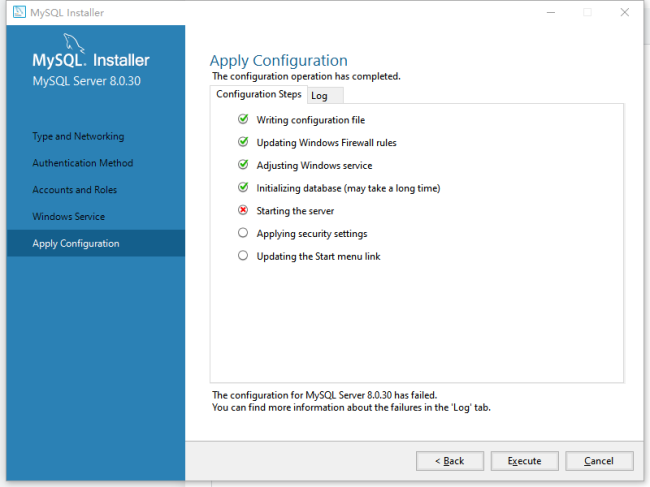
日志内容:
Beginning configuration step: Starting the server
Attempting to start service MySQL80...
Failed to start service MySQL80.
Waiting until a connection to MySQL Server 8.0.30 can be established (with a maximum of 10 attempts)...
Retry 1: Attempting to connect to Mysql@localhost:3306 with user root with no password...
Unknown error: 发生一个或多个错误。
Waiting 5 seconds before the next connection attempt...
Retry 2: Attempting to connect to Mysql@localhost:3306 with user root with no password...
Unknown error: 发生一个或多个错误。
Waiting 5 seconds before the next connection attempt...
Retry 3: Attempting to connect to Mysql@localhost:3306 with user root with no password...
Unknown error: 发生一个或多个错误。
Waiting 5 seconds before the next connection attempt...
Retry 4: Attempting to connect to Mysql@localhost:3306 with user root with no password...
Unknown error: 发生一个或多个错误。
Waiting 5 seconds before the next connection attempt...
Retry 5: Attempting to connect to Mysql@localhost:3306 with user root with no password...
Unknown error: 发生一个或多个错误。
Waiting 5 seconds before the next connection attempt...
Retry 6: Attempting to connect to Mysql@localhost:3306 with user root with no password...
Unknown error: 发生一个或多个错误。
Waiting 5 seconds before the next connection attempt...
Retry 7: Attempting to connect to Mysql@localhost:3306 with user root with no password...
Unknown error: 发生一个或多个错误。
Waiting 5 seconds before the next connection attempt...
Retry 8: Attempting to connect to Mysql@localhost:3306 with user root with no password...
Unknown error: 发生一个或多个错误。
Waiting 5 seconds before the next connection attempt...
Retry 9: Attempting to connect to Mysql@localhost:3306 with user root with no password...
Unknown error: 发生一个或多个错误。
Waiting 5 seconds before the next connection attempt...
Retry 10: Attempting to connect to Mysql@localhost:3306 with user root with no password...
Unknown error: 发生一个或多个错误。
Failed to connect to MySQL Server 8.0.30 after 10 attempts.
Ended configuration step: Starting the server
正在回答 回答被采纳积分+1

我也是这样的,按老师的操作了还是不行


相似问题





登录后可查看更多问答,登录/注册
- 参与学习 人
- 提交作业 16436 份
- 解答问题 4469 个
全新版本覆盖5大热门就业方向:Web全栈、爬虫、数据分析、软件测试、人工智能,零基础进击Python全能型工程师,从大厂挑人到我挑大厂,诱人薪资在前方!
了解课程













恭喜解决一个难题,获得1积分~
来为老师/同学的回答评分吧
0 星