对本练习,如果再加一个悬停时使字体颜色改变,为什么不能统一在一个a:hover中声明?
为什么一起声明a:hover,鼠标悬停在被访问后的a标签上不变色?
<!DOCTYPE html>
<html>
    <head>
    <meta charset="UTF-8">
    <title>伪类选择器</title>
    <style type="text/css">
     p{height:30px;}
        /*补充代码*/
        /*a {
            text-decoration: none;
        }*/
        a:link {
            color: orange;
            text-decoration: none;
        }
        .suit a:visited {
            color: green;
        }
        .wc a:visited {
            color: blue;
        }
        .skin a:visited {
            color: purple;
        }
        a:hover {
            font-size: 20px;
            border: 1px solid red;
            color: #ffc0cb;
        }
    </style>
</head>
<body>
<h2>商品列表</h2>
<p class="suit">
<a href="#">衣服鞋帽</a>
</p>
    <p class="wc">
         <a href="#">厕所清洁</a>
    </p>
    <p class="skin">
         <a href="#">化妆用品</a>
    </p>
</body>
</html>
必须要这样分开写?
<!DOCTYPE html>
<html>
    <head>
    <meta charset="UTF-8">
    <title>伪类选择器</title>
    <style type="text/css">
     p{height:30px;}
        /*补充代码*/
        /*a {
            text-decoration: none;
        }*/
        a:link {
            color: orange;
            text-decoration: none;
        }
        .suit a:visited {
            color: green;
        }
        .wc a:visited {
            color: blue;
        }
        .skin a:visited {
            color: purple;
        }
        .suit a:hover {
            font-size: 20px;
            border: 1px solid red;
            color: #ffc0cb;
        }
        .wc a:hover {
            font-size: 20px;
            border: 1px solid red;
            color: #ffc0cb;
        }
        .skin a:hover {
            font-size: 20px;
            border: 1px solid red;
            color: #ffc0cb;
        }
    </style>
</head>
<body>
<h2>商品列表</h2>
<p class="suit">
<a href="#">衣服鞋帽</a>
</p>
    <p class="wc">
         <a href="#">厕所清洁</a>
    </p>
    <p class="skin">
         <a href="#">化妆用品</a>
    </p>
</body>
</html>14
收起
正在回答
1回答

同学你好,可以写在一起,但是效果就会不一样,因为此处涉及到了选择器权重问题,会出现覆盖的效果。
同时需要注意一下,
测试效果点击一个链接,所有链接都会变为访问过的状态
是因为a标签此时都是一个地址,为了区分我们可以给后面添加数字,修改参考如下:
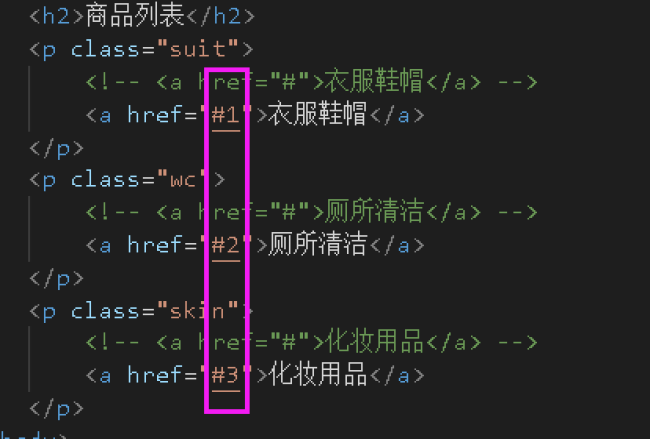
祝学习愉快~

















恭喜解决一个难题,获得1积分~
来为老师/同学的回答评分吧
0 星