页面跳转问题
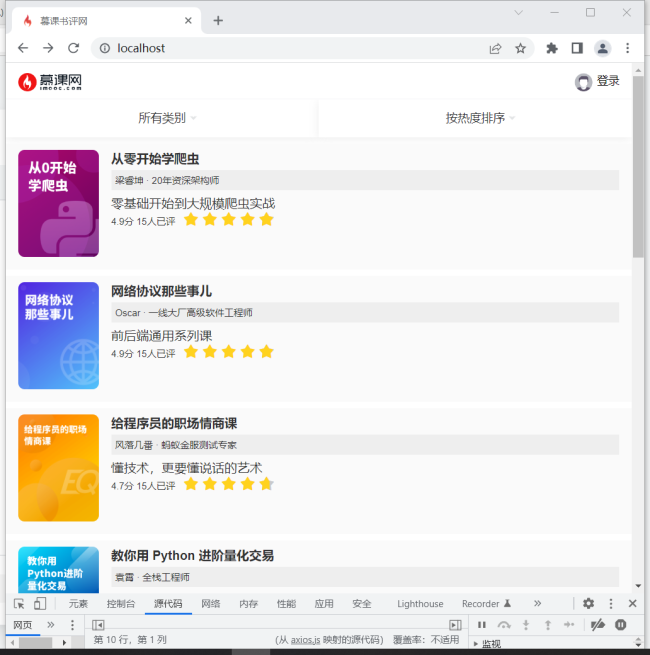
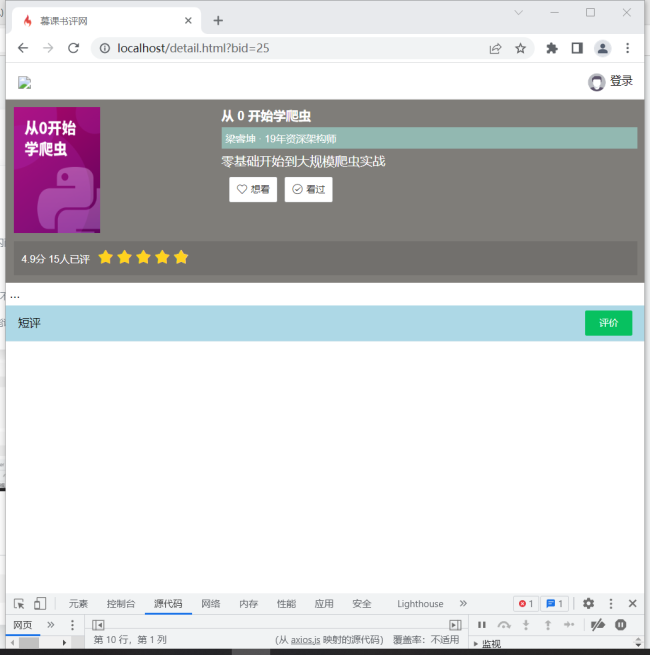
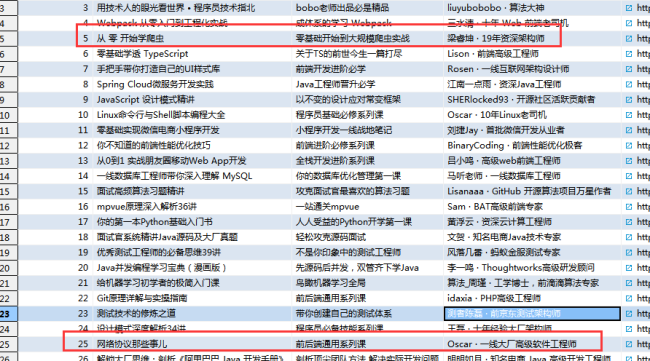
老师这里我点前三个图书都是跳转一个页面
只有后面图书图片的跳转没问题 请问是哪的问题呢
请老师看一下我的代码
<!DOCTYPE html>
<html lang="en">
<head>
    <meta charset="UTF-8">
    <title>慕课书评网</title>
    <meta name="viewport" content="width=device-width,initial-scale=1.0, maximum-scale=1.0,user-scalable=no">
    <!-- 引入样式文件 -->
    <link
            rel="stylesheet"
            href="/assets/vant/index.css"
    />

    <!-- 引入 Vue 和 Vant 的 JS 文件 -->
    <script src="/assets/vue/vue.global.js"></script>
    <script src="/assets/vant/vant.min.js"></script>
    <script src="/assets/axios/axios.js"></script>
    <style>
        .description {
            padding: 5px;
        }

        .description p {
            text-indent: 2em;
            line-height: 30px;
        }

        .description img {
            width: 100%;
        }
    </style>
</head>
<body>
<div id="app">
    <!--导航栏 -->
    <van-nav-bar @click-right="clickRight">
        <template #left>
            <a href="/" style="padding-top: 10px">
                <img src="/images/logo2.png" style="width: 80px">
            </a>
        </template>
        <template #right>
            <template v-if="state.isLogin">
                <img src="/images/user_icon.png" style="height:30px">{{member.nickname}}
            </template>
            <template v-if="!state.isLogin">
                <img src="/images/user_icon.png" style="height: 30px">
                登录
            </template>

        </template>
    </van-nav-bar>

    <van-row style="padding: 10px;color:white;font-size: 80%;background: rgb(127, 125, 121)">
        <van-col span="8" style="float: left;width: 110px;height: 160px">
            <img style="width: 110px;height: 160px"
                 :src="book.cover">
        </van-col>
        <van-col span="16" style="float: left;height: 160px;width:auto">
            <div style="font-size: 16px;font-weight: bold">{{book.bookName}}</div>
            <div style="margin-top:5px;background: #92B8B1;padding: 5px">{{book.author}}</div>
            <div style="font-size: 16px;margin-top:5px;">{{book.subTitle}}</div>
            <div style="padding:10px">
                <template v-if="state.readState == -1">
                    <van-button size="small" icon="like-o" type="default" style="margin-right: 10px"
                                @click="updateReadState(1)">想看
                    </van-button>
                    <van-button size="small" icon="passed" type="default" @click="updateReadState(2)">看过</van-button>
                </template>
                <template v-if="state.readState == 1">
                    <van-button size="small" icon="like" type="success" style="margin-right: 10px"
                                @click="updateReadState(1)">想看
                    </van-button>
                    <van-button size="small" icon="passed" type="default" @click="updateReadState(2)">看过</van-button>
                </template>

                <template v-if="state.readState == 2">
                    <van-button size="small" icon="like-o" type="default" style="margin-right: 10px"
                                @click="updateReadState(1)">想看
                    </van-button>
                    <van-button size="small" icon="checked" type="success" @click="updateReadState(2)">看过</van-button>
                </template>
            </div>
        </van-col>
        <van-col span="24" style="background-color: rgba(0,0,0,0.1);padding: 10px;margin-top: 10px">
            <span style="line-height: 20px;margin-right: 10px">{{book.evaluationScore}}分 {{book.evaluationQuantity}}人已评</span>
            <van-rate v-model="book.evaluationScore" color="#ffd21e" void-icon="star" readonly allow-half></van-rate>
        </van-col>
    </van-row>
    <div class="description" v-html="book.description"></div>
    <van-nav-bar style="background: lightblue">
        <template #left>
            短评
        </template>
        <template #right>
            <van-button type="success" size="small" style="width:60px" @click="showDialog()">评价</van-button>
        </template>
    </van-nav-bar>
    <template v-for="evaluation,index in evaluationList">
        <div style="border-bottom: 1px solid #cccccc">
            <div style="padding: 10px;">
                <span style="margin-right: 20px">{{evaluation.strCreateTime}}</span>
                <span style="margin-right: 20px">{{evaluation.member.nickname}}</span>
                <van-rate v-model="evaluation.score" color="#ffd21e" void-icon="star" readonly allow-half></van-rate>
                <van-button icon="like-o" @click="enjoy(index)" type="success" size="small"
                            style="width:40px;float:right">{{evaluation.enjoy}}
                </van-button>
            </div>
            <div style="padding: 10px;">
                {{evaluation.content}}
            </div>
        </div>
    </template>
    <div style="margin-bottom: 50px">
    </div>

    <van-action-sheet v-model:show="state.dialogVisible" :title="book.bookName">
        <van-form ref="evaluationForm">
            <van-cell-group inset>
                <van-rate v-model="form.score" color="#ffd21e" void-icon="star" style="padding: 16px"></van-rate>
                <van-field
                        v-model="form.content"
                        name="content"
                        placeholder="这里输入评论内容"
                        autocomplete="off"
                        :rules="[{ required: true, message: '请输入评论内容' }]"
                />
            </van-cell-group>
            <div style="margin: 16px;margin-bottom: 50px">
                <van-button round block type="primary" @click="onSubmit('evaluationForm')">
                    提交短评
                </van-button>
            </div>
        </van-form>
    </van-action-sheet>

</div>
<script>
    //日期格式化函数
    function formatDate(time) {
        var newDate = new Date(time);
        return (newDate.getMonth() + 1) + "-" + newDate.getDate();
    }

    //获取查询字符串函数
    function getQueryString(name) {
        var reg = new RegExp('(^|&)' + name + '=([^&]*)(&|$)', 'i');
        var r = window.location.search.substr(1).match(reg);
        if (r != null) {
            return unescape(r[2]);
        }
        return null;
    }

    //提示"需要登录"对话框
    function warnLogin(text) {
        vant.Dialog.confirm({
            title: text,
            confirmButtonText: "去登录",
            cancelButtonText: "关闭"
        })
            .then(() => {
                window.location.href = "/login.html";
            })
    }

    const main = {
        data() {
            return {
                state: { //页面状态
                    isLogin: false, //是否登录
                    member: {}, //当前登录会员数据
                    readState: -1, //当前会员阅读状态 -1:无数据 1:想看 2:看过
                    dialogVisible: false //短评对话框是否显示
                },
                book: {},
                evaluationList: [], //短评列表
                form: { //短评表单数据
                    score: 5,
                    content: ""
                }
            }
        }
        , methods: {
            //显示短评对话框
            showDialog: function () {
                const objApp = this;
                if (!objApp.state.isLogin) {
                    warnLogin("登录后才能进行评论哦");
                    return;
                }
                this.state.dialogVisible = true;
            }
            , clickRight: function () {
                //点击"登录"按钮跳转到登录页
                if (!this.state.isLogin) {
                    window.location.href = "/login.html";
                }
            }
            , updateReadState: function (readState) {
                //更新阅读状态
            }
            , onSubmit: function (formName) {
                //提交短评功能
            }
            , enjoy: function (index) {
                //点赞功能
            }
        }
        , mounted() {
            //初始化后数据操作
            const bookId = getQueryString("bid");
            const objApp = this;
            const uri = "/api/book/id/" + bookId;
            axios.get(uri).then(function (response) {
                const json = response.data;
                if (json.code == "0") {
                    objApp.book = json.data.book;
                } else {
                    console.error(json);
                }
            })
        }
    };
    const app = Vue.createApp(main);
    app.use(vant);
    app.use(vant.Lazyload);
    app.mount("#app");
</script>
</body>
</html>
<!DOCTYPE html>
<html lang="en">
<head>
<meta charset="UTF-8">
<meta name="viewport" content="width=device-width,initial-scale=1.0, maximum-scale=1.0,user-scalable=no">
<title>慕课书评网</title>
<!-- 引入样式文件 -->
<link rel="stylesheet" href="/assets/vant/index.css"/>
<!-- 引入 Vue 和 Vant 的 JS 文件 -->
<script src="/assets/vue/vue.global.js"></script>
<script src="/assets/vant/vant.min.js"></script>
<script src="/assets/axios/axios.js"></script>
<style>
.van-card {
height: 160px
}
.van-card__thumb {
width: 110px
}
</style>
</head>
<body>
<div id="app">
<!--导航栏部分,显示慕课网Logo和登录按钮-->
<van-nav-bar @click-right="clickRight">
<template #left>
<a href="/" style="padding-top: 10px">
<img src="/images/logo2.png" style="width: 80px">
</a>
</template>
<template #right>
<!-- 根据会员登录状态决定显示昵称还是登录按钮 -->
<template v-if="state.isLogin">
<img src="/images/user_icon.png" style="height:30px">{{member.nickname}}
</template>
<template v-if="!state.isLogin">
<img src="/images/user_icon.png" style="height: 30px">
登录
</template>
</template>
</van-nav-bar>
<van-row>
<!-- 分类筛选下拉框 -->
<van-col span="12">
<van-dropdown-menu>
<van-dropdown-item @change="changeCategory()" v-model="state.category" :options="categoryOptions"/>
</van-dropdown-menu>
</van-col>
<!-- 结果排序下拉框 -->
<van-col span="12">
<van-dropdown-menu>
<van-dropdown-item @change="changeOrder()" v-model="state.order" :options="orderOptions"/>
</van-dropdown-menu>
</van-col>
</van-row>
<!-- 图书列表,遍历加载bookList数据 -->
<template v-for="(item,index) in bookList">
<van-card @click="showDetail(index)">
<template #title>
<div style="font-size: 16px;font-weight: bold">{{item.bookName}}</div>
<div style="margin-top:5px;background: #eeeeee;padding: 5px">{{item.author}}</div>
<div style="font-size: 16px;margin-top:5px;">{{item.subTitle}}</div>
<span style="line-height: 20px;margin-right: 10px">{{item.evaluationScore}}分 {{item.evaluationQuantity}}人已评</span>
<van-rate v-model="item.evaluationScore" color="#ffd21e" void-icon="star" readonly
allow-half></van-rate>
</template>
<template #thumb>
<img :src="item.cover" style="width:102px;height:136px;">
</template>
</van-card>
</template>
<!-- 当前如果不是最后一页,显示"加载更多"按钮 -->
<van-button v-show="!state.isLastPage" plain hairline type="primary" block style="margin-bottom:50px"
@click="loadMore">点击加载更多...
</van-button>
<!-- 当前如果是最后一页,则提示"没有其他数据" -->
<van-button v-show="state.isLastPage" disabled hairline type="default" block style="margin-bottom:50px">没有其他数据了
</van-button>
</div>
<script>
const main = {
data() { //初始数据
return {
bookList: [{ //图书数据
"bookId": 5,
"bookName": "从 0 开始学爬虫",
"subTitle": "零基础开始到大规模爬虫实战",
"author": "梁睿坤 · 19年资深架构师",
"cover": "/images/5ce256ea00014bc903600480.jpg",
"description": "...",
"categoryId": 2,
"evaluationScore": 4.9,
"evaluationQuantity": 15
}, {
"bookId": 25,
"bookName": "网络协议那些事儿",
"subTitle": "前后端通用系列课",
"author": "Oscar · 一线大厂高级软件工程师",
"cover": "/images/5da923d60001a92f05400720.jpg",
"description": "...",
"categoryId": 2,
"evaluationScore": 4.7,
"evaluationQuantity": 15
}, {
"bookId": 1,
"bookName": "教你用 Python 进阶量化交易",
"subTitle": "你的量化交易开发第一课",
"author": "袁霄 · 全栈工程师",
"cover": "/images/5c247b0b0001a0a903600480.jpg",
"description": "...",
"categoryId": 1,
"evaluationScore": 4.6,
"evaluationQuantity": 13
}] //当前要显示的书籍内容
, state: {
category: -1, //技术分类,默认分类选中"所有类别"
order: "quantity", //排序,默认按热度排序
page: 1, //查询页号
isLastPage: false,//是否为最后一页
isLogin: false,//当前页面状态是否已登录
member: {}//当前登录的会员数据
}
, categoryOptions: [
{text: "所有类别", value: -1}
]
, orderOptions: [
{text: "按热度排序", value: "quantity"},
{text: "按分数排序", value: "score"}
]
}
}
, methods: {
/*
* onchange 当页面状态发生变更后,Ajax重新查询图书数据
* isFlush 参数说明是否清空已有图书列表
*/
onchange: function (isFlush) {
const objApp = this;
const uri = "/api/book/list?page=" + objApp.state.page + "&categoryId=" + objApp.state.category + "&order=" + objApp.state.order;
axios.get(uri).then(function(response){
const json = response.data;
if(json.code == "0"){
const list = json.data.page.records;
if(isFlush == true){
objApp.bookList.splice(0, objApp.bookList.length);
}
list.forEach(function(item){
objApp.bookList.push(item);
})
// console.info(list);
objApp.state.page = json.data.page.current;
if(json.data.page.pages == json.data.page.current){
objApp.state.isLastPage = true;
}else{
objApp.state.isLastPage = false;
}
}else{
console.error(json);
}
})
},
//点击"加载更多"按钮时,向服务器查询下一页数据
loadMore: function () {
//如果当前不是最后一页,则当前页号+1并向服务器发起请求查询下一页数据
if (this.state.isLastPage == false) {
this.state.page = this.state.page + 1;
this.onchange();
}
}
//当更改"分类"下拉选项后,清空原有数据进行查询
, changeCategory: function () {
//页号重置为1
this.state.page = 1;
//重新查询图书数据
this.onchange(true);
}
//当更改"排序"下拉选项后,清空原有数据进行查询
, changeOrder: function () {
//页号重置为1
this.state.page = 1;
//重新查询图书数据
this.onchange(true);
}
//点击右上角"登录"按钮后,跳转至登录页
, clickRight: function () {
if (!this.state.isLogin) {
window.location.href = "/login.html";
}
}
//点击具体的图书专栏后,跳转到详情页面
, showDetail: function (index) {
const book = this.bookList[index];
window.location.href = "/detail.html?bid=" + book.bookId;
}
}
, mounted() {
//页面初始化时执行的操作
const objApp = this;
this.onchange(true);
axios.get("/api/category/list")
.then(function(response){
const json = response.data;
if(json.code == "0"){
json.data.list.forEach(function(item){
const option = {};
option.text = item.categoryName;
option.value = item.categoryId;
objApp.categoryOptions.push(option);
})
}else{
console.error(json);
}
})
}
};
const app = Vue.createApp(main);
app.use(vant);
app.use(vant.Lazyload);
app.mount("#app");
</script>
</body>
</html>package com.pzx.reader.controller;
import com.baomidou.mybatisplus.core.metadata.IPage;
import com.pzx.reader.entity.Book;
import com.pzx.reader.service.BookService;
import com.pzx.reader.utils.ResponseUtils;
import org.springframework.web.bind.annotation.GetMapping;
import org.springframework.web.bind.annotation.PathVariable;
import org.springframework.web.bind.annotation.RequestMapping;
import org.springframework.web.bind.annotation.RestController;
import javax.annotation.Resource;
import java.lang.ref.PhantomReference;
@RestController
@RequestMapping("/api/book")
public class BookController {
@Resource
private BookService bookService;
@GetMapping("/list")
public ResponseUtils list(Long categoryId, String order, Integer page) {
ResponseUtils resp = null;
try {
IPage<Book> p = bookService.selectPage(categoryId, order, page, 10);
resp = new ResponseUtils().put("page", p);
} catch (Exception e) {
e.printStackTrace();
resp = new ResponseUtils(e.getClass().getSimpleName(), e.getMessage());
}
return resp;
}
@GetMapping("/id/{id}")
public ResponseUtils selectById(@PathVariable("id") Long id) {
ResponseUtils resp = null;
try {
Book book = bookService.selectById(id);
resp = new ResponseUtils().put("book", book);
} catch (Exception e) {
e.printStackTrace();
resp = new ResponseUtils(e.getClass().getSimpleName(), e.getMessage());
}
return resp;
}
}package com.pzx.reader.entity;
import com.baomidou.mybatisplus.annotation.IdType;
import com.baomidou.mybatisplus.annotation.TableId;
import com.baomidou.mybatisplus.annotation.TableName;
@TableName("book")
public class Book {
@TableId(type = IdType.AUTO)
private Long bookId;
private String bookName;
private String subTitle;
private String author;
private String cover;
private String description;
private Long categoryId;
private Float evaluationScore;
private Integer evaluationQuantity;
public Long getBookId() {
return bookId;
}
public void setBookId(Long bookId) {
this.bookId = bookId;
}
public String getBookName() {
return bookName;
}
public void setBookName(String bookName) {
this.bookName = bookName;
}
public String getSubTitle() {
return subTitle;
}
public void setSubTitle(String subTitle) {
this.subTitle = subTitle;
}
public String getAuthor() {
return author;
}
public void setAuthor(String author) {
this.author = author;
}
public String getCover() {
return cover;
}
public void setCover(String cover) {
this.cover = cover;
}
public String getDescription() {
return description;
}
public void setDescription(String description) {
this.description = description;
}
public Long getCategoryId() {
return categoryId;
}
public void setCategoryId(Long categoryId) {
this.categoryId = categoryId;
}
public Float getEvaluationScore() {
return evaluationScore;
}
public void setEvaluationScore(Float evaluationScore) {
this.evaluationScore = evaluationScore;
}
public Integer getEvaluationQuantity() {
return evaluationQuantity;
}
public void setEvaluationQuantity(Integer evaluationQuantity) {
this.evaluationQuantity = evaluationQuantity;
}
@Override
public String toString() {
return "Book{" +
"bookId=" + bookId +
", bookName='" + bookName + '\'' +
", subTitle='" + subTitle + '\'' +
", author='" + author + '\'' +
", cover='" + cover + '\'' +
", description='" + description + '\'' +
", categoryId=" + categoryId +
", evaluationScore=" + evaluationScore +
", evaluationQuantity=" + evaluationQuantity +
'}';
}
}package com.pzx.reader.mapper;
import com.baomidou.mybatisplus.core.mapper.BaseMapper;
import com.pzx.reader.entity.Book;
public interface BookMapper extends BaseMapper<Book> {
}24
收起
正在回答
1回答

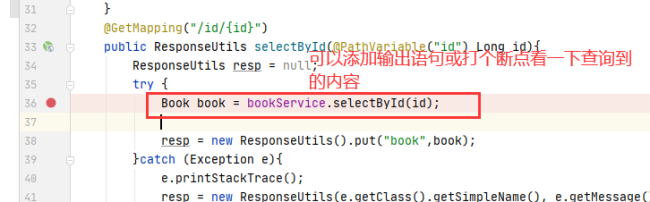
同学你好,1、测试同学代码是没有问题的,可能是缓存导致的问题,建议同学清除缓存试一下。
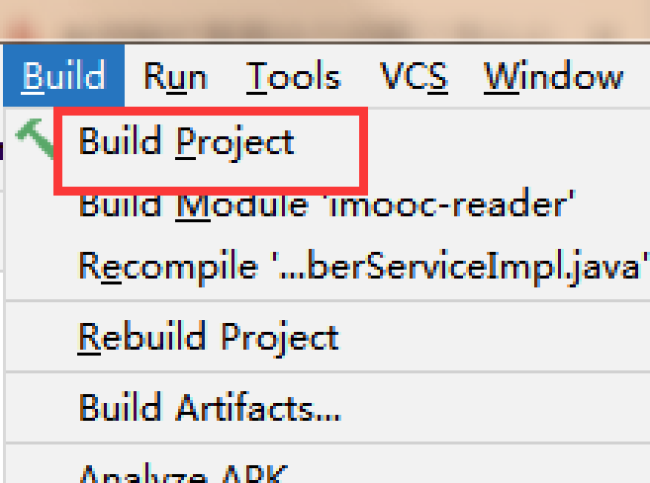
1)idea:删除out与target目录,然后重构项目
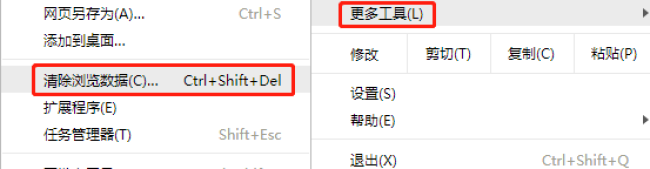
2)浏览器:
2、如果还存在问题,建议同学使用课程源码试一下,查看是否存在对应的问题。先排查一下是否是代码导致的问题。
祝学习愉快!
相似问题







登录后可查看更多问答,登录/注册
2023版Java工程师
- 参与学习 人
- 提交作业 8813 份
- 解答问题 9886 个
综合就业常年第一,编程排行常年霸榜,北上广深月薪过万! 不需要基础,无需脱产即可学习,只要你有梦想,想高薪! 全新升级:技术栈升级(包含VUE3.0,ES6,Git)+项目升级(前后端联调与功能升级)
了解课程












恭喜解决一个难题,获得1积分~
来为老师/同学的回答评分吧
0 星