老师
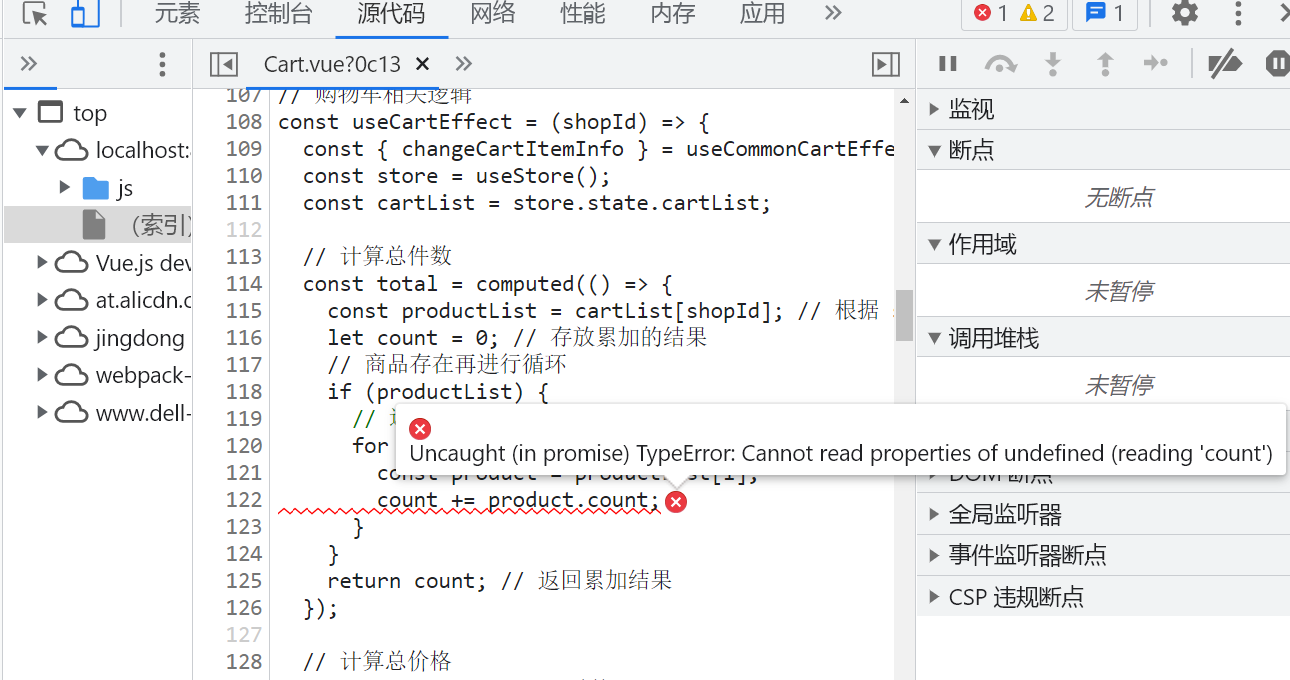
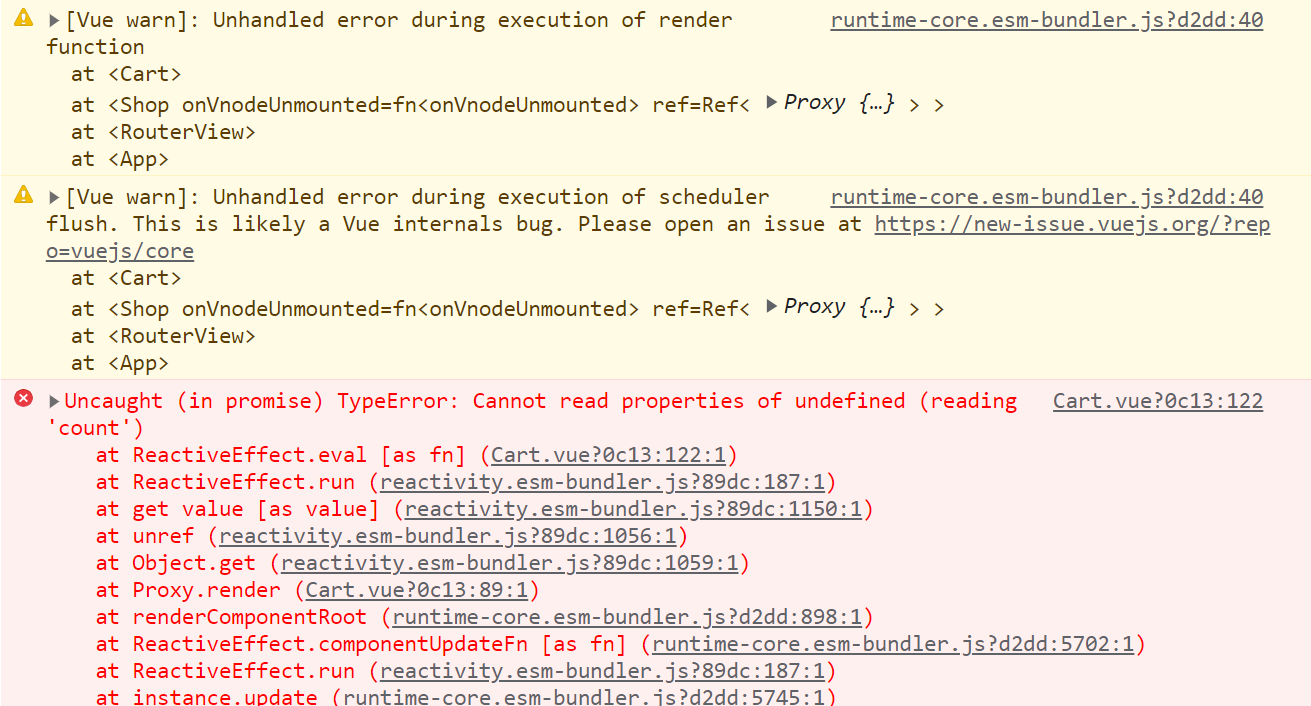
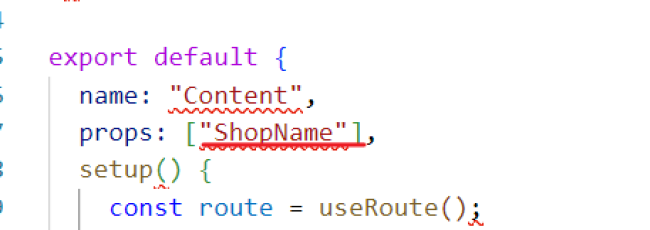
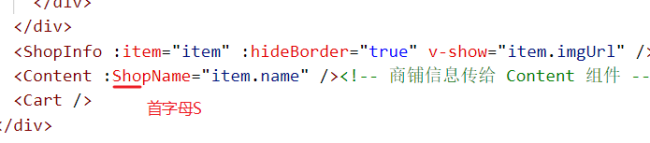
数据结构的变更这里,只把 shopName 相关的东西写完,点击增加会说 Cart 文件有问题 读取不了未定义的属性,Cart里面的东西我没有去做更改
这里的商铺名也传递给 Content 组件了
<template>
<div class="content">
<div class="category">
<div
:class="{
category__item: true,
'category__item--active': currentTab === item.tab,
}"
v-for="item in categories"
:key="item.tab"
@click="() => handleTabClick(item.tab)"
>
{{ item.name }}
</div>
</div>
<div class="product">
<div class="product__item" v-for="item in list" :key="item._id">
<img :src="`${item.imgUrl}`" class="product__item__img" />
<div class="product__item__detail">
<h4 class="product__item__title">{{ item.name }}</h4>
<p class="product__item__sales">月售{{ item.sales }}件</p>
<p class="product__item__price">
<span class="product__item__yen">¥</span>
<span class="product__item__bold">{{ item.price }}</span>
<span class="product__item__origin">¥{{ item.oldPrice }}</span>
</p>
</div>
<div class="product__number">
<span
class="product__number__minus iconfont"
@click="
() => {
changeCartItem(shopId, item._id, item, -1, ShopName);
}
"
>

</span>
<!-- 这里的 count 数据从购物车中去取,这样清空购物车的时候数据才能去跟着变化 -->
<span class="product__number__fs">{{
cartList?.[shopId]?.productList?.[item._id]?.count || 0
}}</span>
<span
class="product__number__plus iconfont"
@click="
() => {
changeCartItem(shopId, item._id, item, 1, ShopName);
}
"
>

</span>
</div>
</div>
</div>
</div>
</template>
<script>
import { reactive, ref, toRefs, watchEffect } from "vue";
import { useRoute } from "vue-router";
import { useStore } from "vuex";
import { get } from "../../utils/request";
import { useCommonCartEffect } from "./commonCartEffect"; // 购物车相关的逻辑复用(上下购物车联动)
const categories = [
{ name: "全部商品", tab: "all" },
{ name: "秒杀", tab: "seckill" },
{ name: "新鲜水果", tab: "fruit" },
];
// Tab 切换相关的逻辑
const useTabEffect = () => {
const currentTab = ref(categories[0].tab);
// 接收调用函数 () => handleCategoryClick(item.tab) 时传递的 tab 值
const handleTabClick = (tab) => {
// getContentData(tab); // 点击列表项重新获取对应的数据
currentTab.value = tab; // 点击列表项将函数中接收到的 tab 值赋值给 data 中的 currentTab
};
return { currentTab, handleTabClick };
};
// 列表内容相关的逻辑
const useCurrentListEffect = (currentTab, shopId) => {
const content = reactive({ list: [] });
// 获取列表内容
const getContentData = async () => {
const result = await get(`/api/shop/${shopId}/products`, {
tab: currentTab.value, //依赖于 Tab 切换
});
if (result?.errno === 0 && result?.data?.length) {
content.list = result.data;
}
};
// 首次页面加载以及监听的数据发生变化,watchEffect 会执行。
watchEffect(() => {
getContentData(); // 监听函数在 watchEffect 内部执行,内部会分析代码:监听函数依赖于 currentTab,即 currentTab 发生改变,监听函数会再次执行
});
const { list } = toRefs(content);
return { list };
};
export default {
name: "Content",
props: ["shopName"],
setup() {
const route = useRoute();
const store = useStore();
const shopId = route.params.id;
const { currentTab, handleTabClick } = useTabEffect();
const { list } = useCurrentListEffect(currentTab, shopId);
const { changeCartItemInfo, cartList } = useCommonCartEffect();
const changeShopName = (shopId, ShopName) => {
store.commit("changeShopName", { shopId, ShopName });
};
const changeCartItem = (shopId, productId, item, num, shopName) => {
changeCartItemInfo(shopId, productId, item, num);
changeShopName(shopId, shopName);
};
return {
categories,
currentTab,
list,
shopId,
cartList,
handleTabClick,
changeCartItem,
};
},
};
</script>
<style lang="scss" scoped>
@import "../../style/variables.scss";
@import "../../style/mixins.scss";
.content {
display: flex;
position: absolute;
left: 0;
right: 0;
top: 1.5rem;
bottom: 0.5rem;
}
.category {
overflow-y: scroll;
width: 0.75rem;
height: 100%;
background-color: $search-bgColor;
&__item {
line-height: 0.4rem;
text-align: center;
font-size: 0.14rem;
color: $content-fontColor;
&--active {
background-color: $bgColor;
}
}
}
.product {
overflow-y: scroll;
flex: 1;
&__item {
position: relative;
display: flex;
padding: 0.12rem 0;
margin: 0 0.16rem; // 左右的间隙用 margin 去做,使用 padding 的话下边框会贯穿整个 padding 区域
border-bottom: 0.02rem solid $content-bgColor;
&__img {
width: 0.68rem;
height: 0.68rem;
margin-right: 0.16rem;
}
&__detail {
overflow: hidden;
}
&__title {
margin: 0;
line-height: 0.2rem;
font-size: 0.14rem;
color: $content-fontColor;
// 超过规定行数展示省略号
@include ellipsis;
}
&__sales {
margin: 0.06rem 0;
line-height: 0.16rem;
font-size: 0.12rem;
color: $content-fontColor;
}
&__price {
margin: 0;
line-height: 0.2rem;
font-size: 0.14rem;
color: $highlight-fontColor;
}
&__yen {
font-size: 0.12rem;
}
&__bold {
font-weight: bold;
}
&__origin {
margin-left: 0.08rem;
line-height: 0.2rem;
font-size: 0.12rem;
color: $light-fontColor;
text-decoration: line-through;
}
.product__number {
position: absolute;
right: 0;
bottom: 0.12rem;
&__minus,
&__plus {
display: inline-block;
border-radius: 50%;
text-align: center;
}
&__minus {
width: 0.18rem;
line-height: 0.18rem;
border: 0.01rem solid $medium-fontColor;
color: $medium-fontColor;
margin-right: 0.1rem;
}
&__fs {
font-size: 0.16rem;
pointer-events: none;
}
&__plus {
width: 0.2rem;
line-height: 0.2rem;
background-color: $btn-bgColor;
color: $bgColor;
margin-left: 0.1rem;
}
}
}
}
</style>
import { createStore } from "vuex";

export default createStore({
  state: {
    cartList: {
      // shopId: {
      //   // 商品的名字
      //   shopName: "沃尔玛",
      //   // 商品的商品列表
      //   productList: {
      //     productId: {
      //       _id: "1",
      //       name: "番茄250g/份",
      //       imgUrl: "http://www.com",
      //       sales: 10,
      //       price: 33.6,
      //       pldPrice: 39.6,
      //       count: 2,
      //     },
      //   },
      // },
    },
  },
  getters: {},
  mutations: {
    changeCartItemInfo(state, payload) {
      // 根据传入的参数,获取到商铺的id、商品id、商品详细信息、增加还是减少等数据
      const { shopId, productId, productInfo, num } = payload;
      let shopInfo = state.cartList[shopId] || {
        shopName: "",
        productList: {},
      };
      let product = shopInfo.productList[productId];
      if (!product) {
        productInfo.count = 0;
        product = productInfo;
      }
      product.count += num; // 获取到商品信息  ->  count 在原来的基础上进行加减操作(1/-1)
      num > 0 ? (product.check = true) : (product.check = false); // 添加的商品大于 0,就展示表示选中的图标

      // 约束:加减有上限和下限
      if (product.count < 0) return (product.count = 0);
      if (product.count > 99) return (product.count = 99);

      // 改变数据后重新赋值,添加到 state 下的 cartList 中
      shopInfo.productList[productId] = product;
      state.cartList[shopId] = shopInfo;
    },

    changeShopName(state, payload) {
      const { shopId, shopName } = payload;
      const shopInfo = state.cartList[shopId] || {
        shopName: "",
        productList: {},
      };
      shopInfo.shopName = shopName;
      state.cartList[shopId] = shopInfo;
    },

    // 购物车展开点击状态图标能进行 勾选/取消勾选 等操作
    changeCartItemChecked(state, payload) {
      const { shopId, productId } = payload;

      const product = state.cartList[shopId][productId];
      product.check = !product.check; // 对状态图标进行点击取反
    },

    // 点击清空购物车
    cleanCartProducts(state, payload) {
      const { shopId } = payload;
      state.cartList[shopId] = {};
    },

    // 点击全选按钮,即所有商品全部选中
    setCartItemsChecked(state, payload) {
      const { shopId } = payload;
      const products = state.cartList[shopId];
      if (products) {
        // 循环添加的每一项商品,使 check 的值为 true,一旦 check 为 true,此时全选按钮就是 true,点击就能够实现全选
        for (let key in products) {
          const product = products[key];
          product.check = true;
        }
      }
    },
  },
});
<template>
<!-- 默认不展示遮罩层 -->
<div class="mask" v-if="showCart" @click="handleCartShowChange" />
<div class="cart">
<!-- 默认不展示购物车弹层 -->
<div class="product" v-if="showCart">
<div class="product__header">
<div
class="product__header__all"
@click="() => setCartItemsChecked(shopId)"
>
<!-- allChecked 为 true,则展示全选图标,反之则展示未选中图标 -->
<span
class="product__header__icon iconfont"
v-html="allChecked ? '' : ''"
>
</span>
全选
</div>
<div class="product__header__clear">
<span
class="product__header__clear__btn"
@click="() => cleanCartProducts(shopId)"
>清空购物车</span
>
</div>
</div>
<!-- template 为占位符,不影响页面 -->
<template v-for="item in productList" :key="item._id">
<!-- 商品数量为空的时候,下方购物车信息不进行展示 -->
<div class="product__item" v-if="item.count > 0">
<!-- item.check 为true,则商品数量大于1,则展示选中状态的图标,反之则展示未选中状态的图标 -->
<div
class="product__item__checked iconfont"
v-html="item.check ? '' : ''"
@click="() => changeCartItemChecked(shopId, item._id)"
></div>
<img :src="`${item.imgUrl}`" class="product__item__img" />
<div class="product__item__detail">
<h4 class="product__item__title">{{ item.name }}</h4>
<p class="product__item__price">
<span class="product__item__yen">¥</span>
<span class="product__item__bold">{{ item.price }}</span>
<span class="product__item__origin"
>¥{{ item.oldPrice }}</span
>
</p>
</div>
<div class="product__number">
<span
class="product__number__minus iconfont"
@click="
() => {
// -1 代表减少项
changeCartItemInfo(shopId, item._id, item, -1);
}
"
>

</span>
<!-- count 在点击的时候,vuex 会随之进行更新(vuex 内部定义了 count) -->
<span class="product__number__fs">{{ item.count || 0 }}</span>
<!-- <span class="product__number__fs">{{
cartList?.[shopId]?.productList?.[item._id]?.count || 0
}}</span> -->
<span
class="product__number__plus iconfont"
@click="
() => {
// 1 代表增加项
// 向哪个 shop 添加内容(1/2)? 详情页面各个商品对应的 id(1/2/3/4)? 整个商品的信息?
changeCartItemInfo(shopId, item._id, item, 1);
}
"
>

</span>
</div>
</div>
</template>
</div>
<div class="check">
<div class="check__icon">
<img
class="check__icon__img"
src="http://www.dell-lee.com/imgs/vue3/basket.png"
@click="handleCartShowChange"
/>
<div class="check__icon__tag">{{ total }}</div>
</div>
<div class="check__info">
总计:<span class="check__info__price">¥ {{ price }}</span>
</div>
<div class="check__btn">
<router-link to="/">去结算</router-link>
</div>
</div>
</div>
</template>
<script>
import { computed, ref } from "vue";
import { useStore } from "vuex";
import { useRoute } from "vue-router";
import { useCommonCartEffect } from "./commonCartEffect"; // 购物车相关的逻辑复用(上下购物车联动)
// 购物车相关逻辑
const useCartEffect = (shopId) => {
const { changeCartItemInfo } = useCommonCartEffect(); // 点击加减将商品以及 shopId 存到购物车
const store = useStore();
const cartList = store.state.cartList;
// 计算总件数
const total = computed(() => {
const productList = cartList[shopId]; // 根据 shopId 获取店铺的所有商品
let count = 0; // 存放累加的结果
// 商品存在再进行循环
if (productList) {
// 遍历所有商品,将数量累加
for (let i in productList) {
const product = productList[i];
count += product.count;
}
}
return count; // 返回累加结果
});
// 计算总价格
const price = computed(() => {
const productList = cartList[shopId];
let count = 0;
if (productList) {
for (let i in productList) {
const product = productList[i];
// 只有 check 为 true 的时候(商品选中状态)才会去计算价格
if (product.check) {
count += product.count * product.price;
}
}
}
return count.toFixed(2);
});
// 根据购物车中商品的选中与否 来决定全选按钮的展示
const allChecked = computed(() => {
const productList = cartList[shopId];
// 全选按钮默认是 true
let result = true;
if (productList) {
for (let i in productList) {
const product = productList[i];
// 购物车有商品且没有选中,就让全选按钮为 false
if (product.count > 0 && !product.check) {
result = false;
}
}
}
return result;
});
// 购物车展开列表功能
const productList = computed(() => {
const productList = cartList[shopId] || [];
return productList;
});
// 购物车展开点击状态图标能进行 勾选/取消勾选 等操作
const changeCartItemChecked = (shopId, productId) => {
// 同步的改变 store 中的数据
store.commit("changeCartItemChecked", { shopId, productId }); //数据传送到vuex
};
// 点击清空购物车
const cleanCartProducts = (shopId) => {
store.commit("cleanCartProducts", { shopId });
};
// 点击全选按钮,即所有商品全部选中
const setCartItemsChecked = (shopId) => {
store.commit("setCartItemsChecked", { shopId });
};
return {
total,
price,
productList,
allChecked,
changeCartItemInfo,
changeCartItemChecked,
cleanCartProducts,
setCartItemsChecked,
};
};
// 展示隐藏购物车逻辑
const toggleCartEffect = () => {
const showCart = ref(false);
// 点击购物车按钮 控制购物车弹层、以及遮罩层的展示与否 / 点击遮罩层使遮罩层消失
const handleCartShowChange = () => {
showCart.value = !showCart.value;
};
return { showCart, handleCartShowChange };
};
export default {
name: "Cart",
setup() {
const route = useRoute();
const shopId = route.params.id;
const { showCart, handleCartShowChange } = toggleCartEffect();
const {
total,
price,
productList,
allChecked,
changeCartItemInfo,
changeCartItemChecked,
cleanCartProducts,
setCartItemsChecked,
} = useCartEffect(shopId);
return {
showCart,
total,
price,
shopId,
productList,
allChecked,
changeCartItemInfo,
changeCartItemChecked,
cleanCartProducts,
setCartItemsChecked,
handleCartShowChange,
};
},
};
</script>
<style lang="scss" scoped>
@import "../../style/variables.scss";
@import "../../style/mixins.scss";
.mask {
z-index: 1;
position: fixed;
top: 0;
right: 0;
bottom: 0.49rem;
left: 0;
background: rgba(0, 0, 0, 0.5);
}
.cart {
z-index: 2;
overflow-y: hidden;
position: absolute;
left: 0;
right: 0;
bottom: 0;
}
.product {
overflow-y: scroll;
flex: 1;
background-color: $bgColor;
&__header {
display: flex;
line-height: 0.5rem;
border-bottom: 1px solid $content-bgColor;
font-size: 0.14rem;
color: $content-fontColor;
&__all {
width: 0.74rem;
margin-left: 0.18rem;
}
&__icon {
margin-right: 0.1rem;
font-size: 0.22rem;
color: $btn-bgColor;
}
&__clear {
flex: 1;
margin-right: 0.18rem;
text-align: right;
&__btn {
display: inline-block;
}
}
}
&__item {
position: relative;
display: flex;
padding: 0.12rem 0;
margin: 0 0.16rem; // 左右的间隙用 margin 去做,使用 padding 的话下边框会贯穿整个 padding 区域
border-bottom: 0.02rem solid $content-bgColor;
&__checked {
width: 0.2rem;
line-height: 0.5rem;
margin: 0 0.16rem 0 0.03rem;
font-size: 0.22rem;
color: $btn-bgColor;
}
&__img {
width: 0.46rem;
height: 0.46rem;
margin-right: 0.16rem;
}
&__detail {
overflow: hidden;
}
&__title {
margin: 0;
line-height: 0.2rem;
font-size: 0.14rem;
color: $content-fontColor;
// 超过规定行数展示省略号
@include ellipsis;
}
&__price {
margin: 0.06rem 0 0 0;
line-height: 0.2rem;
font-size: 0.14rem;
color: $highlight-fontColor;
}
&__yen {
font-size: 0.12rem;
}
&__bold {
font-weight: bold;
}
&__origin {
margin-left: 0.08rem;
line-height: 0.2rem;
font-size: 0.12rem;
color: $light-fontColor;
text-decoration: line-through;
}
.product__number {
position: absolute;
right: 0;
bottom: 0.12rem;
&__minus,
&__plus {
display: inline-block;
border-radius: 50%;
text-align: center;
}
&__minus {
width: 0.18rem;
line-height: 0.18rem;
border: 0.01rem solid $medium-fontColor;
color: $medium-fontColor;
margin-right: 0.1rem;
}
&__fs {
font-size: 0.16rem;
pointer-events: none;
}
&__plus {
width: 0.2rem;
line-height: 0.2rem;
background-color: $btn-bgColor;
color: $bgColor;
margin-left: 0.1rem;
}
}
}
}
.check {
display: flex;
height: 0.49rem;
line-height: 0.49rem;
border-top: 0.01rem solid $bgColor;
box-shadow: 0 -0.01rem 0.01rem 0 $content-bgColor;
&__icon {
position: relative;
width: 0.84rem;
&__img {
display: block;
margin: 0.12rem auto;
width: 0.28rem;
height: 0.26rem;
}
&__tag {
position: absolute;
left: 0.47rem;
top: 0.01rem;
padding: 0 0.05rem;
// 设置最小宽度 .2rem,这样数字过大宽度能随之发生变化
min-width: 0.2rem;
height: 0.2rem;
line-height: 0.2rem;
background-color: $highlight-fontColor;
color: $bgColor;
border-radius: 0.1rem;
font-size: 0.15rem;
text-align: center;
transform: scale(0.7);
// 给一个缩放中心点,这样数字过大也能在固定的位置展示
transform-origin: left center;
}
}
&__info {
flex: 1;
font-size: 0.12rem;
color: $content-fontColor;
line-height: 0.49rem;
&__price {
font-size: 0.18rem;
color: $highlight-fontColor;
font-weight: bold;
}
}
&__btn {
width: 0.98rem;
text-align: center;
background-color: #4fb0f9;
color: $bgColor;
font-size: 0.14rem;
}
a {
text-decoration: none;
color: $bgColor;
}
}
</style>
13
收起
正在回答
1回答

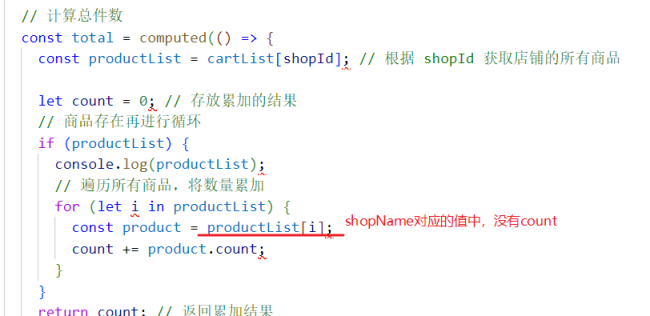
同学你好,cart.vue中,productList获取的不对。同学的productList打印如下:
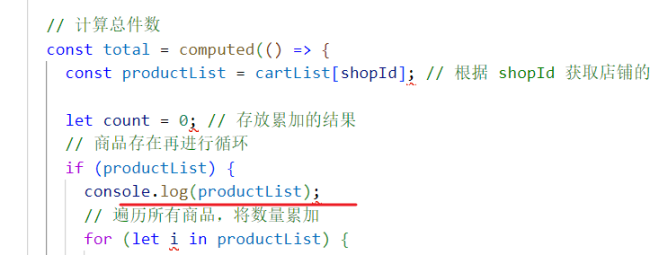
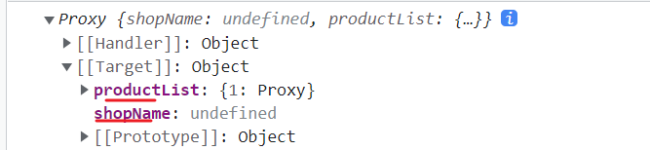
该数据中有两个键,当键是shopName时,shopName的值中没有count属性,所以代码会报错:
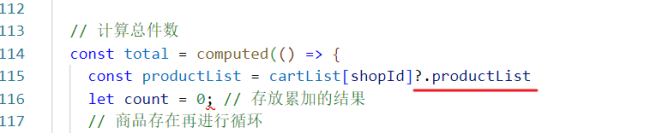
调整如下:
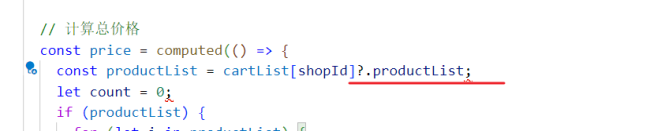
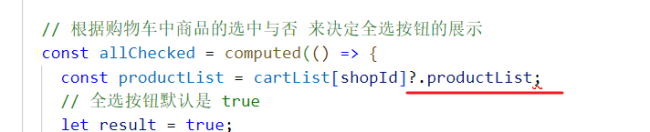
同理,如下位置也需要调整:

祝学习愉快!

相似问题







登录后可查看更多问答,登录/注册













恭喜解决一个难题,获得1积分~
来为老师/同学的回答评分吧
0 星