import math
from selenium.webdriver.common.keys import Keys
from selenium.webdriver.common.by import By
import time
import re
import csv
from selenium import webdriver
from lxml import etree
from bs4 import BeautifulSoup
from selenium.webdriver.support.ui import WebDriverWait
from selenium.webdriver.support import expected_conditions as EC
from selenium.common.exceptions import NoSuchElementException
from selenium.common.exceptions import TimeoutException

f = open("千方M1新增联系人连续导出--.csv", mode='w', newline='', encoding='gbk')  # utf-8
writer_obj = csv.writer(f)

with open("accounts.txt") as f:
    lines = f.readlines()
    accounts = [line.strip().split(',') for line in lines]

url = 'http://fintech.fintech55.com/csxt-web'

qianfang = webdriver.Chrome()

# 遍历账户登录
for account in accounts:
    try:
        username = account[0]
        password = account[1]

        qianfang.get(url)
        username_field = qianfang.find_element(By.XPATH,
                                               '//*[@id="app"]/div/section/div/div[1]/form/div[2]/div/div/div[1]/input')
        password_field = qianfang.find_element(By.XPATH,
                                               '//*[@id="app"]/div/section/div/div[1]/form/div[3]/div/div/div[1]/input')

        username_field.send_keys(username)
        password_field.send_keys(password)
        password_field.send_keys(Keys.RETURN)
    except IndexError:
        print('导出完成')
        break

    qianfang.find_element(By.XPATH, '//*[@id="app"]/div/section/div/div[1]/form/div[5]/div/div/button[2]')
    time.sleep(1)

    qianfang.get('http://fintech.fintech55.com/csxt-web/#/telephone-collection-manage/tel-person-case-manage')
    time.sleep(1)

    # 获取页面信息
    WebDriverWait(qianfang, 50, 0.5).until(EC.presence_of_element_located(
        (By.XPATH, '//*[@id="app"]/section/div/div[2]/div[2]/div[1]/section/section[2]/div[3]/div[2]/span[1]')))
    qianfang.find_element(By.XPATH,
                          '//*[@id="app"]/section/div/div[2]/div[2]/div[1]/section/div[1]/div/label[2]/span').click()
    time.sleep(2)

    print('循环操作,获取剩余页数的数据')

    last_page = qianfang.find_element(By.XPATH,
                                      '//*[@id="app"]/section/div/div[2]/div[2]/div[1]/section/section[2]/div[3]/div[2]/span[1]').text
    last_page_2 = re.findall('共 (.*?) 条', last_page)
    test = int(last_page_2[0])
    last_page_1 = math.ceil(test / 10)

    for page in range(0, last_page_1):
        print(username, "----------进行至第{}页,一共{}页有{}条----------".format(page + 1, last_page_1, test))

        latest_driver = qianfang.window_handles[-1]
        qianfang.switch_to.window(latest_driver)

        n = 10
        for i in range(1, n + 1):
            try:
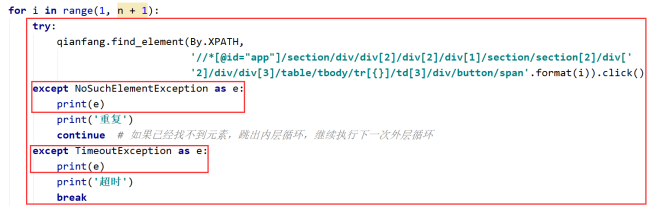
                try:
                    qianfang.find_element(By.XPATH,
                                          '//*[@id="app"]/section/div/div[2]/div[2]/div[1]/section/section[2]/div['
                                          '2]/div/div[3]/table/tbody/tr[{}]/td[3]/div/button/span'.format(i)).click()

                except NoSuchElementException:

                    print('重复')
                    continue  # 如果已经找不到元素,跳出内层循环,继续执行下一次外层循环
            except TimeoutException:
                print('超时')
                break


            #except Exception:

            #    qianfang.find_element(By.XPATH,
            #                          '//*[@id="app"]/section/div/div[2]/div[2]/div[1]/section/section[2]/div[2]/div/div[3]/table/tbody/tr/td[3]/div/button/span').click()

            #    print('切换下个账号')
            #    break


            WebDriverWait(qianfang, 50, 0.5).until(EC.presence_of_element_located(
                (By.XPATH,
                 '//*[@id="app"]/div/section/div[4]/div[1]/section/section/section/div[1]/div/div[3]/table/tbody/tr[1]/td[6]/div')))

            name = []
            name.append(username)

            html = etree.HTML(qianfang.page_source)
            list_1 = html.xpath(
                '//div[@class="el-col el-col-5"]//button[@class="el-button el-tooltip span-style el-button--text"]/span/text()')
            list_1_0 = [list_1[1]]

            # print(list_1_0,end=' ')
            # writer_obj.writerow(list_1_0)

            list_2 = html.xpath(
                '//div[@class="data-grid-item-container row"]/div[@class="data-grid-item__content col-span"]/text()')
            list_2_0 = [list_2[4]]

            #print(list_2_0,end=' ')
            # writer_obj.writerow(list_2_0)

            soup_01 = BeautifulSoup(qianfang.page_source, 'lxml')
            data_fy = soup_01.find_all('table', class_="el-table__body")
            for item_fy_01 in data_fy:
                data_fy_02 = item_fy_01.find_all('div', class_="cell")
                data_fy_03 = re.findall(
                    '<div class="cell"><div>(.*?)</div></div>, <div class="cell">(.*?)</div>, <div class="cell">(.*?)</div>, <div class="cell">(.*?)</div>, <div class="cell">(.*?)</div>, <div class="cell">(.*?)</div>, <div class="cell el-tooltip" style="width: 176px;">(.*?)</div>, <div class="cell"><button class="el-button el-button--text el-button--small" data-v-df2042d4="" type="button"><!-- --><!-- --><span>(.*?)</span>',
                    str(data_fy_02))
                for data_fy_04 in data_fy_03:
                    two = {}
                    two['电话'] = data_fy_04[5]
                    lst_01 = [
                        data_fy_04[5]
                    ]

                    # print(lst_01, end=' ')
                    # writer_obj.writerow(lst_01)

                    row = name + list_1_0 + list_2_0 + lst_01
                    print(row, end=' ')
                    writer_obj.writerow(row)
                    f.close()

            print('\n')

            qianfang.find_element(By.XPATH, '//*[@id="app"]/div/section/div[1]/div/button[2]/span').click()
            time.sleep(0.2)

        # 定位下一页按钮
        qianfang.find_element(By.XPATH,
                              '//*[@id="app"]/section/div/div[2]/div[2]/div[1]/section/section[2]/div[3]/div[2]/button[2]/i').click()
        WebDriverWait(qianfang, 5, 0.5).until(EC.presence_of_element_located(
            (By.XPATH,
             '//*[@id="app"]/section/div/div[2]/div[2]/div[1]/section/section[2]/div[2]/div/div[3]/table/tbody/tr[2]/td[3]/div/button/span')))
qianfang.quit()
我这个第72-86,改来改去都是不行,最后面运行的事情确实是出现Timeout,但是没有跳转




















恭喜解决一个难题,获得1积分~
来为老师/同学的回答评分吧
0 星