关于页面渲染的问题
老师,控制台里面能正常打印productList 为什么页面没有渲染出来 麻烦看一下
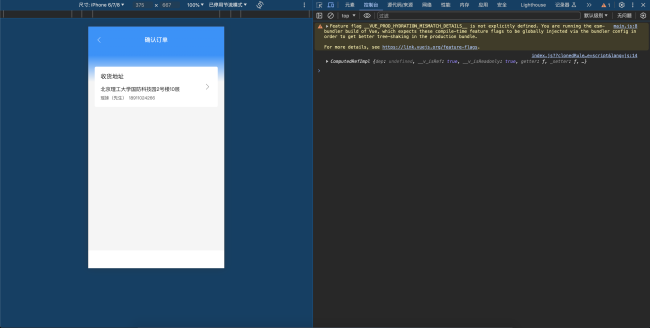
相关代码:OrderConfirmation
<template>
<div class="wrapper">
<div class="top">
<div class="top__header">
<div class="top__header__back iconfont"></div>
确认订单
</div>
<div class="top__receiver">
<div class="top__receiver__title">收货地址</div>
<div class="top__receiver__address">
北京理工大学国防科技园2号楼10层
</div>
<div class="top__receiver__info">
<span class="top__receiver__info__name">瑶妹(先生)</span>
<span class="top__receiver__info__name">18911024266</span>
</div>
<div class="top__receiver__icon iconfont"></div>
</div>
</div>
<div class="products">
<div class="products__title"></div>
<div class="products__list" >
<div
class="product__item"
v-for="item in productList"
:key="item._id"
>
<img class="product__item__img" :src="item.imgUrl" alt="" />
<div class="product__item__detail">
<h4 class="product__item__title">{{item.name}}</h4>
<p class="product__item__price">
<span class="product__item__yen">¥{{ item.price }} * {{ item.count }}</span>
<span class="product__item__yen">¥{{ item.price * item.count }}</span>
</p>
</div>
</div>
</div>
</div>
</div>
</template>
<script>
import { useRoute } from "vue-router";
import { useCommonCartEffect } from "../../effects/cartEffects";
export default {
name: "OrderConfirmation",
setup() {
const route = useRoute();
const shopId = route.params.id;
const { productList } = useCommonCartEffect(shopId);
console.log(productList);
return { productList };
},
};
</script>
<style lang="scss" scoped>
@import "../../style/viriables.scss";
@import "../../style/mixins.scss";
.wrapper {
position: absolute;
top: 0;
left: 0;
bottom: 0.49rem;
right: 0;
background: #f5f5f5;
padding: 0 0.18rem;
}
.top {
position: relative;
height: 1.96rem;
margin: 0 -0.18rem;
background-size: 100% 1.59rem;
background-image: linear-gradient(0deg, rgba(0, 145, 255, 0) 4%, #0091ff 50%);
background-repeat: no-repeat;
padding: 0.26rem 0.18rem 0 0.18rem;
&__header {
font-size: 0.16rem;
color: #fff;
text-align: center;
line-height: 0.22rem;
&__back {
position: absolute;
left: 0.18rem;
color: #fff;
font-size: 0.25rem;
line-height: 0.22rem;
}
}
&__receiver {
position: absolute;
bottom: 0;
width: 3.39rem;
height: 1.11rem;
background-color: #fff;
border-radius: 0.04rem;
padding: 0.16rem;
box-sizing: border-box;
color: #333;
&__title {
font-size: 16px;
line-height: 0.22rem;
}
&__address {
line-height: 0.2rem;
font-size: 0.14rem;
padding: 0.14rem 0 0.06rem 0;
}
&__info {
line-height: 0.17rem;
font-size: 0.12rem;
color: #666666;
&__name {
margin-right: 0.06rem;
}
}
&__icon {
position: absolute;
right: 0.16rem;
top: 0.4rem;
font-size: 0.26rem;
color: #666666;
transform: rotate(180deg);
}
}
}
.products {
padding-top: 0.16rem;
&__title {
color: red;
}
&__list {
color: red;
}
&__item {
margin: 0 0.16rem;
position: relative;
display: flex;
padding: 0.12rem 0;
border-bottom: 0.01rem solid $content-bgColor;
&__checked {
margin-right: 0.16rem;
line-height: 0.5rem;
color: $btn-bgColor;
font-size: 0.2rem;
}
&__img {
width: 0.46rem;
height: 0.46rem;
margin-right: 0.16rem;
}
&__detail {
overflow: hidden;
flex: 1;
color: $content-fontcolor;
}
&__title {
@include ellipse;
padding-right: 0.02rem;
font-size: 0.14rem;
line-height: 0.2rem;
margin: 0;
}
&__price {
margin: 0.06rem 0 0 0;
line-height: 0.2rem;
font-size: 14px;
color: $hightlight-fontColor;
}
&__yen {
font-size: 0.12rem;
}
}
}
</style>相关代码: Cart.vue
<template>
<div
class="mask"
v-if="showCart && calculations.total > 0"
@click="handleCartShowChange"
/>
<div class="cart">
<div class="product" v-if="showCart && calculations.total > 0">
<div class="product__header">
<div
class="product__header__all"
@click="
() => {
setCartItemsChecked(shopId);
}
"
>
<span
class="product__header__icon iconfont"
v-html="calculations.allChecked ? '' : ''"
/>
全部
</div>
<div class="product__header__clear">
<span
class="product__header__clear__btn"
@click="
() => {
cleanCartProducts(shopId);
}
"
>清空购物车</span
>
</div>
</div>
<template v-for="item in productList" :key="item._id">
<!-- 判断购物车加入的是否大于 -->
<div class="product__item" v-if="item.count > 0">
<!-- @click.stop 禁止冒泡 -->
<div
class="product__item__checked iconfont"
v-html="item.check ? '' : ''"
@click="
() => {
changeCartItemChecked(shopId, item._id);
}
"
/>
<img class="product__item__img" :src="item.imgUrl" alt="" />
<div class="product__item__detail">
<h4 class="product__item__title">{{ item.name }}</h4>
<p class="product__item__price">
<span class="product__item__yen">¥</span>{{ item.price }}
<span class="product__item__origin"
>¥{{ item.oldPrice }}</span
>
</p>
</div>
<div class="product__number">
<span
class="product__number__minus"
@click="
() => {
changeCartItemInfo(shopId, item._id, item, -1);
}
"
>-</span
>
<span class="product__number__many">{{ item.count || 0 }}</span>
<span
class="product__number__plus"
@click="
() => {
changeCartItemInfo(shopId, item._id, item, 1);
}
"
>+</span
>
</div>
</div>
</template>
</div>
<div class="check">
<div class="check__icon">
<img
src="http://www.dell-lee.com/imgs/vue3/basket.png"
class="check__icon__img"
@click="handleCartShowChange"
/>
<div class="check__icon__tag">{{ calculations.total }}</div>
</div>
<div class="check__info">
总计:<span class="check__info__price"
>¥{{ calculations.price }}</span
>
</div>
<div class="check__btn">
<router-link :to="{ path: `/orderConfirmation/${shopId}` }"> 去结算 </router-link>
</div>
</div>
</div>
</template>
<script>
// 计算属性
import { computed, ref } from "vue";
// vuex
import { useStore } from "vuex";
// 获取根路径
import { useRoute } from "vue-router";
// 购物车相关逻辑
import { useCommonCartEffect } from "../../effects/cartEffects";
// 获取购物车信息逻辑
const useCartEffect = (shopId) => {
const store = useStore();
// 购物车相关逻辑
const { cartList,changeCartItemInfo , productList} = useCommonCartEffect(shopId);
const calculations = computed(() => {
const productList = cartList[shopId]?.productList;
const result = { total: 0, price: 0, allChecked: true };
if (productList) {
for (let i in productList) {
const product = productList[i];
result.total += product.count;
if (product.check) {
result.price += product.count * product.price;
}
if (product.count > 0 && !product.check) {
result.allChecked = false;
}
}
}
result.price = result.price.toFixed(2);
return result;
});
// 购物车数量
// const total = computed(() => {
// const productList = cartList[shopId]?.productList;
// let count = 0;
// if (productList) {
// for (let i in productList) {
// const product = productList[i];
// count += product.count;
// }
// }
// return count;
// });
// 金额
// const price = computed(() => {
// const productList = cartList[shopId]?.productList;
// let count = 0;
// if (productList) {
// for (let i in productList) {
// const product = productList[i];
// if (product.check) {
// count += product.count * product.price;
// }
// }
// }
// // 保留几位小数
// return count.toFixed(2);
// });
// 判断是否为全选状态
// const allChecked = computed(() => {
// const productList = cartList[shopId]?.productList;
// let result = true;
// if (productList) {
// for (let i in productList) {
// const product = productList[i];
// if (product.count > 0 && !product.check) {
// result = false;
// }
// }
// }
// // 返回选中状态
// return result;
// });
const changeCartItemChecked = (shopId, productId) => {
// 判断商品是否勾选
store.commit("changeCartItemChecked", {
shopId,
productId,
});
};
// 清除购物车
const cleanCartProducts = (shopId) => {
store.commit("cleanCartProducts", { shopId });
};
// 当加入的商品数量大于1 点击全选
const setCartItemsChecked = (shopId) => {
store.commit("setCartItemsChecked", { shopId });
};
return {
calculations,
productList,
changeCartItemInfo,
changeCartItemChecked,
cleanCartProducts,
setCartItemsChecked,
};
};
// 展示隐藏购物车逻辑
const toggleCartEffect = () => {
// 点击购物车icon 展示出来
const showCart = ref(false);
const handleCartShowChange = () => {
showCart.value = !showCart.value;
};
return { showCart, handleCartShowChange };
};
export default {
name: "Cart",
setup() {
const route = useRoute();
// 获取商铺id
const shopId = route.params.id;
const { showCart, handleCartShowChange } = toggleCartEffect();
const {
calculations,
productList,
changeCartItemInfo,
changeCartItemChecked,
cleanCartProducts,
setCartItemsChecked,
} = useCartEffect(shopId);
return {
calculations,
productList,
shopId,
changeCartItemInfo,
changeCartItemChecked,
cleanCartProducts,
setCartItemsChecked,
showCart,
handleCartShowChange,
};
},
};
</script>
<style lang="scss" scoped>
@import "../../style/viriables.scss";
@import "../../style/mixins.scss";
// 蒙层
.mask {
position: absolute;
top: 0;
left: 0;
bottom: 0;
right: 0;
z-index: 1;
background-color: rgba(0, 0, 0, 0.5);
}
.cart {
position: absolute;
bottom: 0;
left: 0;
right: 0;
border-top: 0.01rem solid $content-bgColor;
z-index: 2;
}
// product
.product {
overflow-y: scroll;
flex: 1;
background-color: $bgColor;
&__header {
display: flex;
margin: 0 0.16rem;
height: 0.52rem;
line-height: 0.52rem;
border-bottom: 0.01rem solid $content-bgColor;
&__all {
width: 0.72rem;
font-size: 0.14rem;
color: $content-fontcolor;
}
&__icon {
vertical-align: top;
font-size: 0.2rem;
color: $btn-bgColor;
}
&__clear {
flex: 1;
text-align: right;
font-size: 0.14rem;
color: $content-fontcolor;
&__btn {
display: inline-block;
}
}
}
&__item {
margin: 0 0.16rem;
position: relative;
display: flex;
padding: 0.12rem 0;
border-bottom: 0.01rem solid $content-bgColor;
&__checked {
margin-right: 0.16rem;
line-height: 0.5rem;
color: $btn-bgColor;
font-size: 0.2rem;
}
&__img {
width: 0.46rem;
height: 0.46rem;
margin-right: 0.16rem;
}
&__detail {
overflow: hidden;
flex: 1;
color: $content-fontcolor;
}
&__title {
@include ellipse;
padding-right: 0.02rem;
font-size: 0.14rem;
line-height: 0.2rem;
margin: 0;
}
&__price {
margin: 0.06rem 0 0 0;
line-height: 0.2rem;
font-size: 14px;
color: $hightlight-fontColor;
}
&__yen {
font-size: 0.12rem;
}
&__origin {
font-size: 0.12rem;
line-height: 0.2rem;
color: $medium-fontColor;
text-decoration: line-through;
}
.product__number {
position: absolute;
right: 0;
bottom: 0.12rem;
&__minus,
&__plus {
display: inline-block;
width: 0.2rem;
height: 0.2rem;
line-height: 0.17rem;
text-align: center;
font-size: 0.2rem;
border-radius: 50%;
}
&__minus {
border: 0.01rem solid $medium-fontColor;
}
&__many {
padding: 0 0.1rem;
}
&__plus {
background-color: $btn-bgColor;
color: white;
}
}
}
}
.check {
height: 0.49rem;
overflow: hidden;
display: flex;
background-color: $bgColor;
z-index: 2;
&__icon {
position: relative;
box-sizing: border-box;
width: 0.84rem;
padding: 0.12rem 0.24rem;
&__img {
width: 0.28rem;
}
&__tag {
position: absolute;
top: 0.02rem;
right: 0.2rem;
min-width: 0.2rem;
height: 0.2rem;
background-color: $hightlight-fontColor;
border-radius: 0.1rem;
text-align: center;
line-height: 0.2rem;
color: white;
transform: scale(0.6);
// 以左侧中间的位置为中心点
transform-origin: left center;
}
}
&__info {
flex: 1;
line-height: 0.49rem;
font-size: 12px;
color: $content-fontcolor;
&__price {
font-size: 18px;
color: $hightlight-fontColor;
}
}
&__btn {
width: 0.98rem;
line-height: 0.49rem;
text-align: center;
font-size: 14px;
color: $bgColor;
background-color: #4fb0f9;
a {
text-decoration: none;
color: $bgColor;
}
}
}
</style>相关代码:Content
<template>
<div class="content">
<div class="category">
<div
:class="{
category__item: true,
'category__item--active': currentTab === item.tab,
}"
v-for="item in categories"
:key="item.name"
@click="
() => {
handleTabClick(item.tab);
}
"
>
{{ item.name }}
</div>
</div>
<div class="product">
<div class="product__item" v-for="item in list" :key="item._id">
<img class="product__item__img" :src="item.imgUrl" alt="" />
<div class="product__item__detail">
<h4 class="product__item__title">{{ item.name }}</h4>
<p class="product__item__sales">月售{{ item.sales }}件</p>
<p class="product__item__price">
<span class="product__item__yen">¥</span>{{ item.price }}
<span class="product__item__origin">¥{{ item.oldPrice }}</span>
</p>
</div>
<div class="product__number">
<span
class="product__number__minus"
@click="
() => {
changeCartItem(shopId, item._id, item, -1, shopName);
}
"
>-</span
>
<span class="product__number__many">
{{getProductCartCount(shopId, item._id)}}
</span>
<span
class="product__number__plus"
@click="
() => {
changeCartItem(shopId, item._id, item, 1, shopName);
}
"
>+</span
>
</div>
</div>
</div>
</div>
<Cart />
</template>
<script>
import { reactive, ref, toRefs, watchEffect } from "vue";
import { get } from "../../utils/repuest";
import { useRoute } from "vue-router";
import { useStore } from "vuex";
import Cart from "./Cart.vue";
// 购物车相关逻辑
import { useCommonCartEffect } from "../../effects/cartEffects";
const categories = [
{ name: "全部商品", tab: "all" },
{ name: "秒杀", tab: "seckill" },
{ name: "新鲜水果", tab: "fruil" },
];
// tab相关逻辑
const useTabEffect = () => {
const currentTab = ref(categories[0].tab);
const handleTabClick = (tab) => {
currentTab.value = tab;
};
return { currentTab, handleTabClick };
};
// 商品相关逻辑
const useCurrentListEffect = (currentTab, shopId) => {
const content = reactive({ list: [] });
const getContentDate = async () => {
const result = await get(`/api/shop/${shopId}/products`, {
tab: currentTab.value,
});
if (result?.errno === 0 && result?.data?.length) {
content.list = result.data;
}
};
// 当依赖发生变化时重新渲染页面
watchEffect(() => {
getContentDate();
});
const { list } = toRefs(content);
return { list };
};
// 购物车相关逻辑
const useCartEffect = () => {
const store = useStore();
const { changeCartItemInfo, cartList } = useCommonCartEffect();
const changeShopName = (shopId, shopName) => {
store.commit("changeShopName", { shopId, shopName });
};
// 购物车相关逻辑
const changeCartItem = (shopId, productId, item, num, shopName) => {
changeCartItemInfo(shopId, productId, item, num);
changeShopName(shopId, shopName);
// console.log(shopId, productId, item, num);
};
const getProductCartCount = (shopId, productId) => {
return cartList?.[shopId]?.productList?.[productId]?.count || 0
}
return { changeCartItem, cartList, getProductCartCount };
};
export default {
name: "Content",
props: ["shopName"],
components: { Cart },
setup() {
const route = useRoute();
const shopId = route.params.id;
const { currentTab, handleTabClick } = useTabEffect();
const { list } = useCurrentListEffect(currentTab, shopId);
const { changeCartItem, cartList, getProductCartCount } = useCartEffect();
return {
list,
currentTab,
categories,
handleTabClick,
shopId,
cartList,
changeCartItem,
getProductCartCount
// changeCartItemInfo
};
},
};
</script>
<style lang="scss" scoped>
@import "../../style/viriables.scss";
@import "../../style/mixins.scss";
.content {
display: flex;
position: absolute;
top: 1.43rem;
left: 0;
bottom: 0.5rem;
right: 0;
}
.category {
overflow-y: scroll;
width: 0.76rem;
height: 100%;
background-color: $search-bgColor;
&__item {
line-height: 0.4rem;
text-align: center;
font-size: 0.14rem;
color: $content-fontcolor;
&--active {
background-color: $bgColor;
}
}
}
.product {
overflow-y: scroll;
flex: 1;
margin: 0 0.16rem;
&__item {
position: relative;
display: flex;
padding: 0.12rem 0;
border-bottom: 0.01rem solid $content-bgColor;
&__img {
width: 0.68rem;
height: 0.68rem;
margin-right: 0.16rem;
}
&__detail {
overflow: hidden;
flex: 1;
color: $content-fontcolor;
}
&__title {
@include ellipse;
padding-right: 0.02rem;
font-size: 0.14rem;
line-height: 0.2rem;
margin: 0;
}
&__sales {
margin: 0.06rem 0;
font-size: 12px;
line-height: 0.16rem;
}
&__price {
margin: 0;
line-height: 0.2rem;
font-size: 14px;
color: $hightlight-fontColor;
}
&__yen {
font-size: 0.12rem;
}
&__origin {
font-size: 0.12rem;
line-height: 0.2rem;
color: $medium-fontColor;
text-decoration: line-through;
}
.product__number {
position: absolute;
right: 0;
bottom: 0.12rem;
&__minus,
&__plus {
display: inline-block;
width: 0.2rem;
height: 0.2rem;
line-height: 0.17rem;
text-align: center;
font-size: 0.2rem;
border-radius: 50%;
}
&__minus {
border: 0.01rem solid $medium-fontColor;
}
&__many {
padding: 0 0.1rem;
}
&__plus {
background-color: $btn-bgColor;
color: $bgColor;
}
}
}
}
</style>10
收起
正在回答 回答被采纳积分+1
相似问题
关于页面渲染
8
0
3

老师请问 浏览器渲染页面过程 这一块知识点在那里讲到过
20
1
3

spa前端渲染项目,fp fcp这些统计还有意义不?
27
0
5

页面渲染
11
0
1
关于页面渲染
38
0
1

登录后可查看更多问答,登录/注册










恭喜解决一个难题,获得1积分~
来为老师/同学的回答评分吧
0 星