click 与onclick
<!DOCTYPE html>
<html>
<head>
    <meta charset="UTF-8" />
    <title>Document</title>
    <style>
        #box{width:400px;height:400px;border:1px solid red;text-align:center;}
        .child{width:300px;height:300px;margin:0 auto 50px;}
    </style>
</head>
<body>
<div id="box">
    <div class="child"></div>
    <input type="button" value="按钮1" class="btn1"/>
    <input type="button" value="按钮2" class="btn2"/>
</div>
<script src="https://cdn.bootcss.com/jquery/3.3.1/jquery.min.js"></script>
<script>
    //
    $(function () {
        var div_two=$('.child'),
            btn1=$('.btn1').get(0),
            btn2=$('.btn2').get(0);
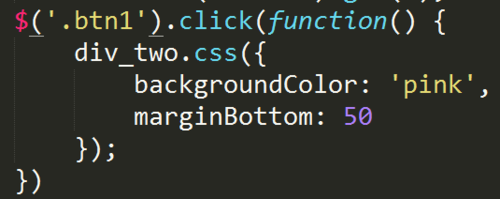
        btn1.onclick=function () {
            div_two.css({
                backgroundColor:'pink',
                marginBottom:50});  //属性设置完毕不加分号  属性设置驼峰形式时不用加' ',设置为横杠需要加'background-color'
        };
        btn2.onclick=function () {
            div_two.css({
                width:'-=100',
                height:'-=100'});  //可以是表达式、函数,此处表示在原基础减100
        }

    })
</script>
</body>
</html>
看了同学们的问答都是写的click ,它跟绑定事件onclick有什么不同?
0
收起
正在回答 回答被采纳积分+1
1回答

相似问题
click和onclick
11
0
1

啥时候用click啥时候用onclick
19
0
3

click onclick
12
0
1

请问老师,关于onclick和click的区别
12
0
3


登录后可查看更多问答,登录/注册
前端小白入门系列课程
- 参与学习 人
- 提交作业 11218 份
- 解答问题 36712 个
从一个不会编程的小白到一个老司机是需要过程的,首先得入门,学习基础知识,然后才能进阶,最后再到精通,本专题是你走进前端世界的不二选择!
了解课程


















恭喜解决一个难题,获得1积分~
来为老师/同学的回答评分吧
0 星