我的为啥跟老师的不一样?
<!DOCTYPE html> <html> <head> <meta charset="UTF-8"> <title>城市医院预约平台</title> <link rel="stylesheet" type="text/css" href="css.css"> </head> <body> <div id="top" class="top"> <div class="wrap"> <p class="call">010-114/116114电话预约</p> <p class="welcome"> 欢迎来到城市医院预约挂号统一平台 请 <a href="#">登录</a> <a href="#">注册</a> <a href="#">帮助中心</a> </p> </div> </div> <div id="header" class="header"> <div class="wrap"> <a class="logo" href="#"> <img src="logo.png" alt=""> </a> <div class="search"></div> </div> </div> <div id="nav" class="nav"> <div class="wrap"> <div class="link menu"> 全部科室 <div class="menu-list"></div> </div> <a href="#" class="link">按医院挂号</a> <a href="#" class="link">按科室挂号</a> <a href="#" class="link">按疾病挂号</a> <a href="#" class="link">最新公告</a> <a href="#" class="link rigth">社会知名医院</a> </div> </div> <div id="banner" class="banner"> <div class="banner-slider"></div> <div class="banner-search"></div> <div class="banner-help"></div> </div> <div id="content" class="content"> <div class="content-tab"></div> <div class="content-news"></div> <div class="content-close"></div> </div> <div id="footer" class="footer"> </div> </body> </html>
body{
	margin: 0;
	padding: 0;
}
a{
	text-decoration: none;
}
.wrap{
	width: 1000px;
	margin: 0 auto;
	position: relative;
}
.top{
	height: 30px;
	background: #f5f5f5;
	line-height: 30px;
	color: #868686;
	font-size: 13px;
}
.header{
	height: 92px;
}
.nav{
	height: 36px;
	background: #60bff2;
}
.banner{
	width: 802px;
	margin: 0 auto;
	height: 414px;
	padding: 9px 0 0 198px;
	overflow: hidden;
}
.banner-slider{
	float: left;
	width: 544px;
	height: 414px;
	background: #8edff3;
}
.banner-search{
	float: right;
	width: 250px;
	height: 255px;
	background: #eee;
}
.banner-help{
	float: right;
	width: 250px;
	height: 146px;
	background: #ccc;
	margin-top: 12px;
}
.content{
	width: 1000px;
	margin: 0 auto;
	padding: 10px 0 38px 0;
	overflow: hidden;
}
.content-tab{
	float: left;
	width: 742px;
	height: 490px;
	background: #eee;
}
.content-news,.content-close{
	float: right;
	width: 248px;
	height: 236px;
	border: 1px solid #ccc;
}
.content-close{
	margin-top: 12px;
	border-color: red;
}
.footer{
	height: 132px;
	padding: 25px;
	background: #eceef2;
}
p{
	margin: 0;
	padding: 0;
	display: inline-block;
}
.top .call{
	float: left;
	padding-left: 20px;
	background: url('icon-call.png') no-repeat center left;
}
.top .welcome{
	float: right;
}
.top a{
	color: #4da5e1;
	padding-left: 10px;
}
.header .logo{
	width: 402px;
	height: 74px;
	padding: 9px 0;
	display: inline-block;
}
.header .logo img{
	width: 100%;
	height: 100%;
}
.header .search{
	width: 326px;
	height: 38px;
	position: absolute;
	right: 0px;
	top: 29px;
	background: orange;
}
.nav .link{
	display: inline-block;
	float: left;
	padding-left: 30px;
	line-height: 36px;
	color: #d7f3ff;
	font-size: 16px;
	min-width: 80px;
	text-align: center;
}
.nav a:hover{
	color: #d7f3ff;
}
.nav .menu{
	width: 130px;
	padding-right: 30px;
	background: #1fa4f0;
	position: relative;
}
.nav .menu .menu-list{
	background: #1fa4f0
	width: 100%;
	height: 423px;
	position: absolute;
	left: 0;
	top: 36px;
}0
收起
正在回答
1回答

同学你好,你说的效果不一样是指的全部科室下面的蓝色内容框没有出现吗?
没有出现的原因是在css样式中,丢失了一个;结尾,参考下图:
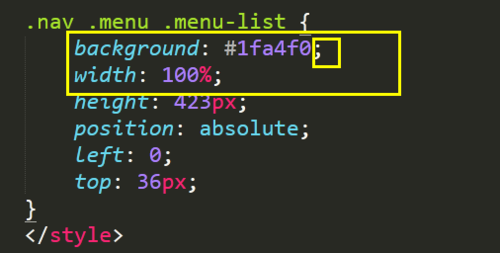
每写完一个css样式,就需要使用;来结尾。
测试一下哦,如果帮助到了你,欢迎采纳。
祝学习愉快!
相似问题
为什么我的环境变量那块操作跟老师的不一样?
22
0
5


web moudle的pom中有这么一段跟老师的不一样
20
0
3

老师 是不是现在 的组件代码跟之前的不一样了
26
0
3


和老师的不一样
38
0
3

登录后可查看更多问答,登录/注册
前端小白入门系列课程
- 参与学习 人
- 提交作业 11218 份
- 解答问题 36712 个
从一个不会编程的小白到一个老司机是需要过程的,首先得入门,学习基础知识,然后才能进阶,最后再到精通,本专题是你走进前端世界的不二选择!
了解课程


















恭喜解决一个难题,获得1积分~
来为老师/同学的回答评分吧
0 星