请问如何用js实现对密码的实时校验
<%--
Created by IntelliJ IDEA.
User: williwei
Date: 2019-03-11
Time: 21:18
To change this template use File | Settings | File Templates.
--%>
<%@ page contentType="text/html;charset=UTF-8" pageEncoding="UTF-8" %>
<!DOCTYPE html>
<html>
<head>
<%--<base href="<%=basePath%>">--%>
<meta http-equiv="Content-Type" content="text/html; charset=utf-8">
<title>注册界面</title>
</head>
<body>
<center>
<h1>用户注册</h1>
<form action="/RegistServlet" method="post">
<table width="400px" cellspacing="0px" cellpadding="0px" border="1px">
<tr>
<td>用户名</td>
<td><input type="text" name="username" placeholder="用户名为3-12位字母数字或下划线组合" required="required"></td>
</tr>
<tr>
<td>密 码</td>
<td><input type="password" name="password" placeholder="密码长度为6-12位的纯数字" id="password" required="required"></td>
</tr>
<tr>
<td>确认密码</td>
<td><input type="password" name="checkPWD" placeholder="密码长度为6-12位的纯数字" required="required"></td>
</tr>
<tr>
<td>手机号码</td>
<td><input type="text" name="phone" placeholder="请输入正确的手机号码格式" pattern="1[3578]\d{9}" required="required"></td>
</tr>
<tr>
<td>邮箱</td>
<td><input type="email" name="email" placeholder="请输入正确邮箱格式" required="required"></td>
</tr>
<tr>
<td colspan="2" style="text-align:center">
<input type="submit" value="注册"onclick="check()">
<input type="reset" value="重置">
</td>
</tr>
</table>
</form>
</center>
<script>
function check()
{
with(document.all){
if(password.value!=checkPWD.value)
{
alert("两次密码输入不一致")
input1.value = "";
input2.value = "";
}
}
}
</script>
</body>
</html>只能提交的时候校验,如何像视频演示的那样实现实时校验?
1
收起
正在回答
3回答

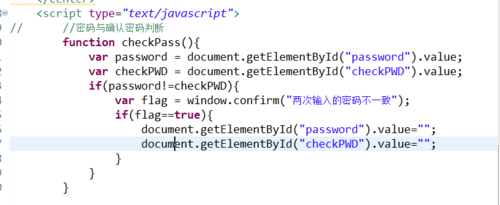
同学你好,同学可以使用js完成对密码的校验,通过id获取password和checkPWD的值,然后if判断,如果不同则使用弹出框给出提示,并将两次输入的密码设置为空,参考如下代码:
如果我的回答解决了你的疑惑,请采纳。祝:学习愉快~
好帮手慕阿满
2019-03-14 16:06:43
同学你好,在js中,使用getElementById()元素获取值,所以需要给确认密码处设置id,使其为checkPWD,另外设置失去焦点事件onblur(),当失去焦点时,调用checkPass()函数,修改如:
<tr>
                <td>确认密码</td>
                <td><input type="password" name="checkPWD" placeholder="密码长度为6-12位的纯数字" required="required" id="checkPWD" onblur="checkPass()"></td>
           		 </tr>
如果我的回答解决了你的疑惑,请采纳。祝:学习愉快~

HoodieWilli
2019-03-14 10:58:58
<%--
Created by IntelliJ IDEA.
User: williwei
Date: 2019-03-11
Time: 21:18
To change this template use File | Settings | File Templates.
--%>
<%@ page contentType="text/html;charset=UTF-8" pageEncoding="UTF-8" %>
<!DOCTYPE html>
<html>
<head>
<%--<base href="<%=basePath%>">--%>
<meta http-equiv="Content-Type" content="text/html; charset=utf-8">
<title>注册界面</title>
</head>
<%
String msg = "";
if (request.getAttribute("msg") != null){
msg = (String)request.getAttribute("msg");
}
%>
<body>
<h3><font color="red"><%=msg%></font></h3>
<center>
<h1>用户注册</h1>
<form action="/BookManager/RegistServlet" method="post">
<table width="400px" cellspacing="0px" cellpadding="0px" border="1px">
<tr>
<td>用户名</td>
<td><input type="text" name="username" placeholder="用户名为3-12位字母数字或下划线组合" required="required"></td>
</tr>
<tr>
<td>密 码</td>
<td><input type="password" name="password" placeholder="密码长度为6-12位的纯数字" id="password" required="required"></td>
</tr>
<tr>
<td>确认密码</td>
<td><input type="password" name="checkPWD" placeholder="密码长度为6-12位的纯数字" required="required"></td>
</tr>
<tr>
<td>手机号码</td>
<td><input type="text" name="phone" placeholder="请输入正确的手机号码格式" pattern="1[3578]\d{9}" required="required"></td>
</tr>
<tr>
<td>邮箱</td>
<td><input type="email" name="email" placeholder="请输入正确邮箱格式" required="required"></td>
</tr>
<tr>
<td colspan="2" style="text-align:center">
<input type="submit" value="注册"onclick="checkPass()">
<input type="reset" value="重置">
</td>
</tr>
</table>
</form>
</center>
<script type="text/javascript">
function checkPass()
{
var password = document.getElementById("password").value;
var checkPWD = document.getElementById("checkPWD").value;
if (password != checkPWD){
var flag = window.confirm("两次密码输入不一致");
if (flag == true){
document.getElementById("password").value = "";
document.getElementById("checkPWD").value = "";
}
}
// with(document){
// if(password.value!=checkPWD.value)
// {
// alert("两次密码输入不一致")
// input1.value = "";
// input2.value = "";
// }
// }
}
</script>
</body>
</html>可是这样改了还是不能实时校验啊
相似问题






登录后可查看更多问答,登录/注册
从网页搭建入门Java Web2018版
- 参与学习 人
- 提交作业 1088 份
- 解答问题 10204 个
如果你有Java语言基础,又想以后从事Java Web开发,那么本路径是你的不二选择!本路径从网页搭建开始入手,通过大量案例来学习Java Web基础。定能助你完成Java Web小白的蜕变!
了解课程












恭喜解决一个难题,获得1积分~
来为老师/同学的回答评分吧
0 星