about区组合图片有点问题,请老师帮忙看一下
<div class="down">
				<ul>
					<li><img src="images/b1.jpg"></li>
					<li><div class="about-down"></div></li>
					<li><img src="images/b2.jpg"></li>
					<li><div class="about-down"></div></li>
					<li><div class="about-down"></div></li>
					<li><img src="images/b3.jpg"></li>
					<li><div class="about-down"></div></li>
					<li><img src="images/b4.jpg"></li>
				</ul>
			</div>

.about .down{
	width:100%;
}

.about .down ul li{
	list-style:none;
	float:left;
	background-color:pink;
}

.about .down ul li img{
	width:379.8px;
	height:379.8px;
	margin:0;
}

.about .down ul li .about-down{
	background-color:#07cbc9;
	width:379.8px;
	height:379.8px;
}
我给li中的img添加了背景色为粉色,显示li中的img高度比div高度大一些,导致下一行的排列不能按期望显示。如下图所示:怎么修改呢?
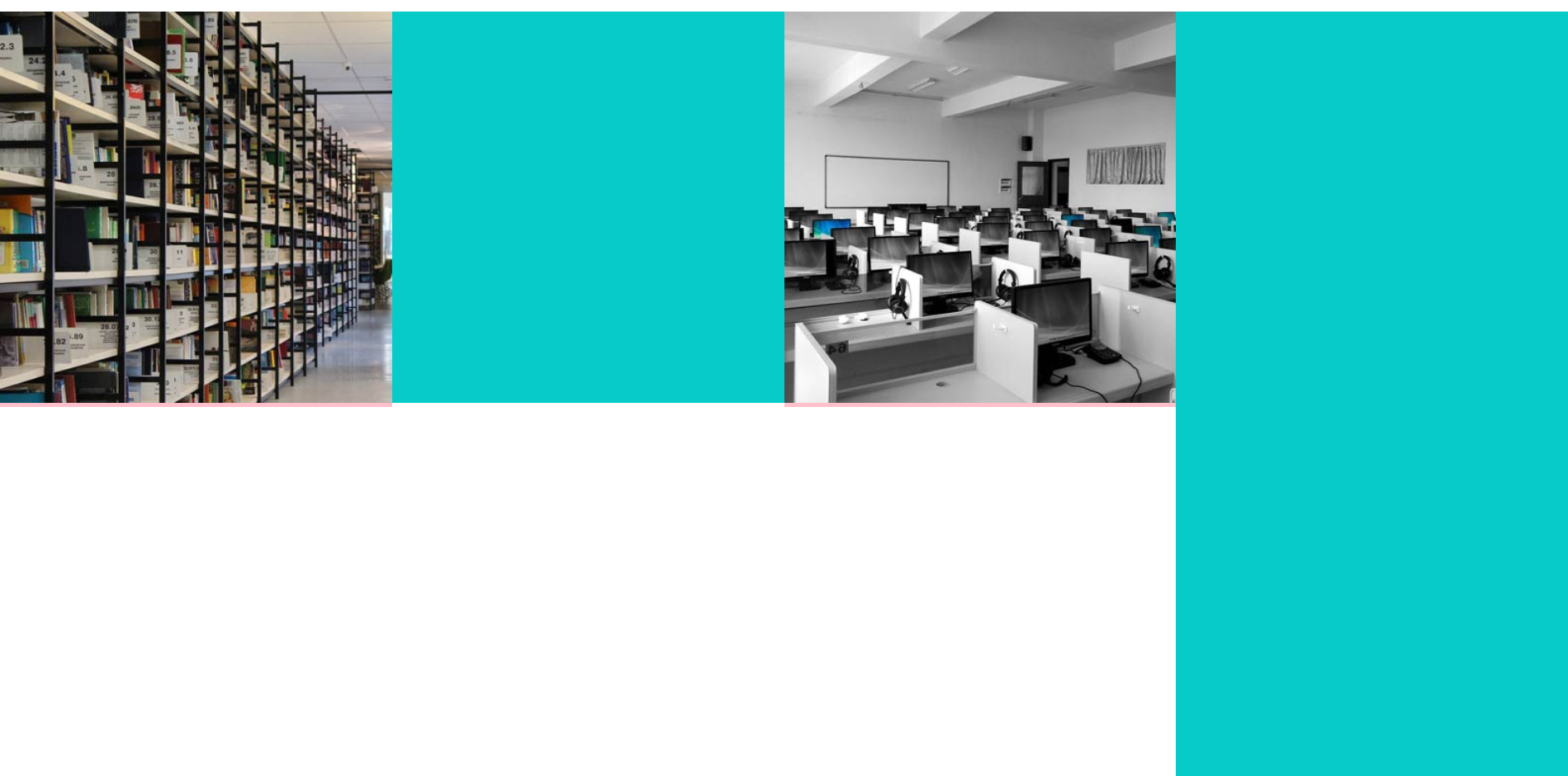
30
收起
正在回答
3回答

你好,建议参考代码如下:
<!DOCTYPE html>

<html>

<head>
    <meta charset="UTF-8">

    <style>

        .content .about .up{
            width:100%;
            height:550px;
            overflow:hidden;
        }

        .up1{
            width:100%;
            height:150px;
        }

        .content .about .up .up2{
            width:100%;
            height:400px;
        }

        h1{
            margin-top:40px;
            margin-left:46%;
        }

        label.line{
            background-color:#07cbc9;
            display:block;
            width: 40px;
            height: 2px;
            margin:15px auto;
        }

        .up1 p{
            margin:15px auto;
            width:400px;
            color:#686868;
            text-align:center;
            line-height:22px;
            font-size:12px;
        }

        .content .about .up .up-left{
            width:400px;
            margin-left:300px;
            position:absolute;
            z-index:200;
        }

        .content .about .up .up2 .up2-text{
            border:1px solid #ccc;
            width:330px;
            height:200px;
            background-color:rgba(255, 255, 255, 0.4);
        }

        .up2 h2{
            margin-left:10px;
            font-size:25px;
            font-weight:normal;
            width:150px;
            text-align:center;
        }

        .up2-text p{
            margin: 20px 15px 0 15px;
            font-size:15px;
        }

        .btn-exp{
            margin-left: 15px;
            margin-top:15px;
            width:100px;
            height:30px;
            background-color:black;
            text-align:center;
            color:white;
            border:0;
        }

        .btn-exp:hover{
            background-color:transparent;
            border:1px solid black;
            color:#686868;
        }

        .about .up .up2 img{
            position:absolute;
            width:500px;
            height:300px;
            left:50%;
            margin-left: -250px;
            z-index:100;
        }

        .about .up .up-right{
            position:absolute;
            width:150px;
            height:200px;
            right:330px;
        }

        .up-right .block{
            width:150px;
            height:100px;
            border:1.2px solid #07cbc9;
            text-align:center;
        }

        .up-right .block h3{
            margin-top: 15px;
        }

        .up-right .block p{
            margin-bottom: 15px;
        }

        .up-right ul li{
            list-style:none;
            margin-bottom:20px;
        }

        .about .down{
            width:100%;
            height:770px;
        }

        .about .down ul li{
            list-style:none;
            float:left;
            background-color:pink;
        }

        .about .down ul li img{
            width:379.8px;
            height:379.8px;
            margin:0;
        }

        .about .down ul li .about-down{
            background-color:#07cbc9;
            width:379.8px;
            height:379.8px;
        }

    </style>

</head>

<body>

<!-- 此处写代码 -->

<div class="about">
    <div class="down">
        <table class="GAL-TB" border="0" cellspacing="0" cellpadding="0">
        <tr>
            <td><img src="images/b1.jpg"></td>
            <td><div class="about-down"></div></td>
            <td><img src="images/b2.jpg"></td>
            <td><div class="about-down"></div></td>
            <tr>
            <td><div class="about-down"></div></td>

            <td><img src="images/b3.jpg"></td>
            <td><div class="about-down"></div></td>
            <td><img src="images/b4.jpg"></td>
        </tr>
        </tr>
        </table>
    </div>
</div>
</body>

</html>
运行效果如下:
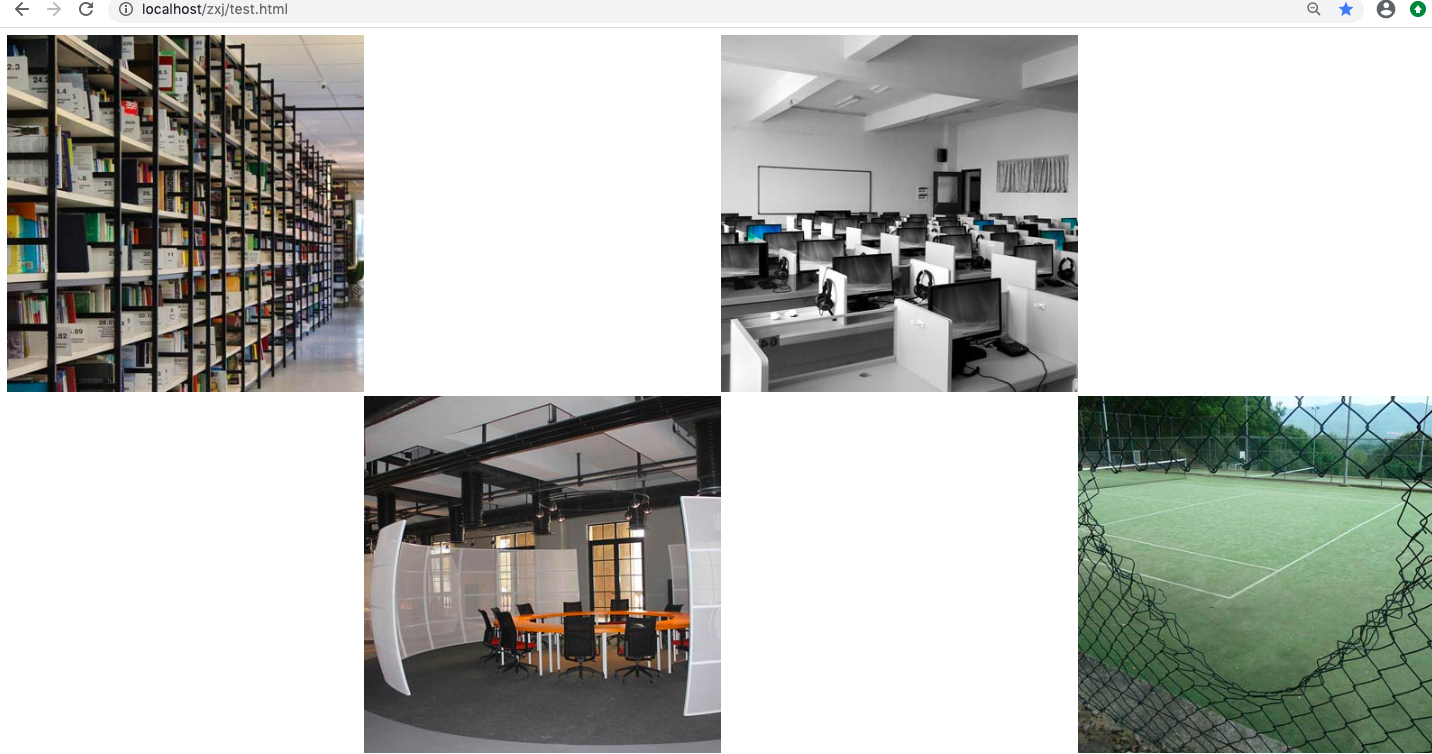
如果解决您的问题请采纳,祝学习愉快!

木木汇成林
2020-02-08 12:19:04
<div class="about">
			<div class="up">
				<!-- about简介 -->
				<div class="up1">
					<h1>ABOUT</h1>
					<label class="line"></label>
					<p>
						There are moments in life when you miss someone so much that you just want to pick them from your dreams and hug them for real!
					</p>
				</div>
				<!-- 图片和文字 -->
				<div class="up2">
					<div class="up-left">
						<h2>A WORD ABOUT US</h2>
						<div class="up2-text">
						<p>
							May you have enough happiness to make you sweet,enough trials to make you strong,enough sorrow to keep you human,enough hope to make you happy? Always put yourself in others’shoes.
						</p>
						<input type="button" class="btn-exp" value="EXPLORE">
						</div>
					</div>

					<img src="images/bb3.jpg">
					<div class="up-right">
						<ul>
							<li>
								<div class="block">
									<h3>70000</h3>
									<label class="line"></label>
									<p>Students</p>
								</div>
							</li>
							<li>
								<div class="block">
									<h3>600</h3>
									<label class="line"></label>
									<p>Faculty</p>
								</div>
							</li>
						</ul>
					</div>
				</div>
			</div>
			<div class="down">
				<ul>
					<li><img src="images/b1.jpg"></li>
					<li><div class="about-down"></div></li>
					<li><img src="images/b2.jpg"></li>
					<li><div class="about-down"></div></li>
					<!-- <li><div class="about-down"></div></li>
					<li><img src="images/b3.jpg"></li>
					<li><div class="about-down"></div></li>
					<li><img src="images/b4.jpg"></li> -->
				</ul>
			</div>
		</div>

.content .about .up{
	width:100%;
	height:550px;
	overflow:hidden;
}

.up1{
	width:100%;
	height:150px;
}

.content .about .up .up2{
	width:100%;
	height:400px;
}

h1{
	margin-top:40px;
	margin-left:46%;
}

label.line{
    background-color:#07cbc9;
    display:block;
    width: 40px;
    height: 2px;
    margin:15px auto;
}

.up1 p{
	margin:15px auto;
	width:400px;
	color:#686868;
	text-align:center;
	line-height:22px;
	font-size:12px;
}

.content .about .up .up-left{
	width:400px;
	margin-left:300px;
	position:absolute;
	z-index:200;
}

.content .about .up .up2 .up2-text{
	border:1px solid #ccc;
	width:330px;
	height:200px;
	background-color:rgba(255, 255, 255, 0.4);
}

.up2 h2{
	margin-left:10px;
	font-size:25px;
	font-weight:normal;
	width:150px;
	text-align:center;
}

.up2-text p{
	margin: 20px 15px 0 15px;
	font-size:15px;
}

.btn-exp{
	margin-left: 15px;
	margin-top:15px;
	width:100px;
	height:30px;
	background-color:black;
	text-align:center;
	color:white;
	border:0;
}

.btn-exp:hover{
	background-color:transparent;
	border:1px solid black;
	color:#686868;
}

.about .up .up2 img{
	position:absolute;
	width:500px;
	height:300px;
	left:50%;
	margin-left: -250px;
	z-index:100;
}

.about .up .up-right{
	position:absolute;
	width:150px;
	height:200px;
	right:330px;
}

.up-right .block{
	width:150px;
	height:100px;
	border:1.2px solid #07cbc9;
	text-align:center;
}

.up-right .block h3{
	margin-top: 15px;
}

.up-right .block p{
	margin-bottom: 15px;
}

.up-right ul li{
	list-style:none;
	margin-bottom:20px;
}

.about .down{
	width:100%;
	height:770px;
}

.about .down ul li{
	list-style:none;
	float:left;
	background-color:pink;
}

.about .down ul li img{
	width:379.8px;
	height:379.8px;
	margin:0;
}

.about .down ul li .about-down{
	background-color:#07cbc9;
	width:379.8px;
	height:379.8px;
}
guly
2020-02-08 12:15:15
你好,由于代码贴出不是很完整,老师不能准确回复你的问题,建议贴出class=about部分div代码
或者参考如下代码:
<!DOCTYPE html>
<html>
<head>
    <meta charset="UTF-8">
    <!-- 此处编写样式 -->
    <style>
        .ABOUT2{
            position: relative;
            width: 100%;
            height: 700px;
            background-color: #07cbc9;
        }
        .ABOUT2 .GAL-TB{
            width: 100%;
            height: 100%
            margin: 0px;
            line-height:0px;
        }
        .ABOUT2 .GAL-TB img{
            width: 100%;
            height: 350px;
        }
        .ABOUT2 .GAL-TB .word1{
            padding-left: 20px;
            width: 100%-20px;
            height: 250px;
            line-height:2em;
            color: white;
            font-size: 15px;
        }
        .ABOUT2 .GAL-TB .word1 .word11{
            padding-top: 20px;
        }
        .ABOUT2 .GAL-TB .word1 .word12{
            padding-top: 20px;
            font-size: 12px;
            line-height:1.5em;
            color: #cccccc;
        }
        .ABOUT2 .GAL-TB .word1 .btn{
            height: 40px;
            width:90px;
            background-color: #000;
            color: white;
            border:0;
            z-index: 10;
            margin-left: 30%;
            margin-top: 20px;
        }
        .ABOUT2 .GAL-TB .word1 .btn:hover{
            border: 2px solid #000;
            background-color: transparent;
            color: #000;
            cursor: pointer;
        }
        .ABOUT2 .jiantou1{
            position: absolute;
            z-index: 10;
            top: 175px;
            right: 75%;
            width: 0;
            height: 0;
            border-width: 20px;
            border-style: solid;
            border-color: transparent #07cbc9 transparent  transparent;
            transform: rotate(0deg); /*顺时针旋转90°*/
        }
        .ABOUT2 .jiantou2{
            position: absolute;
            z-index: 10;
            top:175px;
            right: 25%;
            width: 0;
            height: 0;
            border-width: 20px;
            border-style: solid;
            border-color: transparent #07cbc9 transparent  transparent;
            transform: rotate(0deg); /*顺时针旋转90°*/
        }
        .ABOUT2 .jiantou3{
            position: absolute;
            z-index: 10;
            top:525px;
            left: 25%;
            width: 0;
            height: 0;
            border-width: 20px;
            border-style: solid;
            border-color: transparent #07cbc9 transparent transparent;
            transform: rotate(180deg); /*顺时针旋转90°*/
        }
        .ABOUT2 .jiantou4{
            position: absolute;
            z-index: 10;
            top:525px;
            left: 75%;
            width: 0;
            height: 0;
            border-width: 20px;
            border-style: solid;
            border-color: transparent #07cbc9 transparent transparent;
            transform: rotate(180deg); /*顺时针旋转90°*/
        }
    </style>
</head>
<body>
<!-- 此处写代码 -->
    <div class="ABOUT2">
        <table class="GAL-TB" border="0" cellspacing="0" cellpadding="0">
            <tr>
                <td><img src="images/b1.jpg" alt="b1.jpg"></td>
                <td><div class="word1">
                    <h1>Library</h1><p class="word11">Lorem Ipsum is simoly dummy text of the<br>printing and typesetting industry</p><p class="word12">Lorem Ipsum has been the industry's standard dummy<br>text ecer since the 1500s,when an unknown printer took<br>a galley of type and scrambled it to make a type<br>soecimen book.</p>
                    <button type="button" class="btn">EXPLORE</button>
                </div>
                </td>
                <td><img src="images/b2.jpg" alt="b2.jpg"></td>
                <td><div class="word1">
                    <h1>Library</h1><p class="word11">Lorem Ipsum is simoly dummy text of the<br>printing and typesetting industry</p><p class="word12">Lorem Ipsum has been the industry's standard dummy<br>text ecer since the 1500s,when an unknown printer took<br>a galley of type and scrambled it to make a type<br>soecimen book.</p>
                    <button type="button" class="btn">EXPLORE</button>
                </div>
                </td>
            </tr>
            <tr>
                <td><div class="word1">
                    <h1>Library</h1><p class="word11">Lorem Ipsum is simoly dummy text of the<br>printing and typesetting industry</p><p class="word12">Lorem Ipsum has been the industry's standard dummy<br>text ecer since the 1500s,when an unknown printer took<br>a galley of type and scrambled it to make a type<br>soecimen book.</p>
                    <button type="button" class="btn">EXPLORE</button>
                </div>
                </td>
                <td><img src="images/b3.jpg" alt="b3.jpg"></td>
                <td><div class="word1">
                    <h1>Library</h1><p class="word11">Lorem Ipsum is simoly dummy text of the<br>printing and typesetting industry</p><p class="word12">Lorem Ipsum has been the industry's standard dummy<br>text ecer since the 1500s,when an unknown printer took<br>a galley of type and scrambled it to make a type<br>soecimen book.</p>
                    <button type="button" class="btn">EXPLORE</button>
                </div>
                </td>
                <td><img src="images/b4.jpg" alt="b4.jpg"></td>
            </tr>
        </table>
    </div>
</body>
</html>
如果解决您的问题请采纳,祝学习愉快!
相似问题






登录后可查看更多问答,登录/注册
2. 从网页搭建入门JavaWeb
- 参与学习 人
- 提交作业 676 份
- 解答问题 9666 个
本阶段将从前端网页搭建入手,到Java Web基础,前后端结合助你完成Java Web小白的蜕变!
了解课程










恭喜解决一个难题,获得1积分~
来为老师/同学的回答评分吧
0 星