老师,我设置不了table里面p标签的属性,
<div id="bottom">
<table>
<tr>
<td><img src="img/b1.jpg" /></td>
<td class="word">
<p class="first-p">Library</p>
<p class="second-p">Lorem Ipsum is simply dummy text of the printing and typesetting industyry</p>
<p class="thrid-p">Lorem Ipsum has been the industry's standard dummy text ever since the 1500s,when an unknown printer took a galley of type and scrambled it to make a type sepcimen book</p>
<a href="#">EXPLORE</a>
</td>
<td><img src="img/b2.jpg" /></td>
<td>
<p>Library</p>
<p>Lorem Ipsum is simply dummy text of the printing and typesetting industyry</p>
<p>Lorem Ipsum has been the industry's standard dummy text ever since the 1500s,when an unknown printer took a galley of type and scrambled it to make a type sepcimen book</p>
<a href="#">EXPLORE</a>
</td>
</tr>
<tr>
<td>
<p>Library</p>
<p>Lorem Ipsum is simply dummy text of the printing and typesetting industyry</p>
<p>Lorem Ipsum has been the industry's standard dummy text ever since the 1500s,when an unknown printer took a galley of type and scrambled it to make a type sepcimen book</p>
<a href="#">EXPLORE</a>
</td>
<td><img src="img/b3.jpg" /></td>
<td>
<p>Library</p>
<p>Lorem Ipsum is simply dummy text of the printing and typesetting industyry</p>
<p>Lorem Ipsum has been the industry's standard dummy text ever since the 1500s,when an unknown printer took a galley of type and scrambled it to make a type sepcimen book</p>
<a href="#">EXPLORE</a>
</td>
<td><img src="img/b4.jpg" /></td>
</tr>
</table>
</div >
>
正在回答

你好,因为浏览器在解析的时候,会有一层tbody:
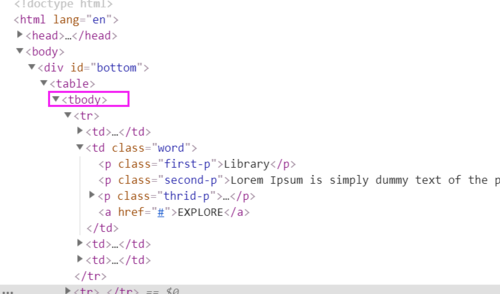
所以如果使用>选择器(父子选择器)的话,后面需要添加tbody,如下:

如果不使用>选择器,直接用空格(后代选择器)就可以了,如下:

两种都可以测试下,祝学习愉快!
相似问题








登录后可查看更多问答,登录/注册











恭喜解决一个难题,获得1积分~
来为老师/同学的回答评分吧
0 星