哪里出错了,不会轮播啊
<!DOCTYPE html>
<html>
<head>
<meta charset="UTF-8">
<title>图片特效</title>
<link rel="stylesheet" type="text/css" href="css/test.css">
</head>
<body>
<!--总盒子-->
<div class="main" id="main"> <div class="banner" id="banner"> <!--图片区-->
<div class="picture" id="picture">
<img src="img/bg1.jpg" class="show">
<img src="img/bg2.jpg">
<img src="img/bg3.jpg">
</div>
</div></div>
<script type="text/javascript" src="js/test.js"></script>
</body>
</html>
*{
margin:0px;
padding:0px;
}
.main{
width:1200px;
height:460px;
margin:30px auto;
position:relative;
overflow:hidden;
}
.banner{
width:1200px;
height:460px;
position:relative;
overflow:hidden;
}
.pictures img{
position: absolute;
float:left;
display:none;
}
.picture .show{
display:block;
}
timer=null;
index=0;
//获取id的函数
function byId(id){
return typeof(id)==="string"?document.getElementById(id):id;
}
var pictures=byId(picture).getElementsByTagName("img");
var size=pictures.length;
function pictureChange() {
var main=document.getElementById("main");
//鼠标停在界面上
main.onmouseover=function(){
if(timer)
clearInterval(timer);
}
//鼠标离开界面
main.onmouseout=function(){
timer=Interval(function(){
index++;
if(index>=3){
index=0;
}
function Changeshow()
},3000);
}
function Changeshow(){
for(var i=0;i<size;i++){
pictures[i].className=" ";
}
pictures[index].className="show";
}
main.onmouseout();
}
pictureChange();
正在回答

同学你好,这里老师将所有的文件都贴出同学复制后,再来重试一下,并且同学使用的是什么浏览器,建议使用Chrome浏览器,例如:
html:
<!DOCTYPE html>
<html>
<head>
 <meta charset="UTF-8">
 <title>图片特效</title>
 <link rel="stylesheet" type="text/css" href="test2_1.css">
</head>
<body>
 <!--总盒子-->
	<div class="main" id="main">
		 <div class="banner" id="banner">    <!--图片区-->
			    <div class="picture" id="picture">
				    <img src="img/bg1.jpg" class="show">
				    <img src="img/bg2.jpg">
				    <img src="img/bg3.jpg">
			    </div>
  		</div>
   </div>
<script type="text/javascript" src="test2_1.js"></script>
</body>
</html>
css:
*{
 margin:0px;
 padding:0px;
}


.main{
 width:1200px;
 height:460px;
 margin:30px auto;
 position:relative;
 overflow:hidden;


}

.banner{
    width:1200px;
 height:460px;
 position:relative;
 overflow:hidden;
}

.pictures img{
 position: absolute;
 float:left;
 display:none;
}

.picture .show{
   display:block;
}
js:
timer=null; index=0;
//获取id的函数
 function byId(id){
      return typeof(id)==="string"?document.getElementById(id):id;
    }
    var pictures=byId(picture).getElementsByTagName("img");
    var size=pictures.length;
    function pictureChange() {
    var main=document.getElementById("main");
    //鼠标停在界面上 m
      main.onmouseover=function(){
        if(timer) clearInterval(timer);
      }
      //鼠标离开界面
      main.onmouseout=function(){
          timer=setInterval(function(){
          index++; if(index>=3){
             index=0;
          }
          changeShow()
        },3000);
     }

    function changeShow(){
        for(var i=0;i<size;i++){
            pictures[i].style.display="none";
        }
        pictures[index].style.display="block";
       }
      main.onmouseout();
    }
pictureChange();
如果我的回答解决了你的疑惑,请采纳。祝:学习愉快~
同学你好,1、定时器是-->setInterval() 方法,可按照指定的周期(以毫秒计)来调用函数或计算表达式,对应在timer中需要添加调用setInterval方法。
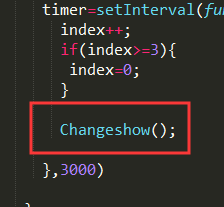
2、Changeshow方法的调用不要求在前面再加上function,加上function就是声明定义了不是调用,所以需要去掉Interval中调用Changeshow方法前的function
3、在Changeshow直接将className设置为空,并不能把img属性的display设置为none,所以这里建议修改为:
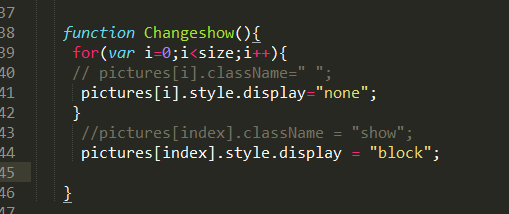
综上所述,修改后的js代码如下:
timer=null;
index=0;

//获取id的函数
function byId(id){
 return typeof(id)==="string"?document.getElementById(id):id;
}


var pictures=byId(picture).getElementsByTagName("img");
var size=pictures.length;


function pictureChange() {
 var main=document.getElementById("main");

//鼠标停在界面上
 main.onmouseover=function(){
       if(timer)
        clearInterval(timer);

 }
   //鼠标离开界面
   main.onmouseout=function(){
     timer=setInterval(function(){
       index++;
       if(index>=3){
        index=0;
       }

       Changeshow();

     },3000)

   }


   function Changeshow(){
    for(var i=0;i<size;i++){
    // pictures[i].className=" ";
     pictures[i].style.display="none";
    }
     //pictures[index].className = "show";
     pictures[index].style.display = "block";

   }

main.onmouseout();

}

pictureChange();
如果我的回答解决了你的疑惑,请采纳!祝学习愉快!





- 参与学习 人
- 提交作业 676 份
- 解答问题 9666 个
本阶段将从前端网页搭建入手,到Java Web基础,前后端结合助你完成Java Web小白的蜕变!
了解课程










恭喜解决一个难题,获得1积分~
来为老师/同学的回答评分吧
0 星