鼠标进入“继续了解学习体验”一整块红色区域鼠标都会变化,怎么修改只指向按钮才改变鼠标
<!DOCTYPE html> <html lang="en"> <head> <meta charset="UTF-8"> <meta name="viewport" content="width=device-width, initial-scale=1.0"> <title>JS实战</title> <link rel="stylesheet" type="text/css" href="./css/index.css" /> <link rel="stylesheet" type="text/css" href="./css/base.css" /> <script src="./JS/index.js"></script> </head> <body> <!-- 头部 --> <header> <div class="header__logo">H5实战页面</div> <div class="header__nava"> <!-- 导航项 --> <a href="javascript:;" class="header__nava-item header__nava-item_custom_ative">实战课程</a> <a href="javascript:;" class="header__nava-item">商业案例</a> <a href="javascript:;" class="header__nava-item">课程体系</a> <a href="javascript:;" class="header__nava-item">集成环境</a> <a href="javascript:;" class="header__nava-item">云端学习</a> <!-- 导航项按钮 --> <a href="javascript:;" class="header__nava-item header__nava-item_custom_buttom">即刻学习</a> </div> </header> <!-- 屏幕1 --> <div class="screan1"> <!-- 屏幕1标题1 --> <h2 class="screan1__heading">实战课程重磅上线</h2> <!-- 屏幕2标题2 --> <h4 class="screan1__subheading">一键云学习,还在等什么?</h4> </div> <!-- 屏幕2 --> <div class="screan2"> <!-- 网页内容容器 --> <div class="screan__wrap"> <!-- 屏幕2标题1 --> <h2 class="screan2__wrap__heading">每门课都是真实商业案例</h2> <!-- 屏幕2标题2 --> <h5 class="screan2__wrap__subheading">真实案例,真实场景,在实战中实践、操作调试<br>大牛带你体验BAT真实开发流程,所有开发过程一一为你呈现</h5> <!-- 屏幕2图片项 --> <div class="screan2__warp_img-item"> <div class="screan2__wrap__img-item__bg-1"></div> <div class="screan2__wrap__img-item__bg-2"></div> <div class="screan2__wrap__img-item__bg-3"></div> </div> </div> </div> <!-- 屏幕3 --> <div class="screan3"> <!-- 容器 --> <div class="screan__wrap"> <!-- 屏幕3图片 --> <div class="screan3__img__bg-1"></div> <!-- 屏幕3标题1 --> <h2 class="screan3__heding">强大的语言课程体系支持</h2> <!-- 屏幕3标题2 --> <h3 class="screan3__subheding">学习环境与课程轻松对接,安装、调试、写入、部署、运行,一站式解决<br>,让你体验开发流程</h3> <div class="screan3__inner"> <div class="screan3__inner-1">HTML5</div> <div class="screan3__inner-2">PHP</div> <div class="screan3__inner-3">JAVA</div> <div class="screan3__inner-4">Python</div> <div class="screan3__inner-5">Node.JS</div> </div> </div> </div> <!-- 屏幕4 --> <div class="screan4"> <div class="screan__wrap"> <h2 class="screan4__wrap__heading">省去本地复杂的环境搭建</h2> <div class="screan4__wrap__heading__line"></div> <h3 class="screan4__wrap__subheading">你可以告别在虚拟机中调试开发了</h3> <div class="screan4__wrap__img"> <div class="screan4__wrap__img__bg-1"></div> <div class="screan4__wrap__img__bg-2"></div> <div class="screan4__wrap__img__bg-3"></div> <div class="screan4__wrap__img__bg-4"></div> <h4 class="screan4__wrap__img__bg-1__inner-1">实战课程集成开发环境</h4> <h4 class="screan4__wrap__img__bg-2__inner-2">内置终端命令行</h4> <h4 class="screan4__wrap__img__bg-3__inner-3">编译你的应用程序</h4> <h4 class="screan4__wrap__img__bg-4__inner-4">通过云端服务输出效果</h4> </div> </div> </div> <!-- 屏幕5 --> <div class="screan5"> <div class="screan__wrap"> <div class="screan5__wrap__img__bg-1"></div> <h2 class="screan5__wrap__heading">云端学习可以这样简单</h2> <h3 class="screan5__wrap__subheading">看视频,敲代码一气呵成。结合慕课网为你提供的云端学习工具,所见即所得。从此学习不一样</h3> </div> </div> <!-- 屏幕6 --> <div class="screan6"> <a href="javascript:;"> <div class="screan6__bottom">继续了解学习体验</div> </a> </div> <!-- 页脚 --> <footer> <div class="screan__wrap"> <div class="footer__heading"> <a href="javascript:;">首页网站</a> <a href="javascript:;">人才招聘</a> <a href="javascript:;">联系我们</a> <a href="javascript:;">高校联盟</a> <a href="javascript:;">关于我们</a> <a href="javascript:;">讲师招募</a> <a href="javascript:;">意见反馈</a> <a href="javascript:;">友情链接</a> </div> <div class="footer__subheading"> <p>copyright ©2015 imooc.com All Rights Reserved | 京ICP备 13046642号-2</p> </div> </div> </footer> </body> </html>
/* 头部 */
header{
 height:60px;
 width: 100%;
 position: fixed;
 top: 0;
 left: 0;
 z-index: 999;
}

/* 头部logo */
.header__logo{
    height: 40px;
    background-color:rgba(128,128,128, 0.1);
    font-size: 18px;
    background: url(../img/logo.png)no-repeat;
    font-weight: bold;
    color: white;
    z-index: 99;
    text-indent: 60px;
    line-height: 40px;
    float: left;
    margin-left:10px;
    margin-top: 10px;
}

/* 网页内容容器 */
.screan__wrap{
    width: 1200px;
    height: 640px;
    margin: 0 auto;

}

/* 头部导航 */
.header__nava{
    float: right;
    display: block;
    line-height: 60px;
    height: 40px;

}

/* 头部导航项 */
.header__nava-item{
    color: #efefff;
    margin-right: 40px;
    cursor:pointer;


}
/* 头部导航按钮 */
.header__nava-item_custom_buttom{
    border-radius: 5px;
    height:40px;
    width: 96px;
    background-color: #f01400;
    color: #efefff;
    display: block;
    float:right;
    margin-top: 10px;
    line-height: 40px;
    margin-right: 30px;
    text-align: center;

}

/* 屏幕1 */
.screan1{
    height: 640px;
    width: 100%;
    background:url(../img/sc1.jpg)no-repeat;
    background-size: cover;
    display: block;
    position: relative;
}
/* 屏幕1标题1 */
.screan1__heading{
    position: absolute;
    font-size:40px;
    font-weight: bold;
    color:#ffff;
   display: block;
    padding-top:240px;
    text-align: center;
    float: left;
    width: 100%;

}
/* 屏幕1标题2 */
.screan1__subheading{
    position: absolute;
    color:#ffff;
   display: block;
    padding-top:315px;
    text-align: center;
    float: left;
    width: 100%;

}

/* 屏幕2 */
.screan2{
    width: 100%;
    height:640px;
    height: 640px;
    width: 100%;
    background-size: cover;
    display: block;
    position: relative;
    overflow: hidden;

}
/* 屏幕2标题1 */
.screan2__wrap__heading{
    color:#07111b;
    font-size: 40px;
    text-align: center;
    margin: 0;
    line-height: 40px;
    padding-top: 90px;

}
/* 屏幕2标题2 */
.screan2__wrap__subheading{
    line-height: 16px;
    color:#07111b;
    font-size: 16px;
    text-align: center;
    margin: 0;
    line-height: 28px;
    padding-top: 63px;
}
/* 屏幕2 图片项  */
.screan2__warp__img-item{
    width: 100%;
    height:391px;
    display: block;
    float: left;
    overflow: hidden;
    margin: 0 auto;
}

/* 屏幕2 图片项1 */
.screan2__wrap__img-item__bg-1{
    display: block;
    position: absolute;
    float: left;
    background: url(../img/sc2.png)no-repeat;
    height: 361px;
    width: 750px;
    z-index: 1;
    color:red;
    margin-left: 225px;
    margin-top: 42px;
}

/* 屏幕2 图片项2 */
.screan2__wrap__img-item__bg-2{
    display: block;
    position: absolute;
    float: left;
    background: url(../img/sc2-1.png)no-repeat;
    height: 380px;
    width: 275px;
    z-index: 99;
    margin-left: 462.5px;
    margin-top: 20px;
}

/* 屏幕2 图片项3 */
.screan2__wrap__img-item__bg-3{
    display: block;
    position: absolute;
    float: left;
    background: url(../img/sc2-2.png)no-repeat;
    height: 305px;
    width: 266px;
    margin-left: 580px;
    margin-top: 103px;
    z-index: 3;

}


/* 屏幕3 */
.screan3{
    float: left;
    width: 100%;
    height:640px;
    height: 640px;
    width: 100%;
    background-size: cover;
    display: block;
    background-color:#2b333b;
    overflow: hidden;
    position: relative;
}
/* 屏幕3图片 */
.screan3__img__bg-1{
    display: block;
    position: absolute;
    float: left;
    background: url(../img/sc3.png)no-repeat;
    height: 340px;
    width: 308px;
    margin-left: -80px;
    margin-top: 150px;
    z-index: 1;
    transform: scale(1.85);
}
/* 屏幕3标题1 */
.screan3__heding{

    font-size:35px;
    color: #ffff;
    padding-left: 665px;
    padding-top:230px;

}
/* 屏幕3标题2 */
.screan3__subheding{
    font-size:15px;
    color: #ffff;
    margin-left: 665px;
    line-height: 25px;
    padding-top:58px;
}

.screan3__inner{
    float: left;
    z-index: 100;
    margin-left: 677px;
    display: block;
}

.screan3__inner-1{
    float: left;
    width: 65px;
    height: 65px;
    border: #1f5975 4px solid;
    border-radius: 50%;
    color:#2294ff;
    text-align: center;
    line-height: 65px;
    margin-top: 140px;
    margin-right:35px;
}

.screan3__inner-2{
    float: left;
    width: 65px;
    height: 65px;
    border: #424d76 4px solid;
    border-radius: 50%;
    color:#7888fd;
    text-align: center;
    line-height: 65px;
    margin-top: 140px;
    margin-right:35px;
}

.screan3__inner-3{
    float: left;
    width: 65px;
    height: 65px;
    border: #6b4146 4px solid;
    border-radius: 50%;
    color:#dd413b;
    text-align: center;
    line-height: 65px;
    margin-top: 140px;
    margin-right:35px;
}

.screan3__inner-4{
    float: left;
    width: 65px;
    height: 65px;
    border: #29535f 4px solid;
    border-radius: 50%;
    color:#27bde5;
    text-align: center;
    line-height: 65px;
    margin-top: 140px;
    margin-right:35px;
}

.screan3__inner-5{
    float: left;
    width: 65px;
    height: 65px;
    border: #3e4e40 4px solid;
    border-radius: 50%;
    color:#909e41;
    text-align: center;
    line-height: 65px;
    margin-top: 140px;
}

/* 屏幕4 */
.screan4{
    float: left;
    width: 100%;
    height:640px;
    height: 640px;
    width: 100%;
    background-size: cover;
    display: block;
    position: relative;
    background-color:#f3f5f7;
    overflow: hidden;
}

.screan4__wrap__heading{
    color: #07111b;
    font-size: 40px;
    text-align: center;
    padding-top:90px;
}

.screan4__wrap__heading__line{
    border-bottom: #ff0000 4px solid;
    width: 50px;
    padding-top: 37px;
    text-align: center;
    margin: 0 auto;
}

.screan4__wrap__subheading{
    color: #07111b;
    font-size: 16px;
    text-align: center;
    padding-top:63px;

}

.screan4__wrap__img{
    display: block;
    height:100%;
    width: 100%;
    margin: 0 auto;

}

.screan4__wrap__img__bg-1{
    background: url(../img/sc4-1.png)no-repeat;
    margin-top: 80px;
    margin-left: 100px;
    margin-right: 220px;
    width: 80px;
    height: 70px;
    display: block;
    float: left;
}

.screan4__wrap__img__bg-2{
    background: url(../img/sc4-2.png)no-repeat;
    margin-right: 220px;
    margin-top: 80px;
    width: 80px;
    height:75px;
    display: block;
    float: left;
}

.screan4__wrap__img__bg-3{
    background: url(../img/sc4-3.png)no-repeat;
    margin-right: 220px;
    margin-top: 80px;
    width: 80px;
    height:75px;
    display: block;
    float: left;
}

.screan4__wrap__img__bg-4{
    background: url(../img/sc4-4.png)no-repeat;
    margin-top: 80px;
    width: 80px;
    height:80px;
    display: block;
    float: left;
}

.screan4__wrap__img__bg-1__inner-1{
    height: 16px;
    margin-top: 30px;
    padding-left:60px;
    font-size: 16px;
    line-height: 16px;
    float: left;
    color: #07111b;
}

.screan4__wrap__img__bg-2__inner-2{
    height: 16px;
    margin-top: 30px;
    padding-left:160px;
    font-size: 16px;
    line-height: 16px;
    float: left;
    color: #07111b;

}

.screan4__wrap__img__bg-3__inner-3{
    height: 16px;
    margin-top: 30px;
    padding-left:180px;
    font-size: 16px;
    line-height: 16px;
    float: left;
    color: #07111b;

}

.screan4__wrap__img__bg-4__inner-4{
    height: 16px;
    margin-top: 30px;
    padding-left:160px;
    font-size: 16px;
    line-height: 16px;
    float: left;
    color: #07111b;

}

/* 屏幕5 */
.screan5{
    position: absolute;
    float: left;
    width: 100%;
    height:640px;
    height: 640px;
    width: 100%;
    display: block;
    position: relative;
    background: url(../img/sc5.jpg)no-repeat;
    background-size: cover;
    overflow: hidden;
}

.screan5__wrap__img__bg-1{
    background: url(../img/sc5-1.png)no-repeat;
    width: 200px;
    height: 200px;
    margin-left: 496px;
    margin-top: 100px;
}

.screan5__wrap__heading{
    color: #ffffff;
    font-size: 40px;
    text-align: center;
    padding-top:90px;
}

.screan5__wrap__subheading{
    color: #ffffff;
    font-size: 16px;
    text-align: center;
    padding-top:64px;
}


.screan6__bottom{
    width: 240px;
    height: 60px;
    border: #707070 1px solid;
    border-radius: 5px;
    margin: 0 auto;
    margin-top: 70px;
    text-align: center;
    line-height: 60px;
    font-weight: bold;

    color:#14191e;
}


/* 屏幕6 */
.screan6{
    position: absolute;
    float: left;
    width: 100%;
    height:200px;
    width: 100%;
    background-size: cover;
    display: block;
    position: relative;
    background-color:#ffff;
    overflow: hidden;
}

/* 页脚 */
footer{
    float: left;
    height: 105px;
    width: 100%;
    background-color:#000000;
    overflow: hidden;
    position: relative;
    overflow: hidden;
}
footer a{
    margin-right: 40px;
    color: #ffffff;

}


.footer__heading{
    margin-top: 33px;
    width: 100%;
    height:15px;
    text-align: center;
}

.footer__subheading{
    padding-top: 13px;
    height:20px;
    margin:0 auto;
    text-align: center;
}
.footer__subheading p{
    font-size: 12px;
    color: #ffffff;
    text-align: center;
}
*{
margin:0;
padding:0;
font-size:12px;
font-family: "Microsoft Yahei";
}
a{
text-decoration: none;
}
8
收起
正在回答
2回答

同学你好,针对你的问题解答如下:
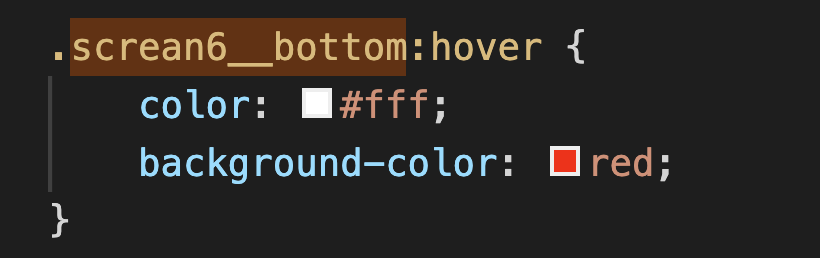
直接格按钮添加鼠标移入事件即可,示例:
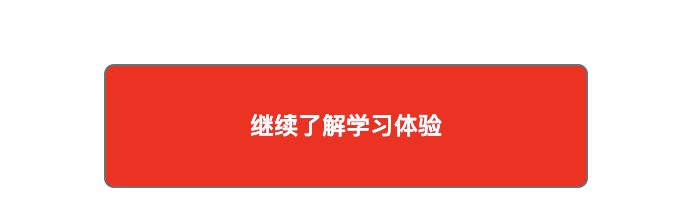
效果图:
最后学分达到总学分的百分之六十可以获得慕课网通关证书哦
如果我的回答帮助到了你,欢迎采纳,祝学习愉快~



















恭喜解决一个难题,获得1积分~
来为老师/同学的回答评分吧
0 星