关于代码的两个问题
<!doctype html>
<html>
<head>
<meta charset="utf-8">
<meta name="viewport" content="width=device-width, initial-scale=1, user-scalable=no, maximum-scale=1, minimum-scale=1">
<title>无标题文档</title>
<style>
*{margin: 0;padding: 0;}
body{width: 100%;height: 2000px;background-color: pink;}
#div{width: 50px;height: 50px;background-color: red;line-height: 50px;text-align: center;color: white;}
</style>
</head>
<body>
<div id="div">↑</div>
<script>
var box=document.getElementById('div');
drag(box,{
x:true,
y:true
});
function drag(ele,options){
options.x=typeof options.x!=='undefined'?options.x:true;
options.y=typeof options.y!=='undefined'?options.y:false;
if(!options.x && !options.y)return;
ele.addEventListener('touchstart',handleTouch,false);
ele.addEventListener('touchmove',handleMove,false);
ele.addEventListener('touchend',handleEnd,false);
var curPoint = {
x: 0,
y: 0
};
var startPoint={};
var isTouchMove=false;//当手指没有移动的时候,不执行handleMove函数
function handleTouch(event){
var touch = event.changedTouches[0];
startPoint.x = touch.pageX;
startPoint.y = touch.pageY;
}
function handleMove(event){
event.preventDefault();//防止触发默认事件,即在Y轴移动的时候并没有移动目标的位置,而是滚动条发生了变化
isTouchMove = true;
var touch = event.changedTouches[0];
var diffPoint = {};
var movePoint = {
x: 0,
y: 0
};
diffPoint.x = touch.pageX - startPoint.x;//移动后和初始值的差值
diffPoint.y = touch.pageY - startPoint.y;
if (options.x) {
movePoint.x = diffPoint.x + curPoint.x;//计算好的移动距离
if(movePoint.x>=document.body.clientWidth-ele.offsetWidth){//元素移动到边界的时候需要添加限制条件
movePoint.x=document.body.clientWidth-ele.offsetWidth;
}else if(movePoint.x<=0){
movePoint.x=0;
}
}
if (options.y) {
movePoint.y = diffPoint.y + curPoint.y;
if(movePoint.y<=0){//元素移动到边界的时候需要添加限制条件
movePoint.y=0;
}else if(movePoint.y>=document.body.clientHeight-ele.offsetHeight){
movePoint.y=document.body.clientHeight-ele.offsetHeight;
}
}
move(ele, movePoint.x, movePoint.y);
}
function handleEnd(event){
if (!isTouchMove) return;
var touch = event.changedTouches[0];
curPoint.x += touch.pageX - startPoint.x;
curPoint.y += touch.pageY - startPoint.y;
isTouchMove = false;
}
function move(ele,x,y){
x = x || 0;
y = y || 0;
ele.style.transform = 'translate3d(' + x + 'px, ' + y + 'px, 0)';//增加性能-translate3d
}
}
</script>
</body>
</html>1.我的效果不对,屏幕下方的边界没起到效果,不知什么原因
2.这样写判断和我上面粘贴的判断顺序不一样,请问有什么区别?两个是否都可以?
			if (options.y) {
				movePoint.y = diffPoint.y + curPoint.y;

				if(movePoint.y>=document.body.clientHeight-ele.offsetHeight){//元素移动到边界的时候需要添加限制条件
					movePoint.y=document.body.clientHeight-ele.offsetHeight;
				}else if(movePoint.y<=0){
					movePoint.y=0;
				}
}36
收起
正在回答 回答被采纳积分+1
3回答

好帮手慕慕子
2020-03-08 10:02:03
同学你好,对于你的问题解答如下:
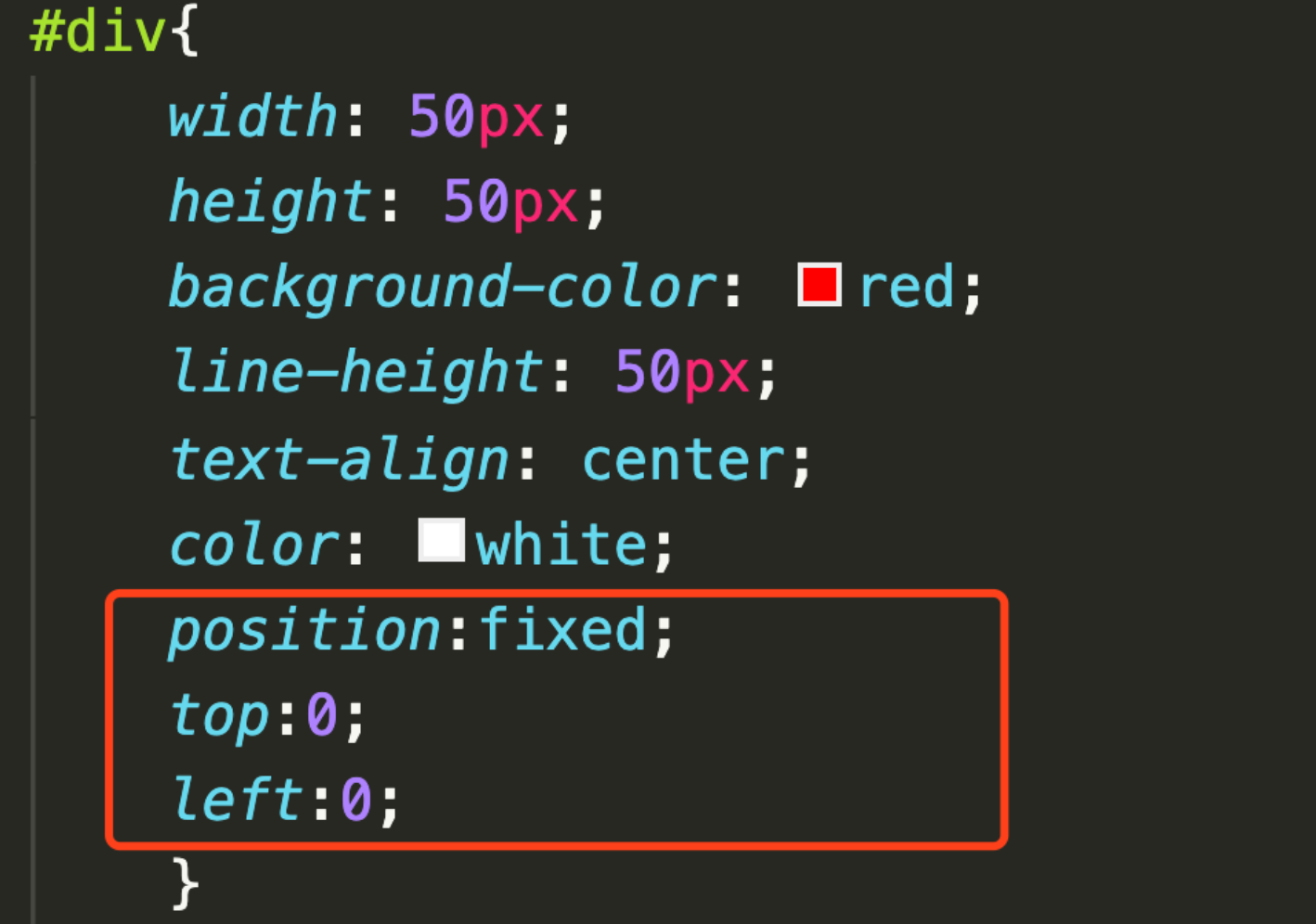
因为固定定位是参考窗口进行定位的,所以需要根据窗口的大小进行判断,然后,设置left和top值,限制方块在窗口可是区域移动。示例:
设置固定定位
通过document.documentElement.clientWidth/clientHeight获取可视窗口区域大小。
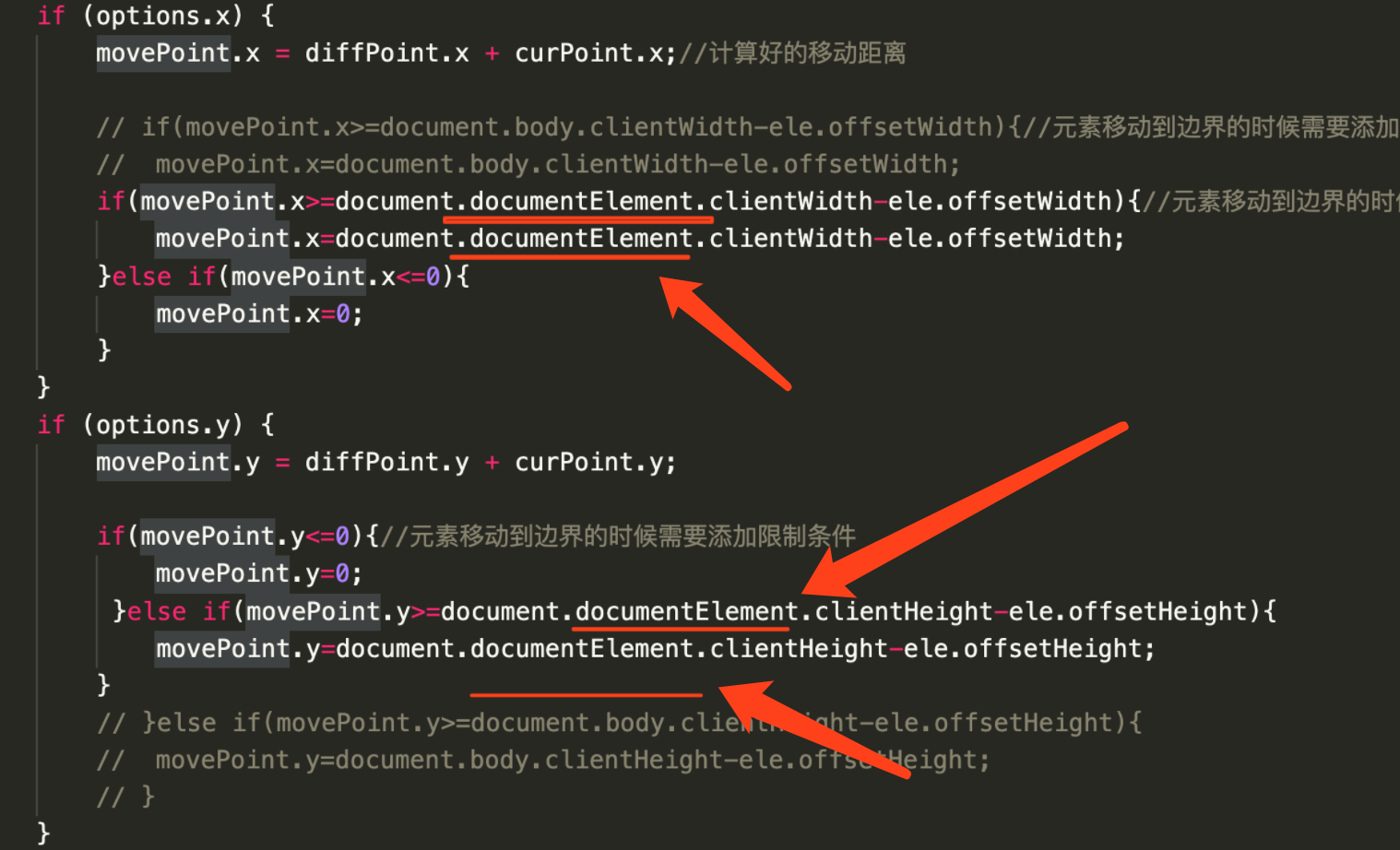
通过left和top属性设置方块的位置。

没有设置定位的情况,是指同学开始粘贴的代码吗?如果是这样的话,那么同学的代码,底部边界限制实现没有问题的,因为页面设置了固定高度2000px,存在滚动条,可以将页面滚动到底部,测试方块的底部限制是生效的。
如果不是指这里,可以新建提问,粘贴你的代码,图文结合详细描述下具体指的是哪里,便于帮助同学准确的定位与解决问题。
如果我的回答帮助到了你,欢迎采纳,祝学习愉快~









3.WebAPP开发与小程序
- 参与学习 人
- 提交作业 622 份
- 解答问题 6815 个
微信带火了小程序,也让前端工程师有了更多的展现机会,本阶段带你从移动基础知识的学习到webAPP开发,及小程序开发,让你PC端与移动端两端通吃。
了解课程









恭喜解决一个难题,获得1积分~
来为老师/同学的回答评分吧
0 星