关于 localStorage.isLogin=true/false;困惑!
自己在login中把这个改成 localStorage.isLogin=false;页面照样能跳转到home页面。但是我要是不写localStorage.isLogin=false页面就无法跳转
得出的结论: 不管是true 或者false,其实重要的是要在Application中种植一个数据。
要是这样的话,这个localStorage.isLogin为什么如此重要,而与true/false无关后期还会用它进行数据校验吗?
我的代码如下:
Login.vue
<template>
<div class="wrapper">
<img src="http://www.dell-lee.com/imgs/vue3/user.png" alt="">
<div class="wrapper__input">
<input class="wrapper__input__content"
v-model="data.username"
placeholder="请输入用户名/手机号">
</div>
<!-- 输入框双向绑定 -->
<div class="wrapper__input">
<input class="wrapper__input__content"
v-model="data.password"
placeholder="请输入密码" type="password">
</div>
<div class="wrapper__login-button" @click="handleLogin">登入</div>
<router-link :to='{name:"Register"}'>
<div class="wrapper__login-link">注册</div>
</router-link>
<!-- reactive数据双向绑定需要把弹框内容写到data里面 -->
<Toast v-if="data.showToast" :message='data.toastMessage' />
</div>
</template>
<script>
// 引入路由其他功能实现点击直接跳转不用输入/home
import { useRouter } from 'vue-router'
// 引入接口工具包,使用后端给的数据
import axios from 'axios'
// 账号密码绑定包将数据包装成可观测的类型,当数据变化时,我们能够感知到
import { reactive } from 'vue'
// 引入弹框样式组件
import Toast from '../../components/Toast'
// 后端要求content-type的类型为json
axios.defaults.headers.post['Content-Type'] = 'application/json';
export default {
name:'Login',
components:{ Toast },
setup(){
// 账号密码绑定当数据变化时,我们能够感知到
const data=reactive({
username:'',
password:'',
showToast:false,
// 建立弹框内容
toastMessage:''
})
const router=useRouter();
const handleLogin=()=>{
axios.post('https://www.fastmock.site/mock/ae8e9031947a302fed5f92425995aa19/jd/api/user/login', {
username: data.username,
password: data.password
}).then(()=>{
alert('成功')
// localStorage.isLogin=false;
router.push({name: 'Home'})
}).catch(()=>{
data.showToast=true
data.toastMessage='登入失败'
// 两秒后弹框消失
setTimeout(()=>{
data.showToast=false
},2000)
// alert('失败')
})
}
return{handleLogin,data}
}
}
</script>
<style lang="scss" scoped>
.wrapper{
position: absolute;
top: 0;
left: 0;
right: 0;
bottom: 0;
margin-top: 50%;
img{
display: block;
margin: 0 auto .4rem auto;
width: .66rem;
height: .66rem;
}
.wrapper__input{
height: .48rem;
margin: 0 .4rem .16rem .4rem;
padding: 0 .16rem;
background: #f9f9f9;
border: ipx solid rgba(0,0,0,0.10);
border-radius: 6px;
&__content{
width: 100%;
height: .48rem;
border: none;
background: none;
outline: none;
font-size: .16rem;
&::placeholder{
color: #777;
}
}
}
.wrapper__login-button{
margin: .32rem .4rem .16rem .4rem;
background: #0091ff;
box-shadow: 0 .04rem .08rem 0 rgba(0,145,255,0.32);
border-radius: .04rem;
color: white;
line-height: .48rem;
font-size: .16rem;
text-align: center;
}
.wrapper__login-link{
text-align: center;
font-size: .15rem;
color: #777;
}
}
</style>
index.js
import { createRouter, createWebHashHistory } from 'vue-router'
// 引入两个页面用于路由路径展示
import Home from '../views/home/Home'
import Login from '../views/login/Login'
import Register from '../views/register/Register'
const routes = [
{
path: '/',
name: 'Home',
component: Home
},
{
path: '/register',
name: 'Register',
component: Register,
beforeEnter(to,from,next){
const isLogin=localStorage.isLogin;
if(isLogin){
next({name:'Home'})
}else{ next() }
}
},
{
path: '/login',
name: 'Login',
component: Login,
// 此处实现的是用户已经登入了就没必要再来到login这个页面了直接回到home页面
beforeEnter(to,from,next){
const isLogin=localStorage.isLogin;
if(isLogin){
next({name:'Home'})
}else{ next() }
console.log(to,from)
}
},
// {
// path: '/about',
// name: 'About',
// // route level code-splitting
// // this generates a separate chunk (about.[hash].js) for this route
// // which is lazy-loaded when the route is visited.
// component: () => import(/* webpackChunkName: "about" */ '../views/About.vue')
// }
]
const router = createRouter({
history: createWebHashHistory(),
routes
})
// 设置登入密码页面跳转功能
router.beforeEach((to,from,next)=>{
// 在本地存储中添加访问Home功能
const isLogin=localStorage.isLogin;
// 此处实现的是你访问任何路径都只会跳转到Login页面
if(!isLogin &&( to.name!=="Login"&&to.name!=='Register')){
next({name:'Login'})
}else{
// next()表示当前页面
next();
}
})
export default router
在这里输入代码,可通过选择【代码语言】突出显示
正在回答 回答被采纳积分+1

同学你好,这是因为localStorage在获取isLogin时,isLogin的类型为字符串(虽然我们设置的值是布尔,但是localStorage保存的时候都是以字符串的形式保存的)。不管是“false”还是“true”,在判断的时候,结果都是true(空字符串才是false)。所以不管设置为true还是false,都可以跳转(课程中也是存在这个问题)。
如果想要解决这个问题,可以在获取isLogin时,进行json数据的转换,参考如下:
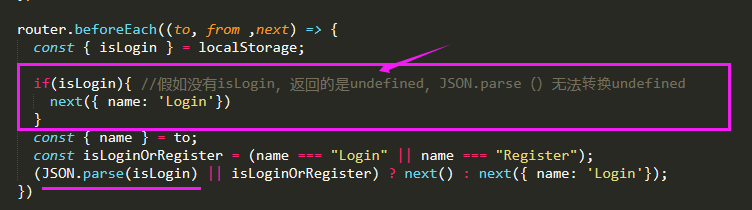
注意,如果localStorage还没有保存isLogin时,获取的值是undefined。JSON.parse()无法转换undefined,会报错,所以判断一下。
以上知识可以特殊记一下,总结一下哦。
祝学习愉快~

























恭喜解决一个难题,获得1积分~
来为老师/同学的回答评分吧
0 星