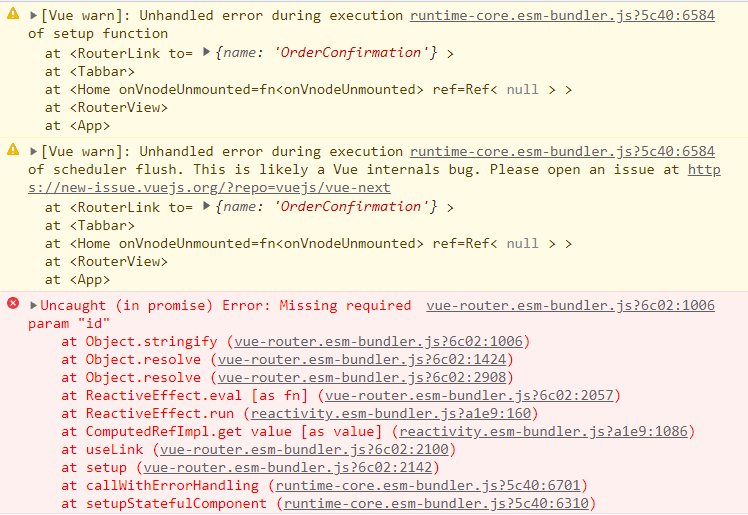

这个报错是啥意思啊

正在回答

登陆购买课程后可参与讨论,去登陆

2回答

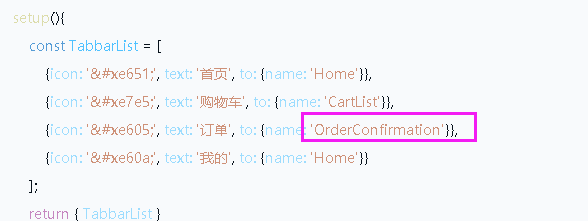
同学你好,是因为tabbar中用了订单页面

https://img1.sycdn.imooc.com//climg/61b01a01097e6fe905880221.jpg

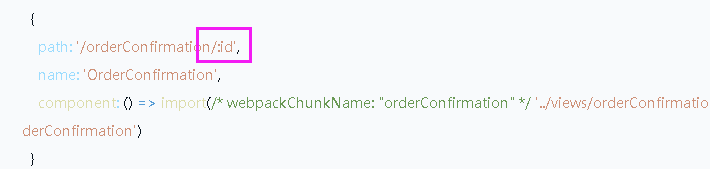
而这个页面在路由中后面拼接了id

https://img1.sycdn.imooc.com//climg/61b01a220962e49707100169.jpg

所以在这里name只写OrderConfirmation是不可以的,缺少了id。

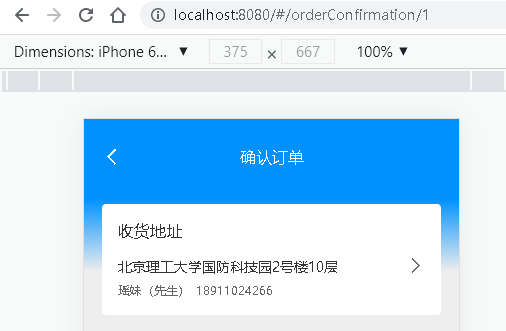
当前小节中的订单页,不是tabbar导航中直接点击跳转的,而是点击结算的时候跳转的那个确认订单页

https://img1.sycdn.imooc.com//climg/61b01a880913881f03920066.jpg

https://img1.sycdn.imooc.com//climg/61b01a98094b02a505060331.jpg

后面小节中才会讲解导航中的订单页

https://img1.sycdn.imooc.com//climg/61b01abf099b13b603850064.jpg

不要着急哦。

导航这里还是改为“Home”,后面实现了再更改。祝学习愉快!

好帮手慕星星 2021-12-07 17:06:19

同学你好,报错的意思是丢失了必须的id

https://img1.sycdn.imooc.com//climg/61af239b09f3dcd505370062.jpg

是写哪个页面后报错的呢?建议具体查找一下,然后将自己写的代码粘贴上来,老师测试下。

祝学习愉快~

  • 提问者 无名小码农 #1

    我就是在写这个订单页出错的,昨天还是好好的,今天项目运行好就报错了


    <template>

      <div class="tabbar">

        <div

        v-for="(item, index) in TabbarList"

        :class="{'tabbar__item':true, 'tabbar__item--active': index === 0 }"

        :key="item.icon"

        >

          <router-link :to="item.to">

            <div class="iconfont" v-html="item.icon" />

            <div class="tabbar__title">{{item.text}}</div>

          </router-link>

        </div>

      </div>

    </template>


    <script>

    export default {

      name: "Tabbar",

      setup(){

          const TabbarList = [

              {icon: '&#xe651;', text: '首页', to: {name: 'Home'}},

              {icon: '&#xe7e5;', text: '购物车', to: {name: 'CartList'}},

              {icon: '&#xe605;', text: '订单', to: {name: 'OrderConfirmation'}},

              {icon: '&#xe60a;', text: '我的', to: {name: 'Home'}}

          ];

          return { TabbarList }

      }

    }

    </script>

    2021-12-07 20:42:07
  • 提问者 无名小码农 #2

    <template>

        <div class="top">

            <div class="top__bgcor" />

            <div class="top__header">

                <div class="top__header__back iconfont">&#xe67d;</div>

                确认订单

            </div>

            <div class="top__receiver">

                <div class="top__receiver__title">收货地址</div>

                <div class="top__receiver__address">广东省广州市海珠区大塘东华南四巷五号</div>

                <div class="top__receiver__info">

                    <span class="top__receiver__info__name">阿凛</span>

                    <span class="top__receiver__info__phone">15342356631</span>

                </div>

                <div class="top__receiver__enter iconfont">&#xe67d;</div>

            </div>

        </div>

    </template>


    <script>

    export default {

        name: "OrderConfirmation",

        setup() {


        },

    }

    </script>


    2021-12-07 20:42:29
  • 提问者 无名小码农 #3

    <router-link :to="{path: `/orderConfirmation/${shopId}`}">

          去结算

    </router-link>  


    import { createRouter, createWebHashHistory } from 'vue-router'


    const routes = [

      {

        path: '/',

        name: 'Home',

        component: () => import(/* webpackChunkName: "home" */ '../views/home/Home')

      },

      {

        path: '/shop/:id',

        name: 'Shop',

        component: () => import(/* webpackChunkName: "shop" */ '../views/shop/Shop')

      },

      {

        path: '/login',

        name: 'Login',

        component: () => import(/* webpackChunkName: "shop" */ '../views/login/Login'),

        beforeEnter(to, from, next){

          const { isLogin } = localStorage;

          isLogin ? next({ name: 'Home'}) : next();

        }

      },

      {

        path:'/register',

        name:'Register',

        component: () => import(/* webpackChunkName: "shop" */ '../views/register/Register'),

        beforeEnter(to, from, next){

          const { isLogin } = localStorage;

          isLogin ? next({ name: 'Home'}) : next();

        }

      },

      {

        path: '/cartList',

        name: 'CartList',

        component: () => import(/* webpackChunkName: "cartList" */ '../views/cartList/CartList')

      },

      {

        path: '/orderConfirmation/:id',

        name: 'OrderConfirmation',

        component: () => import(/* webpackChunkName: "orderConfirmation" */ '../views/orderConfirmation/OrderConfirmation')

      }

      // {

      //   path: '/about',

      //   name: 'About',

      //   // route level code-splitting

      //   // this generates a separate chunk (about.[hash].js) for this route

      //   // which is lazy-loaded when the route is visited.

      //   component: () => import(/* webpackChunkName: "about" */ '../views/About.vue')

      // }

    ]


    const router = createRouter({

      history: createWebHashHistory(),

      routes

    })


    router.beforeEach((to,from,next)=>{

      const isLogin=localStorage.isLogin;

      if(!isLogin && ( to.name!=="Login" && to.name!=='Register')){

        next({name:'Login'})

      }else{

        next();

      }

    })


    export default router


    2021-12-07 20:44:08
问题已解决,确定采纳
还有疑问,暂不采纳

恭喜解决一个难题,获得1积分~

来为老师/同学的回答评分吧

0 星
请稍等 ...
微信客服

购课补贴
联系客服咨询优惠详情

帮助反馈 APP下载

慕课网APP
您的移动学习伙伴

公众号

扫描二维码
关注慕课网微信公众号

在线咨询

领取优惠

免费试听

领取大纲

扫描二维码,添加
你的专属老师