about区域中8张图片应该如何排版?如何居中?
问题:
- header区域右侧li悬浮时,如何控制宽度,我看案例演示的时候宽度挺正常的。
- ABOUT中间区域应该如何设置?每次我调整百分比的时候左右两侧的文字就挤到一起了。如果才能将两侧的文字相对中间的图片固定?
- ABOUT下部的8张图应该如何设置才能居中显示?
- GALLERY下面六张图应该如何设置才能居中显示?
- GALLERY下面六张图中,图片和文字应该是什么关系?我把ul li设置为父级元素,里面的title设置为子元素,父元素设置为relative,父元素设置为absolute,为什么设置bottom属性的时候还有一些富余的空白?
html
<!DOCTYPE html>
<html lang="en">
<head>
    <meta charset="UTF-8">
    <meta http-equiv="X-UA-Compatible" content="IE=edge">
    <meta name="viewport" content="width=device-width, initial-scale=1.0">
    <link type="text/css" rel="stylesheet" href="css/index.css">
    <script type="text/javascript" src="index.js"></script>
    <title>Document</title>
</head>
<body>
    <!-- 头部区域 -->
    <div class="header">
        <div class="header_img">
            <img src="images/logo.png" alt="#">
        </div>
        <div class="menu">
            <ul>
                <li><a href="#">HOME</a></li>
                <li><a href="#">ABOUT</a></li>
                <li><a href="#">GALLERY</a></li>
                <li><a href="#">FACULTY</a></li>
                <li><a href="#">EVENTS</a></li>
                <li><a href="#">CONTACT</a></li>
            </ul>
        </div>
    </div>
    <!-- //头部区域 -->
    <!-- banner区域 -->
    <div class="banner">
        <img src="images/banner3.jpg" alt="#">
        <div class="layer"></div>
        <div class="form">
            <form action="">
                <input type="text" placeholder="your Name" /><br>
                <input type="text" placeholder="your Phone" /><br>
                <input type="text" placeholder="your Email" /><br>
                <textarea name="" id="" cols="30" rows="3" placeholder="Write Your Comment Here"></textarea><br>
                <input type="button" class="btn" value="SEND MESSAGES">
            </form>
        </div>
    </div>
    <!-- //banner区域 -->
    <!-- about top区域 -->
    <div class="about-top">
        <div class="about">ABOUT</div>
        <div class="underline"></div>
        <div class="para">
            <p>Lorem Ipsum is simply dummy text of the printing and typesetting industy. Lorem Ipsum has been the industry's
            standard dummy text ever since the 1500s</p>
        </div>
    </div>
    <!-- //about top区域 -->
    <!-- about middle区域 -->
    <div class="about-middle">
        <div class="left">
            <div class="word">A WORD ABOUT US</div>
            <div class="box">
                <p>Praesent dignissim viverra est, sed bibendum ligula congue non. Sed ac nisl et felis gravida commodo? Suspendisse
                    eget ullamcorper ipsum. Suspendisse diam amet.</p>
                <input type="button" value="EXPLORE">
            </div>
        </div>
        <div class="middle">
            <img src="images/bb3.jpg" alt="#"/>
        </div>
        <div class="right">
            <ul>
                <li>
                    <div class="board">
                        <div class="num">70000</div>
                        <div class="underline"></div>
                        Students
                    </div>
                </li>
                <li>
                    <div class="board">
                        <div class="num">600</div>
                        <div class="underline"></div>
                        Faculty
                    </div>
                </li>
            </ul>
        </div>
    </div>
    <!-- //about middle区域 -->
    <!-- about bottom区域 -->
    <div class="about-bottom">
        <ul>
            <li>
                <img src="images/b1.jpg" alt="#">
            </li>
            <li>
                <div class="para">
                    <div class="title">Library</div>
                    <div class="abstract">Lorem Ipsum is simply dummy text of the printing and typesetting industry</div>
                    <div class="content">Lorm Ipsum has been the industry's standard dummy text ever since the 1500s,
                        when an unkonwn printer took a galley of type and scrambled it to make a type specimen book.</div>
                    <div class="btn"><input type="button" value="EXPLORE"></div>
                </div>
            </li>
            <li>
                <div class="img"><img src="images/b2.jpg" alt="#"></div>
            </li>
            <li>
                <div class="para">
                    <div class="title">Computer Lab</div>
                    <div class="abstract">Lorem Ipsum is simply dummy text of the printing and typesetting industry</div>
                    <div class="content">Lorm Ipsum has been the industry's standard dummy text ever since the 1500s,
                        when an unkonwn printer took a galley of type and scrambled it to make a type specimen book.</div>
                    <div class="btn"><input type="button" value="EXPLORE"></div>
                </div>
            </li>
            <li>
                <div class="para">
                    <div class="title">Conference Hall</div>
                    <div class="abstract">Lorem Ipsum is simply dummy text of the printing and typesetting industry</div>
                    <div class="content">Lorm Ipsum has been the industry's standard dummy text ever since the 1500s,
                        when an unkonwn printer took a galley of type and scrambled it to make a type specimen book.</div>
                    <div class="btn"><input type="button" value="EXPLORE"></div>
                </div>
            </li>
            <li>
                <img src="images/b3.jpg" alt="#">
            </li>
            <li>
                <div class="para">
                    <div class="title">Play Ground</div>
                    <div class="abstract">Lorem Ipsum is simply dummy text of the printing and typesetting industry</div>
                    <div class="content">Lorm Ipsum has been the industry's standard dummy text ever since the 1500s,
                        when an unkonwn printer took a galley of type and scrambled it to make a type specimen book.</div>
                    <div class="btn"><input type="button" value="EXPLORE"></div>
                </div>
            </li>
            <li>
                <img src="images/b4.jpg" alt="#">
            </li>
        </ul>
    </div>
    <!-- //about bottom区域 -->
    <!-- gallery区域 -->
    <div class="gallery">
        <div class="top">
            <div class="about">GALLERY</div>
            <div class="underline"></div>
            <div class="para">
                <p>Lorem Ipsum is simply dummy text of the printing and typesetting industy. Lorem Ipsum has been the industry's
                    standard dummy text ever since the 1500s.</p>
            </div>
            </div>
        <div class="bottom">
            <ul>
                <li>
                    <img src="images/03-01.jpg" alt="">
                    <div class="title">SCIENCE LAB</div>
                </li>
                <li>
                    <img src="images/03-02.jpg" alt="">
                    <div class="title">INDOOR STADIUM</div>
                </li>
                <li>
                    <img src="images/03-03.jpg" alt="">
                    <div class="title">TRANSPORTATION</div>
                </li>
                <li>
                    <img src="images/03-04.jpg" alt="">
                    <div class="title">KIDS ROOM</div>
                </li>
                <li>
                    <img src="images/03-05.jpg" alt="">
                    <div class="title">MEDITATION CLASSES</div>
                </li>
                <li>
                    <img src="images/03-06.jpg" alt="">
                    <div class="title">KIDS PLAY GROUND</div>
                </li>
            </ul>
        </div>
    </div>
    <!-- //gallery区域 -->
    <!-- foot区域 -->
    <div class="foot">
        2016 imooc.com 京ICP备13046642号
    </div>
    <!-- //foot区域 -->

</body>
</html>
css
*{
    padding: 0px;
    margin: 0px;
}

body{
    font-family:'Microsoft Yahei UI';
}

.header{
    width: 100%;
    height: 80px;
    position: fixed;
    top: 0;
    z-index: 30;
    background-color: #07cbc9;
}

.header .header_img{
    float: left;
    margin-left: 100px;
    margin-top: 15px;
}

.header .menu{
    float: right;
    height: 80px;
    margin-right: 100px;
    line-height: 80px;
    font-weight: 700;
}

.header ul li{
    list-style: none;
    float: left;
    margin-right:20px;
}

.header .menu ul li:hover{
    background-color: #000;
}

a{
	text-decoration: none;
	color: #ffffff;
}

.banner{
    width: 100%;
    margin-top: 80px;
    height: 800px;
    position: relative;
}

.banner img{
    height: 800px;
    width: 100%;
    position: absolute;
}

.banner .layer{
    height: 800px;
    width: 100%;
    position: absolute;
    background-color: #000;
    opacity: 0.4;
    z-index: 10;
}

.banner .form{
    width: 100%;
    height: 500px;
    top: 0;
    position: absolute;
    text-align: center;
    margin-top: 100px;
    z-index: 20;
}

.banner input, textarea{
    box-sizing: border-box;
    padding-left: 10px;
    width: 400px;
    margin-top: 30px;
    line-height: 40px;
    border: 2px solid #ffffff;
    color: #ffffff;
    font-family:'Microsoft Yahei UI';
    background-color: transparent;
}

input::-webkit-input-placeholder, textarea::-webkit-input-placeholder {
    color: #ffffff;
}

.banner input{
    height: 40px;
}

.banner .btn{
    width: 150px;
}

.banner input:hover{
    border: 2px solid #07cbc9;
}

.banner textarea:hover{
    border: 2px solid #07cbc9;
}


/* about的区域 */
.about-top{
    width: 100%;
}

.about-top .about{
    font-size: 60px;
    font-weight: 700;
    margin-top: 30px;
    text-align: center;
}

.about-top .underline{
    margin: 5px auto;
    background-color: #07cbc9;
    width: 40px;
    height: 2px;
    text-align: center;
}

.about-top .para{
    margin: 10px auto;
    width: 500px;
    line-height: 30px;
	margin-bottom:20px;
    text-align: center;
}

/* about-middle的区域 */
.about-middle{
    width: 100%;
    height: 450px;
}

.about-middle .left{
    float: left;
    position: relative;
    left: 20%;
    z-index: 10;
}

.about-middle .left .word{
    font-size: 40px;
    width: 250px;
    text-align: center;
}

.about-middle .left .box{
    width: 300px;
    height: 250px;
    padding: 20px;
    line-height: 30px;
    background-color: rgba(255, 255, 255, 0.4);
    border: 2px solid whitesmoke;
}

.about-middle .left .box input{
    height: 40px;
    width: 100px;
    margin: 20px auto;
    border: 0px;
    color: #ffffff;
    background-color: #000;
}

.about-middle .left .box input:hover{
    background-color: transparent;
    border: 2px solid #000;
    color: black;
}

.about-middle .middle{
    width: 100%;
    float: left;
    position: absolute;
    text-align: center;
}

/* about中间靠右边的区域 */
.about-middle .right{
    float: right;
    position: absolute;
    right: 18%;
}

.about-middle .right .board{
    height: 150px;
    width: 250px;
    border: 1px solid #07cbc9;
}

.about-middle .right .board .num{
    font-size: 36px;
    font-weight: 700;
    margin-top: 20px;
}

.about-middle .right ul li{
    list-style: none;
    margin-bottom: 40px;
    text-align: center;
}

.about-middle .right .underline{
    margin: 10px auto;
    background-color: #07cbc9;
    width: 40px;
    height: 2px;
    text-align: center;
}

/* about底部的区域 */
.about-bottom{
    width: 100%;
    height: 900px;
}

.about-bottom ul{
    margin-top: 80px;
}

.about .bottom .img{
    width: 50%;
    height: 100%;
    float: left;
    overflow:hidden;
}

.about .bottom .img img{
    width: 100%;
}

.about-bottom ul li{
    line-height: 30px;
    list-style: none;
    height: 395px;
    width: 450px;
    float: left;
}

.about-bottom .para{
    box-sizing: border-box;
    padding-left: 30px;
    padding-top: 20px;
    padding-right: 20px;
    height: 395px;
    width: 450px;
    color: #ffffff;
    background-color: #07cbc9;
}

.about-bottom .para .title{
    font-size: 28px;
    margin-bottom: 20px;
}

.about-bottom .abstract{
    font-size: 20px;
    margin-bottom: 20px;
}

.about-bottom .para .btn{
    text-align: center;
}

.about-bottom .para input{
    height: 40px;
    width: 100px;
    margin-top: 40px;
    color: #ffffff;
    background-color: #000;
    border: none;
}

.about-bottom .para input:hover{
    border: 1px solid #000;
    color: #000;
    background-color: transparent;
}

/* gallery上半部分的内容 */
.gallery{
    width: 100%;
}

.gallery .top .about{
    font-size: 60px;
    font-weight: 700;
    margin-top: 30px;
    text-align: center;
}

.gallery .top .underline{
    margin: 5px auto;
    background-color: #07cbc9;
    width: 40px;
    height: 2px;
    text-align: center;
}

.gallery .top .para{
    margin: 10px auto;
    width: 500px;
    line-height: 30px;
	margin-bottom:20px;
    text-align: center;
}

/* gallery下半部分的内容 */
.gallery .bottom{
    width: 1260px;
    height: 600px;
    position: relative;
    left: 20%
}
.gallery .bottom ul li{
    position: relative;
    list-style: none;
    width: 360px;
    height: 240px;
    margin-right: 60px;
    margin-bottom: 60px;
    float: left;
    background-color: #07cbc9;
}

.gallery .bottom .title{
    position: absolute;
    bottom: -60px;
    width: 360px;
    height: 60px;
    background-color: #000;
    color: #ffffff;
    line-height: 60px;
    margin-bottom: 30px;
    padding-left: 20px;
    box-sizing: border-box;
}

/* 页脚 */
.foot{
    width: 100%;
    height: 80px;
    line-height: 80px;
    text-align: center;
    background-color: #07cbc9;
    color: #ffffff;
}
12
收起
正在回答
1回答

同学,你好!
1、可以设置li的pading值,使左右两边都有边距
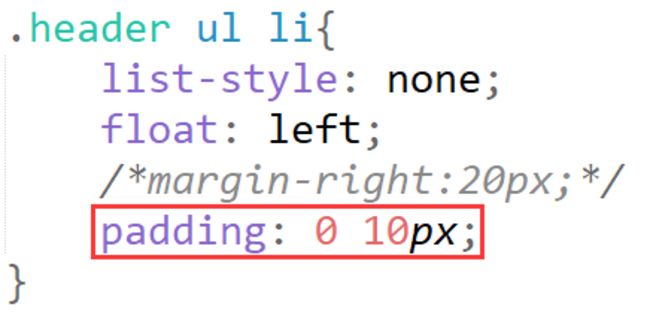

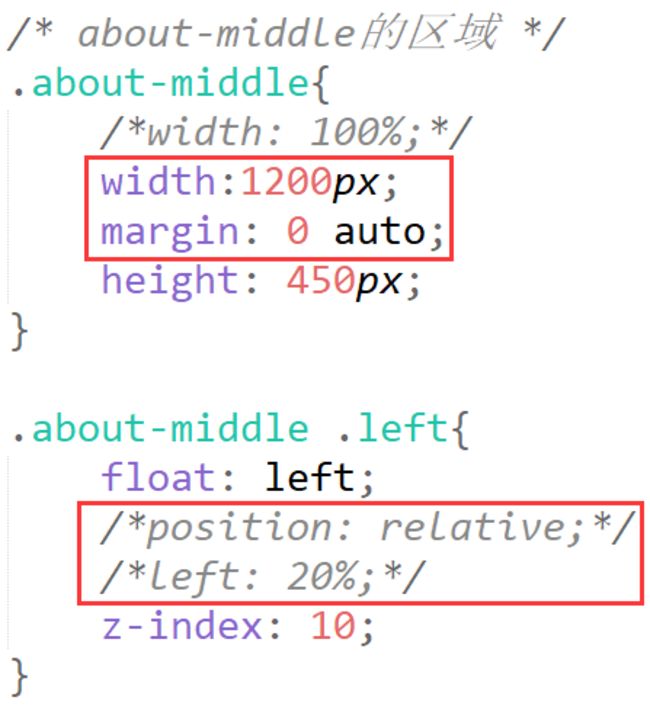
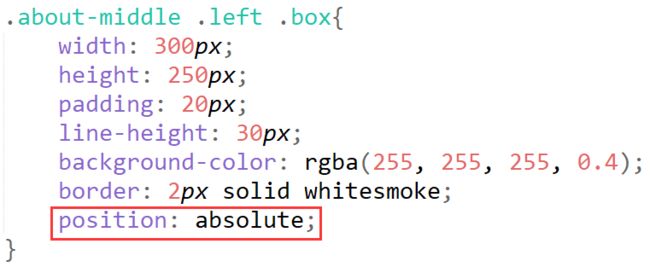
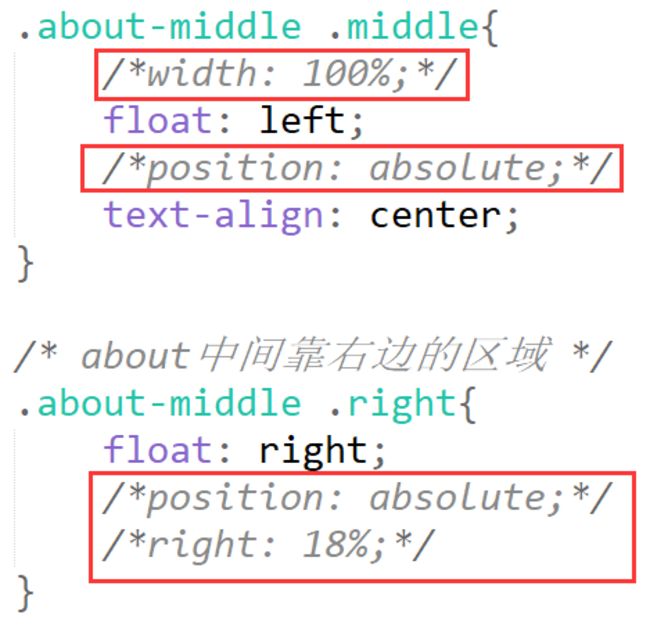
2、可以设置外层div的固定宽度,设置margin使其水平居中,只有左下角设置position,其他部分只设置浮动即可
参考代码:
3、ABOUT下的8张图片不需要居中显示,可以设置li的width为25%,使其一行四列显示,再设置img的width和height为100%即可
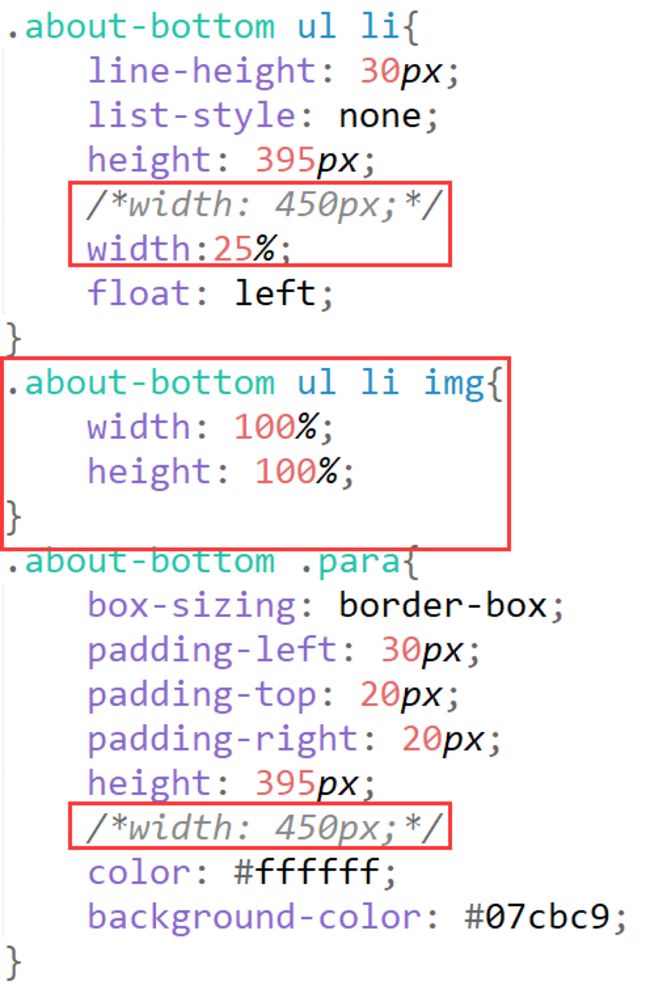

4、同学的代码实现了居中效果
5、img与div的下边界默认是会有一点空隙的,可以图片添加vertical-align: bottom;属性
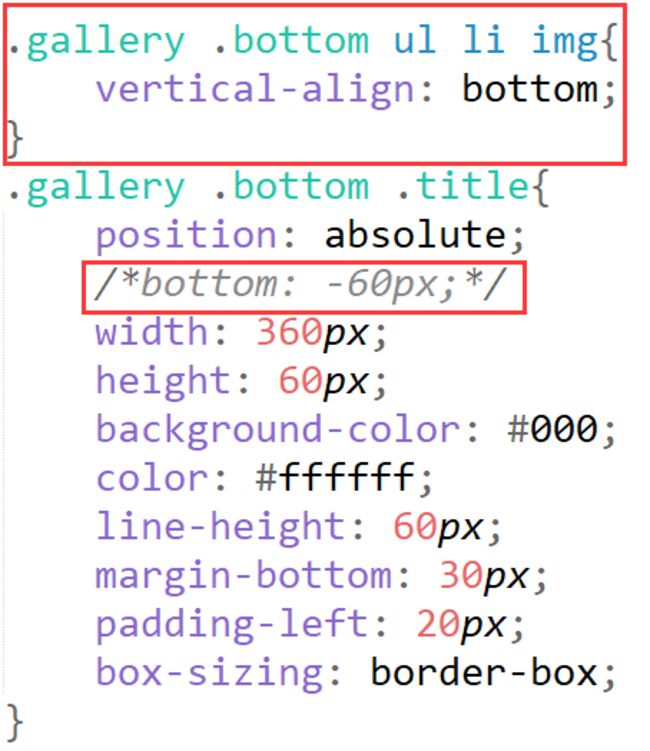
祝学习愉快!
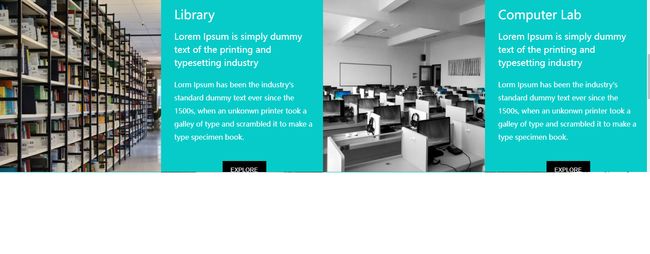
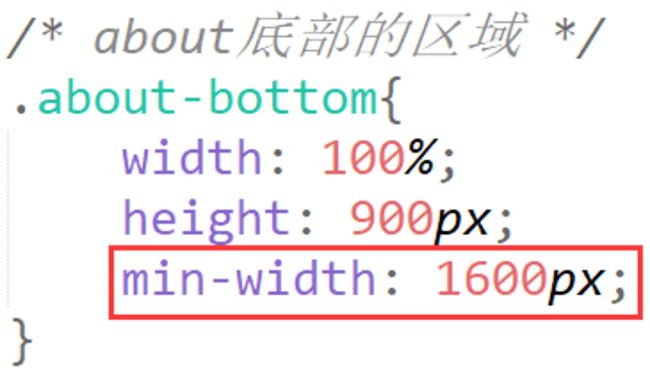
相似问题
width值不为固定数值时,如何设置块级元素垂直水平居中
21
0
3

如何让文字垂直居中?如何让六个元素居中?
16
1
3


about图片居中
12
0
1
如何设置中间浮动的盒子居中呢?
12
0
3

logo的图片如何垂直居中?
44
0
6



登录后可查看更多问答,登录/注册
Python全栈工程师2020
- 参与学习 人
- 提交作业 5317 份
- 解答问题 2433 个
Facebook曾声称“只招全栈工程师”!全栈用人需求猛增,市面人才紧缺。 0基础进击Python全栈开发,诱人薪资在前方!
了解课程










恭喜解决一个难题,获得1积分~
来为老师/同学的回答评分吧
0 星