急急急!!!老师 我自己写了接口 getUserInfo想要登录后自动获取到用户信息 为什么一直获取不到 是调用接口的写法有问题吗
StaticPart页面:result输出是空
<template>
<!-- 定位及消息提醒 -->
<div class="message">
<div class="message__position">
<!-- <span class="iconfont position__icon"></span>
<span class="position__text">北京理工大学国防科技园2号楼10层</span> -->
<span class="position__text"
:key="index">Hi,{{info.user_name}}</span>
</div>
<div class="iconfont message__notice"></div>
</div>
<!-- 搜索框 -->
<div class="search">
<span class="iconfont"></span>
<input type="text"
class="search__text"
placeholder="水果"
v-model="searchKey">
<span class="search__btn"
@click="search">搜索</span>
<Toast v-if="showToast"
:message="toastMessage" />
</div>
<!-- banner -->
<div class="banner">
<img class="banner__img"
src="http://www.dell-lee.com/imgs/vue3/banner.jpg">
</div>
<!-- 分类 -->
<div class="icons">
<div class="icons__item"
v-for="item in iconsList"
:key="item.desc">
<div class="iconfont icons__item__img"
v-html="item.img"></div>
<p class="icons__item__desc">{{item.desc}}</p>
</div>
</div>
<!-- 间隔 -->
<div class="gap"></div>
</template>
<script>
import { reactive, toRefs } from 'vue'
import { post } from '../../utils/request'
import Toast, { useToastEffect } from '../../components/Toast.vue'
// 获取用户信息(有问题)
const getUserInfoEffect = () => {
const userInfo = reactive({
info: {}
})
const getUserInfo = async () => {
const result = await post('/user/getUserInfo')
console.log('result.data:' + result)
if (result?.code === 1 && result?.data) {
userInfo.info = result.data
}
}
getUserInfo()
const { info } = toRefs(userInfo)
console.log('info:' + JSON.stringify(info))
return { info }
}
// 处理搜索商品相关逻辑
const useSearchEffect = (changeToast) => {
const data = reactive({
searchKey: ''
})
const search = async () => {
try {
// const { searchKey } = data
if (searchKey === null || searchKey === '') {
changeToast('请输入你想要的商品')
} else {
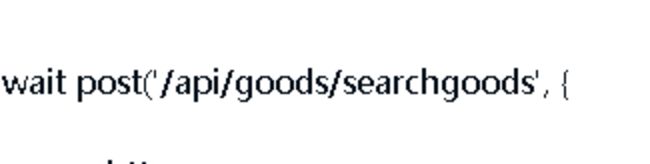
const result = await post('/api/goods/searchgoods', {
searchkey: data.searchKey
})
if (result?.code === 1) {
changeToast('搜索成功')
}
}
} catch (e) {
changeToast('请求失败')
}
}
const { searchKey } = toRefs(data)
return { searchKey, search }
}
export default {
name: 'StaticPart',
components: { Toast },
setup () {
const iconsList = [
{ img: '', desc: '有机蔬菜' },
{ img: '盛', desc: '水果' },
{ img: '', desc: '粮油作物' },
{ img: '', desc: '鲜花绿植' },
{ img: '', desc: '农副产品' },
{ img: '', desc: '禽畜牧蛋肉' },
{ img: '', desc: '水产' },
{ img: '', desc: '中药材' },
{ img: '', desc: '种子' },
{ img: '', desc: '其他' }
]
const { info } = getUserInfoEffect()
const { showToast, toastMessage, changeToast } = useToastEffect()
const { searchKey, search } = useSearchEffect(changeToast)
return { iconsList, info, showToast, toastMessage, searchKey, search }
}
}
</script>
<style lang="scss" scoped>
@import "../../style/viriables.scss";
@import "../../style/mixins.scss";
// 定位及消息提醒
.message {
position: relative;
color: $content-fontcolor;
&__position {
padding: 0.16rem 0;
height: 0.22rem;
line-height: 0.22rem;
margin-right: 0.5rem;
@include ellipsis;
.position__icon {
font-size: 0.19rem;
position: relative;
top: 0.01rem;
}
.position__text {
font-size: 0.16rem;
}
}
.message__notice {
position: absolute;
right: 0;
top: 0.17rem;
font-size: 0.19rem;
}
}
// 搜索框
.search {
margin-bottom: 0.12rem;
height: 0.32rem;
line-height: 0.32rem;
border-radius: 0.16rem;
background-color: $search-bgColor;
color: $search-fontColor;
display: flex;
.iconfont {
font-size: 0.16rem;
display: inline-block;
padding: 0 0.08rem 0 0.16rem;
}
&__text {
flex: 1;
font-size: 0.14rem;
border-style: none;
outline: medium;
background-color: $search-bgColor;
padding-right: 0.15rem;
}
&__btn {
display: inline-block;
width: 0.5rem;
background: $search-fontColor;
color: $bgColor;
border-radius: 0.16rem;
text-align: center;
height: 0.28rem;
line-height: 0.28rem;
position: relative;
top: 0.02rem;
}
}
// banner
.banner {
margin-bottom: 0.16rem;
// 防止图片下方信息发生抖动(在图片未加载出来时,下方信息上移)
height: 0;
overflow: hidden;
padding-bottom: 25.4%; //根据图片进行计算(高/宽)
&__img {
width: 100%;
}
}
// 分类
.icons {
display: flex;
flex-wrap: wrap; //换行
&__item {
width: 20%;
.icons__item__img {
font-size: 0.36rem;
width: 0.4rem;
height: 0.4rem;
margin: 0 auto;
}
&__desc {
text-align: center;
color: $content-fontcolor;
margin: 0.06rem 0 0.16rem 0;
}
}
&__item:nth-child(1) {
color: #73ba2d;
}
&__item:nth-child(2) {
color: #ef6600;
}
&__item:nth-child(3) {
color: #3a9c40;
}
&__item:nth-child(4) {
color: #529873;
}
&__item:nth-child(5) {
color: $medium-fontColor;
}
&__item:nth-child(6) {
color: #2ba246;
}
&__item:nth-child(7) {
color: #d7231e;
}
&__item:nth-child(8) {
color: $content-fontcolor;
}
&__item:nth-child(9) {
color: #d7882c;
}
&__item:nth-child(10) {
color: $medium-fontColor;
}
}
// 间隔
.gap {
height: 0.1rem;
background-color: $content-bgColor;
margin: 0 -0.18rem;
}
</style>
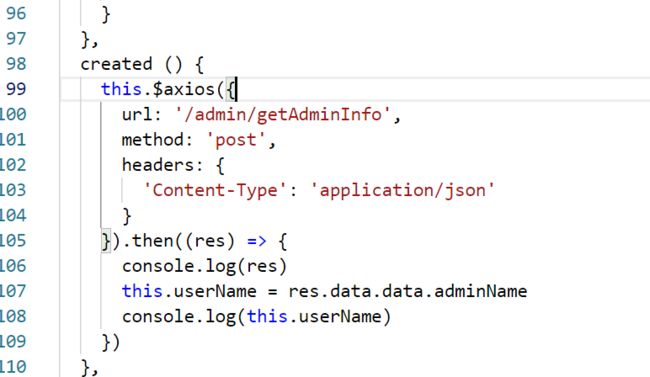
我用vue2这种方法调用接口getUserInfo可以获取到用户信息
正在回答 回答被采纳积分+1




相似问题






登录后可查看更多问答,登录/注册
















恭喜解决一个难题,获得1积分~
来为老师/同学的回答评分吧
0 星