炫彩小球案例中怎么控制小球生成速率
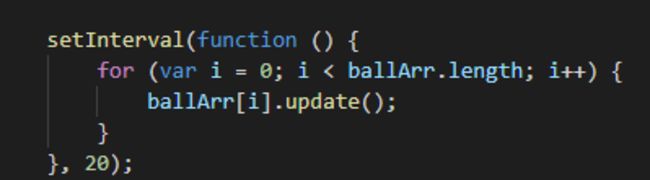
通过修改定时器的速率虽然可用减少小球数量的更新频率,但是小球的透明度渐变和半径增速都受到影响减少了。请问应该怎么修改代码?
16
收起
正在回答
2回答

onmousemove里定义个flag,在定义一个定时器,里面判断flag,再决定是否生成小球。
moveArr,onmouse里, while(num--) moveArr.push({e.clientX,e.clientY}), 然后在外面跑一个while(moveArr.length) {new Ball(moveArr[i].x,moveArr[i].y); moveArr.splice(i,1)};即可。

好帮手慕久久
2022-05-03 13:48:09
同学你好,可以参考一下“OCEAN_NO1”同学的思路,老师再给你提供一个稍微简单点的思路:
    <script>
        // 小球类
        function Ball(x, y) {
            // 属性x、y表示的是圆心的坐标
            this.x = x;
            this.y = y;
            // 半径属性
            this.r = 20;
            // 透明度
            this.opacity = 1;
            // 小球背景颜色,从颜色数组中随机选择一个颜色
            this.color = colorArr[parseInt(Math.random() * colorArr.length)];
            // 这个小球的x增量和y的增量,使用do while语句,可以防止dX和dY都是零
            do {
                this.dX = parseInt(Math.random() * 20) - 10;
                this.dY = parseInt(Math.random() * 20) - 10;
            } while (this.dX == 0 && this.dY == 0)

            // 初始化
            this.init();
            // 把自己推入数组,注意,这里的this不是类本身,而是实例
            ballArr.push(this);
        }
        // 初始化方法
        Ball.prototype.init = function () {
            // 创建自己的dom
            this.dom = document.createElement('div');
            this.dom.className = 'ball';
            this.dom.style.width = this.r * 2 + 'px';
            this.dom.style.height = this.r * 2 + 'px';
            this.dom.style.left = this.x - this.r + 'px';
            this.dom.style.top = this.y - this.r + 'px';
            this.dom.style.backgroundColor = this.color;
            // 上树
            document.body.appendChild(this.dom);

        };
        // 更新
        Ball.prototype.update = function () {
            // 位置改变
            this.x += this.dX;
            this.y -= this.dY;
            // 半径改变
            this.r += 0.2;
            // 透明度改变
            this.opacity -= 0.01;
            this.dom.style.width = this.r * 2 + 'px';
            this.dom.style.height = this.r * 2 + 'px';
            this.dom.style.left = this.x - this.r + 'px';
            this.dom.style.top = this.y - this.r + 'px';
            this.dom.style.opacity = this.opacity;

            // 当透明度小于0的时候,就需要从数组中删除自己,DOM元素也要删掉自己
            if (this.opacity < 0) {
                // 从数组中删除自己
                for (var i = 0; i < ballArr.length; i++) {
                    if (ballArr[i] == this) {
                        ballArr.splice(i, 1);
                    }
                }
                // 还要删除自己的dom
                document.body.removeChild(this.dom);
            }
        };


        // 把所有的小球实例都放到一个数组中
        var ballArr = [];

        // 初始颜色数组
        var colorArr = ['#66CCCC', '#CCFF66', '#FF99CC', '#FF6666',
            '#CC3399', '#FF6600'];

        // 定时器,负责更新所有的小球实例
        setInterval(function () {
            // 遍历数组,调用调用的update方法
            for (var i = 0; i < ballArr.length; i++) {
                ballArr[i].update();
            }
        }, 20);

        // 设置锁
        let flag = true
        // 设置定时器,控制开锁
        let timer = null
        // 鼠标指针的监听
        document.onmousemove = function (e) {
            // 得到鼠标指针的位置
            var x = e.clientX;
            var y = e.clientY;

            // 开锁状态
            if (flag) {
                // 生成一个小球
                new Ball(x, y);
                // 立马关锁
                flag = false
                // 清除可能存在的定时器
                clearTimeout(timer)
                // 延时时间到,开锁,然后才可以继续生成小球
                timer = setTimeout(() => {
                    flag = true
                }, 200)
            }
        };
    </script>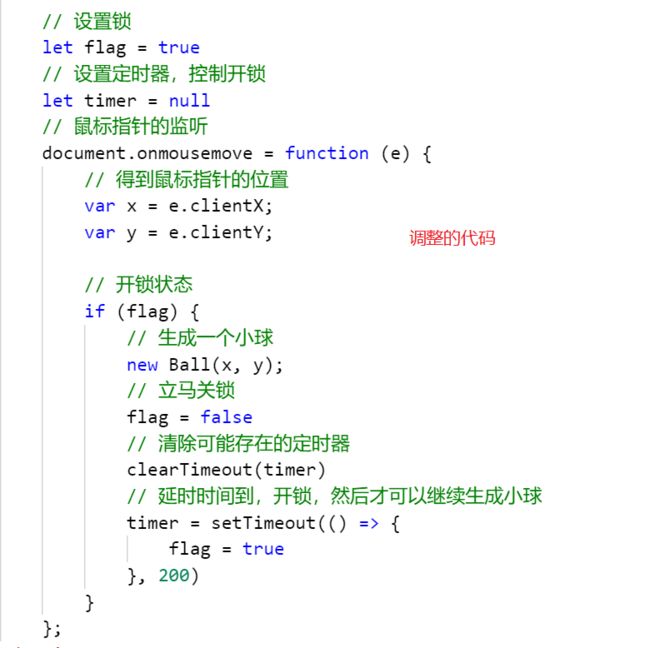
祝学习愉快!
相似问题



登录后可查看更多问答,登录/注册













恭喜解决一个难题,获得1积分~
来为老师/同学的回答评分吧
0 星