老师,水平垂直居中的方法有点混淆了
HTML部分
<!DOCTYPE html>
<html lang="en">

<head>
    <meta charset="UTF-8">
    <meta http-equiv="X-UA-Compatible" content="IE=edge">
    <meta name="viewport" content="width=device-width, initial-scale=1.0">
    <title>Document</title>
    <link rel="stylesheet" href="css/css.css">
</head>

<body>
    <div class="box">
        <a href="#"><img src="./images/btn.png" class="button_left" alt=""></a>
        <img src="./images/cart.png" class="shopping_right" alt="">
        <span>3</span>
    </div>
</body>

</html>
CSS部分
* {
    margin: 0;
    padding: 0;
}

a {
    text-decoration: none;
}

.box {
    width: 500px;
    height: 100px;
    position: absolute;
    top: 50%;
    margin-top: -50px;
    left: 50%;
    margin-left: -250px;
    background-color: aliceblue;
}


.box .button_left {
    width: 100px;
    height: 50px;
    position: absolute;
    left: 30px;
    top: 50%;
    margin-top: -25px;
}

.box .shopping_right {
    width: 100px;
    height: 70px;
    position: absolute;
    right: 40px;
    top:50%;
    margin-top: -35px;
}

.box span {
    display: block;
    width: 30px;
    height:30px;
    background-color: red;
    text-align: center;
    line-height: 30px;
    border-radius: 50%;
    position: absolute;
    top: 10px;
    right: 25px;
}
老师,现在我会用绝对定位实现盒子在页面中水平垂直居中,比如这个最外面的盒子box就用的这个方法,但最开始我试着用margin:auto auto;发现只能水平居中,并不能水平垂直居中,不知道是代码错了还是理解错了,用margin:0 auto,只实现盒子水平居中我倒是能理解,难道只有绝对定位实现盒子在页面水平垂直居中吗?谢谢!
8
收起
正在回答 回答被采纳积分+1
1回答

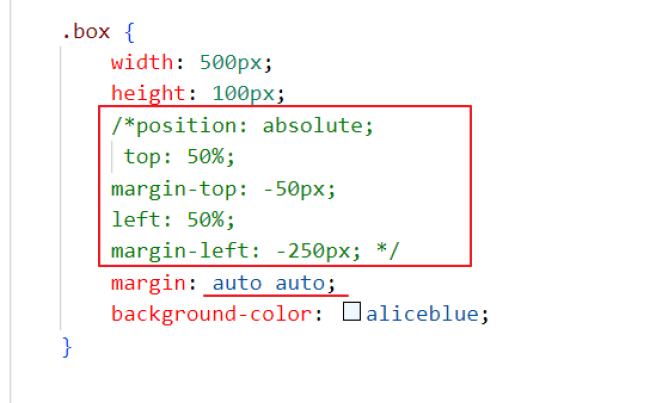
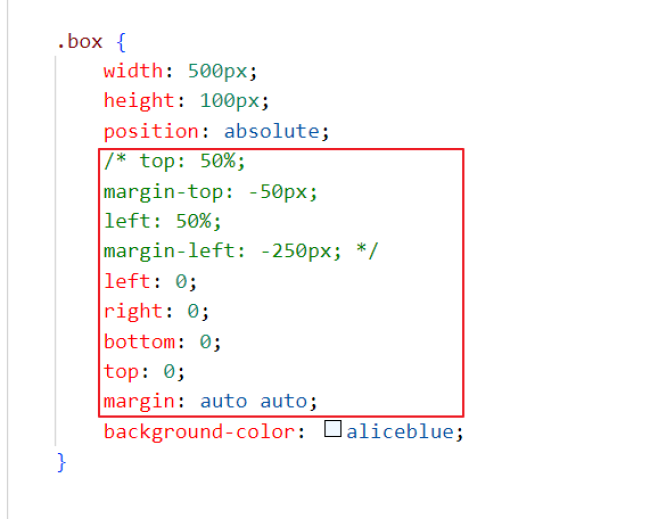

















恭喜解决一个难题,获得1积分~
来为老师/同学的回答评分吧
0 星