使用node14.16安装报错

使用node14.16安装报错

我更换到node15.16版本。因为没有办法使用cnmp执行安装,我用的是npm install执行安装报错如下:

gyp ERR! configure error

gyp ERR! stack Error: Can't find Python executable "python", you can set the PYTHON env variable.

gyp ERR! stack     at PythonFinder.failNoPython (D:\go\mall-master\node_modules\node-gyp\lib\configure.js:484:19)

gyp ERR! stack     at PythonFinder.<anonymous> (D:\go\mall-master\node_modules\node-gyp\lib\configure.js:509:16)

gyp ERR! stack     at D:\go\mall-master\node_modules\graceful-fs\polyfills.js:284:29

gyp ERR! stack     at FSReqCallback.oncomplete (fs.js:183:21)

gyp ERR! System Windows_NT 10.0.26200

gyp ERR! command "C:\\nvm4w\\nodejs\\node.exe" "D:\\go\\mall-master\\node_modules\\node-gyp\\bin\\node-gyp.js" "rebuild" "--verbose" "--libsass_ext=" "--libsass_cflags=" "--libsass_ldflags=" "--libsass_library="

gyp ERR! cwd D:\go\mall-master\node_modules\node-sass

gyp ERR! node -v v14.16.1

gyp ERR! node-gyp -v v3.8.0

gyp ERR! not ok

Build failed with error code: 1

[            ......] \ postinstall: info lifecycle node-sass@4.13.0~postinstall: Failed to exec postinstall script


正在回答 回答被采纳积分+1

登陆购买课程后可参与讨论,去登陆

1回答
bobby 10小时前

这个错误是因为 Node.js 的一些原生模块需要 Python 来编译,而你的系统没有安装 Python 或者环境变量没有正确配置。以下是解决方案:

对于 Windows 用户,最全面的解决方案是安装 windows-build-tools

cmd

# 以管理员身份运行 PowerShell 或 CMD
npm install --global windows-build-tools

这会自动安装:

  • Python 2.7

  • Visual C++ Build Tools

  • 其他必要的编译工具


  • 提问者 二十1024 #1

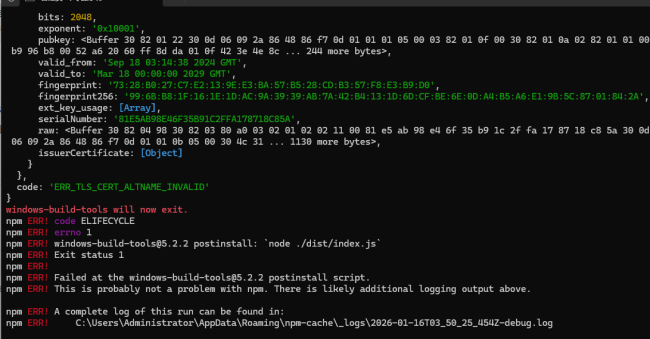
    使用这个安装之后又返回其他的报错信息

    windows-build-tools will now exit.

    npm ERR! code ELIFECYCLE

    npm ERR! errno 1

    npm ERR! windows-build-tools@5.2.2 postinstall: `node ./dist/index.js`

    npm ERR! Exit status 1

    npm ERR!

    npm ERR! Failed at the windows-build-tools@5.2.2 postinstall script.

    npm ERR! This is probably not a problem with npm. There is likely additional logging output above.


    npm ERR! A complete log of this run can be found in:

    npm ERR!     C:\Users\Administrator\AppData\Roaming\npm-cache\_logs\2026-01-16T03_50_25_454Z-debug.log

    https://img1.sycdn.imooc.com/climg/030715690969b5d210910569.jpg

    9小时前
  • 提问者 二十1024 #2

    按照这个方案已经解决了


    你在 Node 14.16 版本下执行 npm install --global windows-build-tools 依然安装失败并提示退出,核心原因是 windows-build-tools 这个包早已被官方废弃(无论 Node 14 还是更高版本),在 Win10/Win11 系统中完全无法正常运行,执行后会直接触发脚本退出和 ELIFECYCLE 错误。

    你的核心诉求是解决 node-gyp 找不到 Python 的编译报错,无需执着于安装这个废弃包,下面给出 适配 Node 14.16 的替代方案(优先推荐无需手动装编译工具的方案,新手零配置):

    方案 1:绕过原生编译(最推荐,无需装 Python / 编译工具)

    Node 14.16 适配淘宝二进制镜像,直接下载编译好的原生模块(如 node-sass),完全跳过本地编译,从根源解决 node-gyp 报错:

    1. 清理残留缓存和依赖(避免干扰)

    以管理员身份打开终端,执行:

    bash

    运行

    # 删除不完整的全局包(windows-build-tools 残留)npm uninstall -g windows-build-tools# 清理 npm 缓存npm cache clean --force# 若有项目依赖问题,进入项目目录执行(可选)rmdir /s /q node_modules
    del package-lock.json

    2. 配置 npm 淘宝二进制镜像(关键)

    bash

    运行

    # 基础镜像(加速 npm 包下载)npm config set registry https://registry.npmmirror.com/# 原生模块二进制镜像(跳过本地编译,核心!)npm config set sass_binary_site https://npmmirror.com/mirrors/node-sass/npm config set node_gyp https://npmmirror.com/mirrors/node-gyp/# 临时指定 Python 路径(即使没装,镜像会兜底)npm config set python python2.7

    3. 重新执行需要的 npm 命令

    • 若想安装全局包:npm install -g 目标包 --unsafe-perm

    • 若安装项目依赖:进入项目目录执行 npm install --unsafe-perm


    9小时前
  • bobby 回复 提问者 二十1024 #3

    完美,我把你的这个问题置顶一下

    6小时前
问题已解决,确定采纳
还有疑问,暂不采纳

恭喜解决一个难题,获得1积分~

来为老师/同学的回答评分吧

0 星
Go开发工程师全新版
  • 参与学习       532    人
  • 解答问题       611    个

风口上的技术,薪资水平遥遥领先,现在学习正值红利期! 未来3-5年,Go语言势必成为企业高性能项目中不可替代的语言 从基础到项目实战再到重构,对转行人员友好,真正从入门到精通!

了解课程


请稍等 ...
微信客服

购课补贴
联系客服咨询优惠详情

帮助反馈 APP下载

慕课网APP
您的移动学习伙伴

公众号

扫描二维码
关注慕课网微信公众号

在线咨询

领取优惠

免费试听

领取大纲

扫描二维码,添加
你的专属老师