position-absolute的居中问题
按老师的方法书写在浏览器中不能居中老师帮忙看一下呗
<!DOCTYPE html>
<html>
<head>
<meta charset="UTF-8">
<title>绝对定位</title>
<style type="text/css">
/*.block {
width: 80px;
height: 80px;
line-height: 80px;
text-align: center;
border: 2px solid black;
}*/
/*.block:nth-child(1){
position: absolute;
left: 20px;
top: 20px;
border-color: blue;
z-index: 999999;
}*/
/*.block:nth-child(2){
position: absolute;
left: 20px;
top: 20px;
width: 50%;
height: 50%;
border-color: red;
z-index: 1;
}*/
.parent {
position: relative;
width: 200px;
height: 150px;
background: blue
}
.child {
position: absolute;
width: 80px;
height: 80px;
background:red;
top: 0;
right: 0;
left: 0;
bottom: 0;
margin:auto auto;
}
</style>
</head>
<body>
<!-- <div class="block">A</div>
<div class="block">B</div>
<div class="block">C</div>
-->
<div class="parent">
<div class="child">
</div>
</div>
</body>
</html>
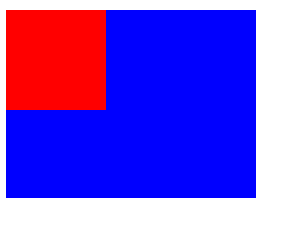
正在回答 回答被采纳积分+1

改正后的代码如下:注意看一下关于top和left的注释。祝学习愉快!
<!DOCTYPE html>
<html>
<head>
    <meta charset="UTF-8">
    <title>绝对定位</title>
    <style type="text/css">
        /*.block {
            width: 80px;
            height: 80px;
            line-height: 80px;
            text-align: center;
            border: 2px solid black;
        }*/
            /*.block:nth-child(1){
                position: absolute;
                left: 20px;
                top: 20px;
                border-color: blue;
                z-index: 999999;
            }*/
        /*.block:nth-child(2){
            position: absolute;
            left: 20px;
            top: 20px;
            width: 50%;
            height: 50%;
            border-color: red;
            z-index: 1;
        }*/
        .parent {
            position: relative;
            width: 200px;
            height: 150px;
            background: blue
        }
        .child {
            position: absolute;
            width: 80px;
            height: 80px;
            background:red;
            top: 35px;
            /*  top和left都是通过计算得到的,如top
            是parent的宽度减去child的宽度,然后除以2*/
            left: 60px;
            margin:0 auto;
        }
    </style>
</head>
<body>
    <!-- <div class="block">A</div>
    <div class="block">B</div>
    <div class="block">C</div>
     -->
     <div class="parent">
         <div class="child">

         </div>
     </div>
</body>
</html>相似问题






登录后可查看更多问答,登录/注册
- 参与学习 人
- 提交作业 1088 份
- 解答问题 10204 个
如果你有Java语言基础,又想以后从事Java Web开发,那么本路径是你的不二选择!本路径从网页搭建开始入手,通过大量案例来学习Java Web基础。定能助你完成Java Web小白的蜕变!
了解课程













恭喜解决一个难题,获得1积分~
来为老师/同学的回答评分吧
0 星