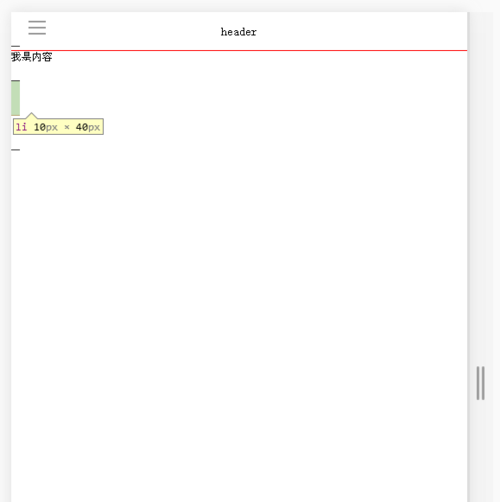
老师,jQuery方法没滑出菜单时左侧的li怎么会多出来一块?
<!doctype html>
<html>
<head>
<meta charset='utf-8'>
<meta name="viewport" content="width=device-width,initial-scale=1,maximum-scale=1,user-scalable=no">
<!--禁止格式检测:-->
<meta name="format-detection" content="telephone=no,email=no,address=no">
<title>移动端左滑导航菜单jQuery</title>
<link href="css/reset.css" rel="stylesheet">
<link href="css/demo-jq.css" rel="stylesheet">
<script src="https://cdn.bootcss.com/jquery/3.3.1/jquery.js"></script>
</head>
<body class="active">
<div class="outwrap">
<header class="header">header</header>
<div class="topbarbtn"></div>
<section class="maincontent">
<p>我是内容</p>
</section>
<footer class="footer">footer</footer>
</div>
<section class="slidebar">
<ul>
<li>左侧导航</li>
<li>左侧导航</li>
<li>左侧导航</li>
<li>左侧导航</li>
</ul>
</section>
<script>
var slideBarObj={
init:function(){
var _this=this;
//点击事件
$(".topbarbtn").on("click",function(){
if($(this).hasClass("active")){
_this.slideLeft();
}else{
_this.slideRight();
}
})
},
//显示
slideRight:function(){
$(".slidebar").animate({"width":"150px"},50);
$(".outwrap").animate({"margin-left":"150px"},50);
$(".topbarbtn").addClass("active");
},
//隐藏
slideLeft:function(){
$(".slidebar").animate({"width":"0"},50);
$(".outwrap").animate({"margin-left":"0"},50);
$(".topbarbtn").removeClass("active");
}
}
slideBarObj.init();
</script>
</body>
</html>
.header,.footer{
position:absolute;
left:0;
right:0;
height:45px;
line-height:45px;
font-size:1.4rem;
text-align:center;
}
.header{
border-bottom:1px solid red;
top:0;
}
.footer{
border-top:1px solid red;
bottom:0;
}
.outwrap{
position:absolute;
top:0;
bottom:0;
left:0;
right:0;
padding:45px 0;
margin-left:0;
}
.topbarbtn{
width:45px;
height:45px;
position:absolute;
line-height:2.6;
padding-left:20px;
top:0;
}
.topbarbtn::before{
content:"";
width:20px;
height:2px;
background:#999;
display:inline-block;
box-shadow:0 7px 0 #999,0 -7px 0 #999;
}
.slidebar{
position:absolute;
top:0;
bottom:0;
width:0;
background:#666;
z-index:100;
}
.slidebar li{
height:40px;
padding-left:10px;
line-height:40px;
color:#fff;
border-bottom:1px solid #333;
}
html,body,ul,ol,li,dd,dt,h1,h2,h3,h4,h5,h6,p{
margin:0;
padding:0;
}
html,body{
height:100%;
-webkit-font-size-adjust:100%; /*横屏或竖屏时防止字体缩放失真*/
font-size-adjust:100%;
}
html{
font-size:62.5%;
}
*{
box-sizing:border-box;
}
h1{font-size:1.8rem;}h2{font-size:1.6rem;}h3{font-size:1.4rem;}
input,button{
-webkit-appearance:none;
-moz-appearance:none;
appearance:none;
}
正在回答

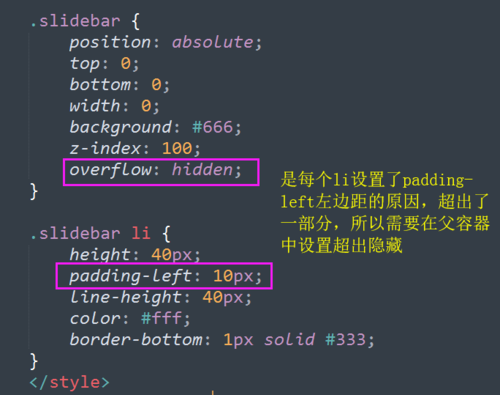
js和jquery实现的方式不一样,js中slide-bar本身是有宽度的,只不过开始向左移动了150px隐藏起来了,通过点击按钮,将body向右移动150px。
而jquery中,slide-bar本身没有宽度,也没有位移,但是里面的文字是需要显示出来的,所以会有超出的部分,通过jquery改变slide-bar的宽度来实现显示。
可以在看看这两部分代码。
相似问题





登录后可查看更多问答,登录/注册
- 参与学习 人
- 提交作业 467 份
- 解答问题 4826 个
本路径带你通过系统学习HTML5、JavaScript、jQuery的进阶知识,不仅如此,还会学习如何利用组件化的思想来开发网页,知识点+案例,使得所学可以更好的得到实践。
了解课程









恭喜解决一个难题,获得1积分~
来为老师/同学的回答评分吧
0 星