请问这种添加一张图片的方式实现轮播图的情况,如何发送消息,请老师指正
// JavaScript Document
(function ($){
	function Slider($elem,options){
		this.$elem=$elem;
		this.options=options;

		this.$items=this.$elem.find(".slider-item");
		this.$indicators=this.$elem.find(".slider-indicator");
		//this.$controlLeft=this.$elem.find(".slider-control-left");
		//this.$controlRight=this.$elem.find(".slider-control-right");
		this.$controls=this.$elem.find(".slider-control");//添加这个后上面两行不再需要

		//顺序不能颠倒,因_getCorrectIndex函数中用到了itemNum
		this.itemNum=this.$items.length;//获取图片的张数
		this.curIndex=this._getCorrectIndex(this.options.activeIndex);//_getCorrectIndex为了防止外面传进来的数据不符合要求

		this._init();
	}
	Slider.DEFAULTS={
		css3:false,
		js:false,
		animation:"fade",
		activeIndex:0,
		interval:4000,
		loop:true//值为true即无缝切换
	};
	Slider.prototype._init=function(){
		var self=this;
		//init 按钮
		this.$indicators.removeClass('slider-indicator-active');
		this.$indicators.eq(this.curIndex).addClass('slider-indicator-active');

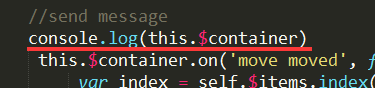
		//send message
		 this.$container.on('move moved', function(e) {
			 var index = self.$items.index(this);

			 if (e.type === 'move') {
				 if (index === self.curIndex) {
					 self.$elem.trigger('slider-hide', [index, this]);
				 } else {
					 self.$elem.trigger('slider-show', [index, this]);
				 }
			 } else { // moved
				 if (index === self.curIndex) { // 指定的
					 self.$elem.trigger('slider-shown', [index, this]);
				 } else {
					 self.$elem.trigger('slider-hidden', [index, this]);
				 }
			 }
		 });

		//to  写在这里的原因:Slider已经单例处理了,而_init在Slider里执行,故这个判断只执行一次,也只需要执行一次。
		//每次点击按钮都会调用一次to,而这里的判断只需一次
		if(this.options.animation==="slide"){
		   this.$elem.addClass('slider-slide');

		   this.to=this._slide;

		   this.$container=this.$elem.find('.slider-container');
		   this.itemWidth=this.$items.eq(0).width();
		   this.$container.css('left',-1*this.curIndex*this.itemWidth);

		   //move init
		   this.$container.move(this.options);

		   if(this.options.loop){
		       this.$container.append(this.$items.eq(0).clone());//添加上第五张图片
			   this.transitionClass=this.$container.hasClass('transition')?'transition':'';
			   this.itemNum++;//图片数量加上1
		   }

		   }else{
		   this.$elem.addClass('slider-fade');
		   this.$items.eq(this.curIndex).show();

		   //发送消息(淡入淡出方式)
		   this.$items.on("show shown hide hidden",function(event){
		   	   self.$elem.trigger('slider-'+event.type,[self.$items.index(this),this]);
		   });

		   //showHide init
		   this.$items.showHide(this.options);

		   this.to=this._fade;
		   }
		//鼠标滑过轮播图时按钮显示隐藏
		this.$elem
		.hover(function(){
			self.$controls.show();
		},function(){
			self.$controls.hide();
		})
		.on("click",".slider-control-left",function(){
			self.to(self._getCorrectIndex(self.curIndex-1),1);//添加一个参数direction,确定滑动方向
		})
		.on("click",".slider-control-right",function(){
			self.to(self._getCorrectIndex(self.curIndex+1),-1);
		})
		.on("click",".slider-indicator",function(){//给圆点添加事件
			self.to(self._getCorrectIndex(self.$indicators.index(this)));
		});
		//给按钮绑定事件,直接给elem绑定事件
		/*this.$controlLeft.on("click",function(){
			self.to(self.curIndex-1);
		});
		this.$controlRight.on("click",function(){
			self.to(self.curIndex+1);
		});*/
		//auto
		if(this.options.interval && !isNaN(Number(this.options.interval))){
			this.$elem.hover($.proxy(this.pause,this),$.proxy(this.auto,this));
		    this.auto();
		   }
	};
	//Slider.prototype.to=function(index){};  _init中添加判断后不再需要
	Slider.prototype._getCorrectIndex=function(index,maxNum){//对索引值进行处理
		maxNum=maxNum||this.itemNum;//为了后面_slide小圆点切换正常(赋值maxNum就采用maxNum的值,如果没有就图片的张数)
		if(isNaN(Number(index)))return 0;
		if(index<0)return maxNum-1;
		if(index>maxNum-1)return 0;
		return index;
	};
	Slider.prototype._activateIndicators=function(index){
		this.$indicators.removeClass('slider-indicator-active');
		this.$indicators.eq(index).addClass('slider-indicator-active');
	};
	Slider.prototype._fade=function(index){
		if(this.curIndex===index)return;//当前图片没有发生变化,不再执行_fade

		this.$items.eq(this.curIndex).showHide('hide');
		this.$items.eq(index).showHide('show');

		this._activateIndicators(index);

		this.curIndex=index;
	};
	Slider.prototype._slide=function(index,direction){
		if(this.curIndex===index)return;//当前图片没有发生变化,不再执行_slide

		var self=this;

		this.$container.move('x',-1*index*this.itemWidth);

		this.curIndex=index;

		if(this.options.loop && direction){
			if(direction<0){//点击右按钮
				if(index===0){
				    this.$container.removeClass(this.transitionClass).css('left',0);
					this.curIndex=index=1;
					setTimeout(function(){
						self.$container.addClass(self.transitionClass).move('x',-1*index*self.itemWidth);
					},20);
				}
			}else{//点击左按钮
				if(index===this.itemNum-1){
				    this.$container.removeClass(this.transitionClass).css('left',-1*index*this.itemWidth);
					this.curIndex=index=this.itemNum-2;
					setTimeout(function(){
						self.$container.addClass(self.transitionClass).move('x',-1*index*self.itemWidth);
					},20);
				}
			}
			index=this._getCorrectIndex(index,this.itemNum-1);
		}
		this._activateIndicators(index);
	};
	Slider.prototype.auto=function(){
		var self=this;
		this.intervalId=setInterval(function(){
			self.to(self._getCorrectIndex(self.curIndex+1),-1);//添加-1为了滑入方式切换幻灯片,与_getCorrectIndex保持一致(等价于右按钮)
		},self.options.interval);
	};
	Slider.prototype.pause=function(){
		clearInterval(this.intervalId);
	};
	$.fn.extend({
		slider:function(option){
			return this.each(function(){
				var $this=$(this);
				var slider=$this.data('slider');
				var canshu=$.extend({},Slider.DEFAULTS,$this.data(),typeof option==='object'&&option);
				//首先是默认参数,然后是data-active="menu",最后是传参数时的参数
				if(!slider){//如果没有值就进入if判断,添加上实例化的对象;有值的话就不会进入if判断再次实例化了
					$this.data('slider',slider=new Slider($this,canshu));
				}
				//if(typeof option === 'string')这样写不容许出错
				if(typeof slider[option]==='function'){
					slider[option]();
				}
			});
		}
	});
})(jQuery);
var $slider=$(".slider");
$slider.on("slider-show slider-shown slider-hide slider-hidden",function(event,i,elem){
	console.log(event.type+i);
});
$slider.on("slider-show",function(event,i,elem){
	//按需加载
});
$slider.slider({
	css3:false,
	js:true,
	animation:"slide",
	activeIndex:0,
	interval:0,
	loop:true
});
发送消息:(我写的这个有错误)
this.$container.on('move moved', function(e) {
var index = self.$items.index(this);
if (e.type === 'move') {
if (index === self.curIndex) {
self.$elem.trigger('slider-hide', [index, this]);
} else {
self.$elem.trigger('slider-show', [index, this]);
}
} else { // moved
if (index === self.curIndex) { // 指定的
self.$elem.trigger('slider-shown', [index, this]);
} else {
self.$elem.trigger('slider-hidden', [index, this]);
}
}
});
32
收起
正在回答
2回答

同学你好,因为老师这里测试,这个直接就是错误的,没有办法往下一步进行,同学可以将将当前的修改下,然后在一步步的排查。
另,组件化是一种思想,简单说就是:功能相同的代码可以复用。不用使用一次写一次,而是封装一次,每次用到调用就可以了。不过组件化开发是前端中比较难的一部分,有很多有一些经验的开发者也没有做到完全的组件化开发,这个是需要经验的积累的。其实视频中更多的是给同学们灌输组件化的思想。在工作能运用到这个思想,会对编程能力得到很大的提升的。并不是说要学到何种程度,而是在开发的工程中要有组件化的意识。慢慢积累就好哦。
祝学习愉快!














恭喜解决一个难题,获得1积分~
来为老师/同学的回答评分吧
0 星