老师,我想在清空购物车那里加一个功能,我尝试过改变v-if上面的true或false值,但是报错说这个属性只读?请问怎么实现呢?
Cart.vue
<template>
<div class="cart-menu" v-if="showCart">
<div class="productList">
<div class="productList__all">
<span
class="productList__all__checked iconfont"
v-html="allChecked ? '' : ''"
@click="
() => {
selectCartAllProduct(shopId);
}
"
></span>
<span class="productList__all__text">全选</span>
</div>
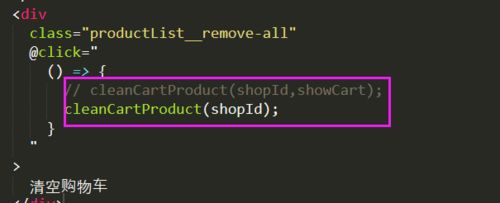
<div
class="productList__remove-all"
@click="
() => {
cleanCartProduct(shopId,showCart);
}
"
>
清空购物车
</div>
</div>
<template v-for="item in productItemList" :key="item._id">
<div class="product" v-if="item.count > 0">
<div
class="product__checked iconfont"
v-html="item.check ? '' : ''"
@click="
() => {
changeCartItemChecked(shopId, item._id);
}
"
></div>
<img :src="item.imgUrl" class="product__img" />
<div class="product__list">
<span class="product__list__name">{{ item.name }}</span>
<!-- <span class="product__list__sales">月售{{ item.sales }}件</span> -->
<div class="product__list__price">
<span class="cur-price">
<i class="cur-price__icon">¥</i>
{{ item.price }}
</span>
<span class="price">¥{{ item.oldPrice }}</span>
</div>
</div>
<div class="product__number">
<span
class="product__number__minus"
@click="
() => {
changeCartItemInfo(shopId, item._id, item, -1);
}
"
>-</span
>
{{ item.count || 0 }}
<span
class="product__number__plus"
@click="
() => {
changeCartItemInfo(shopId, item._id, item, 1);
}
"
>+</span
>
</div>
</div>
</template>
</div>
<div class="cart">
<div class="cart__sort">
<span class="iconfont cart__sort__icon" @click="handleCartDisplay"
></span
>
<span class="cart__sort__number">{{ total }}</span>
</div>
<div class="cart__total-price">
<span class="cart__total-price__total">总价:</span>
<span class="cart__total-price__price">¥ {{ price }}</span>
</div>
<div class="cart__pay">去结算</div>
</div>
</template>
<script>
import { useStore } from "vuex";
import { useRoute } from "vue-router";
import { computed, ref } from "vue";
import { useCommonCartEffect } from "./commonCartEffect";
//获取购物车信息逻辑
const useCartEffect = () => {
const { changeCartItemInfo } = useCommonCartEffect();
const store = useStore();
const route = useRoute();
const shopId = route.params.id;
const cartList = store.state.cartList;
const showCart = ref(false);
//计算总单数
const total = computed(() => {
const productList = cartList[shopId];
let count = 0;
if (productList) {
for (let i in productList) {
const product = productList[i];
count += product.count;
}
}
return count;
});
//计算总价格
const price = computed(() => {
const productList = cartList[shopId];
let count = 0;
if (productList) {
for (let i in productList) {
const product = productList[i];
if (product.check) {
count += product.price * product.count;
}
}
}
return count.toFixed(2);
});
//检查购物车列表是否为全选
const allChecked = computed(() => {
const productList = cartList[shopId];
let result = true;
if (productList) {
for (let i in productList) {
const product = productList[i];
if (product.count > 0 && !product.check) {
result = false;
}
}
}
return result;
});
//改变购物车订单选中状态
const changeCartItemChecked = (shopId, productId) => {
store.commit("changeCartItemChecked", { shopId, productId });
};
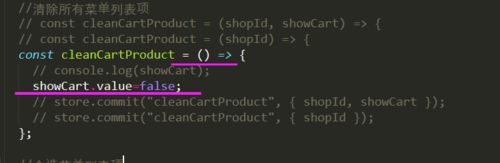
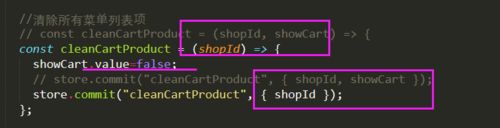
//清除所有菜单列表项
const cleanCartProduct = (shopId, showCart) => {
// console.log(showCart);
store.commit("cleanCartProduct", { shopId, showCart });
};
//全选菜单列表项
const selectCartAllProduct = (shopId) => {
store.commit("selectCartAllProduct", { shopId });
};
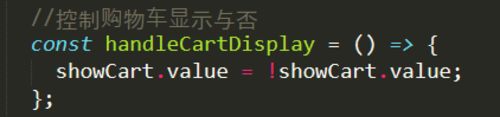
//控制购物车显示与否
const handleCartDisplay = () => {
showCart.value = !showCart.value;
};
const productItemList = computed(() => {
const productList = cartList[shopId] || [];
// console.log(productList);
return productList;
});
return {
total,
price,
shopId,
cartList,
productItemList,
changeCartItemInfo,
changeCartItemChecked,
cleanCartProduct,
allChecked,
selectCartAllProduct,
showCart,
handleCartDisplay
};
};
export default {
name: "Cart",
setup() {
const {
total,
price,
shopId,
cartList,
productItemList,
changeCartItemInfo,
changeCartItemChecked,
cleanCartProduct,
allChecked,
selectCartAllProduct,
showCart,
handleCartDisplay
} = useCartEffect();
return {
price,
total,
shopId,
cartList,
productItemList,
changeCartItemInfo,
changeCartItemChecked,
cleanCartProduct,
allChecked,
selectCartAllProduct,
showCart,
handleCartDisplay,
};
},
};
</script>
<style lang="scss" scoped>
@import "../../style/viriables.scss";
@import "../../style/mixins.scss";
.cart-menu {
position: absolute;
padding: 0 0.18rem;
left: 0;
right: 0;
bottom: 0.5rem;
background-color: $color-FFF;
.productList {
display: flex;
justify-content: space-between;
align-items: center;
margin: 0 -0.18rem;
padding: 0 0.18rem;
height: 0.52rem;
border-bottom: 0.01rem solid $color-F1F1F1;
&__all {
display: flex;
align-items: center;
&__checked {
font-size: 0.2rem;
color: $color-0091FF;
margin-right: 0.09rem;
}
&__text {
font-size: 0.14rem;
color: $color-333;
line-height: 0.16rem;
}
}
&__remove-all {
font-size: 0.14rem;
color: $color-333;
line-height: 0.16rem;
}
}
.product {
position: relative;
left: 0.36rem;
display: flex;
width: 3.04rem;
height: 0.7rem;
align-items: center;
&__checked {
position: absolute;
font-size: 0.2rem;
left: -0.36rem;
color: $color-0091FF;
// margin-right: 0.16rem;
}
&__number {
position: absolute;
display: flex;
align-items: center;
right: 0;
bottom: 0.12rem;
&__minus {
@include addAndMinus;
box-sizing: border-box;
border: 0.01rem solid $color-666;
color: $color-666;
margin-right: 0.1rem;
}
&__plus {
@include addAndMinus;
background-color: $color-0091FF;
color: $color-FFF;
margin-left: 0.1rem;
}
}
&__img {
height: 0.46rem;
}
&__list {
display: flex;
margin-left: 0.16rem;
flex-direction: column;
&__name {
@include ellipsis;
width: 1.5rem;
font-size: 0.14rem;
color: $color-333;
line-height: 0.2rem;
font-weight: 600;
margin-bottom: 0.06rem;
}
// &__sales {
// font-size: 12px;
// color: $color-333;
// line-height: 16px;
// margin-bottom: 0.06rem;
// }
&__price {
display: flex;
align-items: center;
.cur-price {
color: $color-E93B3B;
&__icon {
font-style: normal;
display: inline-block;
font-size: 0.12rem;
transform: scale(0.85);
margin-right: -0.03rem;
}
}
.price {
text-decoration: line-through;
display: inline-block;
margin-left: -0.07rem;
font-size: 0.2rem;
color: $color-999;
line-height: 0.2rem;
transform: scale(0.5);
}
}
}
}
}
.cart {
display: flex;
align-items: center;
box-sizing: border-box;
position: absolute;
bottom: 0;
left: 0;
right: 0;
height: 0.5rem;
background: $color-FFF;
box-shadow: 0 -1px 1px 0 $color-F1F1F1;
&__sort {
position: relative;
margin: 0 0.32rem 0 0.24rem;
&__icon {
font-size: 0.26rem;
color: $color-0091FF;
}
&__number {
position: absolute;
display: flex;
justify-content: center;
align-items: center;
left: 0.25rem;
top: -0.07rem;
padding: 0 0.05rem;
min-width: 0.2rem;
height: 0.2rem;
border-radius: 0.1rem;
font-size: 0.16rem;
color: $color-FFF;
transform: scale(0.5);
transform-origin: left center;
background-color: $color-E93B3B;
}
}
&__total-price {
width: 1.93rem;
&__total {
font-size: 0.12rem;
color: $color-333;
margin-right: 0.1rem;
}
&__price {
font-size: 0.18rem;
color: $color-E93B3B;
}
}
&__pay {
flex: 1;
text-align: center;
line-height: 0.49rem;
width: 0.98rem;
color: $color-FFF;
font-size: 0.14rem;
background-color: $color-4FB0F9;
}
}
</style>store文件夹下的index.js
import { createStore } from 'vuex'

export default createStore({
  state: {
    cartList: {
      //第一层级是商铺的id
      // shopId: {
      //第二层级是商品的id
      //第二层内容是商品的内容以及购物数量
      // productId: {
      //   imgUrl: "http://www.dell-lee.com/imgs/vue3/tomato.png",
      //   name: "番茄 250g / 份",
      //   oldPrice: 39.6,
      //   price: 33.6,
      //   sales: 10,
      //   _id: "1",
      //  count: 0
      // }
      // }
    }
  },
  mutations: {
    changeCartItemInfo(state, payload) {
      const { shopId, productId, productInfo, num } = payload;
      let shopInfo = state.cartList[shopId];
      if (!shopInfo) {
        shopInfo = {}
      }
      let product = shopInfo[productId];
      if (!product) {
        product = productInfo;
        product.count = 0
      }
      product.count = product.count + num;
      if (product.count > 0) { product.check = true }
      if (product.count < 0) {
        product.count = 0
      }
      shopInfo[productId] = product;
      state.cartList[shopId] = shopInfo;
      // console.log(shopId, productId, productInfo)
    },

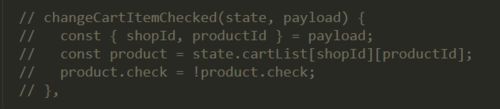
    changeCartItemChecked(state, payload) {
      const { shopId, productId } = payload;
      const product = state.cartList[shopId][productId];
      product.check = !product.check;
    },

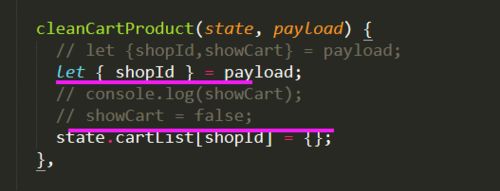
    cleanCartProduct(state,payload){
      const {shopId,showCart} = payload;
      console.log(showCart);
      showCart = false;
      state.cartList[shopId] = {};
    },

    selectCartAllProduct(state,payload){
      const {shopId} =payload;
      const products = state.cartList[shopId];
      if(products){
        for(let key in products){
          const product = products[key];
          product.check = true;
        }
      }
    }
  },
  actions: {
  },
  modules: {
  }
})
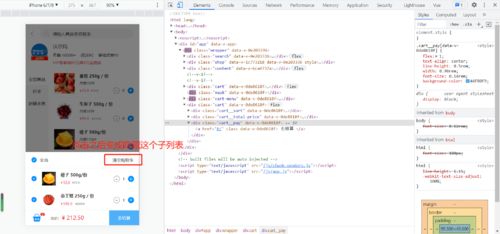
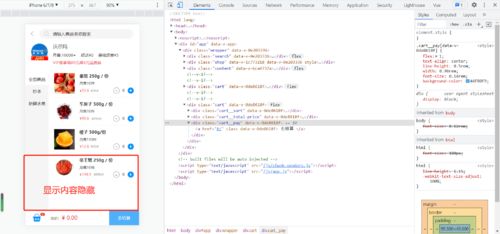
问题描述:我想实现的效果也是绑在了清空购物车的事件中
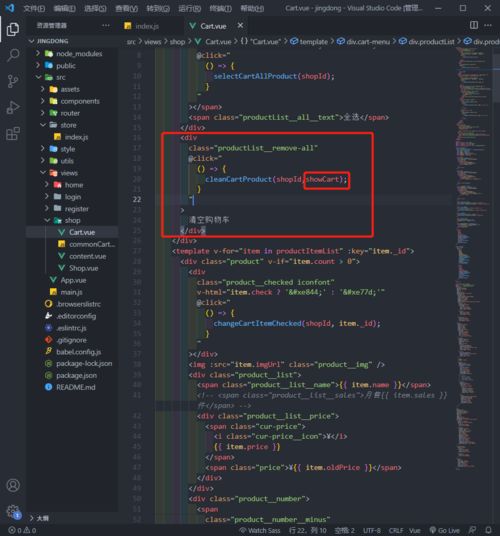
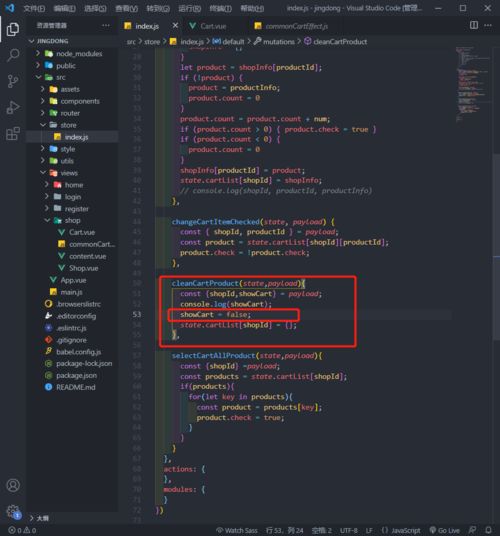
我传进去了这个参数,在store中使用这个值,并尝试修改这个值
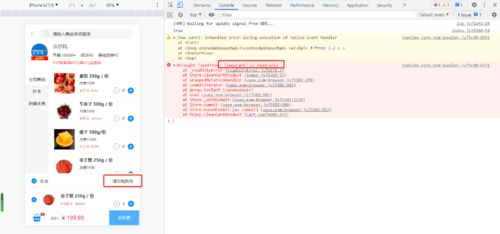
相关截图:但是无效
11
收起
正在回答 回答被采纳积分+1
2回答

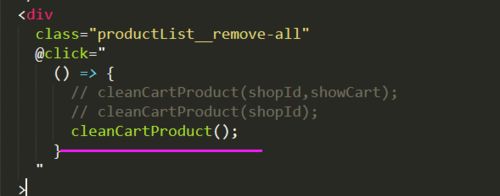



















恭喜解决一个难题,获得1积分~
来为老师/同学的回答评分吧
0 星