正在回答 回答被采纳积分+1
1回答

樱桃小胖子
2022-03-20 11:33:24
同学你好,请参考如下代码和和注释实现哦
<html>

<head>
    <meta charset="UTF-8">
    <title>Document</title>
    <!-- 这个语句不能少 -->
    <meta name="viewport" content="width=device-width, initial-scale=1.0">
    <!-- <meta name=""> -->
    <style>
    #box {
        width: 80%;
        margin: 0 auto;
        background: #ccc;
        /*本例代码中,实现图片居中对齐显示*/
        text-align: center;
    }

    #box>img {
        display: inline-block;
        padding: 1.5%;
        width: 21%;
        height: 200px;
    }

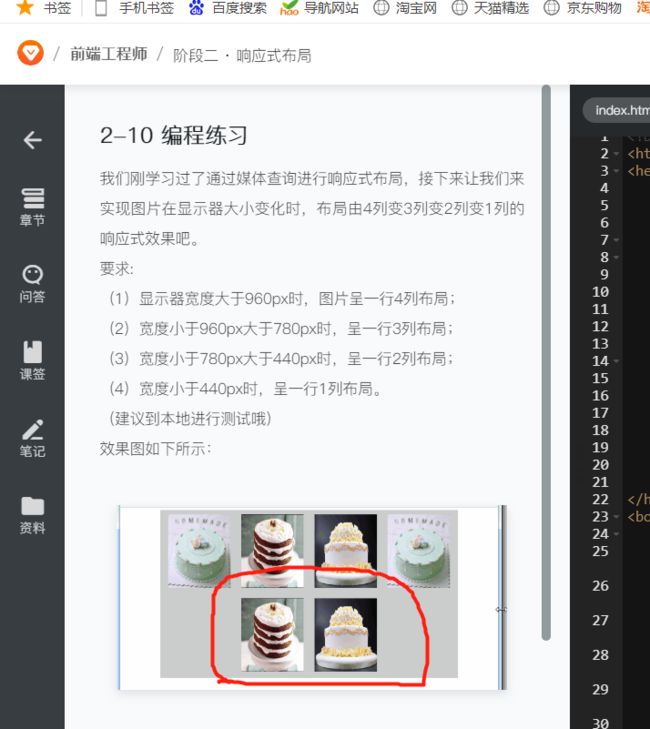
    /*@media(min-width:960px){
            #box img{
                width: 25%;
            }
        }*/
    @media (min-width: 960px) {
        #box img {
            width: 20%;
        }
    }

    /*@media(max-width:960px) {
        #box img {
            width: 33.333%;
        }
    }*/
    @media (min-width: 780px) and (max-width: 960px) {
        #box img {
            width: 26.666668%;
        }
    }

    /*@media(max-width:780px) {
        #box img {
            width: 50%;
        }
    }*/
    @media (min-width: 440px) and (max-width: 780px) {
        #box img {
            width: 40%;
        }
    }

    /*@media(max-width:440px) {
        #box img {
            width: 100%;
        }
    }*/
    @media (max-width: 440px) {
        #box img {
            width: 80%;
        }
    }
    </style>
</head>

<body>
    <div id="box">
        <img src="http://img1.sycdn.imooc.com/climg/5a45e49100014e5010601059.jpg" alt="">
        <img src="http://img1.sycdn.imooc.com/climg/5a45e53b00012e6d09940789.jpg" alt="">
        <img src="http://img1.sycdn.imooc.com/climg/5a45e53c0001d04e09940732.jpg" alt="">
        <img src="http://img1.sycdn.imooc.com/climg/5a45e49100014e5010601059.jpg" alt="">
        <img src="http://img1.sycdn.imooc.com/climg/5a45e53b00012e6d09940789.jpg" alt="">
        <img src="http://img1.sycdn.imooc.com/climg/5a45e53c0001d04e09940732.jpg" alt="">
    </div>
</body>

</html>
希望可以帮到你,祝学习愉快!
相似问题






登录后可查看更多问答,登录/注册










恭喜解决一个难题,获得1积分~
来为老师/同学的回答评分吧
0 星