老师 还是上次提过的问题,在店铺里添加到了购物车,在我的购物车中数据获取的问题,按照老师的代码进行了修改,但是问题还是有点多
1、没有显示所有店铺的购物车数据
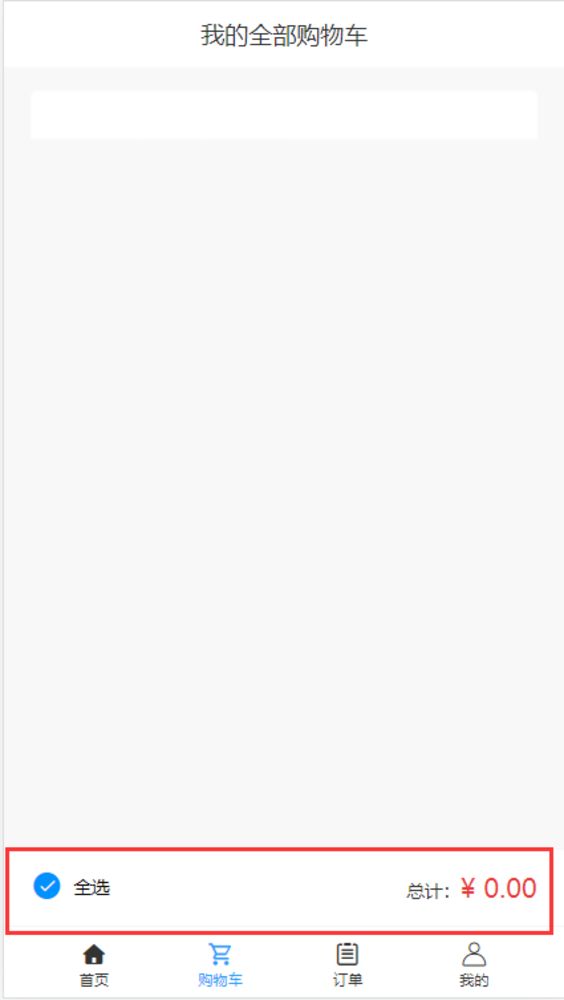
2、全选按钮有问题
3、总计价格有问题
cartList.vue页面:
<template>
<div class="wrapper">
<div class="title">我的全部购物车</div>
<div v-for="(shopItem, shopId) in cartList"
:key="shopId">
<div class="cart">
<div class="cart__title">
{{shopItem.shopName}}
</div>
<div class="cart__wrapper">
<div class="product__list">
<div v-for="item in shopItem.productList"
:key="item.id"
class="product__item">
<div class="product__item__checked iconfont"
v-html="item.check ? '': ''"
@click="() => changeCartItemChecked(shopId, item.id)" />
<img class="product__item__img"
:src="item.imgUrl" />
<div class="product__item__detail">
<h4 class="product__item__title">{{item.name}}</h4>
<p class="product__item__price">
<span class="product__item__yen">¥</span>{{item.price}}
<!-- <span class="product__item__origin">¥{{item.oldPrice}}</span> -->
</p>
</div>
<div class="product__number">
<span class="product__number__minus iconfont"
@click="() => { changeCartItemInfo(shopId, item.id, item, -1) }"></span>
<span class="product__number__value">{{item.count || 0}}</span>
<span class="product__number__plus iconfont"
@click="() => { changeCartItemInfo(shopId, item.id, item, 1) }"></span>
</div>
</div>
</div>
</div>
</div>
</div>
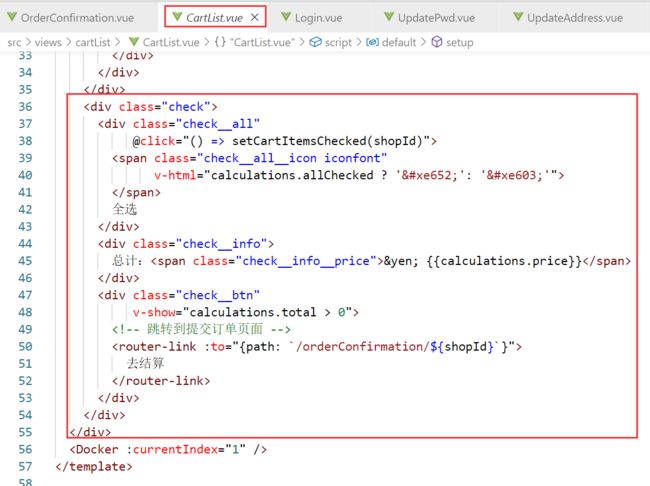
<div class="check">
<div class="check__all"
@click="() => setCartItemsChecked(shopId)">
<span class="check__all__icon iconfont"
v-html="calculations.allChecked ? '': ''">
</span>
全选
</div>
<div class="check__info">
总计:<span class="check__info__price">¥ {{calculations.price}}</span>
</div>
<div class="check__btn"
v-show="calculations.total > 0">
<!-- 跳转到提交订单页面 -->
<router-link :to="{path: `/orderConfirmation/${shopId}`}">
去结算
</router-link>
</div>
</div>
</div>
<Docker :currentIndex="1" />
</template>
<script>
import Docker from '../../components/Docker'
import { useStore } from 'vuex'
import { useRoute } from 'vue-router'
import { useCommonCartEffect } from '../../effects/cartEffects'
// 获取购物车信息逻辑
const useCartEffect = (shopId) => {
const store = useStore()
const cartList = store.state.cartList
// 操作购物车的功能是类似的
const changeCartItemInfo = (shopId, productId, productInfo, num) => {
store.commit('changeCartItemInfo', {
shopId, productId, productInfo, num
})
}
const { calculations } = useCommonCartEffect(shopId)
const changeCartItemChecked = (shopId, productId) => {
store.commit('changeCartItemChecked', { shopId, productId })
}
const setCartItemsChecked = (shopId) => {
// 如果全选状态,点击按钮后取消全选,如果非全选状态,点击按钮后全部选中
const allChecked = !calculations.value.allChecked
store.commit('setCartItemsChecked', { shopId, allChecked })
}
return {
cartList, calculations, changeCartItemInfo, changeCartItemChecked, setCartItemsChecked
}
}
export default {
name: 'CartList',
components: { Docker },
setup () {
const route = useRoute()
const shopId = route.params.id
const {
cartList, calculations, changeCartItemInfo, changeCartItemChecked, setCartItemsChecked
} = useCartEffect(shopId)
return {
cartList, calculations, changeCartItemInfo, changeCartItemChecked, setCartItemsChecked
}
}
}
</script>
<style lang="scss" scoped>
@import "../../style/viriables.scss";
@import "../../style/mixins.scss";
.wrapper {
overflow-y: auto;
position: absolute;
left: 0;
top: 0;
bottom: 0.5rem;
right: 0;
background: #f8f8f8;
}
.title {
line-height: 0.44rem;
background: $bgColor;
font-size: 0.16rem;
color: $content-fontcolor;
text-align: center;
}
.cart {
margin: 0.16rem 0.18rem 0.1rem 0.18rem;
background: $bgColor;
border-radius: 0.04rem 0.04rem 0 0;
&__title {
padding: 0.16rem;
font-size: 0.16rem;
color: $content-fontcolor;
}
&__wrapper {
overflow-y: scroll;
margin: 0 0.18rem;
position: absolute;
left: 0;
right: 0;
top: 1.1rem;
}
}
.product {
&__list {
background: $bgColor;
border-radius: 0 0 0.04rem 0.04rem;
}
&__item {
position: relative;
display: flex;
padding: 0.12rem 0;
margin: 0 0.18rem;
border-bottom: 0.01rem solid $content-bgColor;
&__checked {
line-height: 0.5rem;
margin-right: 0.2rem;
color: $btn-bgColor;
font-size: 0.2rem;
}
&__detail {
overflow: hidden;
}
&__img {
width: 0.46rem;
height: 0.46rem;
margin-right: 0.16rem;
}
&__title {
margin: 0;
line-height: 0.2rem;
font-size: 0.14rem;
color: $content-fontcolor;
@include ellipsis;
}
&__price {
margin: 0.06rem 0 0 0;
line-height: 0.2rem;
font-size: 0.14rem;
color: $hightlight-fontColor;
}
&__yen {
font-size: 0.12rem;
}
&__origin {
margin-left: 0.06rem;
line-height: 0.2rem;
font-size: 0.12rem;
color: $light-fontColor;
text-decoration: line-through;
}
.product__number {
position: absolute;
right: 0;
bottom: 0.26rem;
&__minus {
position: relative;
top: 0.02rem;
color: $medium-fontColor;
margin-right: 0.05rem;
font-size: 0.2rem;
}
&__plus {
position: relative;
top: 0.02rem;
color: $btn-bgColor;
margin-left: 0.05rem;
font-size: 0.2rem;
}
&__value {
font-size: 0.13rem;
}
}
}
}
.check {
width: 100%;
position: absolute;
bottom: 0;
display: flex;
height: 0.49rem;
background-color: $bgColor;
border-top: 0.01rem solid $content-bgColor;
line-height: 0.49rem;
&__all {
width: 0.64rem;
margin-left: 0.18rem;
font-size: 0.12rem;
&__icon {
display: inline-block;
margin-right: 0.05rem;
vertical-align: top;
color: $btn-bgColor;
font-size: 0.2rem;
}
}
&__info {
flex: 1;
color: $content-fontcolor;
font-size: 0.12rem;
text-align: right;
line-height: 0.49rem;
margin-right: 0.18rem;
&__price {
line-height: 0.49rem;
color: $hightlight-fontColor;
font-size: 0.18rem;
}
}
&__btn {
width: 0.98rem;
background-color: #4fb0f9;
text-align: center;
font-size: 0.14rem;
margin-left: 0.2rem;
a {
color: $bgColor;
text-decoration: none;
}
}
}
</style>
===============================
store -> index.js页面
import Vuex from 'vuex'
import { post } from '../utils/request'
// 给cartList数据做持久存储
const setLocalCartList = (state) => {
const { cartList } = state
const cartListString = JSON.stringify(cartList)
localStorage.cartList = cartListString
}
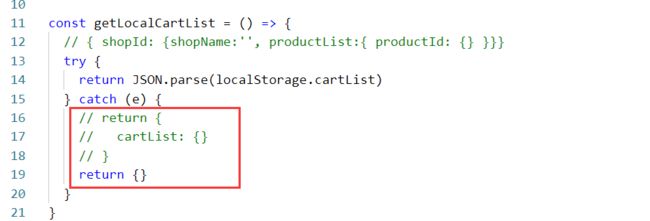
const getLocalCartList = () => {
// { shopId: {shopName:'', productList:{ productId: {} }}}
try {
return JSON.parse(localStorage.cartList)
} catch (e) {
return {}
}
}
export default Vuex.createStore({
state: {
cartList: getLocalCartList(),
userId: ''
},
mutations: {
saveUserId (state, payload) {
state.userId = payload.userId
},
changeCartItemInfo (state, payload) {
const { shopId, productId, productInfo } = payload
const shopInfo = state.cartList[shopId] || {
shopName: '', productList: {}
}
let product = shopInfo.productList[productId]
if (!product) {
productInfo.count = 0
product = productInfo
}
product.count = product.count + payload.num
if (payload.num > 0) { product.check = true }
if (product.count < 0) { product.count = 0 }
shopInfo.productList[productId] = product
state.cartList[shopId] = shopInfo
console.log('cart state:', state)
console.log('userId:', state.userId, 'shopId:', shopId, 'goodsId:', product.id, 'goodsNum:', product.count, 'goodsName:', product.goodsName, 'img:', product.imgUrl)
// 加入购物车
const addCart = async () => {
try {
const result = await post('/cart/create', {
shopId: shopId,
goodsId: product.id,
goodsNum: product.count,
goodsName: product.goodsName,
img: product.imgUrl
})
if (result?.code === 1) {
console.log('添加购物车成功')
} else {
console.log('添加购物车失败')
}
} catch (e) {
console.log('请求失败')
}
}
addCart()
setLocalCartList(state)
},
changeShopName (state, payload) {
const { shopId, shopName } = payload
const shopInfo = state.cartList[shopId] || {
shopName: '', productList: {}
}
shopInfo.shopName = shopName
state.cartList[shopId] = shopInfo
setLocalCartList(state)
},
changeCartItemChecked (state, payload) {
const { shopId, productId } = payload
const product = state.cartList[shopId].productList[productId]
product.check = !product.check
setLocalCartList(state)
},
cleanCartProducts (state, payload) {
const { shopId } = payload
state.cartList[shopId].productList = {}
setLocalCartList(state)
},
setCartItemsChecked (state, payload) {
// 接收allChecked
const { shopId, allChecked } = payload
const products = state.cartList[shopId].productList
if (products) {
for (const key in products) {
const product = products[key]
// 如果allChecked值为true,将每个商品的check值设为true
if (allChecked) {
product.check = true
} else {
// 如果allChecked值为false,将每个商品的check值设为false
product.check = false
}
}
}
setLocalCartList(state)
},
clearCartData (state, shopId) {
state.cartList[shopId].productList = {}
}
}
})
正在回答

同学你好,同学的数据和讲师的数据有区别,所以渲染时,要注意数据名称问题。老师简单修改了cartList页面,效果应该符合同学的要求了,请查看(结构和样式都有调整):
<template>
<div class="wrapper">
<div class="title">我的全部购物车</div>
<!-- 遍历全部购物车数据,并渲染;shopId就是商店id -->
<div v-for="(shopItem, shopId) in cartList" :key="shopId">
<div class="cart">
<div class="cart__title">
{{ shopItem.shopName }}
</div>
<div class="cart__wrapper">
<div class="product__list">
<!-- 遍历数据,只显示count>0的 -->
<template v-for="item in shopItem.productList" :key="item._id">
<div v-if="item.count >0" class="product__item">
<div
class="product__item__checked iconfont"
v-html="item.check ? '' : ''"
@click="() => changeCartItemChecked(shopId, item.id)"
/>
<img class="product__item__img" :src="item.imgUrl" />
<div class="product__item__detail">
<h4 class="product__item__title">{{ item.name }}</h4>
<p class="product__item__price">
<span class="product__item__yen">¥</span
>{{ item.price }}
<!-- <span class="product__item__origin">¥{{item.oldPrice}}</span> -->
</p>
</div>
<div class="product__number">
<span
class="product__number__minus iconfont"
@click="
() => {
changeCartItemInfo(shopId, item.id, item, -1)
}
"
></span
>
<span class="product__number__value">{{
item.count || 0
}}</span>
<span
class="product__number__plus iconfont"
@click="
() => {
changeCartItemInfo(shopId, item.id, item, 1)
}
"
></span
>
</div>
</div>
</template>
</div>
</div>
</div>
</div>
</div>
<Docker :currentIndex="1" />
</template>
<script>
import Docker from '../../components/Docker'
import { useStore } from 'vuex'
// 获取购物车信息逻辑
const useCartEffect = () => {
// 获取全部购物车数据
const store = useStore()
const cartList = store.state.cartList
// 操作购物车的功能是类似的
const changeCartItemInfo = (shopId, productId, productInfo, num) => {
store.commit('changeCartItemInfo', {
shopId, productId, productInfo, num
})
}
const changeCartItemChecked = (shopId, productId) => {
store.commit('changeCartItemChecked', { shopId, productId })
}
const setCartItemsChecked = (shopId) => {
store.commit('setCartItemsChecked', { shopId })
}
return {
cartList, changeCartItemInfo, changeCartItemChecked, setCartItemsChecked
}
}
export default {
name: 'CartList',
components: { Docker },
setup () {
const {
changeCartItemInfo, changeCartItemChecked, setCartItemsChecked, cartList
} = useCartEffect()
return {
cartList, changeCartItemInfo, changeCartItemChecked, setCartItemsChecked
}
}
}
</script>
<style lang="scss" scoped>
@import '../../style/viriables.scss';
@import '../../style/mixins.scss';
.wrapper {
overflow-y: auto;
position: absolute;
left: 0;
top: 0;
bottom: 0.5rem;
right: 0;
background: #f8f8f8;
}
.title {
line-height: 0.44rem;
background: $bgColor;
font-size: 0.16rem;
color: $content-fontcolor;
text-align: center;
}
.cart {
margin: 0.16rem 0.18rem 0.1rem 0.18rem;
background: $bgColor;
border-radius: 0.04rem 0.04rem 0 0;
&__title {
padding: 0.16rem;
font-size: 0.16rem;
color: $content-fontcolor;
}
&__wrapper {
overflow-y: scroll;
margin: 0 0.18rem;
// 这里做了修改
// position: absolute;
// left: 0;
// right: 0;
// top: 1.1rem;
}
}
.product {
&__list {
background: $bgColor;
border-radius: 0 0 0.04rem 0.04rem;
}
&__item {
position: relative;
display: flex;
padding: 0.12rem 0;
margin: 0 0.18rem;
border-bottom: 0.01rem solid $content-bgColor;
&__checked {
line-height: 0.5rem;
margin-right: 0.2rem;
color: $btn-bgColor;
font-size: 0.2rem;
}
&__detail {
overflow: hidden;
}
&__img {
width: 0.46rem;
height: 0.46rem;
margin-right: 0.16rem;
}
&__title {
margin: 0;
line-height: 0.2rem;
font-size: 0.14rem;
color: $content-fontcolor;
@include ellipsis;
}
&__price {
margin: 0.06rem 0 0 0;
line-height: 0.2rem;
font-size: 0.14rem;
color: $hightlight-fontColor;
}
&__yen {
font-size: 0.12rem;
}
&__origin {
margin-left: 0.06rem;
line-height: 0.2rem;
font-size: 0.12rem;
color: $light-fontColor;
text-decoration: line-through;
}
.product__number {
position: absolute;
right: 0;
bottom: 0.26rem;
&__minus {
position: relative;
top: 0.02rem;
color: $medium-fontColor;
margin-right: 0.05rem;
font-size: 0.2rem;
}
&__plus {
position: relative;
top: 0.02rem;
color: $btn-bgColor;
margin-left: 0.05rem;
font-size: 0.2rem;
}
&__value {
font-size: 0.13rem;
}
}
}
}
.check {
width: 100%;
position: absolute;
bottom: 0;
display: flex;
height: 0.49rem;
background-color: $bgColor;
border-top: 0.01rem solid $content-bgColor;
line-height: 0.49rem;
&__all {
width: 0.64rem;
margin-left: 0.18rem;
font-size: 0.12rem;
&__icon {
display: inline-block;
margin-right: 0.05rem;
vertical-align: top;
color: $btn-bgColor;
font-size: 0.2rem;
}
}
&__info {
flex: 1;
color: $content-fontcolor;
font-size: 0.12rem;
text-align: right;
line-height: 0.49rem;
margin-right: 0.18rem;
&__price {
line-height: 0.49rem;
color: $hightlight-fontColor;
font-size: 0.18rem;
}
}
&__btn {
width: 0.98rem;
background-color: #4fb0f9;
text-align: center;
font-size: 0.14rem;
margin-left: 0.2rem;
a {
color: $bgColor;
text-decoration: none;
}
}
}
</style>效果:
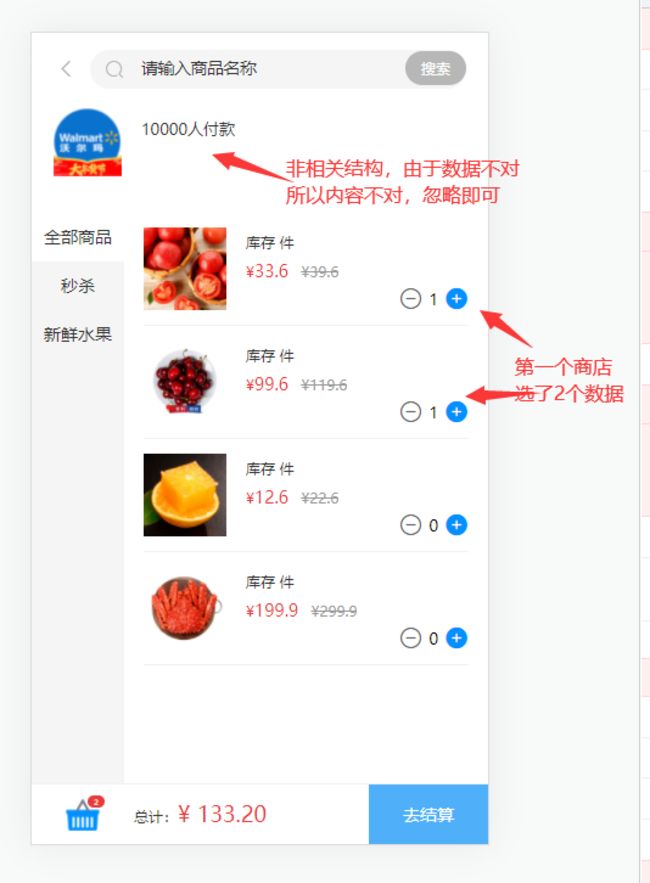
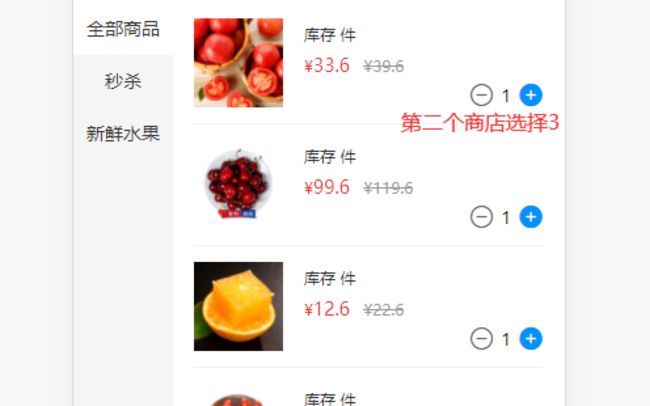
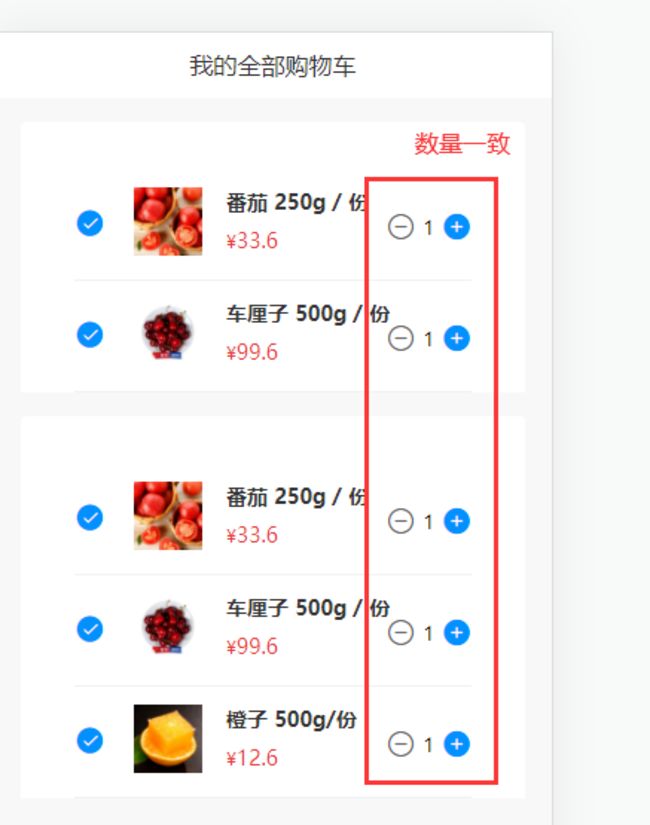
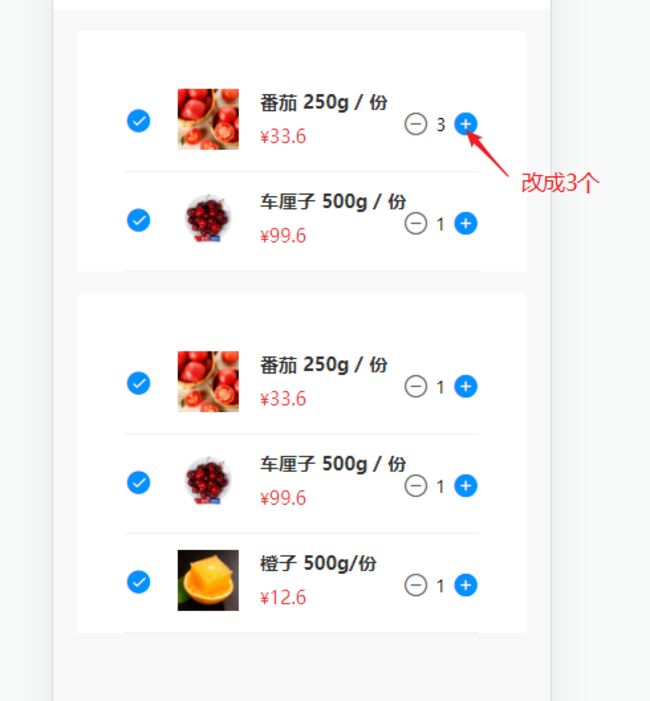
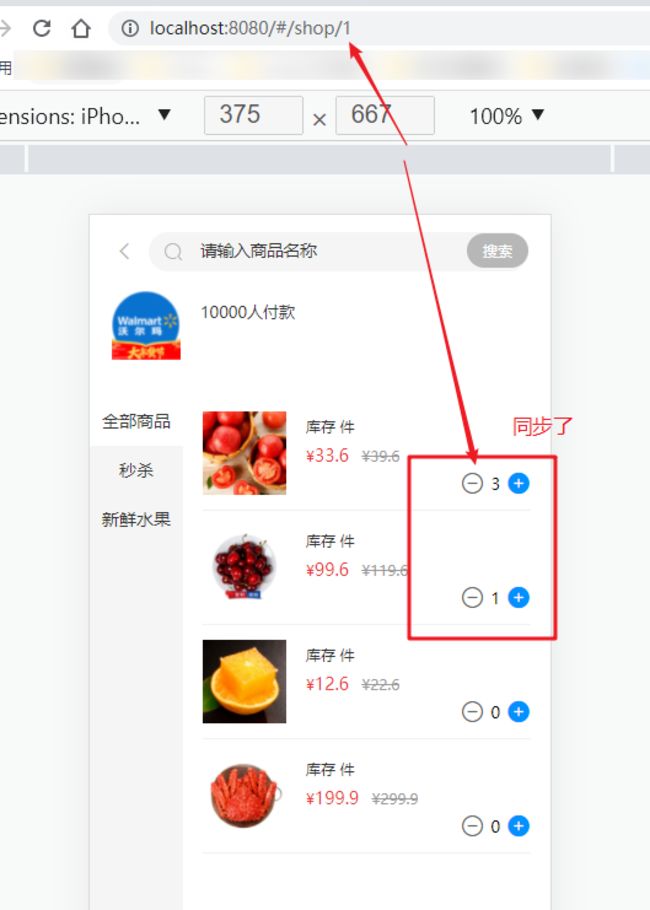
至于底部的计算,同学参考其他购物车逻辑,自己计算一下。
祝学习愉快!
























恭喜解决一个难题,获得1积分~
来为老师/同学的回答评分吧
0 星