老师帮我检查下代码啊 对着敲也实现不了效果 QaQ呜呜
<!DOCTYPE html>
<html lang="en">

<head>
    <meta charset="UTF-8">
    <meta http-equiv="X-UA-Compatible" content="IE=edge">
    <meta name="viewport" content="width=device-width, initial-scale=1.0">
    <title>Document</title>
    <style>
        body {
            background-color: black;
        }

        .ball {
            position: absolute;
            border-radius: 50%;
        }
    </style>
</head>

<body>
    <script>
        // 小球类
        function Ball(x, y) {
            // 属性x、y表示圆心的坐标
            this.x = x;
            this.y = y;
            // 半径属性
            this.r = 20;
            // 透明度
            this.opacity = 1;
            // 小球背景颜色,从颜色数组中随机选择一个颜色
            this.color = colorArr[parseInt(Math.random() * colorArr.lengthc)];
            // 这个小球的x增量、y增量,使用do-while语句,可以防止dX和dY都是0
            do {
                this.dX = parseInt(Math.random() * 20) - 10;
                this.dY = parseInt(Math.random() * 20) - 10;
            } while (this.dX == 0 && this.dY == 0);

            // 初始化
            this.init();
            // 把自己推入数组,注意:这里的this不是类本身,而是实例
            ballArr.push(this);
        }

        // 初始化
        Ball.prototype.init = function () {
            // 创建自己的dom
            this.dom = document.createElement("div");
            this.dom.className = "ball";
            this.dom.style.width = this.r * 2 + "px";
            this.dom.style.height = this.r * 2 + "px";
            this.dom.style.left = this.x - this.r + "px";
            this.dom.style.top = this.y - this.r + "px";
            this.dom.style.backgroundColor = this.color;
            // 上树
            document.body.appendChild(this.dom);
        };

        // 更新
        Ball.prototype.update = function () {
            // 位置改变
            this.x += this.dX;
            this.y -= this.dY;
            // 半径改变
            this.r += 0.2;
            // 透明度改变
            this.opacity -= 0.01;
            this.dom.style.width = this.r * 2 + "px";
            this.dom.style.height = this.r * 2 + "px";
            this.dom.style.left = this.x - this.r + "px";
            this.dom.style.top = this.y - this.r + "px";
            this.dom.style.opacity = this.opacity;

            // 当透明度小于0的时候,就需要从数组中删掉自己,DOM元素也要删掉自己
            if (this.opacity < 0) {
                // 从数组中删除自己
                for (var i = 0; i < ballArr.length; i++) {
                    if (ballArr[i] == this) {
                        ballArr.splice(i, 1);
                    }
                }
                // 还要删除自己的dom
                document.body.removeChild(this.dom);
            }
        };

        // 把所有的小球实例都放到一个数组中
        var ballArr = [];

        // 初始颜色数组
        var colorArr = ["#66CCCC", "#CCFF66", "#FF99CC", "#FF6666", "#CC3399", "#FF6600"];

        // 定时器,负责更新所有的小球实例
        setInterval(function () {
            // 遍历数组,调用小球的update方法
            for (var i = 0; i < ballArr.length; i++) {
                ballArr[i].update();
            }
        }, 20);

        // 鼠标指针事件监听
        document.onmousemove = function (e) {
            // 得到鼠标指针的位置
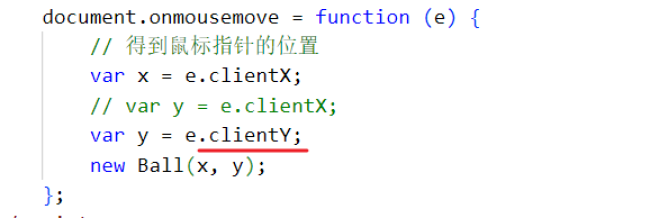
            var x = e.clientX;
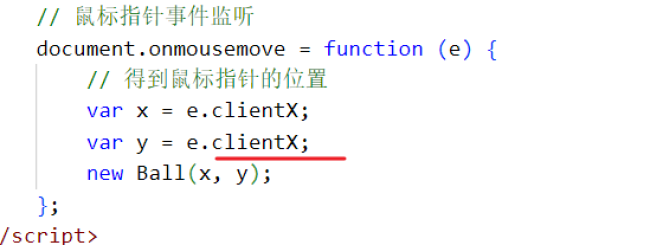
            var y = e.clientX;

            new Ball(x, y);
        };
    </script>
</body>

</html>
搜索
复制
15
收起
正在回答 回答被采纳积分+1
1回答



相似问题
老师检查一下
12
0
3

老师帮我解答下吧 为什么实现不了淡入淡出效果?
28
5
13


老师我的代码如何实现慕课网首页二级导航弹出的样式
1
0
6


老师帮忙检查一下代码呗
10
1
4

为啥代码实现出来的效果不对
1
0
12
登录后可查看更多问答,登录/注册












恭喜解决一个难题,获得1积分~
来为老师/同学的回答评分吧
0 星