shopName不显示
<template>
    <div class="content">
        <div class="category">
            <div
            :class="{'category__item':true,'category__item--active':currentTab === item.tab}"
            v-for="item in categories"
            :key="item.name"
            @click="() => { handleTabClick(item.tab)}">{{item.name}}</div>
        </div>
        <div class="product">
            <div class="product__item"
            v-for="item in list"
            :key="item._id">
                <img :src=item.imgUrl class="product__item__img">
                <div class="product__item__detail">
                    <h4 class="product__item__title">{{item.name}}</h4>
                    <p class="prosduct__item__sales">月售:{{item.sales}}</p>
                    <p class="product__item__price">
                        <span class="product__item__price__yen">¥</span>{{item.price}}
                        <span class="product__item__price__origin">¥{{item.oldPrice}}</span>
                    </p>
                </div>
                <div class="product__num">
                    <span
                    class="product__num__minus"
                    @click="()=>{ changeCartItem(shopId, item._id, item, -1, shopName)}"
                    >-</span>
                    <!-- 因为最开始购物车里没有内容,所以CartList里面就是空的,所以要用?.来访问CartList -->
                    {{getProductCartCount(shopId, item._id)}}
                    <span
                    class="product__num__plus"
                    @click="()=>{ changeCartItem(shopId, item._id, item, 1)}"
                    >+</span>
                </div>
            </div>
        </div>
    </div>
</template>

<script>
import { reactive, ref, toRefs, watchEffect } from 'vue'
import { get } from '../../utils/request'
import { useRoute } from 'vue-router'
import { useCommonCartEffect } from '../../effects/cartEffects.js'
import store from '@/store'
const categories = [{
  name: '全部商品',
  tab: 'all'
}, {
  name: '秒杀',
  tab: 'seckill'
}, {
  name: '新鲜水果',
  tab: 'fruit'
}]

// 跟 tab 切换相关的逻辑
const useTabEffect = () => {
  const currentTab = ref(categories[0].tab)
  const handleTabClick = (tab) => {
    currentTab.value = tab
  }
  return { handleTabClick, currentTab }
}

const useCurrentListEffect = (currentTab, shopId) => {
  const content = reactive({ list: [] })
  const getContentData = async () => {
  // 设置一个data接收请求返回的结果
    const result = await get(`/api/shop/${shopId}/products`, { tab: currentTab.value })
    if (result?.errno === 0 && result?.data?.length) {
      content.list = result.data
    }
  }
  watchEffect(() => {
    getContentData()
  })
  const { list } = toRefs(content)
  return { list }
}

// 跟购物车相关的内容
const useCartEffect = () => {
  const { changeItemToCart, cartList } = useCommonCartEffect()
  // 改变商店的名字
  const changeShopName = (shopId, shopName) => {
    console.log('changeShopName', shopName)
    store.commit('changeShopName', { shopId, shopName })
  }
  const changeCartItem = (shopId, productId, productInfo, num, shopName) => {
    console.log('changeCartItem', shopName)
    changeItemToCart(shopId, productId, productInfo, num)
    changeShopName(shopId, shopName)
  }
  const getProductCartCount = (shopId, productId) => {
    return cartList?.[shopId]?.productList?.[productId]?.count || 0
  }
  return { cartList, changeCartItem, getProductCartCount }
}

export default {
  name: 'Content',
  props: ['shopName'],
  setup () {
    const route = useRoute()
    const shopId = route.params.id
    const { handleTabClick, currentTab } = useTabEffect()
    const { list } = useCurrentListEffect(currentTab, shopId)
    const { cartList, changeCartItem, getProductCartCount } = useCartEffect()
    return { categories, list, handleTabClick, currentTab, shopId, changeCartItem, cartList, getProductCartCount }
  }
}
</script>

<style lang="scss" scoped>
@import '../../style/variables.scss';
@import '../../style/mixins.scss';
.content {
    position: absolute;
    top: 1.5rem;
    right: 0;
    left: 0;
    bottom: .5rem;
    display: flex;
}
.category {
    width: .76rem;
    height: 100%;
    background: $search-bgColor;
    overflow-y: scroll;
    &__item {
        line-height: .4rem;
        text-align: center;
        font-size: .14rem;
        color: $content-fontcolor;
        &--active {
            background: $white-fontColor;
        }
    }
}
.product {
    overflow-y: scroll;
    flex: 1;
    &__item {
        position: relative;
        display: flex;
        padding: .12rem 0;
        margin: 0 .16rem;
        border-bottom: .01rem solid $content-bgColor;
        &__img {
            width: .68rem;
            height: .68rem;
            margin-right: .16rem;
        }
        &__title {
            line-height: .2rem;
            font-size: .14rem;
            color: $content-fontcolor;
            margin: 0;
            @include ellipsis;
        }
        &__detail {
            overflow: hidden;
        }
        &__sales {
            line-height: .16rem;
            font-size: .12rem;
            margin: .06rem 0;
            color: $content-fontcolor;
        }
        &__price {
            line-height: .2rem;
            font-size: .14rem;
            color: $hignlight-fontColor;
            margin: 0;
            &__yen {
                font-size: .12rem;
            }
            &__origin {
                margin-left: .06rem3;
                font-size: .1rem;
                color: $light-fontColor;
                line-height: .2rem;
                text-decoration: line-through;
            }
        }
        .product__num {
            position: absolute;
            right: 0;
            bottom: .12rem;
            font-size: 14px;
            color: $content-fontcolor;
            &__minus, &__plus {
                display: inline-block;
                height: .18rem;
                width: .18rem;
                border-radius: 50%;
                font-size: .2rem;
                line-height: .16rem;
                text-align: center;
            }
            &__minus {
                border: .02rem solid $medium-fontColor;
                color: $medium-fontColor;
                margin-right: .08rem;
            }
            &__plus {
                background-color: $btn-bgColor;
                color: $white-fontColor;
                border: .02rem solid $btn-bgColor;
                margin-left: .08rem;
            }
        }
    }
}
</style>
<template>
<div class="wrapper">
<div class="top">
<div class="top__header">
<div class="iconfont top__header__back"></div>
确认订单
</div>
<div class="top__receiver">
<div class="top__receiver__title">收货地址</div>
<div class="top__receiver__address">北京理工大学国防科技园2号楼10层</div>
<div class="top__receiver__info">
<span class="top__receiver__info__name">瑶妹(先生)</span>
<span class="top__receiver__info__phone">18911024266</span>
</div>
<div class="iconfont top__receiver__icon"></div>
</div>
</div>
<div class="products">
<div class="products__title">{{shopName}}</div>
<div class="products__list">
<div class="products__item"
v-for = "item in productList"
:key="item._id"
>
<img :src="item.imgUrl" class="products__item__img">
<div class="products__item__detail">
<h4 class="products__item__title">{{item.name}}</h4>
<p class="products__item__price">
<span class="products__item__single">
<span class="products__item__price__yen">¥</span>{{item.price}} x {{item.count}}
</span>
<span class="products__item__total">
<span class="products__item__price__yen">¥</span>{{item.price * item.count}}
</span>
</p>
</div>
</div>
</div>
</div>
</div>
</template>
<script>
import { useCommonCartEffect } from '../../effects/cartEffects.js'
import { useRoute } from 'vue-router'
export default {
name: 'OrderConfirmation',
setup () {
const route = useRoute()
const shopId = route.params.id
const { productList, shopName } = useCommonCartEffect(shopId)
return { productList, shopName }
}
}
</script>
<style lang="scss" scoped>
@import '../../style/variables.scss';
@import '../../style/mixins.scss';
.wrapper {
position: absolute;
top: 0;
right: 0;
bottom: 0;
left: 0;
background-color: #eee;
}
.top {
position: relative;
height: 1.96rem;
background-size: 100% 1.59rem;
background-image: linear-gradient(0deg, rgba(0,145,255,0.00) 4%, #0091FF 50%);
background-repeat: no-repeat;
&__header {
position: relative;
padding-top: .26rem;
text-align: center;
font-size: .16rem;
color: #FFFFFF;
line-height: .22rem;
&__back {
position: absolute;
left: .18rem;
font-size: .22rem;
}
}
&__receiver {
position: absolute;
left: .18rem;
right: .18rem;
bottom: 0;
height: 1.11rem;
background-color: #fff;
border-radius: .04rem;
padding: .16rem;
box-sizing: border-box;
&__title {
font-size: .16rem;
color: #333333;
margin-bottom: .14rem;
}
&__address {
font-size: .14rem;
color: #333333;
margin-bottom: .06rem;
}
&__info {
font-size: .12rem;
color: #666666;
}
&__icon {
color: #666;
position: absolute;
right: .06rem;
top: .5rem;
font-size: .20rem;
transform: rotate(180deg);
}
}
}
.products {
background-color: #fff;
margin: .16rem .18rem .55rem .18rem;
&__title {
font-size: .14rem;
line-height: .22rem;
color: #333333;
padding: .16rem;
}
&__item {
position: relative;
display: flex;
padding-bottom: .16rem;
margin: 0 .16rem;
&__img {
width: .46rem;
height: .46rem;
margin-right: .16rem;
}
&__title {
line-height: .2rem;
font-size: .14rem;
color: $content-fontcolor;
margin: 0;
@include ellipsis;
}
&__detail {
overflow: hidden;
flex: 1;
}
&__price {
line-height: .2rem;
font-size: .14rem;
color: $hignlight-fontColor;
margin: .06rem 0 0 0;
display: flex;
&__yen {
font-size: .12rem;
}
}
&__total {
flex: 1;
text-align: right;
color: #000;
}
}
}
</style>import { useStore } from 'vuex'
import { computed } from 'vue'
// 跟购物车相关逻辑
export const useCommonCartEffect = (shopId) => {
// 创建Vuex的实例
const store = useStore()
// 从Vuex中把cartList的数据结构出来
const cartList = store.state.cartList
// 从购物车中添加数据的方法
const changeItemToCart = (shopId, productId, productInfo, num) => {
// commit 方法是同步的将数据修改不需要发送任何请求
store.commit('changeItemToCart', { shopId, productId, productInfo, num })
// console.log(shopId, productId, productInfo)
}
// 购物车的商品列表
const productList = computed(() => {
// 如果 cartList 里面的 shopId 不存在,那就
const productList = cartList[shopId]?.productList || []
return productList
})
// 订单的商铺名称
const shopName = computed(() => {
const shopName = cartList[shopId]?.shopName || ''
console.log(shopName)
return shopName
})
return { cartList, productList, shopName, changeItemToCart }
}import { createStore } from 'vuex'
const setLocalCartList = (state) => {
const { cartList } = state
const cartListString = JSON.stringify(cartList)
localStorage.cartList = cartListString
}
const getLocalCartList = () => {
return JSON.parse(localStorage.cartList) || {}
}
export default createStore({
// Vuex用来存储全局的变量。
state: {
cartList: getLocalCartList()
},
getters: {
},
mutations: {
changeItemToCart (state, payload) {
const { shopId, productId, productInfo } = payload
const shopInfo = state.cartList[shopId] || { shopName: '', productList: {} }
let product = shopInfo.productList[productId]
// 如果 productInfo 不存在,就将productInfo 设为传过来的 productInfo
if (!product) {
product = productInfo
product.count = 0
}
product.count += payload.num
if (product.count < 0) {
product.count = 0
}
if (product.count > 0) {
product.checked = true
}
shopInfo.productList[productId] = product
state.cartList[shopId] = shopInfo
setLocalCartList(state)
},
changeCartItemChecked (state, payload) {
const { shopId, productId } = payload
const product = state.cartList[shopId].productList[productId]
product.checked = !product.checked
setLocalCartList(state)
},
clearCartProducts (state, payload) {
const { shopId } = payload
state.cartList[shopId].productList = {}
setLocalCartList(state)
},
setCartItemsChecked (state, payload) {
const { shopId } = payload
const productList = state.cartList[shopId].productList
if (productList) {
for (const i in productList) {
const product = productList[i]
product.checked = true
}
}
setLocalCartList(state)
},
changeShopName (state, payload) {
const { shopId, shopName } = payload
console.log(shopName)
const shopInfo = state.cartList[shopId] || { shopName: '', productList: {} }
shopInfo.shopName = shopName
state.cartList[shopId] = shopInfo
console.log(shopName)
setLocalCartList(state)
}
},
actions: {
},
modules: {
}
})6
收起
正在回答
1回答

同学你好,Content组件如下位置没有传shopName,需要补上参数:
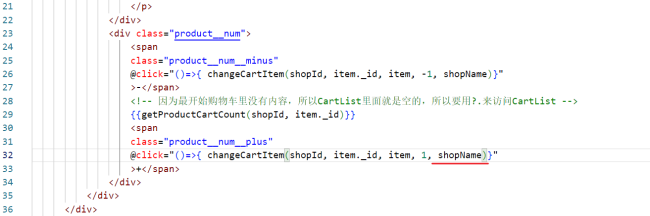
同学添上试试。
祝学习愉快!
相似问题
shopName不显示
11
0
1

shopName 不显示
24
0
3

shopName
16
0
4

shopname的问题
11
0
4


老师,我的shopName为什么是空?
10
0
5

登录后可查看更多问答,登录/注册










恭喜解决一个难题,获得1积分~
来为老师/同学的回答评分吧
0 星