video盒子下面多出了一部分


<!DOCTYPE html>
<html>
<head>
<meta charset="UTF-8">
<title>videoPlayer</title>
<link rel="stylesheet" type="text/css" href="css/videoPlayer.css">
<script src="https://cdn.bootcss.com/jquery/2.2.4/jquery.js"></script>
</head>
<body>
<div class="videoPlayer" id="videoPlayer">
<video id="video" src="imooc.mp4" width="600px" poster="img/potser.jpg"></video>
<!-- 头部标题 -->
<div class="caption" id="caption">myVideo</div>
<!-- 控制区 -->
<div class="control" id="control">
<!-- 控制区上面补分 -->
<div class="top">
<!-- 播放时间 -->
<span class="startTime" id="startTime">00:00</span>
<!-- 视频进度条 -->
<div class="progress">
<div class="timeBar" id="timeBar"></div>
</div>
<!-- 总时长/剩余时长 -->
<span class="endTime" id="endTime">00:00</span>
</div>
<!-- 控制区下面部份 -->
<div class="bottom">
<div class="startBtn botton" id="startBtn"></div>
<div class="endBtn botton" id="endBtn"></div>
<div class="speed1 botton" id="speed1">x1</div>
<div class="speed2 botton" id="speed2">x3</div>
<div class="valume">
<div class="valumeBar"></div>
</div>
<div class="sound botton" id="soundBtn"></div>
<div class="fullscreenBtn" id="fullscreenBtn"></div>
</div>
</div>
</div>
<script src="js/vedioPlayer.js"></script>
</body>
</html>
*{
	padding:0;
	margin:0;
}
ul{
	list-style-type: none;
}
a{
	text-decoration: none;
}
.pause{
	background: url(../img/icon/pause.png) no-repeat !important;
}
.videoPlayer{
	position: relative;
	width: 600px;
	margin:30px auto;
	overflow: hidden;
}
.videoPlayer>.caption{
	position: absolute;
	left: 0;
	top: 0;
	width: 100%;
	height: 30px;
	line-height: 30px;
	color: #fff;
	text-align: center;
	background:#1f1f1f;
}

/*控制区*/
.videoPlayer>.control{
	position: absolute;
	left: 0;
	bottom: 0;
	width: 100%;
	height: 50px;
	color: #fff;
	font-size: 12px;
	background:#1f1f1f;
}
/*控制区顶部*/
.control>.top{
	width: auto;
	height: 16px;
	line-height: 16px;
	padding: 0 1%;
	border-bottom: 1px solid #404040;
}
.control>.top>.startTime,
.control>.top>.progress{
	float: left;
}
.control>.top>.startTime,{
	width: 7%;
	text-align: center;
}
.control>.top>.progress{
	height: 12px;
	width: 86%;
	margin-top: 2px;
	margin-left: 5px;
	border-radius: 5px;
	background:#404040;
	cursor: pointer;
}
.control>.top>.progress>.timeBar{
	width: 50px;
	height: 100%;
	border-radius: 5px;
	background:rgba(255,162,68,0.8);
}
.control>.top>.endTime{
	float: right;
	text-align: center;
	width: 7%;
	cursor: pointer;
}
/*控制区底部*/
.control>.bottom{
	width: auto;
	height: 25px;
	padding:4px;
}
.control>.bottom>.botton{
	float: left;
	width: 25px;
	height: 25px;
	padding:0 3px;
	text-align: center;
	cursor: pointer;
}
.control>.bottom>.botton:nth-child(3),
.control>.bottom>.botton:nth-child(4){
	font-size: 15px;
	line-height: 25px;
	text-align: center;
}
.control>.bottom>.startBtn{
	background:url(../img/icon/play.png) no-repeat;
}
.control>.bottom>.endBtn{
	background:url(../img/icon/stop.png) no-repeat;
}
.control>.bottom>.sound,
.control>.bottom>.valume{
	float: right;
}
.control>.bottom>.sound{
	background:url(../img/icon/sound.png) no-repeat;
}
.control>.bottom>.valume{
	width: 100px;
	height: 10px;
	background:#404040;
	margin-top: 7px;
	margin-right: 4px;
	cursor: pointer;
}
.control>.bottom>.valume>.valumeBar{
	width: 10px;
	height: 100%;
	background:#ddd;
}
$(document).ready(function(){
var player=$('#videoPlayer');
var video=$('#video');
var caption=$('#caption');
var control=$('#control');
var startBtn=$('#startBtn');
var endTime=$('#endTime');
var startTime=$('#startTime')
var timeBar=$('#timeBar');
//在元数据加载后初始化视频数据
video.on('loadedmetadata',function(){
//时间初始化
endTime.text(timeFormat(video[0].duration));
//绑定player移入移除事件
player.hover(function(){
//移入时显示标题和控制区
showTitleAndControl(true);
},function(){
//移出时隐藏标题和控制区
showTitleAndControl(false);
})
//绑定开始按钮点击事件
startBtn.click(function(){
//调用开始和暂停视频函数
startAndPause();
})
//绑定进度条事件
video.on('timeupdate',function(){
var lenPercent=video[0].currentTime/video[0].duration*100;
timeBar.css({width:lenPercent+'%'});
startTime.text(timeFormat(video[0].currentTime))
console.log(lenPercent)
})
})
//视频长度时间格式化
function timeFormat(time){
//获取视频分钟
minutes=Math.floor(time/60);
//获取视频秒
seconds=Math.floor(time%60);
//如果是个位数,在前面加个0
if(minutes<10){
minutes='0'+minutes;
}else if(seconds<10){
seconds='0'+seconds;
}
//拼接完整的时间
videoLength=minutes+':'+seconds;
//返回格式化的时间
return videoLength;
}
// 开始和暂停播放
function startAndPause(){
if(video[0].paused || video[0].ended){
startBtn.addClass('pause');
video[0].play();
}else{
startBtn.removeClass('pause');
video[0].pause();
}
}
//显示和隐藏标题&控制区
function showTitleAndControl(shouldShow){
if(shouldShow){
caption.stop().animate({top:0},500)
control.stop().animate({bottom:0},500)
}else{
caption.stop().animate({top:-30+'px'},500)
control.stop().animate({bottom:-50+'px'},500)
}
}
})如图,整个盒子的下面会多出一点,导致控制区和盒子间有留白,自己找了半天不知道原因,希望老师指导一下(代码比较多QAQ麻烦啦)
38
收起
正在回答
3回答

针对新发现问题,调整如下:
指定视频容器的高度
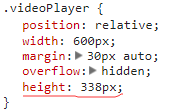
2. 指定下面控制条的top值

动手实践,加油!










响应式开发与常用框架 2018
- 参与学习 人
- 提交作业 2198 份
- 解答问题 5012 个
如果你有web端基础,既想进阶,又想进军移动端开发,那就来吧,我们专题为你带来的课程有HTML5、CSS3、移动基础、响应式、bootstrap、less等,让你在前端道路上畅通无阻!
了解课程












恭喜解决一个难题,获得1积分~
来为老师/同学的回答评分吧
0 星